Vibe Coding in Practice: Refactoring a Unity Game's SO Architecture with AI

How to refactor a Unity game with AI and Vibe Coding, adopting a ScriptableObject data architecture.
This article documents how indie creator A P used AI (Codex) and Vibe Coding to build a scalable Unity game architecture with ScriptableObjects. It covers a visual map editor, mobile remote control of Codex, collaboration pitfalls, and finding the balance between efficiency and controllability.
In today's world, where AI-assisted programming is becoming increasingly common, "Vibe Coding" (collaborating with AI programmatically by feel) is becoming the new normal for indie developers. The term "Vibe Coding" was coined by OpenAI co-founder Andrej Karpathy in early 2025 to describe a brand-new programming paradigm: developers no longer write code line by line, but instead describe their intent to the AI in natural language, iterating and experimenting through dialogue with the AI, and adopting a result once it "feels right." Behind the rise of this approach is the leap in code capabilities of large language models—from GitHub Copilot's inline completions to AI Agents like Cursor, Claude Code, and Codex that possess full project context understanding and autonomous execution abilities. For indie developers, it dramatically lowers the barrier from idea to prototype, but it also brings new challenges: how to maintain control over architecture while letting the AI write the code. In the second episode of his "A P's Unity Memo" series, Bilibili creator "A P" fully documented how he leveraged AI (Codex) to build a scalable architecture for a Monopoly-style game, and introduced Unity's ScriptableObject (SO) data system. This content is not just a tutorial—it's a genuine memo about the mindset of human-AI collaboration and engineering practice.
The Mindset for Starting a Project: If You Want to Do It, Do It Now
A P opened with a valuable perspective: When you have an idea, agonizing over whether to start now or later is meaningless—what matters is taking action immediately. Those who start later may enjoy newer technology and richer resources, but those who start first accumulate irreplaceable hands-on process experience—this kind of "experiencing it firsthand" understanding is something no tutorial can replace.
He especially reminded developers who have already started or are about to start: Your mindset absolutely must stay steady. A P admitted that when his first project reached the stage of a relatively complete prototype, AI happened to introduce more advanced approaches, and he briefly fell into anxiety over whether "all the earlier manual labor was wasted." But once he actually let the AI take over the existing code and began deeper collaboration, he found that his early manual accumulation wasn't for nothing—it was precisely that experience that gave him a deeper understanding of the overall architecture and human-AI coordination.
"We all have to make progress anyway, and one day we'll all be replaced—just follow the development. You have to be able to make decisions, dare to make up your mind—worst case, you tear it all down and start over."
This relaxed attitude of "daring to tear it down and start over" is exactly the quality that indie developers need most in the AI era.
Why Build an Architecture: Scalability First
The core goal of this episode is: turning a project that "can run" into one that "can be extended." A P pointed out several pain points in the current project:
- High cost of extension: Every time a new building or effect is added, manually stacking them becomes increasingly exhausting;
- Token consumption risk: If the AI runs out of tokens, adding content manually is extremely troublesome;
- Muddled responsibilities: UI and animation rules are mixed together, and having the AI continue writing risks "crossing the wires."

The core of the solution is introducing ScriptableObject (SO) as the data configuration layer. ScriptableObject is a type of data container class provided by Unity. It exists independently of GameObjects in the scene, stored in the project as asset (.asset) files. Unlike MonoBehaviour, which must be attached to a game object, SO is a pure data carrier that doesn't participate in the runtime update loop, making it well-suited for configuring shared data that "doesn't change per instance"—such as weapon attributes, level parameters, building effects, and so on. The "Data-Driven Design" that Unity has long advocated has, at its core, the idea of separating logic from data: programmers write general-purpose behavior code, and designers adjust values and configurations by modifying SO assets without touching the code. This not only reduces coupling and memory redundancy, but also makes the project easier to extend and better suited for team collaboration.
In this project, each building (bank, portal, energy station, shop, etc.) is abstracted into a configurable SO asset, each with its own trigger method (pass/stop) and effect command (teleport, add money, display feedback, etc.). This way, buildings become freely composable "effect assets"—whether adjusted by a human or AI, subsequent changes become clearer and responsibilities more distinct.
You may not have noticed, but A P adopted a step-by-step implementation strategy: first having the AI write the SO architecture and base code well, temporarily removing the more complex "SO Event Channel," and then iterating further once the foundation is solid. This "small steps, layered implementation" approach is precisely an effective method for controlling complexity when collaborating with AI.
Remote Control from Your Phone: Codex on Mobile
A P shared a practical tip: when you use an AI Agent like Codex that supports remote control, you can operate it from your phone even when you're not at your computer. Codex is a programming AI Agent released by OpenAI. Unlike traditional conversational assistants, it has the ability to autonomously execute tasks in a real development environment—it can read and write files, run commands, execute compilation and testing, and self-correct based on results. Such Agents typically support cloud execution and mobile access, allowing developers to issue instructions and check progress from their phones even when away from the computer.
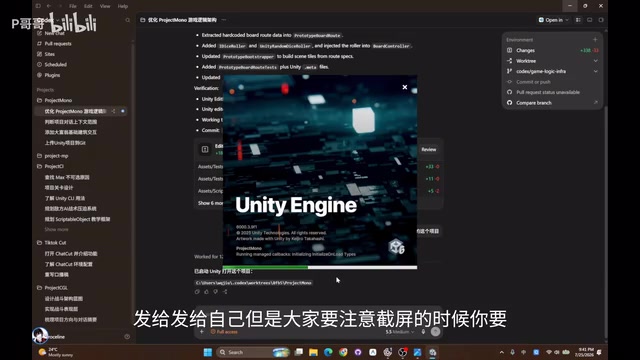
He especially emphasized an easily overlooked detail: When having the AI send you a screenshot, you must tell it "I'm out and about and can't see local images—you need to send me the image by reconstructing it." Otherwise, the AI might just reference a local path, and you, being remote, won't be able to see the image at all. This detail reveals a key point about how Agents work: the AI operates on its own runtime environment (such as a cloud sandbox or local machine), and there's a layer of data transmission between the human and the AI—local paths are invisible to remote users. Understanding an Agent's execution boundaries and context isolation is a prerequisite for efficiently wielding such tools.
He also demonstrated using conversation to have the AI automatically open a Unity project he had forgotten to launch—this "command the Agent anytime, anywhere" way of working is redefining developers' work scenarios.
Landing the SO Data: From Old Format to Brand-New Assets
After the AI generated the BuildingConfig, A P discovered a classic problem: The AI created the SO type definitions but didn't actually generate the corresponding SO assets, nor did it reference them in the runtime logic. This reminds us that the AI's "completion" often requires human verification of whether the loop is truly closed.
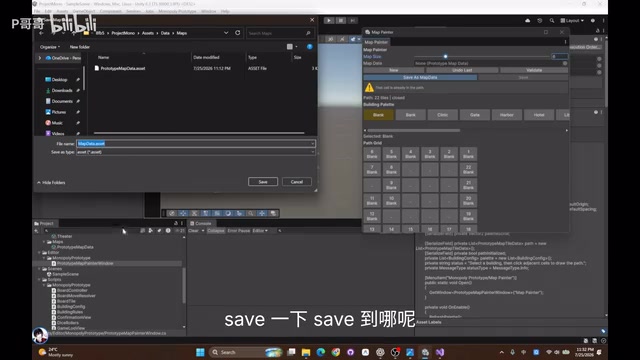
More critically, the AI's initial implementation "still used the old format" as a compatibility layer. A P explicitly asked the AI to completely replace all old building formats with the new SO rather than keeping a transitional scheme. In the end, the AI incorporated all four building types—bank, portal, energy station, and shop—into a catalog (asset catalog) and supported loading them by referencing the catalog rather than hardcoding. Although A P personally wasn't entirely satisfied with this approach, he chose to "gradually change it later," reflecting the rhythm of iterative collaboration.
Key Practice: Building a Visual Map Editor
The most valuable engineering practice in this episode was having the AI build a visual map editor (Editor Tool). A P's requirements were clear:
- Manually "draw" a Monopoly map connected end to end in Unity's Scene;
- Save the drawn map as a ScriptableObject as pure data;
- When the game runs, read this data and regenerate all buildings' tiles and visuals.
The AI quickly implemented MapDataSO and a corresponding MenuItem tool, supporting drawing on a 6×6 grid. After iteration, the editor further supported three explicit behaviors: click to switch types, replace with blank tiles, and erase. During actual operation, A P discovered the constraint logic that "the path must be connected end to end and cannot be broken in the middle," and encountered a small bug when deleting tiles—all of which are inevitable debugging details in real development.
He also offered advanced advice: when creating an Editor Window, you can give the AI more complex instructions, such as supporting long-press and drag-to-fill, or even having the tool automatically generate prefabs or effects to make map connections smoother. This approach of handing over even the "editing experience" to the AI to optimize is worth emulating.
Two Pitfalls to Avoid When Collaborating with AI
Based on his own hands-on experience, A P offered two important pitfall-avoidance tips:
First, be wary of the AI accidentally deleting manual code. He recalled that when using older versions of Codex and Antigravity, the AI would mistakenly treat content the developer added manually as "impurities" and delete it when performing a reverse or updating the working state, because it "didn't recognize" code it hadn't written itself. Although the newer Codex has basically resolved this issue, he still advises: proactively tell the AI what you added manually, or develop the habit of committing (not necessarily pushing), to ensure you can revert if something gets accidentally deleted.
The habit of committing here points to Git version control, a cornerstone of software engineering. A commit creates a snapshot of the current code state in the local repository, while a push is what uploads it to the remote repository—the two can be done separately. Even without pushing online, frequent local commits form a complete history record. Once the AI accidentally deletes or breaks code, developers can quickly roll back to any point in history via revert or checkout. In a collaboration model where AI frequently modifies the codebase, version control serves as both a safety net and a "contract boundary" between human and machine, leaving a traceable, reversible anchor for every autonomous operation the AI performs.

Second, make good use of the CLI to boost efficiency. A P directly had the AI help him "install Unity's command line (CLI) until it worked," hardly lifting a finger himself. This allowed the AI to autonomously trigger compilation, testing, and other operations, drastically reducing manual intervention.
Is the Architecture Worth It? To Each Their Own
At the end of the video, A P offered an honest reflection: he was actually "not too satisfied" with the progress this episode, because each AI task execution was slow—one task took 11 minutes, another 7 minutes, and yet another 20 minutes. He admitted that if he hadn't considered architecture and simply told the AI to "make me a game," it might have been much faster.
So, how much does it really matter to invest time in building architecture? A P's answer is that it varies from person to person:
"I personally enjoy making games, and I want to be able to adjust things myself—like drawing the map and finding various components to tweak. I find that process quite comfortable. If the AI did everything all at once, I'd have to send a voice message every time I wanted to change something, and I'd feel like I was missing out on the experience."
This is a highly thought-provoking point: In an era where AI can generate things with one click, "controllability" and "a sense of participation" are themselves a kind of value. Whether to pursue ultimate efficiency by letting the AI handle everything, or to preserve architectural clarity to enjoy the creative process, depends on how each developer defines the very act of "programming."
Conclusion
What A P demonstrates in this "My-Style Vibe Coding" episode isn't just the technical practice of Unity + ScriptableObject—it's a mature methodology for human-AI collaboration: controlling complexity through step-by-step implementation, verifying that the AI's output truly closes the loop, avoiding accidental deletions through commits and proactive communication, and finding your own balance between efficiency and controllability. For indie developers exploring AI-assisted game development, the reference value of this "memo" far exceeds that of an ordinary tutorial.
Key Takeaways
Related articles

WebMCP in Practice: How MakeMyTrip Is Reshaping the Travel Booking Experience
India's largest OTA platform MakeMyTrip uses WebMCP to standardize AI Agent interactions with web apps, replacing fragile DOM scraping with natural language-driven test automation and simplified complex booking scenarios.

Deep Dive into the EYG Programming Language: A New Portable Programming Paradigm Designed for Humans
Deep analysis of the EYG programming language's core design, including algebraic effects, program state persistence, and cross-platform portability, exploring how it addresses modern software fragmentation.

WebMCP in Practice: How MakeMyTrip Is Reshaping the Travel Booking Experience
India's largest OTA platform MakeMyTrip uses WebMCP to standardize AI Agent interaction with web apps, solving DOM scraping fragility, enabling natural language test automation, and simplifying complex international flight bookings.