Vue3 from Scratch: A Hands-On Journey to Building an AI Health Monitoring System

A hands-on Vue3 beginner tutorial that builds a real enterprise-grade AI health monitoring system.
This Vue3 beginner tutorial follows a "learn just enough, apply immediately" philosophy across three progressive stages—fundamentals, intermediate, and hands-on practice—covering the reactivity system, Composition API, Vue Router, Pinia, Element Plus, and data visualization, culminating in an enterprise-grade AI Personal Health Monitoring System with blood sugar management, RAG smart consultation, and doctor-patient collaboration.
For front-end beginners, the learning path for Vue3 can often feel bewildering—there are countless tutorials with lengthy content, yet few that truly translate into real-world projects. A recent "Vue3 Minimalist Tutorial for Beginners" launched by a Bilibili content creator offers a different approach: centered on the philosophy of "learn just enough, apply immediately," it aims to get you working on an enterprise-grade real project in the shortest possible time. This article breaks down the knowledge framework of this course and focuses on analyzing the technical highlights of its hands-on project—an AI Personal Health Monitoring System.
Course Positioning: Aimed at Beginners, But with Prerequisites
This tutorial is clearly labeled as "Vue3 for beginners," but the author candidly reminds learners that they still need a foundation in three areas: HTML, CSS, and JavaScript. This is a pragmatic positioning—as a modern front-end framework, Vue3 is essentially an encapsulation and enhancement of native web technologies. Skipping the fundamentals and jumping straight into the framework often leads to "knowing what but not why."
The core goal of the course is to address two types of needs: first, quickly transitioning from basic syntax to hands-on development; second, helping learners "understand code and modify portions of it" within a complete project. The latter is especially relevant to real work scenarios—the first task many new front-end developers face after joining a company is often not building from scratch, but making incremental changes to an existing project.
Breaking Down the Three-Stage Learning Path
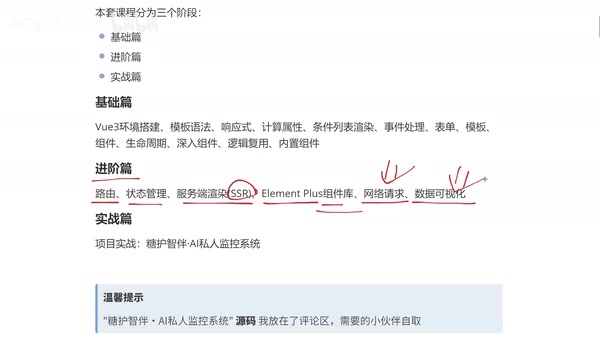
The entire course is divided into three progressive stages: fundamentals, intermediate, and hands-on practice, with a clear structure.
Fundamentals: Solidifying Vue3 Core Syntax
The fundamentals section covers Vue3's skeletal knowledge: environment setup, template syntax, the reactivity system, computed properties, conditional and list rendering, event handling, form binding, components, lifecycle, as well as logic reuse (Composition API) and built-in components.
This part is the foundation for the entire learning process. Here's a detail worth noting: Vue3's biggest changes compared to Vue2 lie in the complete overhaul of the reactivity system and the introduction of the Composition API.
Reactivity System: From Object.defineProperty to Proxy
Vue2 uses Object.defineProperty to hijack the getter/setter of object properties. This approach has notable limitations: it cannot detect the addition or deletion of object properties, nor can it monitor changes in array indices. As a result, Vue2 had to provide helper APIs like $set and $delete to compensate. Vue3 switched to using the ES6 Proxy object as the core of reactivity. Proxy can intercept all operations on an entire object (including property addition, deletion, traversal, etc.), fundamentally solving these problems.
Worth understanding in depth: Object.defineProperty is a feature introduced in ES5 that achieves reactivity by intercepting read/write operations on individual properties, but it was never designed for comprehensive object proxying, hence its inherent limitations. The ES6 Proxy, on the other hand, is a true "metaprogramming" tool that allows developers to define the fundamental semantic behavior of objects, supporting 13 types of interception operations including get, set, deleteProperty, has, and ownKeys, covering nearly all possible ways of interacting with objects. Proxy's advantage lies not only in its "broader interception range" but also in its lazy proxying characteristic: Vue2 needed to recursively traverse and hijack all properties of the entire data object during component initialization, whereas Vue3's Proxy-based implementation can track nested objects on demand—creating a proxy for a nested property only when it's actually accessed. This brings significant initialization performance improvements when dealing with complex data structures that have deep hierarchies and many fields. This architectural change also gave rise to Vue3's two core reactivity APIs: ref (for primitive types, internally wrapped as an object with a .value property) and reactive (for object types, directly returning a Proxy). Understanding this underlying difference helps developers more accurately choose the appropriate reactivity approach in real-world development, avoiding the confusion of lost reactivity.
Composition API: A Shift from Options-Based to Composition-Based Thinking
The Composition API is a brand-new way of organizing code introduced in Vue3, in stark contrast to Vue2's Options API. The Options API scatters component logic by type (data, methods, computed, watch) across different options. When component logic becomes complex, the code for a single feature gets split across multiple places, resulting in high maintenance costs—a classic analogy is that "code of the same color is scattered throughout the file, and modifying a single feature requires jumping back and forth across the file." The Composition API, on the other hand, allows developers to aggregate code by "functional concern"—grouping the reactive data, methods, and computed properties of the same business logic together, and further encapsulating them into reusable "custom Hooks (composables)."
It's worth mentioning that the design of the Composition API was partly inspired by React Hooks, but it differs fundamentally from Hooks: Vue's setup() executes only once when the component is created, avoiding the closure traps and dependency-array management issues in React Hooks that arise from re-executing on every render. This makes Vue3's composables simpler and more straightforward in their mental model—a localized innovation the Vue team made after absorbing React's experience. This pattern significantly improves the maintainability of large projects and is currently the mainstream recommended approach in the Vue3 ecosystem. More importantly, custom composables (typically named with a use prefix, such as useBloodSugar()) enable cross-component logic reuse without relying on Mixins (Vue2's reuse solution had issues like naming conflicts and unclear origins), instead implementing it as plain functions with better readability and testability. The course lists "logic reuse" as a key point in the fundamentals section precisely because mastering the Composition API is a crucial step toward engineering-grade development.
Intermediate: Moving Toward Engineering-Grade Development
The intermediate section covers content closer to what real projects require: routing (Vue Router), state management (Pinia/Vuex), server-side rendering (SSR), and component libraries.
Vue Router: How Front-End Routing Works
Vue Router is the official routing manager for Vue.js. Its core principle is to dynamically render corresponding components by listening for URL changes, without needing to make page requests to the server—this is precisely the fundamental reason single-page applications (SPAs) offer a smooth experience. Understanding the essence of SPAs helps in using Vue Router more effectively: in an SPA, when a user first visits, the browser loads an HTML shell containing the complete JavaScript application. After that, all "page switches" are DOM replacement operations performed by JavaScript on the client side. The server only provides business data in JSON format, rather than the complete HTML pages of traditional multi-page applications. This architecture delivers a smoothness approaching that of native apps, but it also introduces issues like longer initial load times and inherently poor SEO. SSR (server-side rendering) was created precisely as a complementary solution to these problems.
The implementation of front-end routing relies on two underlying mechanisms provided by the browser: Hash mode uses changes in the fragment identifier after the # in the URL (the hashchange event) to match route components. Since content after the # is not sent to the server, it is naturally compatible with all kinds of static file servers. History mode relies on the HTML5 History API (pushState/replaceState methods), which can modify the complete URL path without refreshing the page, producing a more elegant address bar display. However, it requires the server to direct all path requests to the same index.html entry file (i.e., the try_files configuration in Nginx), otherwise directly accessing deep routes will trigger a 404 error. Vue Router 4, which pairs with Vue3, fully embraces the Composition API, allowing elegant access to the router instance and current route information via the useRouter() and useRoute() hooks within setup(), staying highly consistent with Vue3's overall design philosophy. The intermediate section lists routing as its top priority because it is the backbone of multi-page applications, and nearly all real projects depend on it.
Pinia: The Next-Generation State Management for the Vue3 Era
State management is one of the core topics in front-end engineering. Before understanding why state management is needed, one must first understand the problem it solves: in a component tree structure, sibling components cannot directly share data, and passing data across levels requires layer-by-layer props passing downward or emitting events upward. As an application grows in scale, this "prop drilling" makes code extremely difficult to maintain. The essence of a state management library is to provide a global data store independent of the component tree, which any component can directly read from and write to, automatically triggering relevant component updates when data changes.
Vuex was the official state management solution in the Vue2 era, but its cumbersome mutations/actions layered design was widely criticized in the community—this design of forcibly distinguishing synchronous/asynchronous operations was originally intended to support time-travel debugging, but in practice it often introduced large amounts of boilerplate code. Pinia was developed by Vue core team member Eduardo San Martin Morote (posva), initially as an exploratory project to validate the idea of "what Vuex 5 would look like." It was ultimately officially adopted by Vue as the recommended solution due to its simplicity and type-safety advantages. Pinia's internal implementation is based on Vue3's reactive and computed; a store is essentially a specially-processed reactive object, meaning it integrates deeply with Vue DevTools, supporting time-travel debugging and state snapshots. At the same time, it greatly simplifies the syntax: it removes the concept of mutations, allowing state to be modified directly through actions; it supports complete TypeScript type inference; and its modular design is more natural—each store is an independent file, requiring no manual module registration. Pinia's design philosophy is highly aligned with the Composition API, and you can even use ref and computed directly inside a store, lowering the learning curve. The official Vue documentation now lists Pinia as the preferred state management solution, and choosing Pinia for new projects is a decision more in line with ecosystem trends.
Element Plus: The Mainstream UI Choice for Enterprise Back-Office in China
The author chose Element Plus as the teaching UI library, citing that it "currently has the widest adoption rate." Element Plus is the Vue3 upgrade of Element UI, open-sourced by the Ele.me team. It provides over 70 out-of-the-box UI components, covering high-frequency back-office development scenarios such as forms, tables, dialogs, date pickers, pagination, and navigation. It enjoys extremely high adoption in China, for reasons including: comprehensive documentation with a Chinese version, component designs that fit local product habits, deep integration with Vue3 + TypeScript, and a mature community ecosystem (with many back-office templates built on Element Plus). For beginners with job-hunting goals, mastering Element Plus is one of the skills with real competitive value on a résumé.
The intermediate section also includes two major modules: network requests (front-end/back-end interaction) and data visualization.
Front-End Data Visualization: Integrating ECharts with Vue3 in Practice
The author especially emphasizes: "Data visualization is now a necessity for most projects." In the Vue3 ecosystem, Apache ECharts is currently the most mainstream visualization library, open-sourced by Baidu and donated to the Apache Foundation. It supports dozens of chart types including line charts, bar charts, pie charts, radar charts, and maps. When integrating ECharts into a Vue3 project, there are generally two approaches: one is to use native ECharts directly and initialize the instance within the onMounted lifecycle hook; the other is to use wrapper libraries like vue-echarts to use charts as Vue components, where reactive data changes automatically trigger chart updates. Note that ECharts instances are bound to DOM elements, so in Vue3 you need to obtain the DOM reference via ref and manually call dispose() to destroy the instance when the component unmounts (onUnmounted) to avoid memory leaks—this is one of the most common pitfalls beginners encounter in data visualization development. In data-driven applications, chart displays have become nearly standard, and this judgment aligns with the current trend in web application development.
Hands-On Project: AI Personal Health Monitoring System
The hands-on section is the biggest highlight of this tutorial. The project is called "Diabetes Care Companion AI Personal Monitoring Project," and it is an enterprise-grade real project. Parts involving business confidentiality have been removed, and the back-end uses Node.js to mock data, ensuring the front-end project can run completely.
Node.js Mock Data: An Engineering Practice for Front-End/Back-End Decoupling
In both front-end teaching and actual development, using Node.js to mock back-end API responses (Mock) is a mature engineering practice. Common solutions include json-server (quickly exposing JSON files as a REST API), msw (Mock Service Worker, intercepting requests at the browser level without needing to start an extra service), and hand-written Express/Koa interfaces. The core value of Mock lies in decoupling front-end and back-end development—the front-end doesn't need to wait for a real back-end to be ready before developing the interface and logic, while flexibly constructing boundary data (such as empty lists or abnormal blood sugar values) to test various UI states. For teaching scenarios, Mock also shields learners from the complexity of databases, authentication, and server deployment, allowing them to focus on core front-end skills. Of course, this also means learners will need to supplement their experience with real front-end/back-end integration debugging in their own future projects.
Complete Business with Multiple Roles and Modules
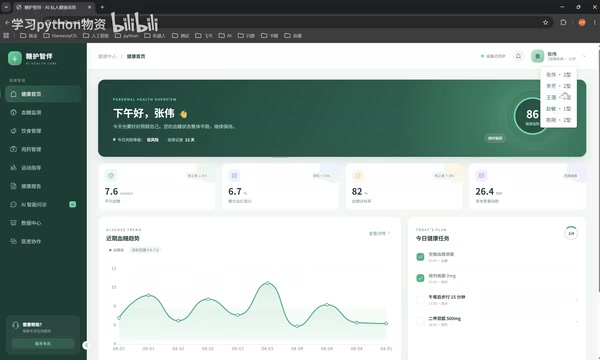
This project revolves around diabetes health management, with a fairly rich set of feature modules:
- Home Dashboard: Presents an overall health overview in chart form
- Blood Sugar Monitoring: Records blood sugar values, measurement status, time, and notes; generates change curves for the past 7 / 30 / 90 days
- Diet Management: Combines charts and lists to display dietary records (blood sugar is strongly correlated with diet)
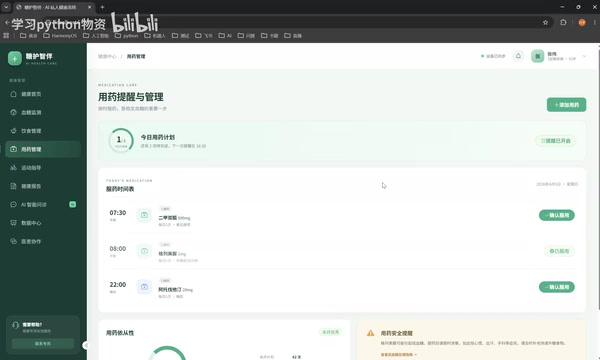
- Medication Management: Records the types and dosages of medication
- Exercise Guidance: Records activity data such as walking, running, and fitness
- Health Reports: Supports exporting PDF reports for easy sharing with doctors or family members
- AI Smart Consultation: Integrates AI, with the back-end introducing a RAG (Retrieval-Augmented Generation) knowledge base for health consultations
- Data Center: Comprehensive blood sugar scoring, blood sugar values by time period, and exercise capability profiles
- Doctor-Patient Collaboration: Patients communicate online with their corresponding doctors and share health data
- Family Care: Notifies relatives immediately when anomalies occur
Dual-End Design and Role Permissions
The project is designed with two roles in mind: doctors and patients. The doctor side can view the respective health status of different patients, while the patient side focuses on personal data recording. This multi-role business modeling is very valuable for learners to understand permission management, data isolation, and view-switching logic in real projects.
At the technical implementation level, multi-role permissions are usually achieved with the help of Vue Router's Navigation Guards—checking the user's identity and permissions before each route transition to decide whether to allow access to the target page, or to redirect unauthorized users to the login page / 403 page. Navigation guards are divided into three levels: global guards (router.beforeEach, applying to all routes), per-route guards (defined in the route configuration, applying only to specific routes), and in-component guards. In actual projects, the global guard typically reads the user's Token and role information stored in the Pinia store, then combines this with route meta information (the meta field, which can define custom fields like requiresAuth and roles) to make an allow-or-block decision. This "navigation guards + state management" coordination pattern is the standard practice for enterprise-grade back-office projects. Experiencing this process firsthand in a hands-on project is extremely helpful for improving a beginner's engineering skills.
Real-World Implementation of AI and RAG
The technology choices for the smart consultation module are worth noting. In the real back-end scenario, a RAG (Retrieval-Augmented Generation) knowledge base was introduced to monitor medication conditions and provide health consultations.
RAG is currently the mainstream technical architecture for deploying large language models (LLMs) in professional vertical domains. Its complete workflow is divided into two phases: the offline indexing phase, where professional documents (such as medical guidelines and drug package inserts) are split into semantic chunks, converted into high-dimensional vectors via an Embedding model, and stored in a vector database (such as Chroma, Pinecone, or Milvus); and the online retrieval phase, where, when a user asks a question, the system likewise vectorizes the question, retrieves the Top-K most semantically similar chunks from the database, concatenates these chunks into the Prompt, and feeds it into the LLM to generate a well-grounded final answer. This architecture effectively mitigates the LLM's "hallucination" problem—that is, the model confidently fabricating answers outside its knowledge boundaries.
At the engineering implementation level, the choice of vector database directly affects retrieval latency and precision: lightweight local solutions (such as Chroma and FAISS) are suitable for prototype validation, while production-grade solutions (such as Milvus, Weaviate, and Pinecone) offer horizontal scalability and persistence. The document chunking strategy significantly impacts retrieval quality—chunks that are too small lose contextual semantics, while chunks that are too large introduce noise. In practice, recursive character splitting combined with sliding-window overlap is typically used to strike a balance. In highly specialized scenarios like healthcare, the value of RAG is especially prominent: medical knowledge is frequently updated (such as the latest treatment guidelines and changes in drug contraindications), and pure LLM training data suffers from temporal lag; medical terminology is dense with little ambiguity, so vector retrieval's semantic matching achieves high precision in this scenario; and the cost of wrong answers is extremely high (potentially leading to patient medication errors). RAG's generation approach, based on auditable literature, makes every recommendation traceable to its source. In engineering implementation, "reference source" metadata (document name, chapter, page number) is often attached alongside the returned answer for users or doctors to verify the original basis, facilitating review by medical experts and content version management, which aligns with medical compliance requirements. Compared to pure Prompt Engineering, a RAG knowledge base both guarantees answer quality and keeps the risk of model output within a manageable range.
On the front-end side, interaction with the RAG back-end is usually manifested as a Streaming Response—receiving model output character by character via SSE (Server-Sent Events) or WebSocket, achieving a typewriter effect similar to ChatGPT. Implementing SSE streaming rendering in Vue3 typically uses the EventSource API or fetch combined with ReadableStream to read the response stream, appending each received text fragment to a reactive variable. Vue's reactivity system will automatically trigger view updates. This is also a common technical point in current AI application front-end development.

Is This Vue3 Tutorial Worth Learning?
From the perspective of content structure, the biggest advantage of this tutorial lies in its "learn to apply" design philosophy: it doesn't explain syntax in isolation but instead anchors everything to a feature-complete project close to real business. The progression from the fundamentals to the hands-on section also aligns with the cognitive patterns of beginners.
Of course, it should be viewed rationally. The author repeatedly emphasizes that "the goal is to learn the technology, not to explain every piece of business in full detail," and the project has stripped out confidential business logic and back-end logic. This means learners will ultimately master front-end implementation skills. For complete full-stack development (especially building a RAG vector database, designing real Node.js APIs, and database CRUD), they will still need to supplement their learning separately. While using Node.js to mock data on the back-end lowers the barrier to running the project, it also makes it difficult for learners to experience the complexity of real front-end/back-end integration debugging—such as handling cross-origin issues (CORS configuration), Token authentication (JWT issuance and verification), interface timeouts and error boundaries (retry logic under network jitter, unified error interceptors), and other engineering details. These are often the first challenges newcomers encounter after joining a company. It is recommended to further supplement this with a real full-stack mini-project after completing this course.
Overall, for beginners hoping to systematically get started with Vue3 and eager to have a hands-on project to showcase, this tutorial provides a relatively efficient path. The author has posted the project source code in the comments section, and interested developers can obtain it for practice on their own.
Conclusion
Behind the somewhat marketing-flavored title "Stop Learning Blindly" actually lies a real pain point in front-end learning: fragmented knowledge is hard to translate into practical ability. Driving learning through a complete project and stringing together scattered syntax with real business is precisely the methodology this tutorial attempts to convey. Regardless of which Vue3 tutorial you ultimately choose, the learning approach of "learning while practicing, with a project-oriented focus" is worth emulating for every front-end beginner.
Key Takeaways
Related articles

Disaster and Glory of the Apollo Program: The History We Must Revisit Before Returning to the Moon
From the fatal Apollo 1 fire to Apollo 8's daring lunar orbit to Apollo 11's successful landing—revisiting the disasters, fears, and compromises of the Apollo program and their lessons for today's return to the Moon.

Netflix Trust Exercise Turns Into Firing Trap: Where Are the Boundaries of Corporate Trust?
A Netflix employee was fired after sharing private info in a trust exercise. We analyze the risks of corporate trust exercises and how employees can protect themselves.

AMD CDNA5 Architecture Deep Dive: Technical Evolution and the AI Computing Competition Landscape
Deep analysis of AMD's CDNA5 architecture covering Chiplet packaging upgrades, HBM memory evolution, and low-precision compute optimization, examining how AMD challenges NVIDIA's AI chip dominance.