Zero-Code Website Building in Practice: A Complete Guide to Creating a Business Website with Alibaba Cloud Website Builder

Zero-code website builders let one person independently build and maintain a business website.
Using Alibaba Cloud's Website Builder (云速成美站) as an example, this article walks through the complete zero-code website building process. With features like template-driven design, visual editing, automatic layout detection, and a built-in AI assistant, the product fully encapsulates the complex design and deployment aspects of traditional web development. Users can update and publish a business website as easily as editing a Word document, dramatically lowering the barrier for small businesses and individual entrepreneurs.
The Barrier to Building a Website Has Dropped Dramatically — One Person Can Handle It All
There was a time when building a business website required a team of specialists — front-end developers, back-end engineers, UI designers — and costs could easily run into tens of thousands of dollars. Today, thanks to mature cloud services and AI tools, a single person with zero coding experience can independently build and maintain a professional business website.
Behind this shift lies two decades of abstraction in the web technology stack. Early website building required direct manipulation of the HTML/CSS/JavaScript trifecta, and developers also needed to master server configuration, database management, DNS resolution, and other operations knowledge. In the mid-2000s, CMS (Content Management Systems) like WordPress pioneered the separation of "content" from "presentation logic," enabling non-technical users to manage content — though theme customization and plugin configuration still posed significant challenges. In the 2010s, SaaS website builders like Wix and Squarespace moved hosting, CDN acceleration, SSL certificates, and other infrastructure entirely to the cloud, so users only needed to focus on the content itself. Now, next-generation products like Alibaba Cloud Website Builder (云速成美站) have taken it a step further by embedding AI capabilities into the editing workflow, completing the final leap from "technical tool" to "business tool."
This article uses Alibaba Cloud's "Website Builder" (云速成美站) as an example to document a real-world business website update process, helping small business owners and individual entrepreneurs understand just how simple zero-code website building has become.
What Is Alibaba Cloud Website Builder? Key Features at a Glance
Alibaba Cloud Website Builder is a template-based website building product whose core philosophy is "What You See Is What You Get" — users don't need to write any code. Through a visual editor, they can drag, drop, and modify template content to complete both the design and deployment of their website.
"What You See Is What You Get" (WYSIWYG) is an editor design paradigm whose core principle is maintaining visual consistency between the editing interface and the final output. This concept can be traced back to the Alto system at Xerox PARC in the 1970s. In web building scenarios, modern WYSIWYG editors are typically implemented using "Virtual DOM" or "Shadow DOM" technology: the editor renders an interactive layer in the browser that corresponds exactly to the real webpage structure, where every user click and input is mapped in real-time to underlying HTML/CSS changes, while a "constraint system" limits the scope of user operations to prevent breaking the template's overall structure. This architecture allows non-technical users to work intuitively without needing to understand the code logic behind it.
Its main features include:
- Template-driven: Offers a wide range of industry templates covering business websites, e-commerce, personal blogs, and more
- Visual editing: Click to modify text, images, and layouts with an extremely low learning curve
- Automatic layout detection: The system automatically checks for text overflow, container overlap, and other layout issues upon saving
- Built-in AI assistant: Ask the AI directly for guidance when you encounter operational questions
- One-click publishing: Bind a domain name and your website goes live
In short, Alibaba Cloud Website Builder encapsulates the two most complex aspects of traditional website building — "design" and "deployment" — so users can focus solely on the content itself.
Hands-On Demo: The Complete Workflow for Updating a Business Website
Step 1: Enter the Visual Editor and Modify Text
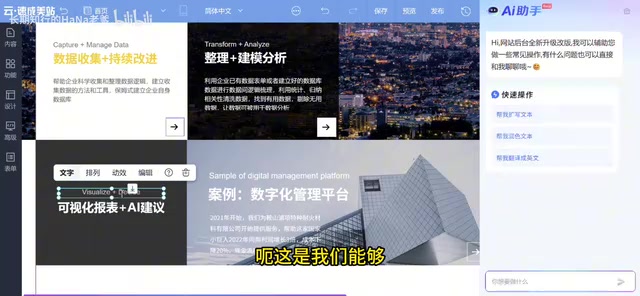
Upon entering the PC editing interface of the Website Builder, all content is presented in a modular format. Modifying text is very intuitive:
- Hover over the paragraph you want to edit
- Click the "Edit" button that appears
- Directly modify the text content
In this particular update, since the company's services had been upgraded to incorporate AI capabilities, the original "Visual Reports" needed to be changed to "Visual Reports + AI Recommendations," and both Chinese and English display content needed updating. Additionally, new partner client names and other information needed to be added.
The operation simply involves double-clicking the text area and editing the field content directly — the experience is very similar to editing a Word document.
Step 2: The System Automatically Detects Layout Issues
This is one of the most practical features of Alibaba Cloud Website Builder. Each time you save, the system automatically scans the page and detects several common types of layout issues:
- Text-container overlap: Newly entered text exceeds the boundaries of the original text box and overlaps with other elements
- Content overflow: Text or images extend beyond the display area of their containing module
- Misalignment: Element alignment doesn't conform to design specifications

This automatic detection mechanism is essentially a static analysis engine based on layout rules. In web rendering, text overflow and element overlap (z-index conflicts) are the two most common layout issues. The root cause lies in the tension between the fixed dimensions of the CSS box model and dynamic content — when the length of user-input text exceeds the preset width and height of a container, the browser's default behavior may cause content to be clipped or create visual conflicts with adjacent elements. Professional front-end developers typically avoid these issues through Responsive Design and flexible layouts (Flexbox/Grid), but template-based website builders often use fixed-size containers to ensure visual consistency. The automatic detection mechanism works by traversing the DOM tree, calculating each element's actual rendering boundaries (Bounding Box), and comparing them against preset safe zones to precisely locate problem nodes — automating work that would otherwise require a developer to debug manually.
In this update, the system detected 3 instances of text-container overlap. Users can fix them one by one or choose to "Ignore." After fixes are complete, saving again triggers a recheck to ensure no issues remain.
This mechanism is extremely user-friendly for non-technical users — you don't need to understand CSS layout; the system tells you exactly where the problems are.
Step 3: Modify Business Information and Other Structured Content
Beyond the display text on pages, business websites also have a lot of structured information to maintain, such as company addresses and contact details.
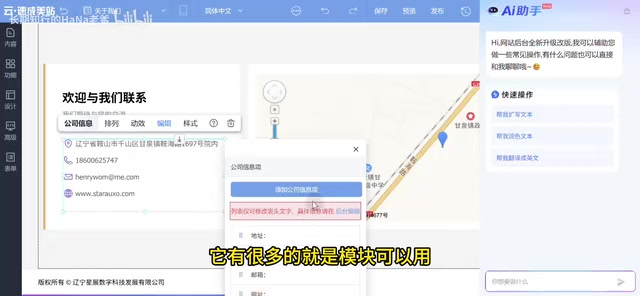
For example, when modifying the company's registered address: if you've forgotten where you originally set it, you can click the "Instructions" button next to it, and the system will guide you directly to the "Business Information" settings page where you can update the address. After making changes, you still need to save and pass the system check.
This modular approach to information management makes maintaining a business website as simple as filling out a form.
Step 4: AI Assistant Available for Questions Anytime
An AI assistant entry point is permanently accessible on the right side of the editor. Whenever you encounter anything you're unsure about during the process, you can ask the AI directly, and it will provide the appropriate operational guidance.
Unlike general-purpose AI assistants, AI assistants in website building scenarios are typically processed through "domain fine-tuning" or "RAG (Retrieval-Augmented Generation)" — using the product's help documentation, operation manuals, and FAQ databases as a knowledge base, enabling the model to provide precise operational path guidance rather than generalized responses. Going further, some website building AI assistants also feature "context awareness" capabilities, able to read the user's current editing page state and provide specific instructions like "click the settings icon on the third module on the right." This type of "context-aware AI assistant" is becoming standard in SaaS products.
Related articles
 Tutorials
ChatGPT Plus Subscription Guide: Are GPT-5.5, image-2, and Codex Worth the Upgrade?
A detailed look at ChatGPT Plus features — GPT-5.5, image-2, and Codex — with a Plus vs Pro comparison and a complete step-by-step subscription guide for users outside the US.
 Tutorials
Harness AI Engineering in Practice: Using Claude Code to Master Enterprise-Level E-Commerce Development
Deep dive into Harness AI Engineering: master enterprise e-commerce development with Claude Code using the Rules, Skills, Wiki, and Changes framework.
 Tutorials
Cursor + Codex Dual-IDE Collaboration: A Practical Methodology for Open-Source Project Customization
A complete methodology for open-source project customization based on real-world experience, detailing the Cursor+Codex dual-IDE workflow, seven-stage process, MVP validation, and AI source code reading techniques.