10x Faster AI Short Drama Editing: Doubao + CapCut Automated Editing in Practice
Install the CapCut skill in Doubao Work and turn viral editing logic into instructions for automated editing.
Based on the finale of Bilibili creator Zhang Mark's AI short drama tutorial, this article breaks down a Doubao Work + CapCut automated editing workflow. The key insight is that traffic problems stem from editing rhythm, not footage quality, and viral rhythm logic can be written as AI instructions. Install the CapCut editor skill as the hub, then send instructions structured as opening hook—middle rhythm—ending suspense, and AI handles clip assembly, pacing cuts, music, and subtitles, producing an editable CapCut project. Manual checks for white flashes, picture jumps, and conflict node pacing are still needed. Editing a one-minute video drops from half a day to just over ten minutes, but results depend on instruction quality and narrative completeness.
Title
10x Faster AI Short Drama Editing: Doubao + CapCut Automated Editing in Practice
Meta Description
Bilibili creator Zhang Mark shares a hands-on guide to AI short drama post-production: using Doubao Work to install the CapCut editor skill, turning viral editing logic into instructions that let AI automatically handle clip assembly, pacing cuts, music, and subtitles—cutting a one-minute video from half a day to just over ten minutes, plus key manual refinement tips.
Article Content
The AI short drama space keeps heating up, but many creators get stuck at the final step: the generated footage looks decent, yet the finished video gets no traffic. The problem usually lies in editing rhythm. In the finale of his full AI short drama production tutorial series, Bilibili creator "AI Shishi Fang" Zhang Mark shares a practical method for automated editing using Doubao Work + CapCut, claiming it can compress what used to be half a day of editing into just over ten minutes. Based on that tutorial, this article breaks down the core logic and key operational points of this workflow.
Editing Rhythm Determines Short Drama Traffic
Zhang Mark points out that the most common pitfalls for novice editors are sluggish shots, wordy dialogue, and insufficient emotional ups and downs. Viewers swipe away faster than you can edit, and the root cause is failing to grasp the underlying logic of viral editing: cut redundant shots, switch shot sizes frequently to avoid monotony, create a twist or conflict every dozen or so seconds, pair with fitting music, and leave enough suspense at the end to keep viewers coming back.
In the past, this required manual frame-by-frame polishing. Now the entire logic can be written as instructions and handed to AI. According to his demo, Doubao Work can automatically assemble clips, make pacing cuts, match music, and add subtitles based on the instructions and raw footage, then generate an editable project file in CapCut.
Installing the CapCut Skill: The Hub of Automated Editing
The first step toward automation is entering the instruction "help me install the CapCut editor" in the Doubao Work dialog box and waiting for the skill installation to complete. Zhang Mark calls this skill the "hub" linking Doubao and CapCut. Once installed, you can select local computer operation mode and import your raw AI short drama footage.
During installation, he suggests mapping out the plot's hooks, conflicts, payoff moments, and suspense in advance, and finalizing the pacing framework of the finished video. This step looks simple but determines the quality of subsequent AI instructions—the more specific the instructions, the closer the automated editing result will be to expectations.
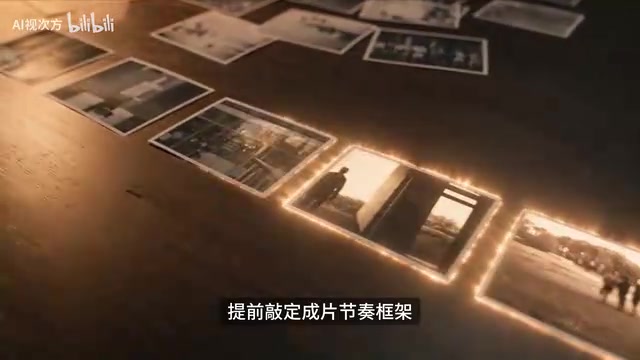
The "CapCut skill" belongs to the Tool Use / Function Calling mechanism within the AI agent ecosystem. Platforms like Doubao Work allow users to install external capability plugins for AI through natural language instructions. Once installed, the AI can operate CapCut like a human—reading footage, calling editing APIs, and generating project files. This is fundamentally different from the traditional model of "AI generates a video and you manually download it": the skill lets AI directly take over control of desktop software, forming a closed loop of "instruction → operate software → produce editable project." This is also why, after installing the skill, you need to select local computer operation mode so the AI can access local footage and drive CapCut. Understanding this makes it clear why instruction quality is so critical—the AI isn't "creating," it's executing a sequence of software operations based on your verbal description.
Instruction Structure: Handing Viral Logic to AI
The core of the tutorial lies in how to write the instructions. Zhang Mark's reference structure is: open with a hook to grab viewers, maintain appeal through sustained rhythm in the middle, and retain viewers with suspense at the end. Combine this structure with specific plot details and send it, and the AI will automatically run the entire process.
According to his demo, in the generated CapCut project file, subtitles are already ordered by narrative logic, and the music isn't randomly applied—Doubao selects tense, rhythmic BGM from the CapCut audio library based on the film's suspenseful tone. This means creators can get a structurally complete editing framework without professional editing skills.
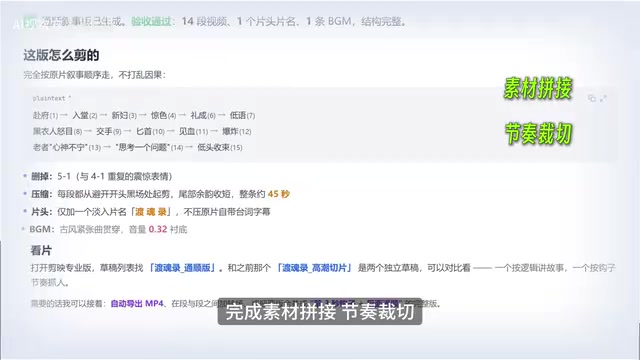
A "CapCut project file" is CapCut's project source file (draft), containing structured data such as video clips on the timeline, audio tracks, subtitle layers, transition and effect parameters. Unlike an exported MP4 finished video, the project file retains all editable elements, allowing creators to adjust frame by frame, replace footage, or rearrange order. The value of AI automated editing lies precisely in the fact that it outputs not a "dead" video but a semi-finished project that can be further polished—subtitles already ordered, BGM already laid out, and you only need to refine key frames. This also explains the division of labor in the tutorial: "AI builds the skeleton, humans polish the key frames"—the project file is the interface between the two.
Two Key Points That Must Be Manually Refined
Automated editing isn't a one-and-done solution. Zhang Mark emphasizes that after the framework is built, two things still need manual checking: first, whether there are white flashes or picture jumps at clip transitions; if so, select the extra frames and delete them directly. Second, preview the conflict and twist nodes; if the pacing is sluggish and impact is insufficient, shorten wordy shots to strengthen emotional ups and downs.
These two steps don't take much time but directly affect the quality of the finished video. AI builds the skeleton, humans polish the key frames—this division of labor strikes a balance between efficiency and quality.
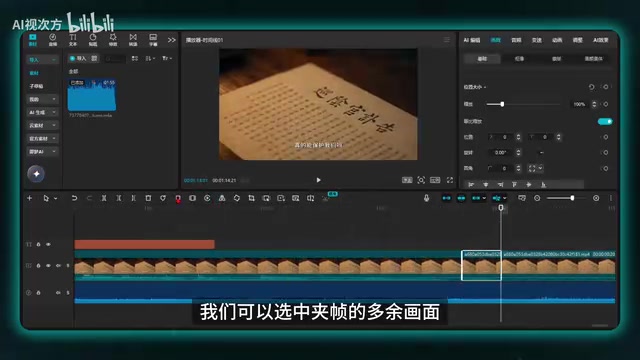
"White flashes" and "picture jumps" are two common types of technical flaws in editing. White flashes usually appear at the junction of two shots as one or more pure white/overexposed frames, often because blank frames from shooting or generation remain at the beginning or end of the footage. Picture jumps refer to sudden changes in shot size, color tone, or movement direction between adjacent shots, creating a visual "jump." Both are especially common in AI automated assembly because the algorithm cuts by time point and may not recognize invalid frames at the edges of footage. The manual fix is to select the junction, check frame by frame, and cut the extra frames, or adjust the cut point position. Although this refinement doesn't take much time, it's the key detail that distinguishes "watchable" from "professional."
Efficiency Gains and Applicable Boundaries
According to the tutorial demo, editing time for a one-minute finished video drops from half a day to just over ten minutes. For AI short drama beginners who can't edit or are inefficient, this workflow lowers the barrier to mass production. But note that the results of automated editing depend heavily on instruction quality and the narrative completeness of the raw footage—if the earlier script and storyboard logic are chaotic, AI will struggle to cut out viral rhythm.
This tutorial is the finale of a four-part series; the first three cover topic selection and scripting, asset production, and AI video generation. Once the entire process is running, creators can complete short drama production from 0 to 1 at relatively low cost. For creators looking to enter the AI short drama space, this method provides a reusable efficiency template, but traffic ultimately still depends on the appeal of the content itself.
One-line Summary
Install the CapCut skill in Doubao Work and turn viral editing logic into instructions for automated editing.
Paragraph Summary
Based on the finale of Bilibili creator Zhang Mark's AI short drama tutorial, this article breaks down a workflow for automated editing using Doubao Work + CapCut. The core point is that the root cause of short dramas getting no traffic lies in editing rhythm, not footage quality, and viral rhythm logic (cut redundancy, vary shot sizes, create twists, add music, leave suspense) can be written as instructions for AI to execute. Operationally, you first install the CapCut editor skill in Doubao Work as the hub, then send instructions structured as "opening hook—middle rhythm—ending suspense," and AI automatically handles clip assembly, pacing cuts, music matching, and subtitle addition, generating an editable CapCut project file. After automated editing, you still need to manually check for white flashes, picture jumps, and the pacing of conflict nodes. According to the demo, editing a one-minute finished video is compressed from half a day to just over ten minutes, but results depend heavily on instruction quality and the narrative completeness of the early-stage footage.
Related articles
AWS AgentCore Gateway: Connecting AI A…
AWS AgentCore Gateway: Connecting AI Agents to Enterprise Backends with MCP
How AWS AgentCore Gateway acts as a primary MCP server to aggregate REST APIs, Lambda, and existing MCP services? Analyzing its AST real-time mapping, zero cold start, semantic search for tool overload, session isolation, and key injection security design, plus the architectural approach to decoupling enterprise AI agents from backends.

One Link Gives Figma AI a New Skill: Hands-On with MCP Connectors
Paste one MCP server link and the AI Agent in Figma gains new tool capabilities. We break down the setup flow, 20+ one-click apps, read/write permissions and execution policies, and the public HTTPS requirement.

Cognition SWE-2 in Practice: One Prompt to Handle the Whole Product Launch Process
Analyzing a YouTube creator's prompt for using Cognition SWE-2 to launch a product: a landing page, seven-email sequence, and non-buyer follow-up tool, plus how the 'test and report' constraint changes AI delivery quality.