141 Real-World Benchmarks Revealed: How Fast Can Your GPU Really Run Large Models?

Community's 141 GPU benchmarks reveal: VRAM determines large model speed, dual cards are a rescue not a multiplier, and the 4090 offers the best value.
A GPU benchmark experiment carried out by ordinary community members collected 141 submissions over three weeks, covering 45 GPU models from the Tesla P40 to the RTX 5090. Based on 90 valid data points, the core conclusions are: VRAM capacity has a moderate correlation with decoding speed (R=0.41), while total RAM capacity is essentially irrelevant (R=0.13), with 16G to 24G VRAM yielding a 73% speed boost. Dual-card parallelism improves performance by only 1.22–1.81×, with two cards being the sweet spot. Version iterations yield a median improvement of only 1.08× and can even regress. The RTX 4090, with a median speed of 118.0 and 9 samples, becomes the most credible value king, while the RTX 5090 leads at 168.0. Among community submissions, 58% exceed 60 tok/s for smooth conversation, but only 20% reach the buttery-smooth level of 100+ tok/s.
A GPU Benchmark Experiment Carried Out by Ordinary People
No vendor launch event, no unified testing environment—just 141 submissions and 2,156 files collected over three weeks, real data produced by a group of ordinary people running the same large model in their own homes. The data covers everything from the Tesla P40 (a card from 2016 that should long since have been recycled) to the freshly launched, still-marked-up RTX 5090—45 GPU models in total.
Many people assume the barrier to running local large models is money, but after digging through this dataset, a more sobering conclusion emerges: what really holds people back isn't budget, it's that you simply don't know how fast your own GPU can run. According to a compilation by Bilibili creator "Strata," of these 141 submissions, 103 came from the community, 15 were official acceptance reports, and 25 were kernel validations. However, only 124 clearly identified the GPU model, and only 90 allowed decoding speed to be calculated—many submissions just dropped a log without specifying the configuration. As a result, all core conclusions below are based on these 90 valid data points.
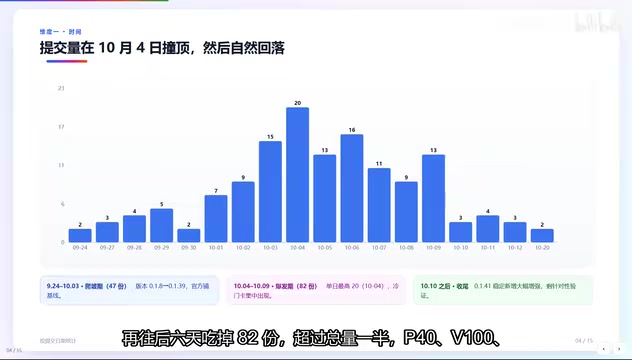
Submission Rhythm: Not Gradual Infiltration, but Sudden Explosion
The growth curve of submissions is quite interesting. The first 10 days saw only 47 submissions, as the official team laid down baselines and the community gradually followed. Then, on a single day, 20 submissions suddenly appeared. Over the next 6 days, another 82 came in—more than half the total. Old cards like the P40, V100, and MI50 all clustered in these few days, after which interest cooled rapidly.
This rhythm closely resembles the typical diffusion pattern of open-source projects: not slow infiltration, but waiting until some version just crosses the "usable" line, then everyone rushes in at once. The version number itself explains nothing, but the performance changes brought by version iterations are worth a closer look.
Version Iterations: Small Quick Steps, but New Versions Really Can Crash
Among the 26 versions, submissions were most concentrated in 0.1.38 and 0.1.39 with 20 each, plus 15 for 0.1.11. Many people's first reaction is "newer is faster," but 7 same-tier cross-version comparisons (with all hardware differences excluded) show: 5 got faster, 2 got slower. The best performer was dual RX 6900XT, which got more than a third faster; but the RTX 4090 actually got slightly slower running Russian, and the ARC Pro B65 dropped 11%. The median was only 1.08×—put plainly, version iterations are small quick steps, and new versions really can crash, so don't blindly upgrade.
tok/s (tokens per second) is the core unit for measuring decoding speed in large model inference, representing the number of tokens generated per second. A token roughly corresponds to one English word or half a Chinese character, so tok/s directly determines conversational fluency: below 10 tok/s output is noticeably stuttery, around 30 tok/s approaches normal reading speed, above 60 tok/s feels nearly instant, and above 100 tok/s qualifies as "buttery smooth." All speed data in this article uses this unit and generally refers to the decoding phase (generation phase), not the prefill phase (processing the input prompt).
GPU Contrasts: Flagships Aren't the Main Force, and Pro Cards Don't Mean Fast
The most-submitted card is the RTX 4090 (12 submissions), followed by the RX 6900XT (11), with the RTX 5090 at only 10. The community's main force is not flagship cards at all—the 4090 and 6900XT are what people actually have and are willing to tinker with.
In terms of speed, the flagship tier has a median of 116, the high-end tier 71.5, and the mainstream tier 59.6. The most surprising is the server and professional card tier, with a median of only 32.4. The V100, P40, and P100 are cheap secondhand with large VRAM, and many people think they're a steal—but they are 2016 and 2017 architectures. Professional cards don't mean fast; check the year before buying.
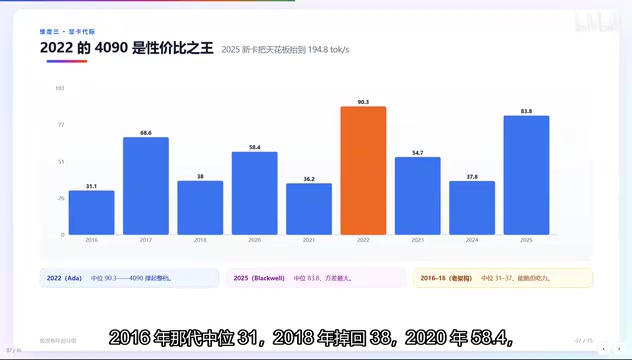
Sorting by year, a pattern emerges: the 2016 generation has a median of 31, 2018 returns to 38, 2021 is 58.4, another 2021 batch is 36.2, 2022 jumps to 90.3 (the highest overall), and 2025 is 83.8. The 2022 peak is almost entirely carried by the RTX 4090 alone, and to this day it remains the value king. Why is 2025 lower instead? This generation has everything—both the 5090 that can hit 194.8 and entry-level cards, laptops, and integrated graphics—so the average gets dragged down. So when looking at generational tiers, don't just look at the median; look at the distribution, because within the same generation the fastest and slowest can differ several-fold.
Counterintuitive Finding: What Determines Speed Is VRAM, Not RAM
This is the conclusion the whole project most wants to convey, because it overturns the intuition that "more memory is always better." The correlation coefficient R between VRAM and speed is 0.41—a moderate correlation, meaning VRAM does matter; but the R between total VRAM-plus-RAM capacity and speed is only 0.13, essentially no relationship at all.
The 128–191G tier has a median of 47.5, while the 64–95G tier is actually 75.7—more memory is slower. The reason is fairly simple: people who stack 128G of RAM tend to be running old cards like the V100 or Pro non-AI, plus three integrated-graphics machines with 128G unified memory but no dedicated VRAM. The VRAM line, by contrast, is clean: from 16G to 24G, the median jumps from 56.8 to 98.3—73% faster. What determines how fast you can run is VRAM, not RAM sticks.
VRAM (Video RAM) is dedicated high-speed memory on the GPU, directly connected to the GPU chip, responsible for storing model weights, KV cache, and intermediate computation results. When the model size exceeds VRAM capacity, the system is forced to offload some layers or cache to main memory (RAM) or even the disk, causing a sharp drop in speed—this is the "can it run at all" threshold. RAM is system memory on the motherboard; no matter how large, it cannot directly accelerate GPU computation unless used as an overflow buffer when VRAM is insufficient. Therefore, VRAM capacity determines whether the model can fit entirely in the GPU and how long a context it can support, making it the primary hardware bottleneck for decoding speed; RAM capacity mainly affects multitasking and model loading, contributing little to pure inference speed.
How Fast Can Your Card Run: A Speed Table for 42 Cards
42 cards are ranked by speed, filterable by model, vendor, and VRAM—click to see each benchmark run. A few frequently asked ones: the RTX 5090 is 168.0, currently the ceiling; the RTX 4090 is 118.0 with the most samples (9), making it the most credible; the RX 6900XT is 50.0—it can run but not easily; the V100 is only 29.8, so secondhand bargain hunters can cool off.
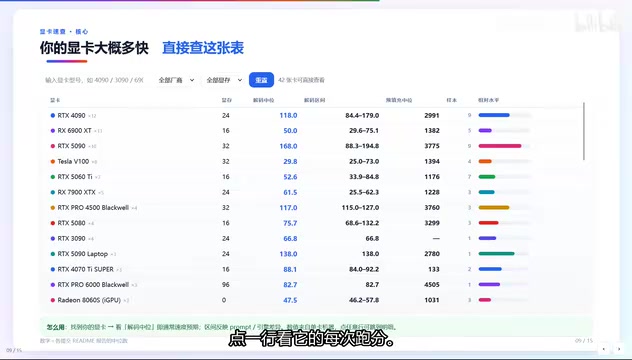
We must emphasize the range: the same model can differ two- or three-fold between fastest and slowest; the median is the typical level, and the range is the best and worst you might encounter. A niche highlight is that the 5090 Laptop version can also hit 138. Among the fastest 10, the first place is no suspense—the 5090 with a median of 168.0 and a peak of 194.8; second place is not another desktop card but the 5090 Laptop at 138. The Blackwell generation is indeed ahead, the 4090 is the most worth buying with a median of 118 and 9 samples—the most solid data.
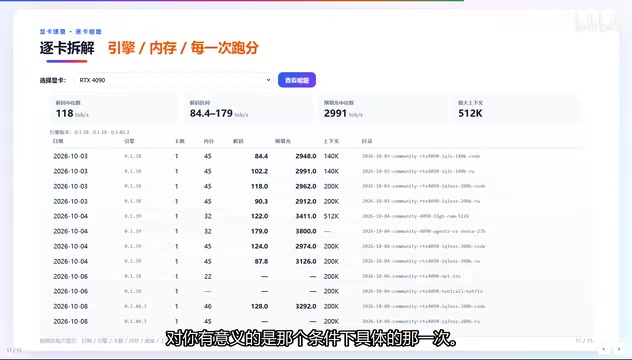
From an experience standpoint, 58% of submissions exceed 60 tok/s, so conversational experience is actually smooth; but only 20% reach 100+ and qualify as buttery smooth. This page is for people who already have a card and want details: pick a card and click, and you can see the decoding median range, prefill, max context, plus a table listing every submission—what day it ran, which engine, how many cards, how much memory.
Why make a separate page? Because medians naturally lie. A certain card's median of 118 looks stable, but digging into the details reveals one run at only 84 and another surging to 179. If you happen to plan to use a certain quantization and a certain context length, what's meaningful to you is that specific run under those conditions. I recommend a three-layer approach: find your card on the previous page, confirm conditions on this page, and finally dig through the Excel for raw records.
Dual Cards: A Rescue, Not a Multiplier
Many people think two cards means twice the speed, right? Four experiments, all same-tier, same version, same prompt, changing only the card count: Pro 4500 running Q4 goes from 61.5 single-card to 111.0 dual-card—a 1.81× gain, the largest; the Tesla P40 goes from 19.6 to 34.8, a 1.78× gain—at 49.6 single-card it's basically unusable, and only dual-card makes it barely acceptable; the other two groups are 1.48× and 1.22×. The faster the card, the smaller the gain from adding another, because the second card has less work to share. Adding a third card increases decoding by only 1% and even has negative effects; the 128K domain prefill drops from 57 to 22.95—cut in half. Dual cards can rescue "can't run," but can't rescue "already fast enough"—two is the sweet spot.
Dual-card parallelism in local large model inference usually means splitting the model across two GPUs by layer (tensor parallelism or pipeline parallelism), or using two cards to share computation. Ideally speed can nearly double, but in practice it's limited by inter-card communication overhead, load balancing, and task granularity: when a single card can already complete the task quickly, the proportion of computation the second card can share decreases, and the speedup ratio falls accordingly; adding a third card may cause communication and synchronization costs to exceed the gains, or even reduce performance due to scheduling conflicts. In addition, dual cards often accelerate the prefill phase (processing long context input) less obviously than the decoding phase—the 128K domain prefill speed being cut in half in the text is an example.
Five Conclusions, Just Remember These
- VRAM sets the ceiling; RAM only determines whether it can run at all: 16G to 24G is 73% faster, and the RAM correlation coefficient is only 0.13.
- Stacking memory on old cards is wasted money: the 128G tier's median is 47.5, worse than the 64–95G tier's 75.7.
- Dual cards are a rescue, not a multiplier: 1.22–1.81×, and two is the sweet spot.
- Versions are small quick steps: median 1.08×, and new versions can crash.
- The community has already run it all: 89% exceed 30 tok/s, 58% exceed 60 tok/s.
In one sentence: first check whether VRAM is enough to fit a small model, then check whether a single card can reach 30; if not, add a second card. As for RAM sticks—they really aren't the cure.
Related articles

A New Paradigm for Text Editing in Compose: TextFieldState Replaces the Old API
Jetpack Compose introduces the TextFieldState API to fix dropped characters and cursor jumps from async input. The old value/onValueChange callbacks will be deprecated in 1.13. This article covers InputTransformation, OutputTransformation, four state hoisting patterns, and new formatted text editing capabilities.

Remote Compose: A New Document-Driven Paradigm for Cross-Platform UI on Android
Remote Compose transmits compact binary documents instead of screen pixels, enabling efficient UI rendering on remote surfaces like Wear OS and widgets. This article covers its document creation API, expression animations, size optimization techniques, and Wear OS progress.

How Crashlytics Eliminates Android Memory and Responsiveness Issues
Through the Chroma Clip case study, this article explains how Firebase Crashlytics uses Application Exit Info, Profiling Manager, GWP ASAN, and ARM MTE to pinpoint ANRs, OOMs, memory limit terminations, and native memory corruption—solving the challenge of stack traces that don't point to the real culprit.