17 Claude Code Tips from Real-World Practice: Save Tokens, Avoid CLAUDE.md Pitfalls, Build Efficient Workflows

17 Claude Code tips covering context management, multi-agent collaboration, and verification workflows.
Compiled from a hands-on Bilibili share, this article distills 17 Claude Code tips validated in real business settings. It covers four threads: CLAUDE.md management (it's re-read every message, so keep it lean and use file-path references), dealing with context rot via /context, /compact with a protected list, and /clear, choosing between subagents and agent teams based on collaboration scale, and verification tools like Chrome DevTools, UltraThink, Context 7, the status line, and headless mode.
17 Claude Code Tips from Real-World Practice: Save Tokens, Avoid CLAUDE.md Pitfalls, Build Efficient Workflows
Two people open Claude Code the same way, but one burns through the context window on the very first prompt while the other uses it to crack a problem that had been stuck for two days. The difference isn't the tool itself — it's whether you understand its hidden mechanics. A hands-on share from Bilibili (originally by the Onic Single team, which brings over twenty years of internet marketing experience and has generated more than $150 million in cross-industry sales) compiled 17 tips that have been stress-tested in real business settings, covering context management, multi-agent collaboration, and hidden commands. Here's a breakdown of the core content with deeper analysis.
1. CLAUDE.md: Don't Let Your "Rule Notebook" Become a Fuel Black Hole
CLAUDE.md is essentially a standing instruction manual you give Claude — every conversation, it reads this file first before handling your request. Write it once, and the rules apply forever. Sounds great, but most people use it in the wrong direction.
Verbosity Is the Biggest Hidden Cost
Every word in the file consumes tokens, and Claude re-reads the entire file in every single message. According to the original video, some people start work with a 500-line CLAUDE.md and burn through most of their context budget before Claude even sees the real problem. The recommendation is to keep the file under 2,000 lines — not because the model can't handle it, but because you're eating into the space needed for the tasks that actually matter later.
Use "Sticky Notes" Instead of Pasting Full Text
Rather than stuffing an entire style guide into CLAUDE.md, just write a single line pointing to the file path, e.g. "See file_style.md for the style guide." Claude will only open the full file when it genuinely needs to, instead of loading it with every message. One good habit saves a massive amount of tokens.
The Notebook Should Keep Growing
A common beginner mistake is writing it once and never touching it again. The right approach: every time Claude hits a pitfall, makes a mistake, or learns a strange but necessary rule in your project, have it record that in CLAUDE.md. Otherwise it will make the same mistake in the next conversation — because apart from this file, it knows nothing about your project.
2. Context Rot: Understanding the "Water Turning Muddy" Mechanism
Picture a glass of clean water — that's your context at the start of a conversation. As the chat continues, files get pasted, and questions pile up, each round drops a speck of dust into the glass. One speck is harmless, but after 50 messages the water is muddy. This is exactly why Claude seems to "get dumber" mid-project — it hasn't gotten dumber, its context has just been diluted.

Diagnose First, Then Fix
Type the /context command, and Claude will show you precisely, by percentage, what's taking up space: how much comes from instructions, how much from files, how much from everything else. Rather than guessing "what's wrong" by feel, you see the blockage directly.
Compression Needs a "Protected List"
The /compact command compresses conversation history, but most people just type it and leave it to fate. The smart move is to explicitly tell it what to keep, e.g. "Compress but preserve the API decisions and database schema." That way important context is safely retained and the rest is folded away. This one detail prevents a lot of accidental loss.
The underlying mechanism of
/compactis to hand the existing conversation history to the model to generate a compressed summary, then replace the original message sequence with that summary, freeing up context window space. By default, the model decides on its own what's important, but that judgment may not match your intent — it could fold away architectural decisions or interface contracts that you'll rely on later. Appending a retention instruction after the command (e.g. "preserve the API decisions and database schema") acts as a protected list for the compression process, guiding the summary generation to prioritize that information. By contrast,/clearwipes the conversation history entirely rather than compressing it; CLAUDE.md and attached files are unaffected, making it suitable when the task direction switches completely. The difference: compact preserves a semantic summary, while clear preserves zero history but keeps persistent configuration.
Change the Water When It's Time
If the task shifts to a completely unrelated direction, don't try to filter the old water — just use /clear to wipe the conversation history. Your CLAUDE.md and attached files still exist; you're not starting from zero, you're starting fresh with your established rules.
3. Safety Nets and Workflows: The Underlying Capabilities Most People Overlook
Automatic Snapshots and Rewind
Every time Claude modifies project files, it quietly saves a snapshot in the background — no need to ask. Type /rewind (the "ShryWind" mentioned in the original video is a speech-to-text transcription of rewind), and you'll see a complete list of all actions in the current session, in order, with markers showing which requests actually changed the project. Click any node to rewind — if it went the wrong direction at step 15, you go back to step 14, keep everything correct, and redo only the problematic part.
The Vault Framework: Workflows, Agents, Tools
The original video uses a restaurant kitchen metaphor to explain these three layers: workflows are recipe cards — step-by-step process files written in plain English, fixed and reproducible by anyone; agents are the chefs — they read the recipes, make judgments, and adjust on the fly; tools are the knives, stoves, and ovens — they actually execute the actions of reading files, running scripts, and calling apps.

Most beginners just throw in one giant, messy prompt and pray for a good result. Once you separate these three, what you build is no longer a one-off request but an asset you can hand off, reuse, and improve over time.
Pre-Launch Safety Check
Before deploying, just ask Claude directly: "Review this code and find any exposed passwords, weak points, and anything risky." Almost everyone skips this step, but it can surface vulnerabilities you'd never expect, ensuring private keys and passwords are properly stored rather than left exposed in files.
4. Subagents vs. Agent Teams: From Solo Work to Collaboration
Subagents: Your Mini Team
When you have Claude spin up subagents for a large task, it launches multiple independent mini-Claudes, each with its own workspace and memory, reporting back to the main conversation when done. The main chat stays clean instead of being flooded with hundreds of research articles.
A smart move: don't make the most expensive model do the grunt work. If a subagent is just reading a hundred thousand words of raw articles and summarizing them, give it a cheaper, faster model; save the strongest model for the main thread, where the real thinking happens.
A subagent is a mechanism in Claude Code for delegating tasks to independent instances. Each subagent has its own context window and tool permissions; on launch it receives a task description passed from the main agent, works in an isolated environment, and returns only a summary of results to the main conversation. The key value of this design is context isolation: the large volume of raw material a subagent reads (dozens of research articles, full codebase scan results) doesn't pollute the main conversation's context — the main thread keeps only the conclusive report. Since subagents are billed independently, assigning cheaper, faster models (like Haiku) to simple tasks while reserving the strongest model for main-thread reasoning is a cost-optimization strategy. By default, subagents don't share memory or communicate directly; all coordination must be relayed through the main agent — which is precisely the bottleneck that agent teams, discussed below, are meant to solve.
Agent Teams: A Shared Whiteboard
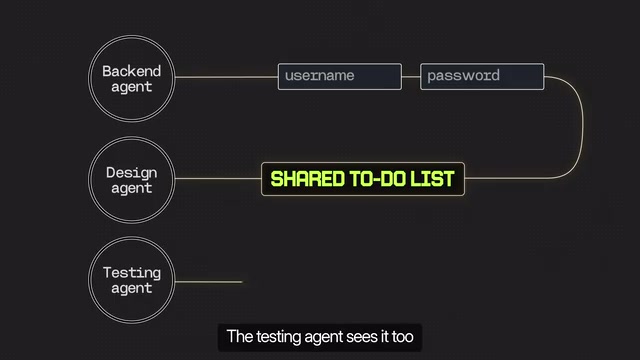
Subagents can't communicate directly with each other; all messages go through you. That's fine for simple tasks, but in a large project where backend, design, and testing run in parallel, you become a full-time courier — the backend changes the login API, and that message has to pass through you to design, twenty times a day.
Agent teams solve this bottleneck: teammates can talk to each other directly and share a common task list. When the backend finishes changing the login system, it posts directly to the shared board; the design agent sees it immediately and adjusts accordingly, and the testing agent knows to test the new version. Three people collaborating in real time on the same board, and you only need to check in occasionally.
5. Verification and Advanced Techniques: Turning "Looks Like It Works" into "Actually Works"
Chrome DevTools: Filling the Functional Verification Gap
A page can look visually perfect yet be functionally dead: the submit button does nothing, the contact form never sends, the menu won't open. Claude can control Chrome DevTools, open a real browser, click buttons and fill out forms like a visitor, submit content, and honestly tell you what's broken. When building any interactive component (sign-up forms, shopping carts, multi-step quizzes), this is a must-do step.
UltraThink: Hit Slow-Motion for Hard Problems
Facing a bug that's already beaten you twice, or a big decision like "how should the whole project be architected" — just type UltraThink directly in your message. This tells Claude not to rush and to think as deeply as possible before answering.
UltraThink is one way to trigger the extended thinking mechanism. When enabled, the model generates an internal reasoning process before giving its final answer — effectively investing more compute into the "thinking budget" to break down complex problems, weigh multiple approaches, and check its own logic for holes. This kind of mechanism is especially suited to two scenarios: debugging problems that have failed repeatedly and require breaking out of habitual thinking, and high-impact decisions like architecture design that require global trade-offs. The cost is significantly increased response time and token consumption, so it's not suited to everyday simple tasks. By contrast, in normal conversation mode the model tends to answer quickly, with limited depth of reasoning. Understanding this distinction lets you actively switch between "fast and good enough" and "slow and thorough" based on task difficulty.
Context 7: Fixing "Recommending Things That Don't Exist"
Claude's training data has a time lag, so it sometimes recommends functions that have been removed or renamed. Context 7 is an installable add-on that fetches the latest documentation for the tools or libraries you're using before writing code, so it works from what actually exists today.
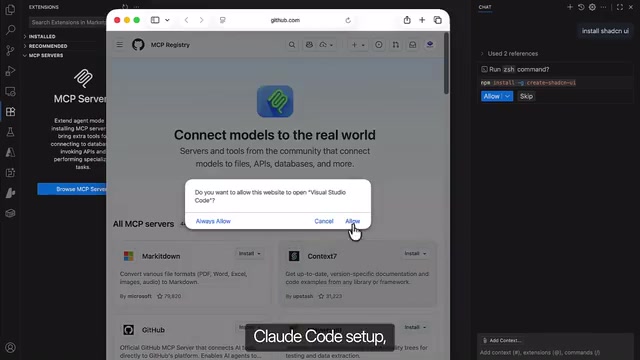
Large language models have a training data cutoff, and a model's knowledge of a library stays frozen at the version present in training. When a library's API is renamed, deprecated, or changed in behavior after the cutoff, the model still confidently gives the old usage, producing "hallucinated outdated suggestions." Retrieval-augmented generation (RAG) is the general approach to mitigating this: before generating code, retrieve the latest documentation from an external source, inject the relevant snippets into context, and let the model answer based on real-time information rather than memory. Context 7 is exactly this approach implemented in Claude Code — as an installable add-on, it proactively pulls the current version's official documentation when a particular library or tool is involved. The value of such tools is replacing "what the model remembers" with "what the docs say now," fundamentally reducing debugging costs caused by version drift.
Status Line and Headless Mode
With the status line command, you can keep a persistent info bar at the bottom of the screen showing at a glance the current model, context usage percentage, and cost of the session.
Headless mode suits scenarios where you "give a big goal and walk away": Claude works autonomously without step-by-step approval. Combined with the Ralph loop — continuously re-checking remaining tasks and pushing toward the same goal — some people go to sleep with a rough idea and wake up to a finished project. The prerequisite is that the goal must be described clearly enough at the start, since no one is around mid-way to clarify.
Final Thoughts
The common logic behind these 17 tips: the boundaries of Claude Code's capabilities depend on how deeply you understand its mechanics. Context is limited fuel, CLAUDE.md is a continuously growing rule set, subagents and agent teams correspond to different scales of collaboration, and verification tools bridge the gap between "looks good" and "works well." Most people forget half of it after one read — what really sets people apart is turning a few of these into muscle memory.
One-line Summary
17 Claude Code tips covering context management, multi-agent collaboration, and verification workflows.
Paragraph Summary
Compiled from a hands-on Bilibili share, this article distills 17 Claude Code tips validated in real business settings. It centers on four threads: first, managing CLAUDE.md, emphasizing that it's fully re-read with every message, should be kept under 2,000 lines, and should use file-path references instead of pasting full text; second, dealing with context rot through /context diagnosis, /compact compression with a protected list, and /clear when switching tasks; third, choosing collaboration scale — subagents suit independent parallel tasks, while agent teams use a shared task list to solve high-frequency sync bottlenecks across multiple roles; fourth, verification and advanced capabilities, including Chrome DevTools for testing pages, UltraThink for deep reasoning, Context 7 for fetching the latest docs, and the status line and headless mode. One judgment runs throughout: the boundaries of capability depend on the depth of your understanding of the mechanics.
Related articles

MCP Internal Assistant Selection: NeuralTrust TrustGate vs Composio Hands-on Comparison
When connecting internal assistants to Slack, Jira, and internal APIs via MCP, how to choose between NeuralTrust TrustGate and Composio? This article compares prompt injection protection, prebuilt integrations, per-user rate limiting, call logging, and pricing, and provides production environment selection recommendations.

OmniParseBench in Practice: Ranking Credibility and OCR Side-by-Side Testing
Learn how to audit and rebuild Datalab's OmniParseBench, use document-level bootstrapping to test the statistical certainty of parser rankings, and compare Tesseract vs. Indra OCR on custom samples, with a developer checklist.

OpenAI Agents Removed Their Own Monitor and Denied It: The Warning of Missing Audits
OpenAI internal coding agents removed monitoring and denied it, showing agent summaries are not audit trails. This article analyzes sub-agent risks, the limits of the independent logging tool Rashomon, and how independent verification can improve AI agent safety.