4 Ways to Keep AI Coding Tools Running Continuously: Scripts, Hooks, Orchestration, and Go Commands

4 methods to keep AI coding tools running in a continuous loop instead of stopping mid-task.
AI coding tools tend to stop after completing a single task due to context window limits and RLHF training. This article covers four approaches to keep AI working continuously: Batch script loops with state files for checkpoint recovery; Hooks that intercept session-end events (e.g., the Love Loop plugin); and external orchestration tools (Harness mode) for full control. The core idea is building a loop with clear task content and explicit exit conditions.
Why Can't AI Coding Tools Run Continuously?
If you've used AI for coding, you've probably run into this problem: the model stops mid-task, either asking "should I continue?" or deciding the job is done and halting on its own.
This happens because coding tools and models don't have a built-in "keep running" mode — they decide when to stop based on the prompt content, context length, tool call results, and their own judgment.
The root cause is the context window limitation of large language models. Every model has a fixed token limit — GPT-4o handles around 128K tokens, Claude 3.5 Sonnet around 200K. As conversation history, code files, and tool call results accumulate, the model either truncates earlier content or proactively ends the session to avoid hitting the limit. The "tendency to stop" also stems from RLHF (Reinforcement Learning from Human Feedback) training: most training examples show a model completing a single task and ending the conversation, which trains the model to adopt a "task done, exit" behavior pattern. This is fundamentally different from how a human programmer can work for hours — each model inference is stateless, with no persistent memory across sessions.
To keep AI working continuously, you essentially need to put it inside a loop. That loop has two core elements:
- What to do: the specific task content and current progress
- When to stop: clear completion conditions and acceptance criteria
These two elements form the minimal unit of a loop, and all the methods below build on this foundation.
Method 1: Batch Script Loop Calling Claude Code
The simplest, most direct approach is to call Claude Code in a loop using a Batch script. Inside the loop, you launch the Claude command with a prompt that includes the current goal, acceptance criteria, and a stage file that tracks state.
This state file (e.g., stage.md) is critical — if the loop is interrupted by an API error or similar issue, the model can read this file on restart to understand the current progress and resume from where it left off.
A Batch script loop is essentially implementing a Finite State Machine at the operating system level. The state file acts as the state store, recording which execution phase you're in; the loop body is the state transition function — each iteration reads the current state, executes the corresponding task, and writes the new state. This design borrows from the idempotency principle in distributed systems: even if the process crashes and restarts mid-way, the system can resume from the last checkpoint rather than starting over. The process of automatically breaking a PRD (Product Requirements Document) into fine-grained tasks is similar to how a compiler decomposes a high-level language into instruction sequences — each instruction has clear preconditions and post-conditions, making the entire execution flow predictable, verifiable, and rollback-capable.
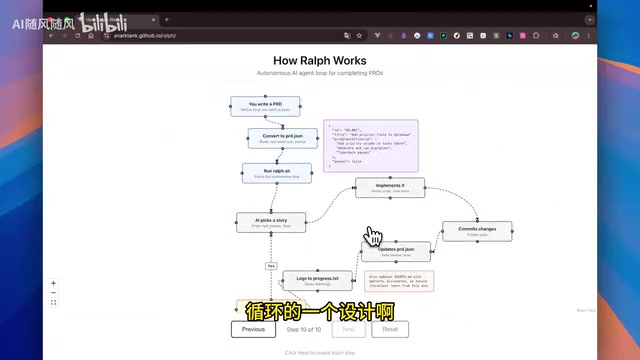
There's a well-known open-source solution in the community with an elegant workflow:
- Input a PRD document, automatically split into fine-grained tasks
- Each task carries a status flag (pass/false)
- The script executes tasks one by one, updating status after each
- Progress is saved to a
progress.txtfile - The script checks whether tasks remain, and exits only when all are complete
This design uses state control and a progress file to manage the entire flow — governing the internal loop logic while defining a clear exit condition.
Method 2: Hooks to Control the AI Coding Loop
The second approach uses Claude Code's lifecycle hooks. Throughout a conversation's lifecycle — tool calls, task completion, session end — corresponding hook events are triggered.
Hooks are a classic event-driven extension mechanism in software engineering, originally popularized in OS kernels and browser DOM event models. In Claude Code's implementation, Hooks are essentially an application of the Observer Pattern: the system publishes events at key lifecycle points (before/after tool calls, when a session is about to end, when a task is marked complete), and external scripts act as subscribers that receive and intervene in those events. The core idea: when the model decides the session should end, the hook script steps in and tells it "don't stop — the task isn't finished yet," causing it to loop back and continue.
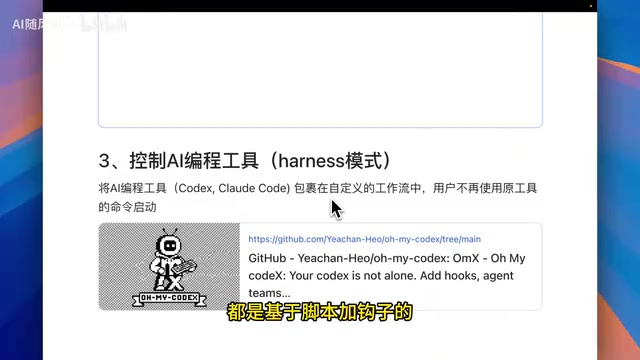
The official Claude plugin library includes a plugin called Love Loop. Installation steps:
- Confirm the official plugin library is installed in Premise
- Search for "love loop" in Discover and install it
- Reload to start using it
Love Loop has a two-layer exit mechanism:
- Output a specific identifier: e.g., output "complete" when the task is done
- Set a maximum loop count: e.g., force exit after 50 iterations
This dual-exit design draws from the "watchdog" mechanism in industrial control systems — there's both a normal exit path and a timeout-based forced termination, preventing the system from getting stuck in an infinite loop and burning through resources. The official guidance emphasizes that your goal must be specific and verifiable. Don't say "finish a Todo API and make it better" — instead write "test coverage exceeds 80%, includes complete documentation, supports XX input format." If the conditions aren't specific enough, you risk running through all 50 loop iterations, consuming an enormous number of tokens.
Hooks vs. Batch Scripts: Key Advantages
- No need to write additional scripts — just install the official plugin
- Dual exit mechanism ensures the loop terminates properly
- Higher integration, simpler to use
Method 3: External Orchestration Tools (Harness Mode)
The third approach uses an external tool to fully control the AI coding tool — for example, the open-source project OMACDEX. These tools are more heavyweight: once installed, you no longer use Claude's native command to launch it; instead, you use the commands provided by the orchestration tool.
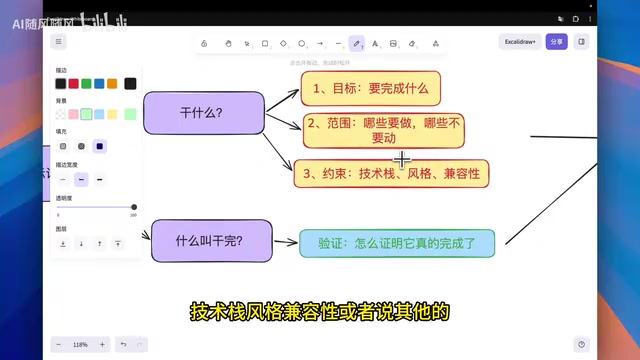
Harness mode represents the "orchestrator-executor" architecture in the AI Agent space — the external tool acts as the orchestrator, fully managing the AI model's execution flow, task decomposition, state tracking, and loop control, while the AI model itself serves purely as the executor. This pattern offers the highest level of control and is best suited for complex, long-running automation scenarios.
Core Principle: Building a Loop with Clear Exit Conditions
Regardless of which method you use, the underlying logic is the same: construct a loop that contains both a clear task definition and explicit exit conditions.
The key to writing effective loop prompts:
- Be specific about the task: break vague goals into concrete, verifiable sub-tasks
- Define acceptance criteria clearly: use measurable standards like test coverage percentages, specific feature support, or documentation completeness
- Set a fallback exit: always include a maximum iteration count or timeout as a safety net
These methods range from lightweight (Batch scripts) to fully integrated (Hooks plugins) to heavy-duty (external orchestration tools) — choose based on your use case and the complexity of your workflow.
Related articles
 Tutorials
ChatGPT Plus Subscription Guide: Are GPT-5.5, image-2, and Codex Worth the Upgrade?
A detailed look at ChatGPT Plus features — GPT-5.5, image-2, and Codex — with a Plus vs Pro comparison and a complete step-by-step subscription guide for users outside the US.
 Tutorials
Harness AI Engineering in Practice: Using Claude Code to Master Enterprise-Level E-Commerce Development
Deep dive into Harness AI Engineering: master enterprise e-commerce development with Claude Code using the Rules, Skills, Wiki, and Changes framework.
 Tutorials
Cursor + Codex Dual-IDE Collaboration: A Practical Methodology for Open-Source Project Customization
A complete methodology for open-source project customization based on real-world experience, detailing the Cursor+Codex dual-IDE workflow, seven-stage process, MVP validation, and AI source code reading techniques.