5 AI Features That Each Worked Fine—Yet the Product Fell Apart
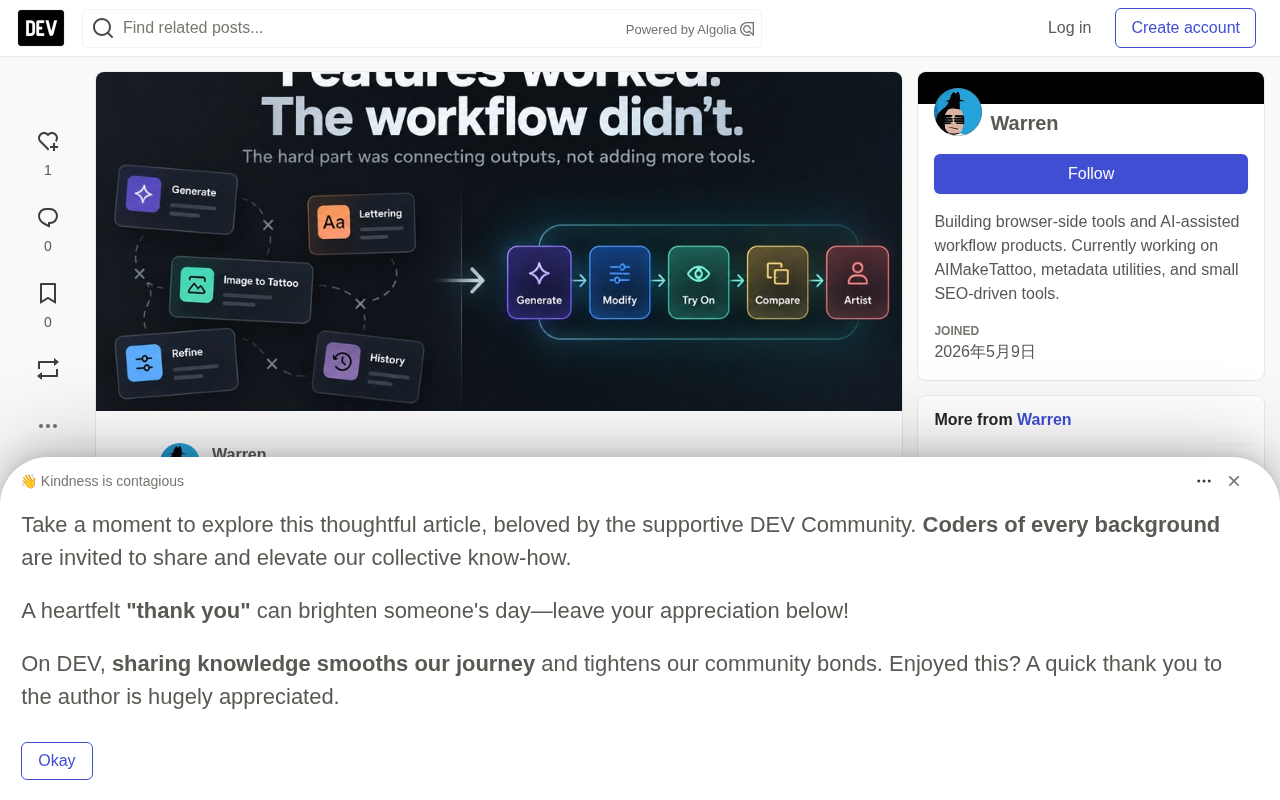
Five AI features work individually, but missing transitions between them break the product experience.
A developer built five AI tattoo features that each tested fine in isolation, yet found the overall product experience broken—not because of the features themselves but because of the transitions between them. He proposes treating generated results as shared objects that flow through the product, so refinement, virtual try-on, and other steps can reuse the previous output instead of making users stitch a workflow together by hand. The article notes that model calls are rarely the hard part; state management, output reuse, and next-step guidance are the main friction points. The author replaces the urge to add another feature with five questions and stresses that transitions are part of the feature—a lesson broadly relevant to multi-AI-feature products.
A developer spent a great deal of time polishing five AI features—tattoo generation, image-to-tattoo, text design, refinement, and virtual try-on. Each feature performed correctly when tested in isolation: the generator produced useful concepts, image-to-tattoo handled conversion, text design preserved exact copy, refinement made local adjustments without forcing a full redo, and virtual try-on placed designs on body photos.
But he eventually discovered that the overall product experience was broken.
The root cause was not inside any single feature, but between features. After a user generates a design they like, the next step is unclear; wanting to modify part of it, change placement, adjust size, move from text design to a full composition, reopen a previous piece, or put the result on a body photo—all of these actions require users to mentally stitch five tools into a single workflow.
In his words: “That was the real bug.”
The Features Are Fine—What's Missing Is the “Transition”
While building AIMakeTattoo, the author gradually realized that he had been asking “what AI feature should I add next,” when the real question was: what does each feature produce, and where should that output flow next?
The effective path he mapped out was: idea → generate → modify → try on → compare → hand off to the tattoo artist. Written down, it looks obvious, but in the product it was anything but.
The key shift was not adding another model call, but making one result directly usable by the next step. Each feature worked on its own, yet users still had to manually stitch the product together—that is the source of the broken feeling.
Treat Outputs as Shared Objects
The most useful mental model is to stop treating the generator, text design, image-to-tattoo, refinement, and virtual try-on as five independent tools, and instead treat the generated result as a shared object that flows through the product.
A generated result can become the input to refinement; a refined result can go into virtual try-on; a text design result can be previewed on the body; a saved result can be reopened instead of recreated. Only then does the product turn from “a collection of demos” into a continuous workflow.
This shift in perspective also redefines feature boundaries: a single generation is just one step in the flow, not the endpoint.
Shared Object is a common concept in software design, referring to a data entity that is passed between multiple modules or steps and read or modified by multiple parties. Unlike each tool maintaining its own private state, a shared object has a unified identity and structure, and any downstream feature can reference it directly without requiring the user or the system to reconstruct it.
In this case, if a tattoo design can carry metadata such as artwork, text, position, size, and refinement history as it moves from one step to the next, then refinement, virtual try-on, and other stages can directly consume the same object without repeated uploads or re-description. This requires explicitly defining the object's schema (for example, design ID, version, layer information) and establishing stable read/write conventions. The maturity of shared objects often determines whether a multi-step AI product can move from demo to usable.
The Model Call Is Rarely the Hard Part
The author readily admits that model work matters, but most frustrating product problems happen outside the model: maintaining state between tools, deciding what information to pass along, handling exact text and visual instructions separately, making the same result usable by the next action, making the next step obvious, and avoiding forcing users to start over.
These are ordinary product and software engineering problems. AI only temporarily hides them, because each isolated feature looks impressive on its own. A successful API response does not mean the user successfully completed the task—a feature can pass every technical test yet create friction because its output has nowhere to go.
State Management refers to an application's ability to maintain consistency of user data across multiple steps or pages. In a single-feature demo, state usually exists only within one request; once you enter a multi-step workflow, you must answer: which fields need to persist across steps? How does the backend store intermediate results? How does the frontend recover them after a refresh or reopen?
Common implementation approaches include a unified design ID and backend storage, session-level or persistent draft mechanisms, and clearly defined input/output contracts for each step. Poor state design directly leads to users being forced to re-enter information, losing refinement results, or being unable to go back—exactly the main source of the “outside the model” friction described in the article. Treating state as a first-class citizen of product architecture often improves the experience more than swapping in a stronger model.
Replace “Add One More Feature” with Five Questions
Before adding a new feature, the author now asks:
- What does this feature output?
- What is the most likely next action?
- Can users directly reuse this output?
- Are we forcing them to re-enter information?
- Does the new feature plug into an existing workflow, or does it just add another branch?
This checklist is more useful than “does another AI capability look good in a demo.”
The Transition Is Part of the Feature
The author used to view handoffs between tools as an implementation detail; now he believes they are the product itself. The transition from generation to modification, and from modification to virtual try-on, can be just as important as any single feature standing alone. The hard part of building an AI product is often not getting yet another model to run, but ensuring that what it produces can continue somewhere useful.
This case has broad reference value for developers of multi-AI-feature products: as the feature list grows longer, the user experience bottleneck shifts from “can it do it” to “where does it go after it's done.” Designing outputs as shared objects that can flow, and treating transitions as first-class citizens, may be a more effective product strategy than stacking model calls.
One-line Summary
Five AI features worked individually, but missing transitions between them broke the overall product experience.
Paragraph Summary
A developer built five AI tattoo features that each tested fine in isolation, yet found the overall product experience broken—the problem was not inside the features but in the transitions between them. He proposes treating generated results as shared objects flowing through the product so that refinement, virtual try-on, and other steps can directly reuse the previous step's output instead of forcing users to manually stitch a workflow together. The article notes that model calls are rarely the hard part; state management, output reuse, and next-step guidance are the main sources of friction. The author replaces the urge to “add one more feature” with five questions, and emphasizes that the transition itself is part of the feature—a lesson with broad relevance for multi-AI-feature products.
Related articles

OpenAI Partners with Shield: How the Astra Agent Revolutionizes IT Troubleshooting
OpenAI and Shield launch the Astra agent, which autonomously logs into computers and legacy systems to fix IT issues in real time, 35-40% faster than traditional models, with humans involved only when judgment is needed.

iPhone Duo Battery Life Tested: One Charge a Day Is Unavoidable, and the Large Screen Is the Culprit
iPhone Duo battery test: heavy use needs at least one charge a day, and about 30% remains after 6.5 hours of screen-on time. How often the large screen is unfolded is key; a MagSafe battery pack helps, and long-term degradation is also worth watching.

Kimi K3.1 Pro Open-Sourced: 2.8 Trillion Parameters Close In on Opus
Moonshot releases the open-source MoE model Kimi K3.1 Pro, with 2.8T total parameters and 104B activated, trailing Opus 5.5 by under 1 point on Terminal Bench 4.0.