5 Claude Code Skills I Use Daily: Taming AI Programming with Engineering Workflows

5 custom Skills for building a complete AI programming workflow from requirements to implementation
Engineer Matt Pocock shares his 5 core custom Skills for Claude Code: Grill Me uses design trees to extract complete requirements; Write PRD converts consensus into structured product requirements documents; PRD to Issues decomposes PRDs into independently executable tasks using vertical slice principles. The core philosophy is that AI agents have no memory—you must actively inject context through rigorous structured processes in every interaction to produce high-quality code.
Introduction: Engineering Thinking for AI Programming
As an engineer with nearly a decade of experience, Matt Pocock shared the 5 custom Skills he relies on most when using Claude Code for daily development. The core philosophy behind these Skills is: AI agents have no memory—you need extremely rigorous and clearly defined processes to guide them toward producing high-quality code.
Understanding this premise requires grasping the technical nature of large language models (LLMs): current mainstream models are essentially stateless. Each inference is based on the token sequence within the current Context Window, with no persistent memory across sessions. Models like GPT-4 and Claude have expanded their context windows from an initial 4K tokens to 100K or even 200K tokens, but this hasn't fundamentally solved the "memory" problem—longer contexts actually trigger the "Lost in the Middle" phenomenon, where the model's attention to information in the middle of the window drops significantly. This means you cannot rely on the AI to "remember" project context on its own; instead, you must actively inject context through structured processes in every interaction.
This article will break down each of these 5 Skills—their design philosophy and practical usage—helping you establish a complete AI programming workflow from requirements clarification to code implementation.
Grill Me: Using Design Trees to Extract Real Requirements
This is Matt's favorite Skill and the starting point of the entire workflow. Surprisingly, it's only three sentences:
- Ruthlessly interrogate every aspect of this plan until we reach consensus.
- Walk down each branch of the design tree, resolving dependencies between decisions one by one.
- If a question can be answered by exploring the codebase, go explore the codebase.
The concept of a "design tree" comes from Frederick P. Brooks' The Design of Design. Brooks is a legendary figure in software engineering, famous for The Mythical Man-Month. In The Design of Design, he systematically articulates the tree-like structure of design decisions: every design choice spawns new constraints and sub-problems, forming a constantly branching decision tree. Brooks argues that great designers don't find the "optimal solution"—rather, they systematically traverse the decision tree, identify critical branching points, and manage dependencies. This thinking aligns closely with depth-first search (DFS) in computer science—you must follow each branch to its end to truly understand the boundaries of the entire design space.
The core idea is: when making design decisions, you need to traverse all possible branches. For example, when designing a search page, you first need to decide whether to build advanced search or a simple text box; if you choose advanced search, you then need to determine all the filters and sorting options—expanding downward continuously until the design is as complete as possible.
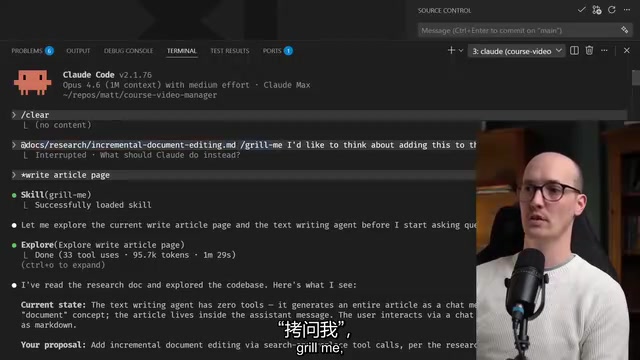
In practice, Matt demonstrated a conversation about adding a feature. Claude fired off 16 questions in one go, covering document lifecycle, UI layout, editing tool formats, and many other aspects. Matt mentioned that for complex features, the Grill session can take 30-45 minutes, answering 30 to 50 questions.
Key insight: A Skill doesn't need to be long to be impactful—what matters is choosing the right wording at the right moment.
Write PRD: Turning Ideas into Structured Documents
Once the Grill Me phase reaches consensus, the next step is invoking the Write PRD (Product Requirements Document) Skill. The complete workflow for this Skill is:
- Have the user provide a detailed description
- Explore the codebase to verify the user's assertions
- Conduct a deep interview with the user (reusing Grill Me logic)
- Outline the major modules that need to be built or modified
- Write the PRD using a template and submit it as a GitHub Issue

PRD (Product Requirements Document) originated in traditional waterfall development but has evolved into a lighter, more dynamic form in modern agile practices. Matt showed an actual generated PRD: the problem statement was "the article writing page regenerates the entire document on every AI interaction," and the solution was "add split-screen document editing." The PRD included numerous User Stories—this comes from agile methodology. User stories are a core artifact in Scrum and Extreme Programming (XP), typically formatted as "As a [role], I want [feature], so that [value]." This format deliberately avoids technical implementation details, forcing the team to think about requirements from the perspective of user value. It also provides the AI agent with the "why" rather than the "how," preventing the AI from getting bogged down in implementation details too early.
The bottom also includes implementation decisions, but deliberately avoids over-specifying details, because if the code diverges from the PRD, subsequent implementation will run into problems. The PRD describes the destination, not the journey.
PRD to Issues: Breaking the Destination into a Journey
With the PRD as the "destination," the next step is planning the "journey." The PRD to Issues Skill breaks the PRD into a kanban-style list of independent tasks.

The core design principle is Vertical Slices rather than horizontal slices. Understanding this distinction is crucial: Horizontal Slicing divides tasks by technical layer—for example, "week one for the database layer, week two for the API layer, week three for the frontend." The fatal flaw of this approach is that until all layers are complete, you cannot verify any end-to-end business value, and risk accumulates until it explodes at the very end. Vertical slicing means each task cuts through all technical layers, delivering a complete but extremely narrow runnable feature. This concept is widely championed in Continuous Delivery and Lean Software Development. For AI agents, vertical slicing has an additional advantage: each Issue is self-contained, so the agent can execute independently without needing to understand the entire system, dramatically reducing context dependency.
Specific principles include:
- Each Issue is a thin vertical slice that cuts through all integration layers
- Prioritize work that quickly exposes "unknown unknowns"
Related articles
 Tutorials
ChatGPT Plus Subscription Guide: Are GPT-5.5, image-2, and Codex Worth the Upgrade?
A detailed look at ChatGPT Plus features — GPT-5.5, image-2, and Codex — with a Plus vs Pro comparison and a complete step-by-step subscription guide for users outside the US.
 Tutorials
Harness AI Engineering in Practice: Using Claude Code to Master Enterprise-Level E-Commerce Development
Deep dive into Harness AI Engineering: master enterprise e-commerce development with Claude Code using the Rules, Skills, Wiki, and Changes framework.
 Tutorials
Cursor + Codex Dual-IDE Collaboration: A Practical Methodology for Open-Source Project Customization
A complete methodology for open-source project customization based on real-world experience, detailing the Cursor+Codex dual-IDE workflow, seven-stage process, MVP validation, and AI source code reading techniques.