5 Essential AI Coding Tools for Beginners: Recommendations and Usage Guide

A beginner's guide to 5 essential AI coding tools and how to use them together effectively.
This guide introduces five AI-powered coding tools ideal for beginners: GitHub Copilot for real-time code suggestions, Cursor for project-aware AI editing, Lovable for generating full web apps from text prompts, Replit AI for zero-config browser-based coding, and Claude as a patient AI tutor. It explains each tool's strengths and shows how to combine them into a progressive learning workflow.
Learning to code has never been easier than it is today. Thanks to the rapid advancement of artificial intelligence, you no longer need years of experience to build websites, create applications, write scripts, or even fix bugs in your programs. Here's the thing — AI hasn't replaced developers. It's simply made programming more accessible, faster, and far less intimidating for beginners.
This article covers the five AI coding tools that beginners should pay the most attention to. Whether you've never written a single line of code or you're just getting started, these tools can help you ramp up faster and build real, functional projects in a fraction of the time.
GitHub Copilot — Your Experienced Coding Companion
For beginners just starting their programming journey, GitHub Copilot is like having a seasoned programmer sitting right next to you. Instead of staring at a blank screen wondering where to begin, Copilot provides real-time code suggestions as you type. It can complete entire functions, explain what different parts of your code do, and even help you avoid common mistakes.
GitHub Copilot is built on OpenAI's Codex model, a variant of the GPT family that was specifically fine-tuned on billions of lines of publicly available source code from GitHub. It uses the autoregressive generation approach of large language models (LLMs) — in simple terms, it predicts the most likely next chunk of code based on the context of what you've written so far. As you type in your editor, Copilot sends the current file content to the cloud-based model for inference, then displays suggestions as "ghost text" after your cursor. All you have to do is press Tab to accept.
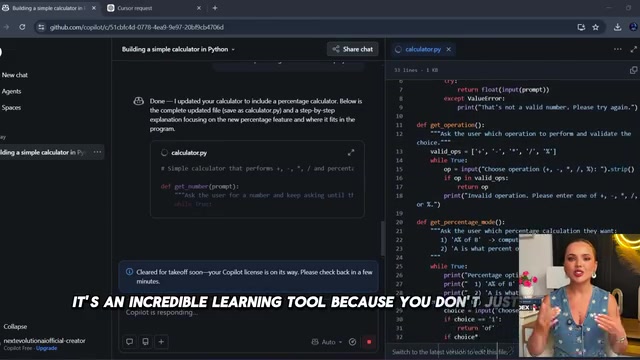
Imagine this scenario: you're building your very first calculator in Python. With Copilot, you don't have to search the web every five minutes — it predicts the logic you're trying to implement and offers helpful suggestions on the spot. More importantly, it supports dozens of programming languages including Python, JavaScript, HTML, CSS, Java, and C++. In 2024, GitHub also launched Copilot Chat, which allows developers to interact with the AI directly using natural language, further lowering the barrier to entry.
For beginners, this is an invaluable learning tool — you're not just copying code. You're watching how experienced code is written while actively building your own projects.
Cursor — The AI Code Editor That Understands Your Entire Project
Cursor has become one of the most popular AI-powered code editors in the world, and it's easy to see why. Think of it as a coding environment with a built-in AI system. Instead of constantly switching back and forth between your editor and ChatGPT, you can ask questions directly within your project, such as:
- Explain what this function does
- Find the bugs in this file
- Add dark mode to my website
- Optimize this code
From a technical architecture standpoint, Cursor is a standalone editor forked from the VS Code open-source codebase. This means it inherits VS Code's massive plugin ecosystem and familiar user experience while deeply integrating AI capabilities under the hood. Its core technical advantage is "codebase indexing" — using Vector Embedding technology to convert your entire project's code into semantic vectors stored in a local vector database. When you ask a question, the system first retrieves the most relevant code snippets from your project, then passes this context along to the AI model for processing. This RAG (Retrieval-Augmented Generation) architecture ensures the AI's responses stay grounded in your project's actual code.
Cursor's key strength is that it understands your entire project, not just a single file or a small code snippet. This is incredibly useful for beginners — the time you spend feeling lost is minimized, and the time you spend actually learning increases dramatically. Many professional developers also use Cursor daily because it significantly accelerates development speed.
Lovable — Generate a Complete Web App from a Single Sentence
What if you could build a fully functional web application from nothing more than a text description? That's exactly what Lovable is designed to do. You can type something like: "Create a modern fitness tracker with user login, progress charts, and a clean mobile-friendly design," and within minutes, Lovable will generate a working application.

Lovable belongs to an emerging category of tools known as "AI full-stack generators," alongside products like Bolt.new and v0. Under the hood, it leverages high-performance large language models as its code generation engine, combined with pre-configured modern tech stack templates — typically including the React framework, TypeScript for type safety, Tailwind CSS for styling, and Supabase for backend services — to transform natural language requirements into complete front-end and back-end code. The generated app can be deployed to the internet with a single click, eliminating the complex traditional workflow of environment setup, dependency management, and server configuration. The emergence of these tools represents an entirely new programming paradigm: "Prompt-Driven Development."
You don't need to understand every line of code right away. Instead, you can go back afterward to study the project and gradually figure out how all the pieces fit together. This "get it running first, learn the principles later" approach makes Lovable one of the fastest paths for beginners to go from pure learning to building real products. Whether it's a personal portfolio app, a network management tool, or a business landing page, Lovable dramatically lowers the barrier to entry.
Replit AI — Zero-Config Programming Platform in Your Browser
Replit has evolved into one of the best programming platforms for beginners because everything runs directly in the browser: no complex installations, no software configuration, no worrying about setting up your computer environment. Just open the website, choose a programming language, and start building immediately.

Replit's core technology is a container-based Cloud IDE (cloud development environment). Each user's project runs in an isolated Linux container, supporting instant execution in over 50 programming languages. For beginners, this means you never have to deal with "configuration hell" — no installing compilers, configuring environment variables, resolving dependency conflicts, or worrying about operating system compatibility. Traditionally, many beginners spend hours or even days on environment setup before writing their first useful line of code — and this is precisely the pain point Replit aims to solve.
Its AI assistant (Replit Agent) can generate code, explain errors, fix bugs, and even create complete projects from simple instructions. Imagine typing "build a simple weather app" and getting a working result within seconds, then iterating and improving step by step. For first-time learners, this eliminates one of the biggest sources of frustration — setting up the development environment. All the time you save can go straight into actually learning to code.
Claude — The Most Patient AI Coding Tutor
Topping the list is Claude. While many people think of it as just another chatbot, it's actually one of the most powerful coding assistance tools available today. What Claude excels at is breaking down programming concepts into forms that beginners can genuinely understand, rather than throwing out a barrage of confusing technical jargon.

Claude is developed by Anthropic, a company founded by former core OpenAI researchers that focuses on AI safety and alignment research. The Claude model family is known for its exceptionally long context windows — the latest version supports up to 200K tokens, equivalent to processing roughly 500 pages of documents or tens of thousands of lines of code at once. This enables Claude to "read" the entire codebase of a medium-sized project and provide coherent, systematic analysis rather than only seeing isolated code snippets. Additionally, Claude uses RLHF (Reinforcement Learning from Human Feedback) and Anthropic's proprietary Constitutional AI technology during training, ensuring its responses are both accurate and pedagogically well-crafted.
Here are some ways you can ask Claude for help:
- Explain JavaScript to me as if I'm a complete beginner
- Why isn't this code working?
- Teach me Python with small daily exercises
- Build a simple game and explain the code line by line
One of Claude's major advantages is its ability to handle large amounts of code and explain it line by line. It can review entire projects, suggest improvements, catch hidden bugs, and clearly explain how complex systems work. It's essentially like having a patient programming tutor available around the clock. And understanding why code works is far more important than simply copying it.
How to Use These Five AI Coding Tools Together
The most exciting thing about AI is that it's made learning to code no longer exclusive to computer science students. Anyone can build websites, create applications, and automate repetitive tasks — even with zero prior experience.
If I had to recommend a combination for someone just starting out, here's how to pair them:
- Use Claude to understand programming concepts
- Use Cursor to write and improve code
- Use Replit to practice online
- Use Lovable to quickly build real applications
- Use GitHub Copilot to boost your coding speed
The logic behind this combination follows a progressive learning path: start by building an understanding of programming concepts through Claude (knowing the "why"), then use Cursor to actually write code in local projects (knowing the "how"), while leveraging Replit's zero-config environment to practice anytime and anywhere. When you want to quickly validate a product idea, use Lovable to generate a prototype. Finally, let Copilot accelerate your output efficiency in day-to-day coding. These five tools cover the complete learning loop from "understanding" to "practice" to "acceleration."
It's important to emphasize that these tools won't turn you into a professional developer overnight. You still need curiosity, practice, and patience. But they remove the biggest obstacles that once discouraged countless beginners — whether it's the complexity of environment setup, the frustration of syntax errors, or the loneliness of coding without immediate feedback. The future of programming isn't about competing with AI — it's about learning to work alongside it. And the sooner you start, the greater the advantage you'll build.
Key Takeaways
Related articles

nenspace: An Extended Mind Tool Where AI Fuses In Without Forcing Itself On You
nenspace proposes an "extended mind" rather than "second brain" philosophy, with lo-fi-inspired restrained AI integration combining working memory, tasks, notes, habits, and logbook to reduce cognitive load.

Clamshell: Close Your MacBook Lid Without Sleep, Keep Background Tasks Running
Clamshell is a Mac productivity tool that keeps your MacBook running when the lid is closed—no external display or sudo needed. Perfect for builds, downloads, and AI Agent tasks.

Galileo's Square-Cube Law: Why Giants Are Physically Impossible
Galileo's 1638 Square-Cube Law reveals why giants can't exist: volume grows as the cube while area grows as the square, creating fundamental limits on scaling in engineering, biology, and AI.