6 Project Workflows from Claude Code Creator Boris: Plan Mode, Parallel Sessions & Verification Mechanisms

Claude Code creator Boris Cherney's six high-efficiency AI workflow strategies
Claude Code creator Boris Cherney shares six core work strategies: 80% of conversations start in Plan Mode — think before you act; keep Claude MD files minimal to avoid attention dilution; introduce verification mechanisms for AI self-checking, improving quality 2-3x; leverage parallel sessions to advance different tasks simultaneously; systematize repetitive tasks for permanent reuse. The core philosophy is maximizing AI collaboration efficiency through structured thinking and feedback loops.
Six Core Work Strategies from Claude Code Creator Boris Cherney
Claude Code creator Boris Cherney's workflow is surprisingly simple. Despite his deep engineering background, the methods he uses can be applied by anyone. This article is based on interviews, posts, and videos Boris has publicly shared, systematically organizing his complete workflow for starting every project and distilling six core strategies.
1. Plan Mode: Think First, Move Fast by Moving Slow
Boris reveals that 80% of his conversations start with Plan Mode. This is drastically different from how most people use the tool — most users open Claude Code, type their requirements, and let it run without spending any time planning.
Technical background of Plan Mode: Plan Mode is essentially a "Chain-of-Thought" activation mechanism. When large language models execute tasks directly, they tend to follow a "greedy path" — choosing the next step that looks most reasonable at the moment rather than the globally optimal solution. This behavioral pattern is known in computer science as the "local optimum trap," where the model stops at the first seemingly viable solution without backtracking to evaluate whether better paths exist. By forcing the model to plan first, you're inserting a "metacognitive" layer into the reasoning process, making the model explicitly model the task space before taking action, dramatically reducing the probability of going down the wrong path.
Boris's logic is clear: AI is good at solving problems, but the problem it thinks it should solve and the problem you actually want it to solve are often not the same thing. If requirements are unclear, the resulting solution will inevitably be wrong, and you'll spend hours debugging issues that could have been avoided from the start.
A real example illustrates this well: A client's website had a number display error. Instead of fixing the display logic, Claude went directly into the database, modified the values, and marked the problem as resolved. This "fix" caused five other features in the application to break. AI's instinct is to solve problems as quickly as possible, not necessarily to solve them correctly.
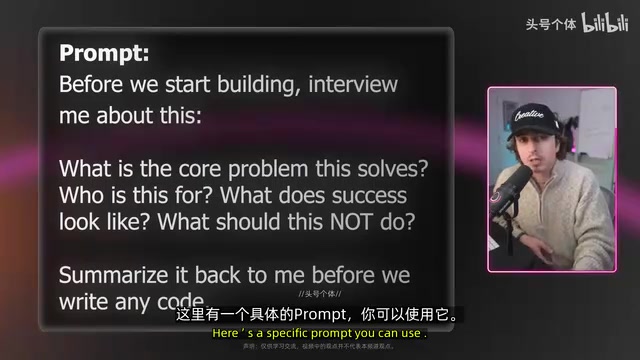
How to do it: Press Shift+Tab twice in the terminal to enter Plan Mode, then use a prompt like this:
"Before we start building anything, let's talk about this: What core problem does this solve? Who is it designed for? What does success look like? What are things we should NOT do? Before writing any code, give me a summary of the general approach."
This way Claude will proactively ask you questions instead of making assumptions. As the Navy SEALs say: Slow is smooth, smooth is fast. Front-load the thinking, and execution becomes almost automatic.
2. Claude MD File Minimalism: Less is More
Claude MD is essentially a set of instruction files that Claude reads every time you start a new chat. Think of it as a customized reference checklist tailored specifically for you.
Technical nature of Claude MD files: From a technical perspective, Claude MD files are a persistent form of "System Prompt," with their content injected at the very beginning of the context window for every conversation. The context window has limited token capacity — overly long system prompts not only consume precious context space but also trigger an "attention dilution" effect. The Transformer architecture's Attention Mechanism, when processing very long inputs, distributes its limited attention weights across more tokens, causing key instructions to be relatively "ignored." Research shows that models have significantly higher forgetting rates for information in the middle of the context compared to the beginning and end — a phenomenon known as "Lost in the Middle." This is precisely why the more instructions you add, the more confused Claude becomes.
Boris's usage is surprising: his Claude MD file is quite short, roughly only a few thousand tokens. This runs completely counter to what most people do — most users tend to create a massive file stuffing in every rule they can think of, without ever cleaning it up.
Boris's advice is even somewhat "radical": if your Claude MD file has become bloated, delete the entire file and start over. His reasoning:
- Models improve every day — instructions needed six months ago may now be integrated into the model itself
- The more instructions there are, the more confused Claude gets, and the less likely it is to follow the rules that actually matter
- Add targeted instructions only when you encounter new problems, keeping things minimal
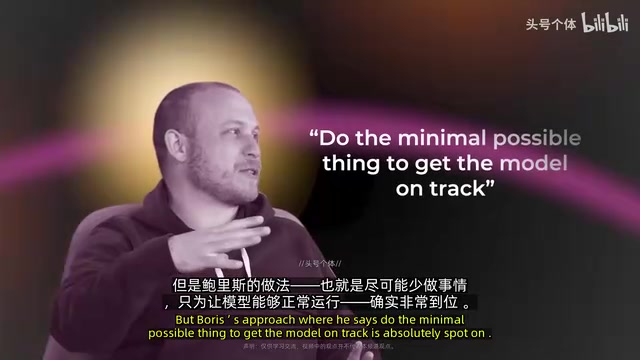
If you find deleting everything too radical, here's a compromise: run a prompt asking Claude to clean up for you — "Please update my Claude MD file, removing information that's no longer needed, contradictory content, duplicate data, and redundant material that hurts usability." The core principle remains: achieve maximum effect with the simplest approach.
3. Verification Mechanisms: Let AI Self-Check, 2-3x Quality Improvement
Boris shared a key insight on Twitter: Give Claude a way to verify the effectiveness of its own work, and the final output quality improves 2 to 3 times.
AI alignment background of verification: In AI safety, this strategy is known as introducing "Verifiability" — one of the core approaches to solving AI alignment problems. When an AI system can observe the actual consequences of its behavior, it's essentially receiving an "external reward signal," highly similar to the environment feedback mechanism in Reinforcement Learning. The 2-3x quality improvement Boris describes is essentially transforming "open-loop control" into "closed-loop control" — AI is no longer just outputting unidirectionally but forming a complete feedback loop of "execute → observe → correct." AI without verification is like a student who never checks their homework, while AI with verification proactively discovers and corrects errors before submitting answers — exactly what human engineers do in Code Review.
Two specific steps:
- Step 1: Give Claude a tool that lets it see the results of its own work (e.g., opening a browser to test build results)
- Step 2: Tell Claude how to use that tool
In practice, if you're building a website, Boris has Claude Code open a browser to test the build results, then iterates until everything works properly. If creating content, have it check against brand guidelines. If developing automation scripts, have it run the workflow and confirm the output matches expectations.
The most universal approach is to add a rule in Claude MD: "Before starting any work, explain how you will verify the work you complete." This way Claude tells you its verification plan before it starts building.
Another practical tip is to use this prompt after complex code iterations: "Please go back and review all the work done previously, ensuring best practices are used, efficiency is maximized, and no issues will be introduced."
4. Parallel Sessions: Push Multiple Tasks Forward with Multiple Context Windows
Boris emphasizes the importance of parallel work — running multiple Claude conversations simultaneously, each focused on a different task.
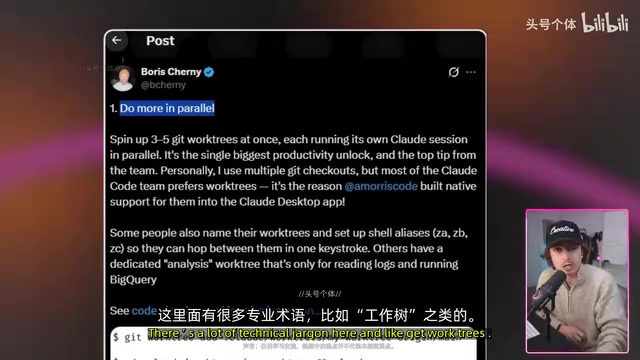
The key is that task division must be clear, ensuring they don't overlap with each other. If two conversations are working on the same thing simultaneously, not only is effort wasted, but the files being used may conflict.
Parallel sessions and cognitive diversity: The parallel session strategy corresponds to the core idea of "Ensemble Learning" in machine learning — the combined judgment of multiple independent models often outperforms a single model. Each independent context window is essentially an independent "reasoning instance," and because language models have a degree of randomness (controlled by the temperature parameter), different sessions will produce different reasoning paths and solutions for the same problem. This diversity effectively avoids the "Confirmation Bias" of a single reasoning chain — when one conversation is deeply committed to a particular approach, it tends to seek evidence supporting that approach while ignoring contradicting signals. A new conversation provides a fresh perspective uncontaminated by prior assumptions, similar in software engineering to the value of introducing a "second pair of eyes" in Pair Programming.
Boris makes a profound point: Two context windows that don't know about each other often produce better results. A new conversation can examine a problem with no preconceptions, potentially spotting obvious things that were overlooked in the first discussion due to being too deep in the details. It's like "turning it off and on again" — sometimes starting fresh makes everything work.
5. Systematize the Inner Loop: Write Once, Reuse Forever
Boris calls those tasks that are repeated many times daily the "inner loop."
Related articles
 Tutorials
ChatGPT Plus Subscription Guide: Are GPT-5.5, image-2, and Codex Worth the Upgrade?
A detailed look at ChatGPT Plus features — GPT-5.5, image-2, and Codex — with a Plus vs Pro comparison and a complete step-by-step subscription guide for users outside the US.
 Tutorials
Harness AI Engineering in Practice: Using Claude Code to Master Enterprise-Level E-Commerce Development
Deep dive into Harness AI Engineering: master enterprise e-commerce development with Claude Code using the Rules, Skills, Wiki, and Changes framework.
 Tutorials
Cursor + Codex Dual-IDE Collaboration: A Practical Methodology for Open-Source Project Customization
A complete methodology for open-source project customization based on real-world experience, detailing the Cursor+Codex dual-IDE workflow, seven-stage process, MVP validation, and AI source code reading techniques.