7 Python Features That Ruin Your Code When Misused

Seven Python features can make code harder to maintain when misused — the key is understanding their trade-off boundaries.
Drawing on a senior developer's experience, this article examines seven Python features that "turn bad when used poorly." property can hide heavy I/O behind field-like access; dataclass exposes all fields and can't guard business rules; pattern matching is often overkill; functools.cache never expires, causing stale data; stacked decorators bury business flow and hide execution order; async is contagious and should stay at the infrastructure edge; slots saves memory but changes the object model. The core idea: features and tools aren't wrong — using them out of context is.
Python is known for its simplicity and elegance, but some features, when used in the wrong context, can actually make code harder to maintain and more error-prone. A senior developer, drawing on their daily experience, has compiled a list of 7 Python features that "turn bad when used poorly," analyzing the trade-offs of each.
1. property: Looks Like a Field, Hides Heavy Operations
property is great for lightweight, predictable computed attributes, like deriving full_name from first_name and last_name. The problem is that it masquerades as a plain attribute access.
If a single line like invoice.total actually does the following behind the scenes — opens a database connection, fetches invoice data, looks up tax rates, validates a VAT ID, and then computes the total — it's no longer an "attribute," but a complete business process. The developer calls it expecting a field access, but triggers an expensive I/O operation. This kind of "surprise" is a breeding ground for bugs.
A more sensible approach is to convert it into a regular method, with a name like get_total() that makes it clear "this is a fetch," and if necessary, declare it as async so the caller is mentally prepared for the latency. Core principle: use property for "attribute-like behavior." When data fetching, API calls, or high-cost operations are involved, switch to a method.
2. data class: Convenience at the Cost of Lost Business Rules
dataclass eliminates tons of boilerplate. Instantiation and printing are extremely convenient, and the data structure is visible at a glance from the class definition. The problem is that every field is public by default.
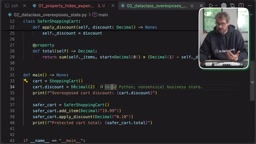
Imagine a shopping cart dataclass with items and discount. With no constraints, a caller can pass discount=2.0 (i.e., 200%) — a value that makes no business sense. dataclass only "opens up all fields"; it doesn't enforce business rules.
When an object needs to guard business rules, switch to a regular class and provide methods that enforce constraints — for example, add_item only works when the price is positive, and apply_discount restricts the discount to between 0 and 1. dataclass is still great for configuration, events, value objects, and similar scenarios, but don't turn every domain object into a dataclass.
3. Pattern Matching: A Great Tool for Structural Matching, Often Overused
Python's match syntax shines when matching complex structures, such as determining whether a user is an admin, or returning different results based on a name and its combinations.
But in many cases, directly checking the is_admin flag is far clearer than a whole pattern-matching setup. Only when behavior is expected to become more complex — for example, when multiple conditions need to be combined in the future — is it worth introducing pattern matching. Don't use a complex solution when a simple one will do. Readability always comes first.
4. Caching: The Hidden Traps of functools.cache
functools.cache is delightfully simple to use: just add a decorator. But it has a fatal flaw — the cache never expires.
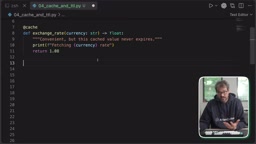
Take exchange rates, for example. Once the rate changes, the program still reads the old value, directly causing stale and inconsistent data. A safer approach is to explicitly control the cache's lifetime and capacity — for instance, using the TTLCache from the cachetools library, setting a maximum number of entries and a TTL value, then decorating the function in almost the same way. Caching can significantly speed things up, but you must understand its boundaries.
functools.cache is the unbounded cache decorator introduced in Python 3.9. It builds a key-value mapping from the function's arguments, equivalent to lru_cache(maxsize=None). Because it neither limits capacity nor sets an expiration time, the result of any call is retained forever — as long as the function's arguments don't repeat, cache entries keep accumulating. In long-running processes, this is both a source of memory leaks and a semantic shift: the cache becomes "once computed, always correct." For data that is naturally immutable, like configuration items or static constants, this "permanent memory" is a feature; but for values that change over time or environment — exchange rates, user state, external API responses — it becomes a silent source of stale data. It won't throw an error; it just quietly returns outdated results. This is why you need a cache implementation with TTL (time-to-live) and capacity limits.
5. Decorators: Elegant Across Cutting Concerns, but Stacking Buries the Business Flow
Decorators make cross-cutting concerns like logging and profiling concise. But when 4 decorators are stacked on a single create_account function, things get out of hand.

Auditing, retries, transactions, and permission checks wrap the function layer by layer, and the function body itself provides far too little information. Worse, you have to understand Python's decorator resolution order (applied bottom-up) to determine execution order — should permission checks come before retries? Should auditing only trigger when the function actually executes? These become hidden architectural decisions.
Decorators are for cross-cutting behavior. Don't hide critical business processes inside decorators just to keep the function body looking clean.
The resolution order of decorators is central to understanding their stacking behavior. When you write multiple decorators, they are applied to the decorated function bottom-up: the decorator closest to the function wraps the original function first, and the topmost one wraps last. At execution time, control flows from the outermost (topmost) inward, layer by layer, until it reaches the original function, then back out. This means the stacking order directly determines the timing and scope of permission checks, retries, and transactions — putting retries before permission checks will retry even permission failures; putting transactions outside auditing means auditing might record uncommitted or rolled-back state. These ordering differences don't appear in the function signature, yet they constitute implicit architectural decisions. This is where stacked decorators are most likely to get out of control.
6. async: Don't Let It Erode Your Business Logic
async enables concurrent I/O operations and makes applications more responsive. But it's "contagious": if one API call is async, the function calling it becomes async too, and soon the entire script is async.
The author suggests treating async as an infrastructure-layer concern rather than a business-logic concern. One approach is to keep business logic synchronous and wrap async APIs with adapters at the edges — for example, using asyncio.run to hide an async fetch_profile behind a synchronous method. However, this approach fails in environments that already have an event loop.
A cleaner alternative is to separate data fetching from business decisions: decide_checkout no longer fetches the credit profile itself, but instead receives order and profile as parameters. Data is fetched by the main function at the async boundary, then passed into the business logic.
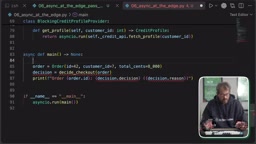
This way, business logic is fully decoupled from infrastructure: async stays at the edges, and the logic stays pure.
The "contagiousness" of async stems from Python's coroutine model: functions defined with async def return coroutine objects that must be driven by an event loop, and the await keyword can only be used inside async functions. So once one layer is asynchronous, every synchronous function that calls it must be converted to async, otherwise it can't await. This is the so-called "function coloring" problem. The event loop itself is a single-threaded concurrent scheduler, suitable for I/O-bound tasks — during network requests or file reads, it can switch to other tasks. But it's not suitable for CPU-bound computation, which would block the entire loop. Understanding this explains the author's argument: treat async as an infrastructure detail, not a business semantic. Business logic should only care about "what to do"; asynchrony is just the implementation of "how to fetch data." Keeping the two separate makes the logic testable, reusable, and immune to forced rewrites when the underlying fetch mechanism switches between sync and async.
7. slots: Optimizing the Object Model, and Changing Usage Expectations
slots=True optimizes a dataclass's memory footprint at the cost of changing Python's object model — you can no longer dynamically add attributes. For example, adding a label to a point will simply raise an error, because there's no editable __dict__ anymore.
This isn't a bad thing. The author only uses slots when three conditions are met: there are a huge number of objects, it's certain that no attributes will be added dynamically, and it's in a controlled internal module. For classes accessed by third-party systems, it's not recommended. After all, dynamic assignment itself is not good design — it loses type information, making it impossible for users to tell what data an object contains. Keeping code stricter is usually more reliable.
FAQ
How do I choose between property and a regular method?
The criteria are cost and predictability. Use property for lightweight computations; use methods when I/O, remote calls, or high-cost operations are involved, and make it clear to callers via naming (e.g., get_xxx) or async.
Can I still use dataclass? Yes. It's suitable for pure data scenarios like configuration, events, and value objects. But when an object needs to guard business rules, switch to a regular class with methods that enforce constraints.
How should I set cache expiration?
Avoid using the never-expiring functools.cache directly on data that changes. Switch to cachetools.TTLCache with an explicit TTL and maximum capacity.
When is slots worth using? Only when you're certain there will be massive numbers of small objects, no dynamic attributes will be added, and the module isn't exposed externally. Otherwise its performance gains are limited, and it changes developers' expectations of the class.
One-line Summary
Seven Python features can make code harder to maintain when used in the wrong scenarios — the key is understanding their trade-off boundaries.
Paragraph Summary
Drawing on a senior developer's hands-on experience, this article reviews seven Python features that "turn bad when used poorly." property masquerades as a field but can hide heavy operations like database queries — use methods when I/O is involved. dataclass exposes all fields by default and can't guard business rules — use a regular class when constraints are needed. Pattern matching is overkill for simple structures. functools.cache never expires, causing stale dynamic data like exchange rates — use cachetools with TTL instead. Stacked decorators bury the business flow and turn execution order into hidden architectural decisions. async is contagious and should stay at the infrastructure edge; business logic should receive data rather than fetch it. slots saves memory but changes the object model, only fitting massive numbers of small objects. The core idea: the features and tools aren't wrong — using them out of context is.
Related articles

VICE: Concept-Level Video Similarity Estimation via Video-Language Entailment
VICE proposes a dual-branch video-language entailment framework that leverages LMMs' single-video understanding to estimate concept-level video similarity, outperforming models that process two videos simultaneously on ConViS-Bench and StepDiff.

UniAVC: A Unified Audio-Video Generation Paradigm with Asynchronous Scheduling to Solve Cross-Modal Challenges
UniAVC introduces progressive training and a modality-decoupled scheduler to solve scarce paired data and unified noise scheduling in joint audio-video generation, covering multiple tasks with a single set of weights.

DaFISH: Spherical Harmonic Rotation Decouples Lighting to Improve Novel View Synthesis Quality
DaFISH proposes spherical harmonic rotation to decouple lighting, decomposing each point's color into albedo and SH lighting factors to solve appearance inconsistency in neural rendering under active light sources, achieving best metrics including PSNR 38.91 dB across five scenes.