7 Real-World Hermes AI Agent Workflows: From Meeting Follow-Ups to 24/7 Monitoring

Seven practical workflows showing how the open-source Hermes AI agent executes tasks autonomously across your real toolchain.
This article covers seven real workflows for Hermes, a free open-source AI agent that connects to your calendar, email, Notion, and Telegram to act autonomously — not just answer questions. The workflows include auto-extracting meeting action items to Notion, drafting emails in your voice, 24/7 monitoring of websites and limited-availability items, tracking client silence signals, sharing memory across tools, mobile remote control, and daily morning briefings. Two core safety rules apply throughout: always keep email in draft mode, and require human confirmation before any payment action.
Chatbot vs. True AI Agent
There are roughly two ways to use AI. One is the chatbot approach — you ask, it answers, you close the tab. The other is delegation — you hand off a task, and it gets done while you sleep. Hermes takes the second path.
Hermes is a free, open-source AI agent. What sets it apart from traditional conversational AI is that it connects to your real toolchain (calendar, email, Notion, Telegram, website Webhooks) and can run continuously and execute tasks autonomously. This article breaks down the seven real workflows demonstrated in the video, covering meeting notes, email handling, round-the-clock monitoring, client management, unified memory, mobile control, and morning briefings.
It's worth noting upfront: the essence of every workflow below is shifting AI from "passive response" to "active execution" — and that's exactly where it changes the way you work.
Workflow 1: Automatic Follow-Through on Meeting Action Items
The biggest problem with traditional meetings is that "a lot gets decided, and half of it disappears" — someone forgot to write it down, tasks go unclaimed. Hermes fixes this: because it knows your calendar, as soon as a meeting ends it automatically pulls the transcript (from tools like Fireflies), reads through it, identifies all action items, determines who's responsible, and creates tasks in Notion assigned to the right people.
The core prompt logic is: when a calendar meeting ends, automatically fetch the transcript, extract all action items and owners, create tasks in Notion; if an owner is unclear, assign it to yourself and flag it.
This is something a chatbot simply can't do — it's not in your meeting, doesn't know your calendar, and won't proactively open Notion to assign work after every call. Set it up once, and it works indefinitely.
Workflow 2: Inbox Sentinel with Draft Mode
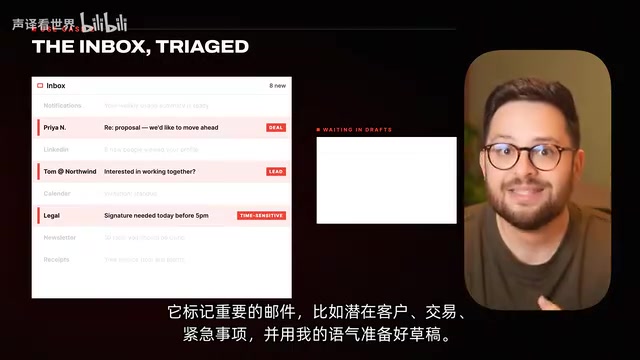
The second workflow tackles email. Important messages get buried in the flood of incoming mail, yet some emails are directly tied to real revenue. The author has Hermes watch the inbox, flag potential leads, deals, and urgent items, then prepare a reply draft in his own voice — which a human reviews before sending. According to the video, this setup alone helped the team close tens of thousands of dollars in deals last month.
The key configuration is having Hermes learn your writing style from the Sent folder — but never enable auto-send. The author emphasizes keeping draft mode throughout: the last thing you want is Hermes hallucinating an incorrect quote and auto-sending it to a prospect. Anything important must pass human review before going out.
This is the first important risk warning in this article: the more autonomous the execution, the more you need human checkpoints.
Workflow 3: Sentinel — Bidirectional 24/7 Monitoring
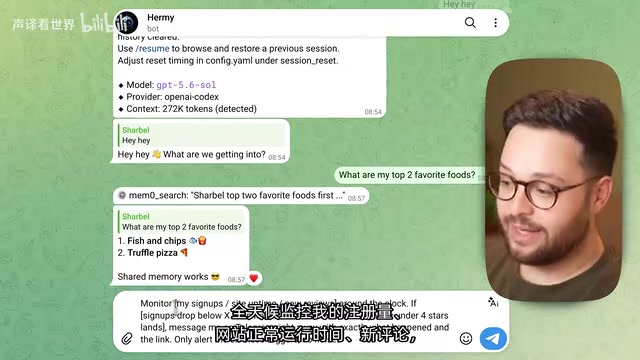
The author calls the third workflow the "Sentinel," and it operates in two directions.
Inward protection: monitors website signups, comments, and uptime. The moment something goes wrong — numbers drop, site goes down — it notifies you via Telegram immediately. It gets ahead of the problem before it becomes a fire, rather than waiting for customer complaints. The implementation involves having Hermes create a Webhook for the target site and defining clear trigger conditions (e.g., "fewer than X signups in one hour").
Outward hunting: monitors hard-to-get concert tickets, popular restaurants, and limited-edition products. The moment a page changes, it logs in with your saved credentials, fills out forms, and adds to cart — stopping just before payment to wait for your confirmation.
Two important notes: first, you must define precisely "what counts as an error," otherwise you'll get constant false alarms (crying wolf); second, any action that spends money needs a human checkpoint — let it bring you to the checkout page, but you make the final click.
A Webhook is an event-driven HTTP callback mechanism: when a specific event occurs on a monitored system (e.g., a new user registers, page content changes), the target system proactively sends an HTTP request to a pre-registered URL, and the agent listens to that URL to trigger subsequent logic. This contrasts with "polling" (periodically checking for changes). Webhooks offer higher real-time performance and lower server resource consumption. However, not all websites natively support Webhooks. For pages that don't (like concert ticket sites or restaurant reservation systems), you typically need a headless browser to periodically scrape page content and compare differences to simulate event detection — which is why the article emphasizes the need to "define clear trigger conditions." Vague conditions are especially prone to false positives in polling scenarios.
Workflow 4: Client Radar — Catching Silent Churn
If you have clients, the author calls this workflow "priceless." Hermes reads all client chats in real time, tracking who's happy, who's going quiet, and who hasn't been in contact for a long time — flagging issues before they become problems.
The author highlights a key insight: what destroys service businesses is rarely a dramatic blow-up. It's the clients who slowly go cold without you noticing, and are gone before you realize it. Hermes catches these early signals so you can step in at the right moment.
The implementation involves creating a Telegram bot that joins all client group chats, reviews all conversations once a day, flags clients who've been silent for X days or whose tone has shifted negative, and generates a "priority outreach list." There's a clear boundary here too: it only generates the radar list — it does not automatically message clients. Sensitive communication still requires a personal touch.
Workflow 5: Unified Memory — One Brain Across Multiple Tools

The reason the first four workflows feel like "one assistant" rather than "four separate bots" comes down to unified memory. When Hermes drafts an email, it already knows what was decided in this morning's meeting. When it flags a silent client, it remembers what you last discussed — everything is connected.
The author goes further with an advanced use case: if you use Claude Code or GPT alongside Hermes, you can connect all tools to a shared memory system so the same "brain" persists across tools. This means when you switch between different tools, you don't have to re-explain your business, clients, and preferences from scratch every time.
The video touches on differences between several memory solutions:
- Memo: local-friendly, free when saving fewer than 10,000 entries and querying fewer than 1,000 per month; can run at zero cost with local models
- Supermemory: cloud-based, fast
- Zep: tracks how facts about you change over time, knowing which ones are still current
- Letta: not just memory, but a complete agent setup with memory built in
Most memory tools require payment; if you have a dedicated local machine, the author recommends Memo.
Technically, "unified memory" is typically implemented via vector databases or graph databases. After each interaction, the agent stores key information (client names, preferences, decisions, context) as embedding vectors in the memory system. When executing the next task, it first retrieves relevant memory fragments via semantic search and injects them into the current prompt context. This is fundamentally different from an LLM's native "conversation window memory" — the latter disappears when you close a tab, while a persistent memory system retains information across sessions and tools. Zep's "tracking facts as they change over time" feature is essentially a temporal knowledge graph: it doesn't just record "user preference A," it records "this preference was updated to B on a specific date," preventing the agent from making wrong decisions based on stale information. This is why the choice of memory solution directly impacts the reliability of the entire system — not just convenience.
Workflow 6: Mobile Control of Your Entire Workspace

The sixth workflow is what the author calls the "most underrated" capability: sending messages directly to your agent from your phone. His Hermes runs on a Mac mini at home, with all files and tools on standby. Wherever he is, he just picks up his phone or sends a voice message via Telegram, and Hermes takes over the desktop to complete tasks on his behalf.
At its core, this is an "always-on agent + remote command" architecture: one machine hosts the full environment, the phone serves only as the command interface. For people who travel frequently or want to break free from carrying a laptop, this turns the experience of having "a laptop in your pocket" into reality.
Workflow 7: Morning Briefing — Work Advances While You Sleep
The final workflow is the simplest, and the one the author says he can't live without: the morning briefing. He sets up a Cron job so that the first message every morning is a question: "What's your number one priority today?" He answers by voice while still in bed, and Hermes starts making progress — so that by the time he actually sits down at his desk, the top priority for the day is sometimes already done.
The prompt logic: send a Telegram message at a fixed time each day containing today's calendar, important emails from the previous evening, and key metrics — then ask for the top priority. Upon receiving a reply, push forward as much as safely possible, but no spending money, no external sends.
This workflow makes "AI working while you sleep" concrete: it doesn't just save you a few minutes — it gives you a head start on the entire day.
Cron is the classic scheduled task tool in Unix/Linux systems, with syntax like 0 7 * * * (meaning execute every day at 7am). In the AI agent context, a Cron job typically triggers a script that calls the agent's API, passes in a preset prompt, and pushes the result to a designated channel (like Telegram). This three-stage architecture of "scheduled trigger + async execution + message push" is the core infrastructure that transforms AI from "waiting to be asked" to "proactively getting things done." For non-technical users, some platforms (like n8n and Make) offer no-code scheduled trigger nodes that achieve the same effect without writing a single line of Cron syntax.
Is It Worth an Afternoon to Set Up?
The shared logic across all seven workflows is clear: shift from "Q&A" to "delegation," from one-off conversations to continuous execution, and tie everything together through unified memory into one coherent assistant. Hermes is free and open-source, and the author believes the only barrier is spending an afternoon configuring these prompts and scheduled tasks.
But the two safety principles woven throughout the article deserve special emphasis: keep emails in draft mode, and require human confirmation for any payment action. The more autonomous the execution, the more critical it is to have safeguards at key junctures — to account for potential model hallucinations or misjudgments.
If you've been using AI purely as a chatbot, these seven workflows offer a starting point for a perspective shift — letting AI actually do the work for you, rather than just chat with you.
Related articles

OpenAI Partners with Shield: How the Astra Agent Revolutionizes IT Troubleshooting
OpenAI and Shield launch the Astra agent, which autonomously logs into computers and legacy systems to fix IT issues in real time, 35-40% faster than traditional models, with humans involved only when judgment is needed.

iPhone Duo Battery Life Tested: One Charge a Day Is Unavoidable, and the Large Screen Is the Culprit
iPhone Duo battery test: heavy use needs at least one charge a day, and about 30% remains after 6.5 hours of screen-on time. How often the large screen is unfolded is key; a MagSafe battery pack helps, and long-term degradation is also worth watching.

Kimi K3.1 Pro Open-Sourced: 2.8 Trillion Parameters Close In on Opus
Moonshot releases the open-source MoE model Kimi K3.1 Pro, with 2.8T total parameters and 104B activated, trailing Opus 5.5 by under 1 point on Terminal Bench 4.0.