7 Vibe Coding Agents Tested & Ranked: Which AI Coding Tool Should Beginners Choose?

A hands-on ranking of 7 Vibe Coding agents to help beginners find the right AI coding tool.
This article provides a hands-on comparison of 7 popular Vibe Coding agents—Trae, Cursor, Claude Code, Codex, WorkBuddy, CoderWork, and more. Each tool is evaluated on beginner-friendliness, performance, and setup difficulty. Trae and WorkBuddy top the list for newcomers, while Claude Code leads in raw power but demands technical expertise.
Introduction: How to Choose Tools in the Vibe Coding Era
With the explosive growth of AI programming capabilities, "Vibe Coding"—describing your requirements in natural language and letting AI write the code for you—has become a new entry point for many developers and even complete beginners. This concept was first coined by Andrej Karpathy, former Tesla AI Director and OpenAI co-founder, in early 2025. He described an entirely new programming paradigm: developers fully immerse themselves in the "vibe," conversing with AI in natural language, accepting all AI-generated code, and sometimes not even carefully reading the code itself. This approach stands in stark contrast to traditional software engineering's emphasis on code reviews and test-driven development, but it dramatically lowers the barrier to entry for software development—enabling product managers, designers, and people with zero programming experience to quickly build working application prototypes. You no longer need to master syntax; as long as you clearly describe your requirements, an AI agent can help you scaffold projects, write code, and fix bugs.
But the market is flooded with AI coding tools—from the early pioneer Cursor to various agents launched by major companies both domestically and internationally. Which one is truly best for beginners? Based on hands-on testing by a Bilibili content creator, this article provides a side-by-side evaluation and tiered ranking of 7 mainstream Vibe Coding agents to help you avoid common pitfalls.
Cursor: Why the Former Pioneer Now Feels Underwhelming
As the first AI-native editor, Cursor made quite a splash when it launched, essentially redefining "AI-assisted programming." Cursor was released by Anysphere in 2023, built on a deeply customized version of Visual Studio Code's open-source core. It pioneered features like multi-file context-aware editing and natural language-driven code refactoring. Its core technical advantage lies in Codebase Indexing—building a semantic index of the entire project codebase, enabling AI to understand cross-file dependencies when generating or modifying code. However, as competitors like Windsurf and Trae rapidly emerged during 2024-2025, and Agent-level products like Claude Code and Codex appeared, Cursor's leading edge has been diluted.
It's important to understand the core difference between AI-native editors and traditional IDEs. Traditional IDEs (Integrated Development Environments) like Visual Studio Code and IntelliJ IDEA focus on code editing, syntax highlighting, debugging, and version control, with AI only attached as a plugin. AI-native editors, on the other hand, are architected from the ground up with Large Language Models (LLMs) as their core interaction engine—code generation, context understanding, and multi-file collaborative editing are deeply embedded into the editor's workflow. This means AI is no longer an "assistant" but the "lead"—developers act more as requirement describers and code reviewers rather than line-by-line writers.
From hands-on testing, today's Cursor is better viewed as an "IDE with built-in AI"—more friendly to experienced programmers. If you've written code before, it works great as a productivity tool. But for cross-disciplinary users and complete beginners, its learning curve and usage logic aren't beginner-friendly.
Overall, Cursor is placed in the "Above Average" tier, bumped up half a level for its pioneer status—it won't lead you astray, but it's unlikely to be the optimal choice for beginners.
Domestic Beginner-Friendly Picks: Trae and WorkBuddy
Trae: A Beginner's First AI Coding Agent
Trae belongs to ByteDance and is one of China's earlier AI-native editors. Its name embodies the philosophy of "Thinking, Reasoning, and Engineering." Unlike Cursor, Trae has consistently kept pace with the industry, maintaining a high-frequency iteration and update cadence.
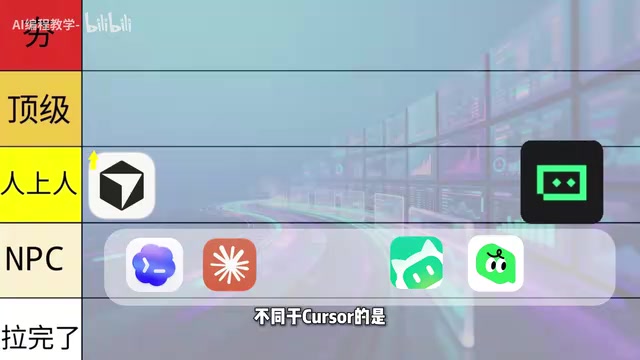
For users in China, Trae's accessibility is outstanding: one-click download and installation from the official website, built-in free models (including ByteDance's proprietary Doubao model and international models like Claude), no need to apply for API keys yourself, and ready to use out of the box with zero complex configuration. Additionally, Trae supports a Builder mode where users simply describe their product requirements, and the AI automatically breaks down tasks, creates file structures, writes code, and self-debugs—the entire process is nearly transparent to the user. This "out-of-the-box" design philosophy dramatically reduces setup costs for beginners. Performance-wise, it fully meets beginners' daily development needs. Therefore, Trae is rated at the "Top Tier" and is the most recommended first Agent tool for beginners in this evaluation.
WorkBuddy: An AI Efficiency Tool for the Workplace
Tencent's WorkBuddy takes a differentiated approach, primarily targeting office workers and white-collar professionals. It has deep native compatibility with Tencent's ecosystem products—WeCom (Enterprise WeChat), Tencent Meeting, etc.—without requiring the additional skill configurations that other AI tools demand.
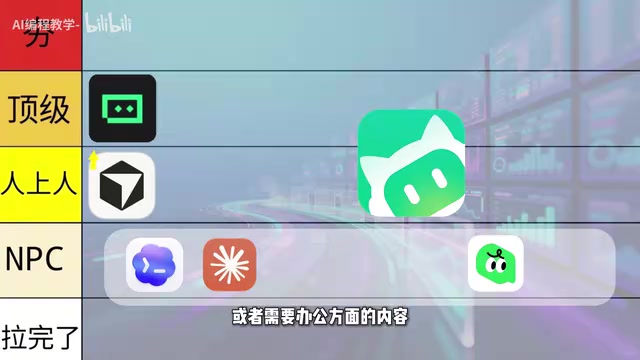
WorkBuddy focuses more on workplace scenarios like PPT creation and project presentations. This office-oriented positioning isn't ideal for independent personal development, but if you're in a corporate environment or have heavy office content needs, it can genuinely save you significant time.
Testing revealed that WorkBuddy is quite forgiving with model API configuration and consumes fewer Tokens than other AI products. Here's an explanation of Tokens: a Token is the basic unit of text processing for large language models. One English word corresponds to roughly 1-2 Tokens, while one Chinese character typically corresponds to 1-3 Tokens. In AI coding scenarios, Token consumption directly determines usage cost—every time you send code context to the model or receive generated results, Tokens are consumed. For large projects, a single conversation might involve tens or even hundreds of thousands of Tokens. Therefore, a tool that can intelligently compress context and reduce redundant Token consumption can save developers considerable costs over long-term use. Overall, WorkBuddy is also rated at the "Top Tier."
Alibaba's CoderWork: Balancing Office Work and Code Development
Alibaba's CoderWork is positioned to serve both office work and development. On the office side, it's compatible with DingTalk, Alibaba Cloud, Quark Docs, and other in-house products. On the development side, it natively integrates the Tongyi Qianwen model with strong performance. Tongyi Qianwen (Qwen) is a large language model series independently developed by Alibaba's DAMO Academy, ranging from lightweight Qwen2.5-Coder-7B to the flagship Qwen-Max across multiple specifications. In the code generation domain, Tongyi Qianwen's specialized coding model Qwen2.5-Coder performs exceptionally well on multiple international benchmarks (such as HumanEval, MBPP, etc.), with some metrics approaching or even surpassing GPT-4 level. CoderWork's deep integration with Tongyi Qianwen gives it a natural language understanding advantage when processing Chinese requirement descriptions and Chinese-annotated code—an important competitive differentiator for domestic developers.
However, the native Tongyi Qianwen model's usage cost is relatively high (pricing ranges from several yuan to dozens of yuan per million Tokens depending on model specification). Fortunately, CoderWork also supports connecting external models to balance costs. If you don't have a single specific need and want to handle both office work and development, CoderWork is worth trying.
It's worth noting that CoderWork's learning curve is steeper than Trae and WorkBuddy, so it's rated at the "Above Average" tier—comprehensive in features but not beginner-friendly enough.

Powerful Performance but High Barriers: Claude Code and Codex
The next two international products deliver strong performance but present higher barriers for beginners.
Claude Code: First-Tier Performance but Intimidating for Beginners
The biggest difference between Claude Code and other tools is that it runs in the command line—a fact that immediately deters a large number of beginners. Claude Code's adoption of a CLI (Command Line Interface) approach is closely tied to Anthropic's product philosophy. The command-line mode allows the AI Agent to directly access the developer's complete file system, execute Shell commands, and run test scripts, enabling truly "autonomous programming." This design grants Claude Code exceptional flexibility and execution capability—it can independently create branches, commit code, run build pipelines, and even automatically rollback and retry when encountering errors. However, this also means users need basic terminal operation skills and an understanding of concepts like environment variable configuration and path management.

From a pure performance perspective—whether it's the native model's understanding of long tasks, task planning, code execution style, or the comprehensive Skill and MCP tool ecosystem—Claude Code firmly stands in the first tier. The MCP (Model Context Protocol) mentioned here is an open standard protocol released by Anthropic in late 2024. Its core goal is to provide LLMs with a unified way to connect to external data sources and tools—whether databases, API endpoints, file systems, or third-party services. In the context of AI coding tools, MCP enables coding agents to invoke external toolchains (such as browsers, terminals, database managers, etc.), extending AI's capabilities from pure code generation to complete development workflows. Claude Code, leveraging Anthropic's first-mover advantage, leads competitors in MCP ecosystem richness.
But powerful performance also means an extremely high barrier to entry: connecting other model APIs requires manual configuration, and the previous major rate limiting ("throttling")—in mid-2025 Anthropic implemented rate limits on Claude Code due to server overload, making it nearly unusable for some users during peak hours—further raised the usage barrier. Overall assessment: rated at the "Average" tier.
Codex: Desktop Experience More Beginner-Friendly
Compared to Claude Code's command-line approach, Codex runs as a desktop application, with more complete support for the VSCode and GitHub ecosystem. Its native GPT model is well-trained with excellent performance, and Token consumption is lower than Claude Code—based on current mainstream pricing, GPT-4o's input price is approximately $2.5 per million Tokens, while Claude 3.5 Sonnet is approximately $3 per million Tokens, meaning Codex offers better long-term cost efficiency at equivalent usage intensity. It handles most development needs well.
While connecting other model APIs still requires manual configuration, overall Codex is more beginner-friendly than Claude Code, earning it an "Above Average" rating.
Summary: Tier List of 7 Vibe Coding Agents
Based on hands-on testing of all 7 Vibe Coding agents, here's the tier breakdown:
- Top Tier (Best for Beginners): Trae, WorkBuddy
- Above Average (For Intermediate Users): Cursor (pioneer bonus), Alibaba CoderWork, Codex
- Average (High Barrier): Claude Code
For complete beginners, start with Trae. If you have workplace office needs, choose WorkBuddy. For advanced users pursuing peak performance who aren't afraid of configuration hurdles, try Claude Code or Codex.
However, it's important to emphasize that choosing a tool is just the first step. What truly makes the difference is whether you can master the methodology of building complete projects with AI coding tools—including onboarding paths, production workflows, and high-quality prompt templates. Prompt quality directly determines the quality of AI-generated code; a well-structured prompt that includes technical constraints and output format requirements often achieves several times the code accuracy compared to vague natural language descriptions. Choosing the right tool helps you start faster, but proper usage methodology determines how far you'll ultimately go.
Related articles

KV Cache Quantization Benchmark: 413 Configurations Reveal KVarN 6-bit Outperforming q8_0
Benchmark of 413 KV cache quantization configs comparing KVarN variance normalization vs traditional methods on Qwen and Gemma models. KVarN 6-bit + precision tail beats q8_0 at lower VRAM.

Robotic Arm Desk Lamp Precision Test: What Does 0.03mm Repeatability Actually Mean?
A DIY robotic arm desk lamp achieves 0.03mm repeatability, approaching industrial standards. Learn what this means for 3D scanning and the desktop robotics trend.

Grok 4.6 Potentially Launching Tomorrow? Decoding xAI's Rapid Iteration Strategy
Community rumors suggest Grok 4.6 may launch soon. This article analyzes xAI's rapid iteration strategy, the competitive logic behind minor updates, and implications for users.