Agent Device: Let AI Verify Its Own App After Writing the Code

Agent Device gives AI a verification loop to check its own app after writing the code.
Agent Device, an open-source CLI tool from CallStack, lets AI agents control mobile apps by reading structured accessibility snapshots rather than guessing from screenshots. It builds a full loop—open, observe, operate, verify—supporting iOS, Android, React Native, and more, fixing the gap where AI writes code but never confirms the result.
Code Written, Job Done? The Verification Gap in AI App Development
Over the past few years, AI-assisted programming has advanced by leaps and bounds—from completing code snippets to generating full feature modules, AI increasingly resembles a capable programmer. But one long-overlooked problem persists: AI writes the code and "hands in the paper," yet has no way to verify what actually happened after its changes.
This is precisely the most awkward gap in mobile app development—AI can generate elegant interface logic, but it can't see what the interface actually looks like. It can't confirm whether a button responds when tapped, whether page navigation works correctly, or whether data renders properly. It writes convincingly, yet lacks the ability to "open its eyes" and confirm the result.
The open-source tool Agent Device, released by the CallStack team, aims to fill in this missing piece. It's a command-line tool whose core purpose is to let AI agents genuinely control mobile apps: understand the interface, perform tap operations, and leave behind evidence of those actions.
The Real Value Isn't Tapping for You—It's the Structured Snapshot
Many people's first reaction is to assume Agent Device is just an auto-clicker that saves you the trouble of manual operation. But its true value goes far beyond that.
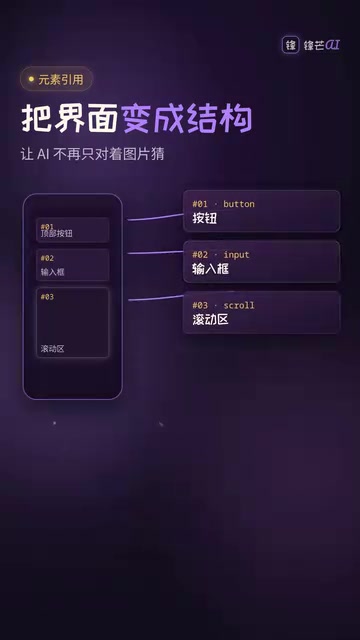
Agent Device's core capability is converting the interface into a structured Accessibility Snapshot. Through "element references," the AI can directly read the hierarchical structure of the current page and precisely execute taps, inputs, scrolls, and other operations—without having to guess button coordinates or text field names from a screenshot.
This distinction is crucial. Traditional visual recognition approaches make the AI guess coordinates from a screenshot like a blind man feeling an elephant—prone to large, unstable errors. A structured snapshot turns the interface into a language the AI can truly "read," transforming operations from a game of probability into deterministic execution.
In other words, Agent Device gives AI eyes that can understand interface structure—not just hands that tap randomly.
A True Closed Loop: Open, Observe, Operate, Then Check Again
The biggest change Agent Device brings is establishing a complete verification loop.
From "Can Write Code" to "Knows What Happened After the Changes"
The workflow of this loop can be summarized as: open the app → observe the state → perform operations → check again. When problems arise, Agent Device can also capture screenshots, recordings, logs, and performance data on demand as diagnostic evidence.
This means the AI's role has fundamentally changed: it's no longer a "generator" that walks away after writing code, but a "responsible developer" capable of verifying its own work. The AI shifts from "can write code" to "knows what happened after the changes"—and filling in this self-verification capability may be more practically meaningful than simply improving code generation quality.

More Than One Platform: The Ambition of a Cross-Platform Verification Chain
You may not have noticed that Agent Device's coverage isn't confined to a single system.
The official documentation lists a fairly broad range of target platforms: iOS, Android, TV, and desktop are all within scope. At the same time, whether it's a native app, React Native, Expo, or Flutter project, they can theoretically all plug into the same verification chain.
This cross-platform consistency is quite appealing given today's reality of parallel multi-platform development. Developers don't have to maintain entirely separate verification schemes for different platforms; instead, they can have the AI complete cross-platform interface verification within a unified framework. This also reflects the technical expertise CallStack has accumulated as a veteran player in the React Native ecosystem.
A Sober View: It's Eyes and an Evidence Collector, Not a QA Lead
Before getting too excited about this tool, it's worth recognizing the boundaries of its capabilities.
At its core, Agent Device is hands, eyes, and an evidence collector—not a "QA lead" that can judge requirements for you. It helps the AI see the interface, perform operations, and gather evidence, but it won't decide for you whether "this feature should be done this way" or whether "this interaction meets product expectations."

There are also several practical constraints worth noting:
- Stable regression testing should still be left to reproducible scripts. Agent Device is better suited for exploratory verification rather than replacing a mature automated testing system;
- Device environment, permission configuration, and accessibility labels directly affect results—if the app itself lacks proper accessibility annotations, the quality of the structured snapshots the AI reads will suffer.
These limitations remind us that Agent Device is a tool for strengthening the verification stage, not an all-purpose quality assurance solution.
Project Status and Assessment
At the time of writing, Agent Device's GitHub page had already garnered 3,484 stars—quite impressive attention for a new tool, showing that the community genuinely cares about filling this capability gap.

What It Really Changes
All things considered, what Agent Device truly changes isn't automatic tapping itself—all kinds of automated clicking tools have long existed. The core change it brings is this: it forces the AI to verify after writing the code.
This is a shift in workflow philosophy. Once the AI has the ability to observe results and collect evidence, the crude "write and hand it in" model may well be replaced by a "write and always verify" closed loop. For teams pursuing delivery quality, this could be an important signal that AI programming is maturing.
Developers who want to try out this project can find the source code by searching "CallStack Agent Device" on GitHub.
Related articles

Transformer²: Achieving Co-Design of Robot Morphology and Control with a Unified Architecture
Deep dive into how Transformer² uses a unified Transformer architecture to integrate robot morphology design and motion control into one model, enabling task-driven end-to-end co-design for embodied AI.

Tutorial: Installing Tailscale on a Jailbroken Kindle to Create a Private Network Node
Learn how to deploy Tailscale on a jailbroken Kindle, turning an idle e-reader into a private network node. Covers cross-compilation, power optimization, and risk considerations.
Tutorial: Installing Tailscale on a Jailbroken Kindle to Create a Private Network Node
Learn how to deploy Tailscale on a jailbroken Kindle to turn an idle e-reader into a private network node. Covers cross-compilation, power optimization, and risk considerations.