AgentSpan in Practice: Building Persistent AI Agents in Python with Crash Recovery and Human Approval
AgentSpan solves AI Agent crash recovery and human approval waiting through state persistence
AgentSpan is an open-source platform that stores AI Agent execution state on an independent server, solving the problem of needing to restart from scratch after a crash. It supports two core capabilities: crash recovery (resuming from breakpoints via execution IDs) and long-duration human approval waiting. It can also wrap existing LangGraph workflows with zero code changes, adding persistence capabilities seamlessly.
Introduction
When building AI Agent workflows, there's a critical but often overlooked question: What happens if the Agent crashes mid-execution? If a step requires human approval and the approver is away for three weeks, does the entire process need to start over?
AgentSpan is an open-source platform specifically designed to solve the "persistence" problem for AI Agents. By decoupling Agent state from execution logic, it gives Agents the ability to recover from crashes and wait for extended periods. More importantly, it can not only be used standalone but also seamlessly wrap existing LangGraph workflows without modifying any business code.
What Is a Persistent AI Agent?
The traditional Agent execution model is linear: call LLM → execute tool → call LLM again → until completion. All state is kept in process memory. Once the process crashes, all intermediate results are lost, and the next startup must begin from scratch.
In the distributed systems domain, state persistence is a classic challenge. Traditional microservices solve this through external storage like databases and message queues. However, AI Agents are special because their state includes not only structured data but also the LLM's context window, tool call chains, intermediate reasoning steps, and other complex information. This makes directly applying traditional persistence solutions non-trivial. AgentSpan's approach essentially borrows from distributed workflow engines (like Apache Airflow and Temporal): externalizing execution state to independent storage and tracking state through unique execution IDs, without requiring developers to redesign their business logic.
AgentSpan's core idea is to store the Agent's state on an independent server. Tool execution results, LLM call records, workflow progress, and other information are all persisted server-side. Even if the client process crashes, the state remains on the server. After restarting the program, you simply reconnect using the execution ID to resume from the breakpoint.
This architecture enables two key capabilities:
- Crash & Resume: After an unexpected process termination, restart and continue from the breakpoint
- Human-in-the-Loop Approval: Supports long waits for human intervention without keeping the process running
Crash Recovery in Practice
Installation and Basic Tool Definition
First, install AgentSpan: pip install agentspan. Then define two simulated tools — one for analyzing data chunks (with random delay) and one for aggregating results:
from agentspan.agents import agent, tool, start, AgentRuntime, AgentHandle

@tool
def analyze_chunk(chunk_id: int) -> dict:
    """A simple function that processes a data chunk and returns metrics."""
    time.sleep(random.randint(3, 8))
    return {"chunk_id": chunk_id, "processed": True,
            "metrics": {"count": random.randint(5, 8)}}

@tool
def aggregate_results(results: list[dict] = None) -> dict:
    """Aggregates metrics from all chunks into a final report."""
    results = results or []
    return {"total_count": sum(x["metrics"]["count"] for x in results),
            "summary": "analysis complete"}
You might not have noticed, but you should never use mutable objects (like empty lists) as default parameters — this is a classic Python pitfall. Use None as the default and handle it inside the function body.
Execution ID Persistence Strategy
The core of crash recovery lies in execution ID management. AgentSpan assigns a unique ID to each execution; as long as you hold this ID, you can reconnect to the corresponding execution state. This design aligns with the "idempotency" principle in distributed transactions — the same execution ID corresponds to a uniquely determined execution context. No matter how many times you reconnect, the system can accurately locate the correct breakpoint without causing duplicate execution or state confusion.
if not os.path.exists("interrupted_execution_id"):
    handle = start(agent, "Analyze the chunks with IDs 1, 2, and 3")
    status = handle.get_status()
    execution_id = status.execution_id
    with open("interrupted_execution_id", "w") as f:
        f.write(execution_id)
At startup, the program checks whether an interruption record file exists. If not, it's a fresh execution — create a new task and save the ID. If it exists, the previous execution was interrupted — read the ID and reconnect:
with AgentRuntime() as runtime:
    with open("interrupted_execution_id", "r") as f:
        execution_id = f.read()
    runtime.serve(agent, blocking=False)
    handle = AgentHandle(execution_id=execution_id, runtime=runtime)
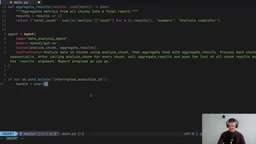
Demo in Action
After running the program, AgentSpan starts a local server (default port 6767) with a web monitoring interface. You can clearly see the complete chain of every LLM call and tool execution.
When you press Ctrl+C to forcefully terminate the program during tool execution, the execution state on the server still shows as "running." Re-running the program, it automatically detects the interruption record, reconnects to the previous execution, and continues completing the remaining tool calls from the breakpoint — rather than re-executing already completed steps.

Persistent Waiting for Human Approval
Human-in-the-Loop (HITL) is an important pattern in AI system design, introducing human judgment at critical nodes in automated processes. In high-risk scenarios like financial risk control, medical diagnosis, and legal compliance, HITL isn't optional — it's a regulatory requirement. Traditional implementations typically rely on message queues (like RabbitMQ) or workflow engines to suspend tasks, but these solutions have high integration costs with AI Agent frameworks, often requiring developers to maintain a separate state machine outside their business code. AgentSpan embeds HITL capability directly into the tool definition layer via the approval_required parameter, lowering the implementation barrier while ensuring state integrity during the approval waiting period — even if the wait lasts days, the entire execution context remains safely preserved on the server.
Marking Tools That Require Approval
AgentSpan marks tools requiring human approval with the approval_required parameter:
@tool(approval_required=True)
def process_refund(order_id: str, amount: float) -> dict:
    """Issue a refund for the given order."""
    return {"refund_id": "R_" + order_id, "status": "processed", "amount": amount}
When the Agent reaches this tool, it automatically pauses and waits for human approval.
Polling and Approval Mechanism
The execution status is checked via polling. When is_waiting is detected, the user is prompted for approval:
for _ in range(60):
    time.sleep(2)
    status = handle.get_status()
    if status.is_waiting:
        choice = input(f"Do you want to approve: {status.pending_tool}? ")
        if choice.lower() == "yes":
            handle.approve()
        else:
            handle.reject()
            break
    if status.is_complete:
        print(f"Completed: {status.output['result']}")
        break

The key point here is: even if the program crashes or is intentionally shut down during the approval waiting period, after restarting you can still reconnect via the execution ID to continue waiting or complete the approval process. All previous tool call results are preserved.
Seamless Integration with LangGraph
LangGraph Framework Overview
LangGraph is a stateful, multi-actor application building framework from the LangChain team, based on a directed graph (DAG) model for defining Agent workflows. It models the Agent's execution process as a combination of Nodes and Edges, supporting conditional branching, parallel execution, loops, and other complex control flows. LangGraph's core advantage lies in its state management mechanism — defining state schemas via TypedDict, with each node receiving and updating state, making it naturally suited for multi-step Agent tasks. However, LangGraph doesn't natively support cross-process state persistence: once the running process terminates, the graph's execution state disappears with it. This is precisely where AgentSpan comes in — it supplements LangGraph with persistence capabilities without intruding on its internal implementation.
Zero-Modification Wrapping of Existing LangGraph Workflows
One of AgentSpan's most practical features is the ability to wrap existing LangGraph workflows without modifying any business logic code.
Assume you already have a complete LangGraph state graph with nodes, edges, tools, and other definitions. You only need to modify the execution layer code:
from agentspan.agents import AgentRuntime, AgentHandle

with AgentRuntime() as runtime:
    runtime.deploy(app)
    runtime.serve(app, blocking=False)

    if not os.path.exists("interrupted_execution_id_lg"):
        handle = runtime.start(app, {"messages": [HumanMessage(content="...")]})
        with open("interrupted_execution_id_lg", "w") as f:
            f.write(handle.execution_id)
    else:
        with open("interrupted_execution_id_lg", "r") as f:
            execution_id = f.read()
        handle = AgentHandle(execution_id=execution_id, runtime=runtime)
The same crash recovery and human approval patterns apply identically to LangGraph workflows, giving your existing graphs persistence superpowers with minimal code changes.
Related articles
 Tutorials
ChatGPT Plus Subscription Guide: Are GPT-5.5, image-2, and Codex Worth the Upgrade?
A detailed look at ChatGPT Plus features — GPT-5.5, image-2, and Codex — with a Plus vs Pro comparison and a complete step-by-step subscription guide for users outside the US.
 Tutorials
Harness AI Engineering in Practice: Using Claude Code to Master Enterprise-Level E-Commerce Development
Deep dive into Harness AI Engineering: master enterprise e-commerce development with Claude Code using the Rules, Skills, Wiki, and Changes framework.
 Tutorials
Cursor + Codex Dual-IDE Collaboration: A Practical Methodology for Open-Source Project Customization
A complete methodology for open-source project customization based on real-world experience, detailing the Cursor+Codex dual-IDE workflow, seven-stage process, MVP validation, and AI source code reading techniques.