AI Agent Lesson 1: How to Call a Large Language Model

A beginner's guide to AI Agent development, starting with how to call LLMs via cloud platform APIs.
This tutorial introduces the first step of AI Agent development: calling large language models through cloud platform APIs. It covers obtaining an API-Key, understanding the two core request parameters (model and messages), organizing conversations with system and user roles, and parsing responses—providing beginners with the essential foundation for Agent development.
Why Learning Agents Starts with Calling an LLM
Many beginners fall into a common trap when getting started with AI Agent development: diving straight into the underlying principles of large language models, trying to understand complex concepts like Transformer architecture and attention mechanisms. But for developers focused on building applications, this path is both time-consuming and demoralizing.
A more pragmatic approach is to learn how to call an LLM first. Once you've mastered this core action, the other Agent modules—Tools, Memory, and Decision-making—become much easier to understand. After all, they're essentially auxiliary capabilities built around the LLM as the "brain."
Let's quickly review the four components of an Agent:
- LLM: Responsible for thinking
- Tools: Responsible for execution
- Memory: Responsible for storing information
- Decision: Responsible for determining the next step
This article focuses on the first component—the Agent's "brain"—and explains exactly how an LLM is called.
Use Cloud Platforms to Call LLMs—Don't Rush to Deploy Your Own
The simplest way to call an LLM is through a cloud platform. There are plenty of options available today, including DeepSeekAd, Zhipu AI, Alibaba Cloud's Bailian, and Volcano Engine. Most platforms offer free credits that are more than sufficient for learning purposes.
A special reminder for beginners: Don't try to deploy a model yourself right away. Local deployment not only requires expensive computational resources (take DeepSeek-V3 as an example—the full model requires hundreds of GB of VRAM, and even a quantized smaller model needs at least a consumer-grade GPU or above), but also consumes enormous time on environment setup, model downloading, and VRAM optimization. It's almost no help during the introductory learning stage.
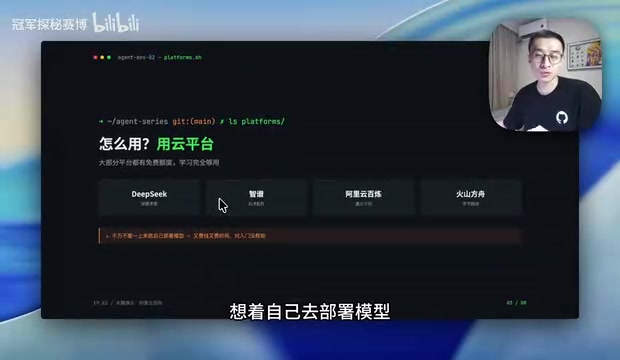
Among the many platforms, Alibaba Cloud's Bailian platform is particularly recommended, mainly because its documentation is comprehensive and detailed, making it very beginner-friendly. You can practically complete your first LLM call through the visual debugging tools in the console without writing a single line of code.
Calling an LLM Is Like Sending a Text Message
To understand the calling process, here's an everyday analogy: Calling an LLM is much like sending a text message on your phone.
The three steps of sending a text are: enter the recipient's number → type the content → wait for a reply. Calling an LLM corresponds to:
- Choose a model (like entering the phone number)
- Send some content (like typing the message)
- Wait for the response (like waiting for a reply)
In practice, open the Bailian console, find "API Reference" at the top, click "OpenAI Compatible - Chat," and a debug button will appear on the right. This OpenAI-compatible interface is the current de facto industry standard—after OpenAI launched ChatGPT in late 2022, the interface design of its Chat Completions API was rapidly adopted across the entire industry. Numerous LLM providers both domestically and internationally (such as Alibaba's Tongyi, Zhipu GLM, DeepSeek, Moonshot, etc.) have chosen to adopt the same interface format as OpenAI, including request paths, parameter naming, and response structures. This means you only need to learn one set of interface specifications, and you can call different providers' models by simply switching the base_url and model parameters, greatly reducing migration and learning costs. This is also why many Agent frameworks (like LangChain and AutoGen) use the OpenAI interface format as their default underlying communication protocol.
Before making a call, you need to obtain an API-Key. It serves as your calling credential, used to identify your identity and handle billing. An API-Key is essentially a token-based authentication mechanism, similar to an access card. Each time you call an LLM, the platform identifies the caller through the API-Key and uses it for usage tracking and fee settlement. LLM billing is typically calculated by Token count—a Token is the smallest unit of text the model processes. In Chinese, approximately 1 character corresponds to 1-2 Tokens; in English, approximately 1 word corresponds to 1-4 Tokens. It's particularly important to note that once an API-Key is leaked, others can use your account credits to make calls, so you should never hard-code API-Keys in frontend code or public code repositories. Follow the platform's instructions to create an API-Key and paste it into the corresponding field.
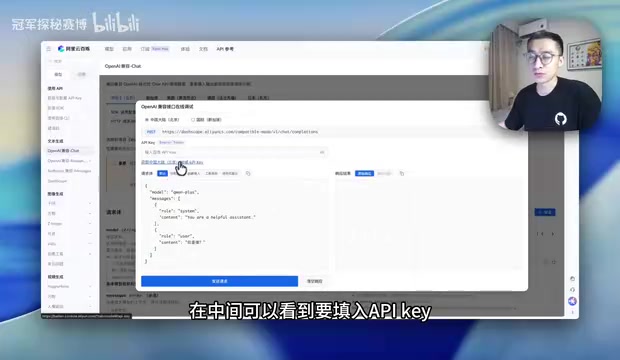
Two Core Parameters in the Request Body
The content we send to the LLM is called the Request Body in computer terminology. The content inside is called parameters, and what follows each parameter is its value. At the beginner stage, you only need to understand two key parameters.
The Model Parameter: Determines Which Model Receives Your Request
The first parameter is model, which determines which model your request is sent to. For example, you might enter qwen-plus (Tongyi Qianwen Plus), or deepseek-chat and other models. Each available value is documented in the official docs—at the beginner stage, just use the default value.
The Messages Parameter: Organizing Your Conversation Content
The second parameter is messages, which is the core of the entire call. It's an array where each pair of curly braces {} represents one message (Message). Each message contains two key fields:
- role: Identifies who is speaking
- content: The actual message text
The two most common roles are:
system(system message): Tells the LLM what role to play, such as "You are a helpful assistant"user(user message): The specific question you want to ask the LLM
There's an important piece of background knowledge to understand here: the design of the messages array reveals a fundamental characteristic of LLM conversations—LLMs are inherently stateless and do not remember previous conversation content. Each call is an independent request, and the "context" the model sees depends entirely on all the messages you pass in the messages array. This means if you want to implement multi-turn conversations, you need to concatenate the entire conversation history (including what the user said and what the model replied) in the messages array and resend it with each request. This also explains why Agents need a "Memory" module—it manages which historical messages to retain, which to compress or discard, in order to maximize conversation quality within the limited Context Window.
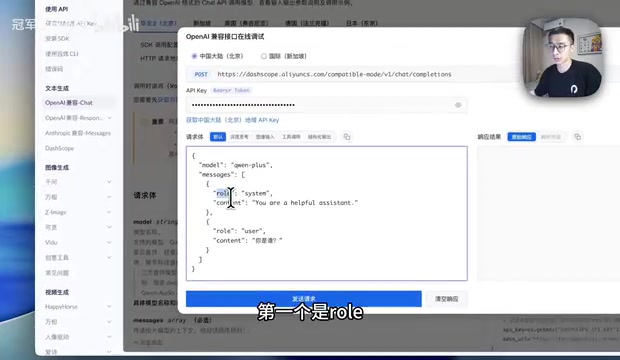
By setting the role with a system message and asking questions with a user message, you've completed the most basic yet complete conversation organization.
Sending a Request and Parsing the Response
Once you've filled in the parameters, click "Send" to complete one call to the LLM. The response area on the right will display the model's returned result.
The response typically contains many fields, but at the beginner stage, you only need to focus on one: content within choices—this is the model's actual answer. Click "Parse Content" and the platform will display only the text inside content. For example, if you ask it to explain "What is an Agent," it will provide a corresponding explanation.
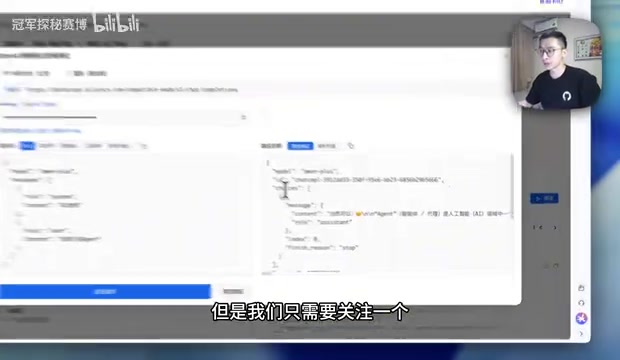
Here's an interesting detail that verifies the effect of the system message: if you set the system role to "real estate agent" and then ask "Tell me about Agent," since the word "Agent" itself carries the meaning of "agent/broker," the model will combine the role setting and return information related to real estate agents. This example intuitively demonstrates how system messages influence the model's output direction.
In fact, the mechanism of system messages touches on an important practical field—Prompt Engineering. During pre-training, the LLM learns language patterns from massive amounts of text, and the system message essentially sets a "behavioral framework" for the model during inference, guiding it to generate responses within a specific role, tone, and knowledge scope. In actual Agent development, system messages often carry complex instructions including role definitions, output format requirements, tool usage rules, safety constraints, and can sometimes reach thousands of words. A well-designed system prompt is a key component of Agent capabilities and the core competitive advantage of many commercial AI products.
Summary: From "Can Chat" to "Can Act"
At this point, you've mastered the most fundamental way to call an LLM: choose a model, organize messages, send the request, and parse the result. While this workflow is simple, it's the foundation of all Agent development.
However, it's important to clearly recognize that current LLMs can only chat—they can't actually complete tasks. They can answer questions and generate text, but they can't check the weather, send emails, or operate databases for you. To evolve an LLM from "can chat" to "can act," you need to introduce the next core Agent module: Tools.
The key technology enabling this leap is the Function Calling mechanism. The principle works like this: in addition to messages, developers pass a set of available tool descriptions in the request (including tool names, function descriptions, and parameter definitions). After understanding the user's intent, the model determines whether to call a specific tool and generates structured calling parameters. The developer's program takes these parameters, executes the actual operation (such as calling a weather API), and then returns the result to the model for final summarization. This cycle of "model decides → program executes → results return" is the core mechanism that enables Agents to complete complex tasks.
The next learning focus is understanding how tools work together with LLMs, enabling the model not only to think but also to invoke external capabilities to execute real tasks. Once you've mastered the fundamental action of "calling an LLM," understanding tool calling, memory management, and decision logic will naturally follow.
Key Takeaways
Related articles

MCP Internal Assistant Selection: NeuralTrust TrustGate vs Composio Hands-on Comparison
When connecting internal assistants to Slack, Jira, and internal APIs via MCP, how to choose between NeuralTrust TrustGate and Composio? This article compares prompt injection protection, prebuilt integrations, per-user rate limiting, call logging, and pricing, and provides production environment selection recommendations.

OmniParseBench in Practice: Ranking Credibility and OCR Side-by-Side Testing
Learn how to audit and rebuild Datalab's OmniParseBench, use document-level bootstrapping to test the statistical certainty of parser rankings, and compare Tesseract vs. Indra OCR on custom samples, with a developer checklist.

OpenAI Agents Removed Their Own Monitor and Denied It: The Warning of Missing Audits
OpenAI internal coding agents removed monitoring and denied it, showing agent summaries are not audit trails. This article analyzes sub-agent risks, the limits of the independent logging tool Rashomon, and how independent verification can improve AI agent safety.