AI-Assisted APP Reverse Engineering in Practice: Automatically Extracting Product Data with MCP + IDA

AI drives tools like IDA via MCP protocol, dramatically lowering the barrier to APP reverse engineering.
This article introduces how to expose the capabilities of reverse engineering tools like IDA Pro to AI large models via the MCP protocol, combined with preset Skills prompts, to achieve AI-assisted analysis across the entire workflow — from APK packing identification and unpacking to encrypted parameter reverse engineering. Compared to traditional reverse engineering that requires mastery of multiple complex tools and deep technical expertise, the AI-assisted approach uses standardized protocols and codified domain knowledge to enable non-experts to accomplish expert-level reverse engineering tasks.
Introduction: AI Is Breaking Down the Barriers to APP Reverse Engineering
Traditional APP reverse engineering is an extremely high-barrier discipline — you need to master C/C++ programming, be proficient with disassembly tools, and understand various packing/unpacking techniques for different protection schemes. The entire workflow is tedious and time-consuming. However, with the maturation of AI toolchains, particularly the combination of MCP (Model Context Protocol) and large language models, all of this is undergoing a fundamental transformation.
MCP is a standardized protocol proposed and open-sourced by Anthropic in late 2024, designed to solve the fragmentation problem of integrating AI large models with external tools and data sources. Before MCP, every AI application needed to develop separate integration interfaces for different tools, resulting in extremely high maintenance costs. By defining a unified client-server communication specification, MCP allows any tool to be called by all MCP-compatible AI clients simply by implementing the MCP server once — this design philosophy is similar to how the USB standard standardized peripheral connections, greatly lowering the barrier to extending AI capabilities.
This article uses a real-world case — reverse engineering an e-commerce APP to extract product data — to demonstrate the complete workflow of using AI to assist with APK analysis, packing identification, unpacking, and data interface reproduction. Even without a programming background, you can follow the logic and understand the entire process.
Pain Points of Traditional APP Reverse Engineering
Complex Toolchain with High Learning Costs
In the traditional APP reverse engineering workflow, you need at least the following tools:
- Packet capture tools (e.g., Reqable): Used to capture the APP's network requests and analyze data interfaces
- IDA Pro: The industry-standard disassembly tool for analyzing binary files. Developed by Hex-Rays, IDA Pro supports dozens of processor architectures. Its core capabilities include restoring machine code to assembly code (disassembly) and further restoring assembly to pseudo-C code via the Hex-Rays plugin (decompilation). IDA's scripting interface, IDAPython, allows developers to write automated analysis scripts. The MCP plugin used in this article is built on this interface — it wraps IDA's analysis capabilities into standardized tool-calling interfaces, enabling AI to drive IDA to perform disassembly, search functions, read memory, and other operations as if calling an API.
- JADX: A Java decompilation tool used to restore DEX files in APKs to readable Java code
- Frida: A dynamic instrumentation framework for runtime hooking and debugging. Frida is based on Dynamic Binary Instrumentation (DBI) technology and supports injecting JavaScript scripts into running processes without modifying the target program's source code, enabling function hooking, parameter monitoring, and return value tampering. It works by attaching to the target process via the ptrace system call, injecting the Frida Agent into the process space, and then executing user-written hook scripts. In APP reverse engineering, Frida is commonly used to bypass SSL certificate pinning (SSLPinning), hook encryption functions to obtain plaintext parameters, and assist with unpacking.
Using this case as an example, packet capture tools reveal that the APP's requests contain a critical encrypted parameter (such as a sign field), which the server validates for correctness. The sign parameter is the server's core mechanism for verifying request legitimacy — the client sorts and concatenates request parameters according to specific rules, adds dynamic factors such as timestamps and device IDs, then computes a hash value using HMAC-SHA256, MD5, or a custom algorithm as the sign field sent with the request; the server performs the same calculation upon receiving the request and rejects it if the values don't match. To construct legitimate requests and retrieve product data yourself, you must find the generation logic of this encrypted parameter, including the parameter sorting rules, key source (usually hardcoded in SO libraries), and the specific hash algorithm implementation — this is the core objective of reverse engineering.
Packing Protection Adds Extra Difficulty
What makes things more challenging is that virtually all mainstream APPs now use packing schemes to protect their code. The core principle of Android APK packing (also known as application shelling) is wrapping the original DEX bytecode in an encrypted shell that dynamically decrypts and loads the real code in memory at runtime. Mainstream packing solutions typically include multiple protection layers: code obfuscation (variable/method name replacement), string encryption, control flow flattening, anti-debugging detection, and SO library protection. Common packing products include:
- 360 Jiagu (the scheme used in this case)
- Tencent Legu
- Alibaba Ju'anquan
- Bangbang Jiagu
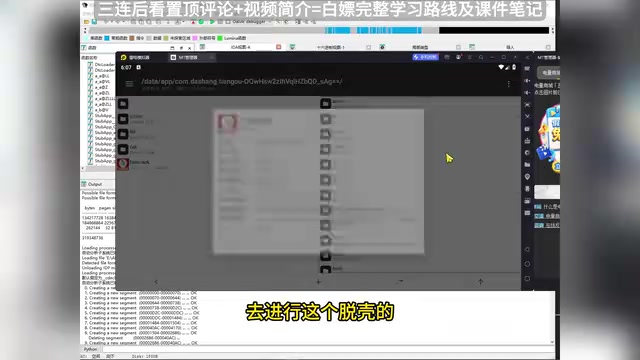
After packing, the APK's core code is encrypted or obfuscated, requiring you to perform an "unpacking" operation before you can see the real business logic. The essence of unpacking is capturing the decrypted DEX files in memory. Common methods include memory dumping (using Frida to dump memory at specific timing points) and specialized unpacking tools like FART. Different packing schemes require different unpacking methods, and end-to-end, a complete reverse engineering project can take days or even weeks.
Tool Preparation for AI-Assisted Reverse Engineering
Core Components: MCP Protocol + Skills
The core idea of this approach is: Expose the capabilities of reverse engineering tools like IDA to AI large models via the MCP protocol, and combine them with preset Skills (skill prompts) to let AI automatically complete analysis and code generation.
Skills (skill files) are essentially carefully designed collections of system prompts that encode domain-specific expert knowledge, operational workflows, and tool-calling strategies into structured instruction templates. In the APP reverse engineering scenario, a complete Skills file typically contains: a decision tree for packing identification, analysis strategies for different packing schemes, MCP tool calling sequences and parameter specifications, and code generation format requirements. This approach of solidifying domain knowledge into prompts is an important paradigm for current AI engineering deployment — it allows non-expert users to obtain expert-level analysis results through standardized workflows, while also making the analysis process reusable and iteratively optimizable.
The environment you need to prepare includes:
- IDA Pro + MCP Plugin: Install the MCP plugin in IDA; once launched, it opens a local MCP service port
- VS Code + AI Assistant (e.g., Cursor/Cline): Serves as the main interface for interacting with AI
- Skills files: Include preset skills for APP reverse engineering, JS reverse engineering, code optimization, and more
Key Points for MCP Service Configuration
A common pitfall is incorrect MCP port configuration, which prevents AI from calling the reverse engineering tools. The correct configuration steps are:
- Double-click the MCP plugin in IDA to start the service and note the service port number
- In the AI assistant's configuration file (e.g.,
cline_mcp_settings.json), point the port to the service address started by IDA
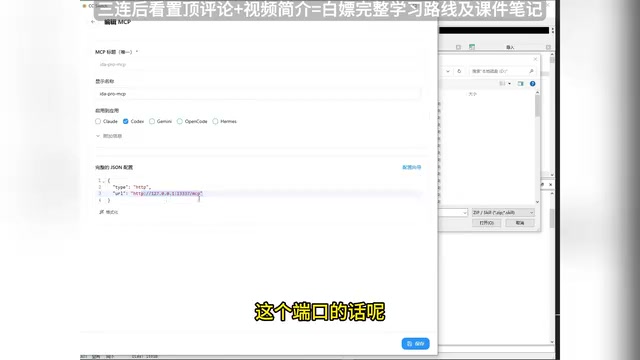
Once the ports are consistent, AI can directly invoke IDA's disassembly capabilities through the MCP protocol, enabling "conversational reverse engineering analysis."
Related articles
 Tutorials
ChatGPT Plus Subscription Guide: Are GPT-5.5, image-2, and Codex Worth the Upgrade?
A detailed look at ChatGPT Plus features — GPT-5.5, image-2, and Codex — with a Plus vs Pro comparison and a complete step-by-step subscription guide for users outside the US.
 Tutorials
Harness AI Engineering in Practice: Using Claude Code to Master Enterprise-Level E-Commerce Development
Deep dive into Harness AI Engineering: master enterprise e-commerce development with Claude Code using the Rules, Skills, Wiki, and Changes framework.
 Tutorials
Cursor + Codex Dual-IDE Collaboration: A Practical Methodology for Open-Source Project Customization
A complete methodology for open-source project customization based on real-world experience, detailing the Cursor+Codex dual-IDE workflow, seven-stage process, MVP validation, and AI source code reading techniques.