AI Code Factory in Action: Deploying 10 Agents on GitHub to Automatically Fix Bugs

A software factory turns coding agents into a schedulable cluster that auto-assigns GitHub issues and keeps humans in the loop.
A Software Factory is an advanced architectural pattern for coding agents: not a single agent, but a scheduling system that manages ~10 coding agents (Claude Code and Codex) simultaneously. It triggers tasks via GitHub issues, performs automatic triage, and generates PRs for human review — following a Signal→Triage→Implement→Release loop with human-in-the-loop checkpoints. Each agent runs in an isolated cloud VPS sandbox to defend against prompt injection and ensure always-on availability. Different models handle tasks by strength, and reusable Agent Skills plus snapshot mechanisms mean the entire factory can be deployed and scaled with almost no hand-written code.
What Is a Software Factory?
If you're already used to working with a single coding agent, the "software factory" may be the next evolutionary step. Instead of watching one agent's chat window, you have an entire cluster of agents on standby — like workers on an assembly line, waiting for tasks to be assigned.
As demonstrated by an overseas developer in a video, a typical software factory can manage around 10 coding agents simultaneously, mixing Codex and Claude Code models to collaborate across multiple projects. The workflow is straightforward: create an issue on GitHub, label it "ready," and the factory automatically dispatches the task to an available agent. Once finished, the agent submits a Pull Request for human review.
It's worth emphasizing that a software factory is not a coding agent itself — it's a scheduling system or program. It receives trigger signals from Slack, Telegram, or GitHub issues, performs a triage round, and assigns tasks to the appropriate agent. This mechanism always maintains "human in the loop" — it's not a fully autonomous "lights-out factory," but an automated pipeline with human review checkpoints.
The Factory's Core Loop: Signal, Triage, Implement, Release
The entire factory operation can be broken down into a clear loop:
- Signal: Any event that triggers the factory — a GitHub issue, a Slack message, etc.
- Triage: Receiving the task and deciding who to assign it to. This step can use an LLM to classify tasks (e.g., determining if it's a bug, a new feature, or a documentation update), or, as the author demonstrates, use a simple piece of code to grab tasks and assign them to an idle agent — no LLM involved.
- Implement: A coding agent implements the changes and validates them through guardrails like unit tests and code review.
- Release: Create a Pull Request or deploy the code directly, then the factory continues listening for new changes.
You can insert any number of human checkpoints into this loop — architectural decisions, breaking changes, production incident handling, or the most basic step of reviewing and merging a PR. In the author's implementation, the triage step is actually a "dispatcher": upon receiving an issue, it assigns it to an idle agent, retrying continuously if no agent is available; if the user specifies Codex or Claude Code in the labels, it routes to the corresponding agent.
Why Mix Different Agents?
One often-overlooked benefit is that a software factory lets you leverage the strengths of different models. The author notes that Claude excels at writing complex logic-heavy code, while Codex (the GPT series) performs better on 3D-related work. So in the triage step, you can use an LLM to scan task content — 3D work goes to Codex, complex coding goes to Claude, and a simple documentation update can go to a cheap, fast small model.
In the live demo, the author created an "add dark mode" issue for a heavily 3D-dependent application and specifically assigned it to Codex. Codex o1 picked it up and completed the task without issue. This "right tool for the right job" approach is exactly the differentiating advantage of a multi-agent cluster over a single agent.
Sandbox Isolation: Security and Resource Protection
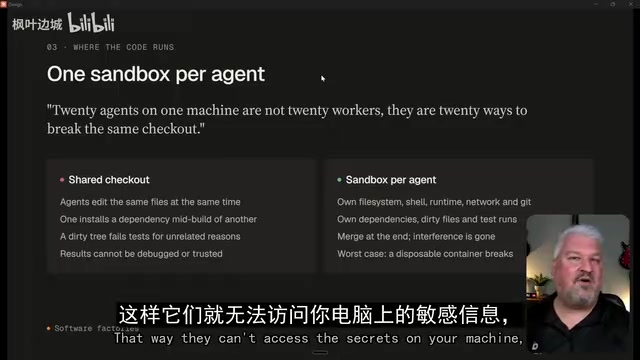
Each agent runs in its own isolated sandbox — a point the author repeatedly emphasizes. There are two reasons:
Security: The content of an issue may contain malicious instructions injected via prompt injection. If the agent only runs inside a restricted sandbox, even if it's compromised, the blast radius is completely contained — it cannot access your laptop, files, or credentials.
Resources: In this setup, each agent runs on a separate VPS (the author uses Upstash Box), each allocated its own hardware resources — e.g., 2 CPUs and 4GB of RAM. Imagine running 10, 20, or even 100 agents simultaneously all competing for resources on your local machine — the experience would be terrible. Independent VPSes also bring an additional benefit: always-on availability. Close your laptop and tasks keep running; you can open GitHub on your phone, file an issue, and some agent will quietly produce a PR in the cloud.
Prompt Injection is an attack technique targeting LLMs: an attacker hides instructions disguised as data inside external content that an agent will process (such as GitHub issue bodies, web pages, or documents), attempting to hijack the agent's behavior — for example, making it leak credentials, execute malicious commands, or bypass existing restrictions. Similar to traditional SQL injection, the root cause is that models struggle to fully distinguish "data" from "instructions." Sandbox isolation is currently the most practical defensive layer: even if an attack successfully hijacks the agent's decision-making, the restricted environment prevents it from accessing sensitive resources on the host system. This is why deploying factory agents on isolated VPSes rather than on your local machine is a security design choice, not just a resource allocation consideration.
Setup Process: Let an Agent Build the Factory for You
The most interesting part is that you barely need to write any code yourself — you let a coding agent build the factory. The author encapsulates the entire build logic into a reusable Agent Skill; install it and trigger it directly.
Prerequisites include:
- At least one GitHub repository for the factory to manage (can be an existing project, or deploy a simple to-do app first for testing). For public repos, be aware that anyone can file issues to trigger your factory — you can restrict the triage step to only handle issues assigned to yourself.
- A cloud runtime environment (the author uses Upstash Box, which has a free tier to follow along with).
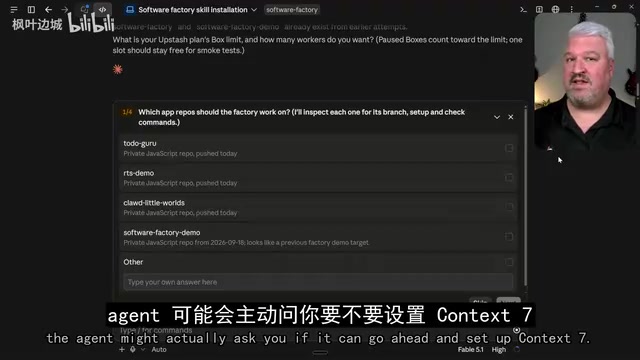
- Creating the factory itself: Drop the Skill's GitHub link to a coding agent, let it install and execute. The agent will progressively ask which repositories to connect, which coding agents to use, the factory repo name, the number of Boxes (free tier limit is 10), the default dispatch strategy, whether to enable browser tools, etc.
You'll then need to configure three types of credentials and write them into a .env file: the Upstash Box API Key, a GitHub fine-grained personal access token (with read/write permissions for contents, issues, and pull requests), and a Claude Code OAuth token (so the agent uses subscription credits rather than a pay-per-use API key). The author specifically recommends updating credentials directly to .env rather than pasting them into chat — it's more secure.
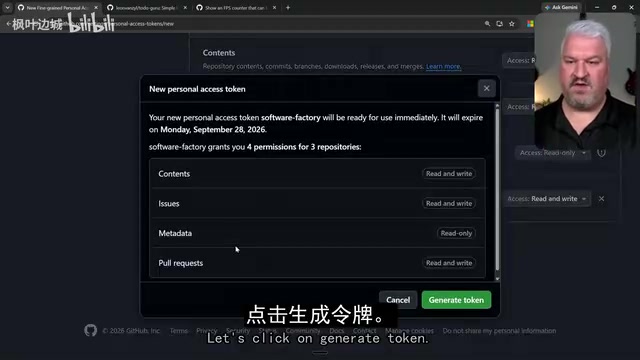
GitHub Fine-grained Personal Access Tokens are a next-generation permission control mechanism introduced by GitHub after 2022. Compared to classic tokens, they allow permissions to be precisely scoped to specific repositories and specific operations (e.g., only allowing read/write access to issues and pull requests on certain repos), drastically reducing the attack surface in the event of credential leakage. In the software factory context, the factory needs to operate across repositories (monitoring issues, submitting PRs), so token permission configuration is critical: overly broad permissions create security risks, while insufficient permissions cause the factory to malfunction. The author recommends writing the token to a .env file rather than pasting it into the chat window, because chat history may be captured in LLM context or logs, while .env files are typically protected by .gitignore.
Triggering and Testing: The Closed Loop from Issue to PR
Once the factory is set up, the managed project repositories also need the ability to "signal the factory." The agent will create Pull Requests in those repos (for forwarding ready issues to the factory); once manually merged, the repository can notify the factory to start working.
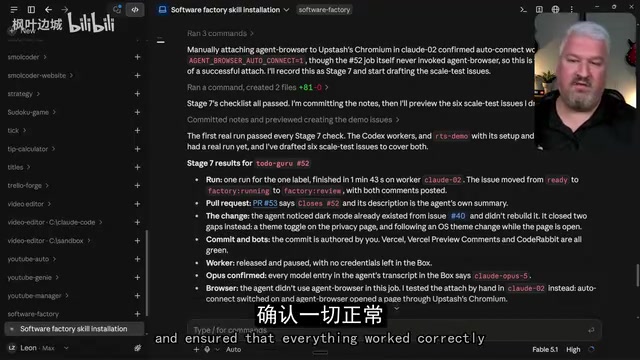
During testing, the author created a "create light and dark modes" issue and labeled it ready. In the factory repo's Actions tab, you can see the task being pulled. One practical detail: the issue's label automatically changes from ready to factory running, then to factory review upon completion — giving you a clear at-a-glance view of which issues are being processed. The factory also comments on the issue indicating which worker (e.g., Claude 02) picked it up, with a link to the generated PR.
Use Snapshots to Unify Environments and Scale Anytime
If you want all agents to come pre-installed with certain skills or guardrails, you don't need to configure each Box individually — instead, use Snapshots to create reusable templates. The author demonstrates how to have an agent create a new snapshot that includes a frontend design skill and the agent browser tool, so that all Boxes created from that snapshot automatically inherit these capabilities.
One important limitation to know: Upstash does not allow agents to delete Boxes or snapshots — those operations must be performed manually, which serves as yet another security safeguard. Scaling out is extremely easy — say "I want 10 Boxes, half Codex and half Claude," and the agent will automatically create the corresponding number of Boxes. Adding a new repository works the same way: update the token's repository scope, have the agent add the repo to the factory, and merge the PR it generates.
Snapshots in cloud computing are a technology that "freezes" a virtual machine's current state into a reusable template — similar to the concept of a Docker image. Through snapshots, teams can lock down a well-configured agent runtime environment (including pre-installed tools, config files, and skill plugins), so that all newly created Boxes start from the same baseline state, avoiding the classic "it works on my machine" environment drift problem. In the software factory context, this is especially valuable: when you need to quickly scale from 5 agents to 20, there's no need to manually configure each one — all new Boxes naturally inherit the same capability boundaries and security settings, making scale-out a nearly frictionless operation.
Summary: Turning Coding Agents Into an Assembly Line
The core idea behind this software factory is essentially upgrading "one-on-one agent supervision" to "one-to-many scheduling and management." Its value lies not in how capable any single agent is, but in: multiple models working to their respective strengths, sandbox isolation for security and resource containment, cloud VPSes for always-on task execution, and human review checkpoints that are always preserved.
For teams looking to scale their use of coding agents, this is an architectural pattern worth studying. Of course, whether you actually need 10 or even hundreds of agents running simultaneously depends on your real workload — the author himself raised this as an open question in the video.
Related articles

AI New Grad Resume Diagnosis: How to Stand Out for ML/CV Roles?
How can AI/ML new grads optimize their resumes to get interviews? Based on a real Reddit case, this article analyzes project selection, depth display, and structure for ML/CV roles, with actionable revision advice.

OpenAI Opens Up Decision Models as Competition with Jev Heats Up
OpenAI makes its decision model widely available, directly challenging first mover Jev. We analyze the impact on the decision model competitive landscape and key considerations for developers and enterprises.

Startup Growth Secrets: Early Sales Are Not the Key
At Disrupt, experts from Lovable, Polska, and Theory Ventures said early startup growth depends not on early sales but on a repeatable sales process, a clear ICP, team development, and data-driven iteration.