AI Coding Tools Tier List: Claude Code Leads, Gemini CLI at the Bottom
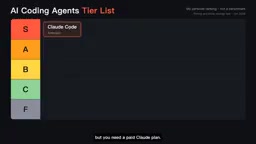
YouTube creator ranks 10 AI coding tools from S to F based on real workflows, showing billing and longevity matter more than model capability.
A YouTube creator ranked 10 mainstream AI coding tools from S to F. Claude Code tops S-tier for handling long multi-step tasks; Codex and Cursor share A-tier; Copilot falls to B-tier after switching to usage-based billing; Google Antigravity, Amazon Kiro, and Devon Desktop land in C-tier due to limits or silent changes; Gemini CLI bottoms out at F-tier after Google stopped offering it to individual users. The key takeaway: competition has shifted from model capability to billing structure and product longevity.
Title
AI Coding Tools Tier List: Claude Code Leads, Gemini CLI at the Bottom
Meta Description
A YouTube creator's tier list of AI coding tools: Claude Code earns S-tier for long-task capability, Codex and Cursor land in A-tier, Copilot drops to B-tier due to usage-based billing, and Gemini CLI bottoms out at F-tier after discontinuing individual service. Includes billing models and selection advice.
Article Content
AI coding tools have become so numerous that it's hard to keep track. A YouTube creator has ranked the 10 most mainstream tools currently available into five tiers from S to F based on personal experience. This isn't a benchmark—it's a ranking based on real-world workflow feel, and the observations about billing traps and tool discontinuation are more valuable than the rankings themselves.
S-Tier: Claude Code, Uninterrupted Long Tasks
According to the video's creator, Claude Code's core advantage is its ability to handle long tasks. Give it a job involving dozens of steps, and it will run all the way through, even backtracking to fix errors along the way. The creator used it to run a complete video subtitle pipeline end-to-end: download, transcribe, translate, and burn in subtitles—all without human intervention.
The tool is available across terminal, desktop, and web interfaces, but requires a paid Claude subscription. This points to an implicit barrier: S-tier capability comes with S-tier cost, and the free tier basically can't experience the power of long tasks.
A-Tier: Codex and Cursor—One for Batch Processing, One for Feel
Codex (OpenAI) excels at cloud-based parallelism. You can throw several tasks at it at once, go grab a coffee, and come back to collect results. It's included with a ChatGPT subscription, making the marginal cost very low for existing ChatGPT users. Perfect for bundling miscellaneous tasks into batches.
Cursor is an AI editor built on top of VS Code. The creator considers it the smoothest for everyday coding, and it lets you freely switch between Claude, GPT, and Gemini models. This model-agnosticism secures its place in A-tier.
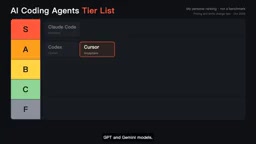
The two are actually complementary: Codex is great for throwing work out and waiting for results, while Cursor is great for sitting at the screen writing line by line.
Model-agnostic means the tool itself isn't tied to any single company's LLM, but rather lets users freely switch between backends like Claude, GPT, and Gemini through a unified interface. For developers, this brings two practical benefits: first, you can choose the most suitable model for the task type (e.g., Claude for long-context tasks, Gemini when multimodality is needed); second, when a provider raises prices, slows down, or discontinues service, you can migrate quickly and avoid vendor lock-in. Cursor's firm hold on A-tier is largely because this flexibility reduces toolchain risk.
B-Tier: Copilot and Two Open-Source Options
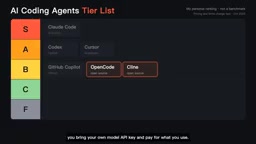
GitHub Copilot is a veteran. It has the lowest paid barrier and the tightest GitHub integration—fixing code and reviewing PRs are always within reach. The problem lies in its billing model: according to the creator, since June Copilot switched to usage-based billing, and agent mode can burn through the monthly quota quickly. Low-cost entry and quota anxiety are two sides of the same coin.
OpenCode (terminal agent) and Klein (VS Code extension) are two open-source approaches. Both are free, bring your own model API key, and pay per actual usage. The creator's assessment is honest: this is freedom, but you need to watch your wallet—a single large task could cost more than a subscription.
Agent mode means the AI no longer just does single-turn completion, but can autonomously plan steps, call tools (read/write files, run commands, search codebases), and loop until the task is complete. This mode greatly increases automation, but it also means token consumption jumps from "a few hundred per call" to "tens of thousands or even hundreds of thousands per call," because every round of tool calls and intermediate results must be re-fed into the model context. Usage-based billing tools consume quotas exponentially faster in agent mode—this is the root cause of the quota anxiety users feel after Copilot switched to usage-based billing.
C-Tier: Highlights, But With Hard Flaws
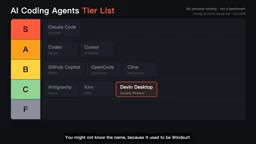
Google Antigravity starts free and is easy to get started with, but usage limits can leave tasks stuck halfway.
Amazon Kiro has an interesting approach: the AI writes a specification first, then writes code based on the spec—very friendly for serious projects. The trade-off is credits-based billing, and a single feature can consume a significant amount of credits.
Devon Desktop is a special case. The creator mentions it was renamed in June and the old agent was replaced, but many longtime users still haven't noticed. For developers relying on a stable toolchain, this kind of silent change is itself a risk signal.
Credits billing is a compromise model that has become popular among AI coding tools in recent years: users pre-purchase a certain number of credits, and each model call deducts based on token consumption or task complexity. Compared to fixed monthly subscriptions, credits are closer to actual usage, but unit prices are often opaque, and consumption varies enormously between tasks—a simple code completion might deduct only a few credits, while letting an agent autonomously complete a full feature module could instantly consume hundreds. For developers, this means costs are hard to predict, and you need to roughly estimate task scale before starting a project, or you'll easily exhaust your quota mid-month.
F-Tier: Gemini CLI—Unusable Means Lowest Score
Gemini CLI is placed in F-tier, not because of poor quality. According to the creator, since June 18, Google no longer offers the tool to individual users—free users and Google AI subscribers need to migrate to Antigravity CLI. A tool you can't use can only be at the bottom. This rule applies to other tools on the list as well: discontinuing service is more fatal than doing a poor job.
How to Choose: Match Your Work Style
The creator's closing advice is straightforward: if you need AI to independently handle long tasks, choose Claude Code; if you want to run a bunch of small tasks in parallel, choose Codex; if you want editor feel, choose Cursor; if your budget is limited, start with Copilot or the open-source OpenCode and Klein.
The value of this list isn't in the rankings, but in the reminder: the competitive focus of AI coding tools has shifted from model capability to billing structure and product longevity. Subscription, usage-based, credits, and free tiers—the cost curves of these four models differ enormously. Before choosing a tool, calculate your own usage habits—that's more practical than looking at benchmarks.
One-line Summary
A YouTube creator ranks 10 AI coding tools from S to F based on real workflows, revealing that billing and longevity matter more than model capability.
Paragraph Summary
A YouTube creator ranked the 10 most mainstream AI coding tools into five tiers from S to F based on personal experience. Claude Code takes S-tier for running long tasks with dozens of steps continuously; Codex excels at cloud-based parallel batch processing, and Cursor shares A-tier for multi-model switching and editor feel; GitHub Copilot has a low entry price but consumes quotas quickly after switching to usage-based billing, while open-source OpenCode and Klein are free but require paying for API usage—both in B-tier; Google Antigravity, Amazon Kiro, and Devon Desktop (which underwent a silent rename) fall into C-tier due to limits or change risks; Gemini CLI is placed in F-tier because Google stopped offering the service to individual users. The creator emphasizes that the real takeaway is that competition has shifted from model capability to billing structure and product longevity.
Related articles
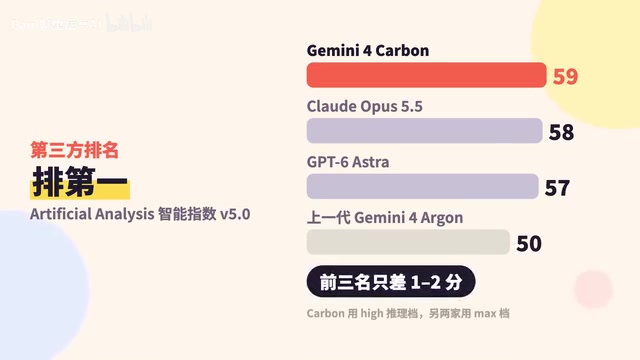
Google Releases Gemini 4 Carbon: Its Strongest Model Yet, Debuting with a Cybersecurity Focus
Google releases Gemini 4 Carbon, calling it its strongest model, with a cybersecurity focus. It tops the third-party composite ranking at 59 points but leads by only one or two. This article analyzes its security test results, staged rollout, token pricing, and the divergence between self-reported and third-party tests on hallucinations.

LangChain Adds SchemagateRetriever: On-Demand Table Retrieval Cuts Text-to-SQL Prompts by 92.9%
LangChain docs add SchemagateRetriever: retrieves only the tables needed for text-to-SQL with permission filtering, cutting median prompt size by 92.9% on Spider 2.0 large schemas via offline BM25 selection with no model calls.

Multi-Step AI Agent Guardrail in Practice: Fact-Change Detection Drives False-Alarm Rate to 0%
Developer shares first version of a multi-step AI Agent guardrail: re-verifying dependency facts before irreversible actions cut false alarms from 50% to 17% across 23 scenarios, then to 0% via conservative normalization without lowering catch rate. Runs on local qwen2.5-7b.