AI-Course-Video: Turn Documents into Teaching Videos with One Click, Fully Automated AI Voiceover and Subtitles
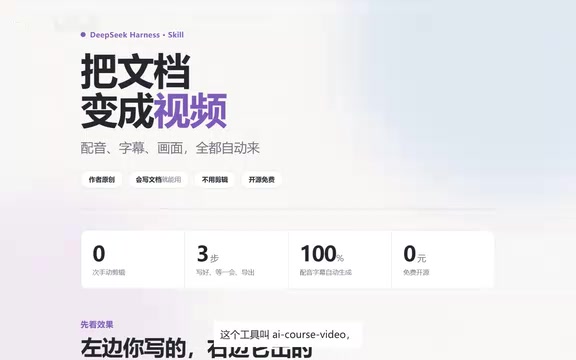
An open-source skill that automatically turns documents into code teaching videos with voiceover and subtitles.
AI-Course-Video is an open-source skill within DeepSeek Harness that converts existing documents into teaching videos with voiceover, subtitles, and line-by-line code explanations in one click. Rather than simply reading text over slides, it translates document structure into teaching rhythm: one concept per page, subtitles aligned to actual speech, and background music that automatically ducks under the voice. The author generated their own intro video with the tool, providing the most direct proof of credibility. Aimed at course creators and knowledge-video makers, it requires no editing or coding skills—just write a good document, wait a few minutes, and export. Document quality remains the ceiling on the final output.
Creating a course video with voiceover, subtitles, and line-by-line code explanations used to mean screen recording, dubbing, and manually typing subtitles—an entire afternoon gone. Now someone has compressed that workflow into "drop in a document—wait a few minutes—export." The open-source tool is called AI-Course-Video, a skill within DeepSeek Harness. According to a Bilibili creator's demo video, the introductory video itself was generated using the tool.
What It Actually Does
First, let's look at the before-and-after comparison the author demonstrated.
On the left is the original document; on the right is what the tool produces: audio, subtitles, and code explained line by line.
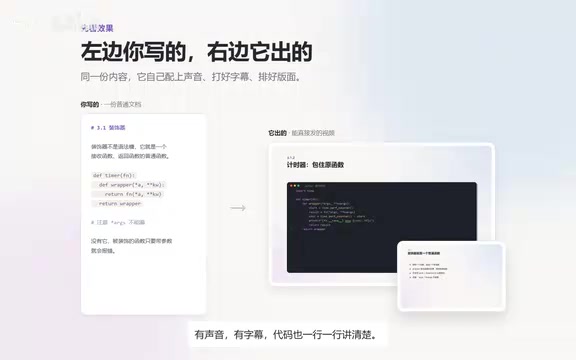
This comparison highlights the tool's core value—it doesn't simply read text aloud over a slide deck. Instead, it translates "document structure" into "teaching rhythm." Each page covers just one concept, subtitles follow the speech, and background music automatically ducks under the voiceover—all handled by default.
The Key Is the "Skill" Format
AI-Course-Video isn't a standalone heavyweight editing application—it's a skill mounted within DeepSeekAd Harness. This positioning deserves separate discussion:
- Low barrier to entry: No editing skills or coding required—just install it into Harness and go.
- Unified workflow: Voiceover, subtitles, visuals, and music all happen in one place, with no shuffling assets between multiple tools.
- Open source and free: The author explicitly states the tool is open source and freely available.
For technical content creators, this combination matters more than any individual feature—what you're saving isn't just the "typing subtitles" step, but the constant context-switching across the entire production pipeline.
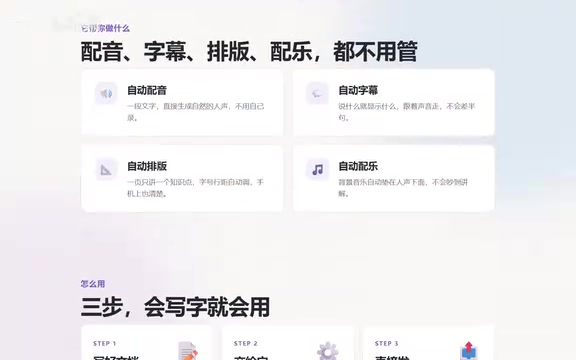
What is DeepSeek Harness? "Harness" here doesn't refer to a specific product officially released by DeepSeek, but rather a community term for a class of "AI agent runtime frameworks"—it connects large models with external tools, scripts, and file systems, enabling the model to invoke capabilities and complete multi-step tasks according to instructions. A Skill is a pluggable functional module mounted on such a framework, typically consisting of a description file plus several execution scripts, which users can trigger via natural language after installation. So "AI-Course-Video is a skill" means it reuses Harness's existing model invocation, file I/O, and task orchestration capabilities, focusing solely on the video generation workflow—which is why it can achieve "install and use."
A Few Details Behind the Automation
The automated processing points the author mentions happen to be the most time-consuming parts of manually creating a course:
Automatic speech generation, with subtitles following the voice. Subtitles aren't hard-cut based on document text—they're aligned to the actual speech, which means no more sentence-by-sentence timeline checking during editing.
One point per page. This is a constraint at the instructional design level, not just layout. One concept per page significantly reduces cognitive load for viewers and makes the pacing of code explanations more controllable.
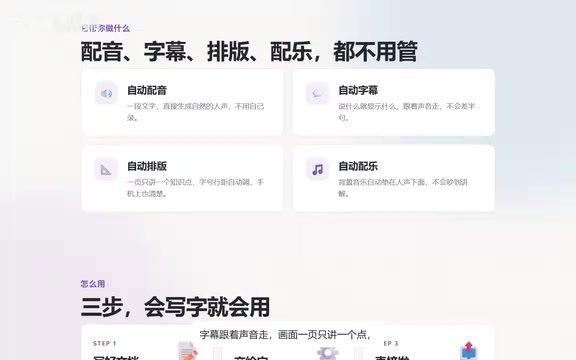
Background music automatically ducks under the voice. This is what's commonly called ducking—the music volume automatically lowers when someone is speaking and rises again during pauses. Doing this manually requires keyframes; in the tool, it's default behavior.
The technical principle behind ducking. Ducking is a classic audio post-production technique: through sidechain compression, the background music track detects the level of the voice track, automatically triggering volume reduction on the music track when the voice appears, then smoothly restoring it when the voice stops. Manual production requires placing keyframes segment by segment on the timeline, while the tool codifies this logic into default rules—typically also setting parameters like attenuation depth, attack, and release times to ensure natural sound. For teaching videos, this step directly determines whether the narration is clearly intelligible.
Subtitle-speech alignment (forced alignment). Subtitles following the voice relies on speech recognition and forced alignment technology: first, ASR transcribes the synthesized speech into timestamped text, then matches and corrects it against the original document text to obtain start and end times for each sentence or even each word. Compared to hard-cutting by character count or punctuation, aligning to actual speech prevents subtitles from drifting out of sync with the audio and provides a more reliable basis for timeline adjustments when revising the script later.
Who It's For
According to the author, the target audience is clear: veteran content creators and course makers. In practice, the applicable range is a bit broader:
- Technical instructors who need to produce teaching videos at scale, especially code-related content;
- Teams with existing structured documentation who want to convert it to video at low cost;
- Knowledge-focused creators who don't want to learn editing but want to try their hand at video.
One caveat: the tool solves the problem of "turning existing documents into video"—the quality of the document itself remains the ceiling. The author's workflow is only three steps: write a good document, wait a few minutes, export and publish—but the first step carries the most weight.
Final Thoughts
"Drop in a document, get a teaching video in minutes" sounds like marketing hype, but AI-Course-Video's demo video was genuinely self-generated—and that constitutes the most direct proof of credibility. It integrates voiceover, subtitles, visual pacing, and music ducking into a single skill within DeepSeek Harness, open source and free, and worth a try for anyone making courses.
If you happen to have a batch of well-written documents on hand, drop one in and see what the finished product looks like a few minutes later.
Related articles

iPhone Duo Battery Life Tested: One Charge a Day Is Unavoidable, and the Large Screen Is the Culprit
iPhone Duo battery test: heavy use needs at least one charge a day, and about 30% remains after 6.5 hours of screen-on time. How often the large screen is unfolded is key; a MagSafe battery pack helps, and long-term degradation is also worth watching.

Kimi K3.1 Pro Open-Sourced: 2.8 Trillion Parameters Close In on Opus
Moonshot releases the open-source MoE model Kimi K3.1 Pro, with 2.8T total parameters and 104B activated, trailing Opus 5.5 by under 1 point on Terminal Bench 4.0.

Costco Tech Price Guessing: Are Monitors, Keyboards, Mice, and Bose Speakers Worth It?
A YouTube blogger guesses prices of Costco tech products: 2K 180Hz monitor, Logitech keyboard and mouse, Bose speaker, and CyberPower UPS, revealing warehouse-store selection and brand premium.