AI Game Development in Practice: Building a Farm Game Architecture from Scratch with DeepSeek + Godot

Building a farm game architecture from scratch using DeepSeek AI and Godot through natural language conversations.
This article documents a developer's complete process of building a top-down farm management game using VSCode's Cline plugin with DeepSeek AI and Godot 4.0+. It covers establishing a 13-rule AI programming handbook, designing game architecture through natural language, generating project files automatically, and iteratively debugging with AI assistance — all at minimal cost.
Introduction: A New Paradigm for AI-Assisted Game Development
For indie game developers, building a game project's foundational architecture from scratch is often the most time-consuming phase. This article documents a developer's complete process of building a top-down farm management game from zero using the combination of VSCode + Cline plugin + DeepSeekAd AI. The entire process requires almost no hand-written code — instead, architecture design, code generation, and debugging are all accomplished through conversations with AI.
The core philosophy of this workflow is: humans handle design decisions, AI handles code implementation. Developers only need to describe requirements in natural language, and the AI generates complete project structures, scene files, and script code.
Development Environment and Toolchain Configuration
The developer used the following tool combination:
- VSCode: Code editor
- Cline Plugin: AI programming assistant plugin that interfaces with DeepSeek
- DeepSeek: AI backend providing code generation capabilities
- Godot 4.0+: Game engine
Notably, this solution has extremely low usage costs. According to the developer's spending records, daily usage costs approximately 1-2 RMB (about $0.15-0.30 USD), and even intensive use only reaches about 5 RMB/day ($0.70 USD). Each query costs roughly 1 fen (fraction of a cent), and complex operations only cost about 1 mao (a few cents).
Establishing an AI Programming Rulebook: 13 Golden Rules
Before starting the project, the developer first created a detailed programming rulebook for the AI — a critical step for ensuring output quality. These 13 rules cover code standards, architecture design, and workflow processes.
Code Standard Rules
- Use Godot 4.0+ syntax: Prohibit deprecated old APIs to avoid errors from outdated statements
- Nodes first, visual first: If an effect can be achieved with nodes, don't hardcode it — reduce code volume
- Expose parameters to the editor: Properties are exposed to the Inspector panel via
@export, rather than modified in code - Use Resource files: Character attributes and item parameters are made into Resource files that plug directly into nodes
- Comments and naming in Chinese: Godot has good Chinese support; variable names, function names, and signal names all use Chinese
Architecture Design Rules
- MVC architecture: Separate data, visuals, and logic to avoid writing "death code"
- Enum state machine: Use simple enum state machines early on, upgrade to node-based state machines later
- Indie game architecture: Reference lightweight architectures commonly used by solo developers, rather than standardized but cumbersome designs for large projects
- Component-based design: Build scenes as reusable components
- Organize folders by feature: A player's scenes, scripts, and images all go in the player folder, rather than being sorted by file type
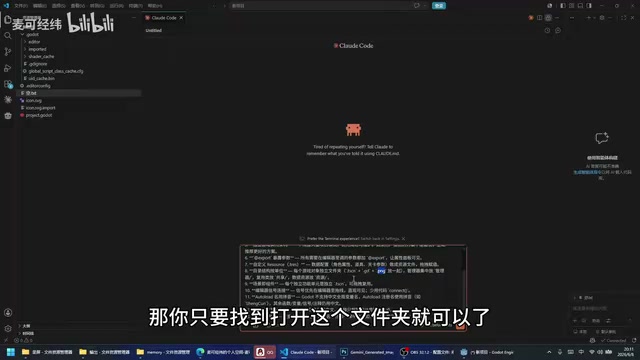
This rulebook is saved in the project root directory, and the AI follows these conventions every time it writes code. The developer also mentioned that additional rules can be appended later.
Collaborating with AI on Game Architecture Design
Defining Game Requirements in Natural Language
After establishing the rules, the developer began describing game requirements to the AI in natural language. The core design of this game is:
- Top-down farm management game, expandable later with fishing, hunting, and other gameplay
- Hand-drawn HD art style
- Demo-stage basic content includes: manor scene, player character, farmland system, crop planting (wheat, potatoes), tool system (hoe, watering can, sickle)
The developer provided detailed descriptions for each element, such as:
- Player node includes sprite, animation, hand-held container; tools are attached under the hand-held container
- Farmland has two states: normal and wet
- Wheat has four growth stages
- Press Q to switch tools, left-click to perform actions

The AI-Generated Architecture Plan
The AI generated a complete project architecture based on the requirements, including these core parts:
Directory structure: Organized by functional modules, with each entity (player, tools, farmland, wheat) having its own folder containing scenes, scripts, and textures.
Node tree design:
- The manor uses TileMap as the base map
- Player node includes Sprite2D, AnimationPlayer, hand-held container, and interaction detection area
- Farmland has collision bodies and state-switching logic
Manager system: The game manager handles tool switching, grid alignment, global state management, and other functions. Grid size was set to 48, but the developer corrected it to 64.

State enums: Defined enum values for tool types (hoe, watering can, seeds, sickle), farmland states (normal, wet), crop growth stages, and more.
The AI also proactively raised details the developer hadn't considered, such as whether harvesting requires a specific tool, grid alignment utility classes, etc. — demonstrating a degree of architecture design capability.
The Complete Code Generation and Debugging Process
One-Click Project File Generation
After confirming the architecture plan, the developer had the AI begin code generation. The AI directly wrote scene files (.tscn) and script files (.gd) in code form, rather than manually creating nodes through the Godot editor.
The advantage of this approach is speed, but it also introduces a common problem: scene file UIDs and node references may be incorrect, preventing them from opening in Godot.
First Run: Expected Errors
As expected, the first run produced multiple errors:
- Game manager errors
- Player scene wouldn't open
- Wheat scene wouldn't open
- Farmland scene wouldn't open
The developer's approach was straightforward — copy the error messages directly to the AI and let it fix them itself. The AI quickly identified that the issues were in the scene file headers and UID references. After fixes, the scenes opened normally.

Iterative Debugging and Feature Refinement
After fixing the basic errors, the game could run but still had many detail issues to address:
- No player instance after manor loads
- Player has no sprite, just a collision body moving around
- Farmland allows repeated digging at the same position
- Tool sprite sizes are incorrect
- Layer order is wrong — player is obscured by farmland
The developer resolved these issues one by one, some through AI fixes and others through manual adjustments in the Godot editor (such as replacing placeholder sprites, adjusting collision body sizes, and setting layer orders).
Lessons Learned and Practical Reflections
The Real Capability Boundaries of AI Programming
This practice demonstrates that AI-assisted game development already has considerable practical utility, but developers still need the following abilities:
- Architecture design ability: You need to know what architecture to use before AI can help you implement it
- Requirement articulation ability: The more detailed your description, the more accurate the AI output; vague descriptions lead to AI making its own decisions, which may not match expectations
- Basic debugging ability: While you don't need to write code by hand, you at least need to understand error messages and relay them to the AI
Cost and Efficiency Comparison
Using DeepSeek as the AI backend, overall costs are extremely low (1-5 RMB daily, roughly $0.15-0.70 USD), essentially negligible for indie developers. In terms of efficiency, going from zero to a runnable basic framework takes only about one to two hours.
The Future Direction of AI Game Development
The developer noted that AI programming capabilities are evolving extremely fast. Within the next six months to a year, AI will likely not only generate code more accurately but may even proactively recommend optimal game architecture solutions — without developers needing to tell it how to build things.
For creators looking to get into game development, the AI + Godot combination is dramatically lowering the technical barrier. The key question is no longer "can you write code" but rather "can you clearly express what you want."
Related articles

Why Does the Tesla Roadster Need to Fly? A Deep Dive into Musk's Wild Demo
Tesla's Roadster launch showed wall-climbing, upside-down driving, and flying stunts—but The Vergecast notes the demo car may lack a battery, the Rocket version is invite-only and not street-legal, and the website terms don't guarantee delivery. After nine years of delays, why does this car still need to exist?

AI Is Not a Replacement: Human-AI Collaboration Through the Lens of Factory Root Cause Analysis
Starting from factory root cause analysis, this article explains how AI accelerates evidence chain construction rather than replacing human experts, exploring the pragmatic implementation logic and business value of 'AI supporting people rather than replacing them.'

AI Agent Decision Auditing: Building an Evidence Chain in Regulated Workflows
Starting from a Reddit discussion, this article analyzes three core issues in AI agent decision auditing within regulated workflows: what fields audit records should contain, how to handle feedback latency for erroneous decisions, and how to continuously calibrate LLM judge consistency with human judgment.