AI Gateway Launches Virtual Models: Centralized Model Configuration Without Redeployment

AI Gateway launches Virtual Models, moving model selection and parameter configuration up to centralized gateway-side management.
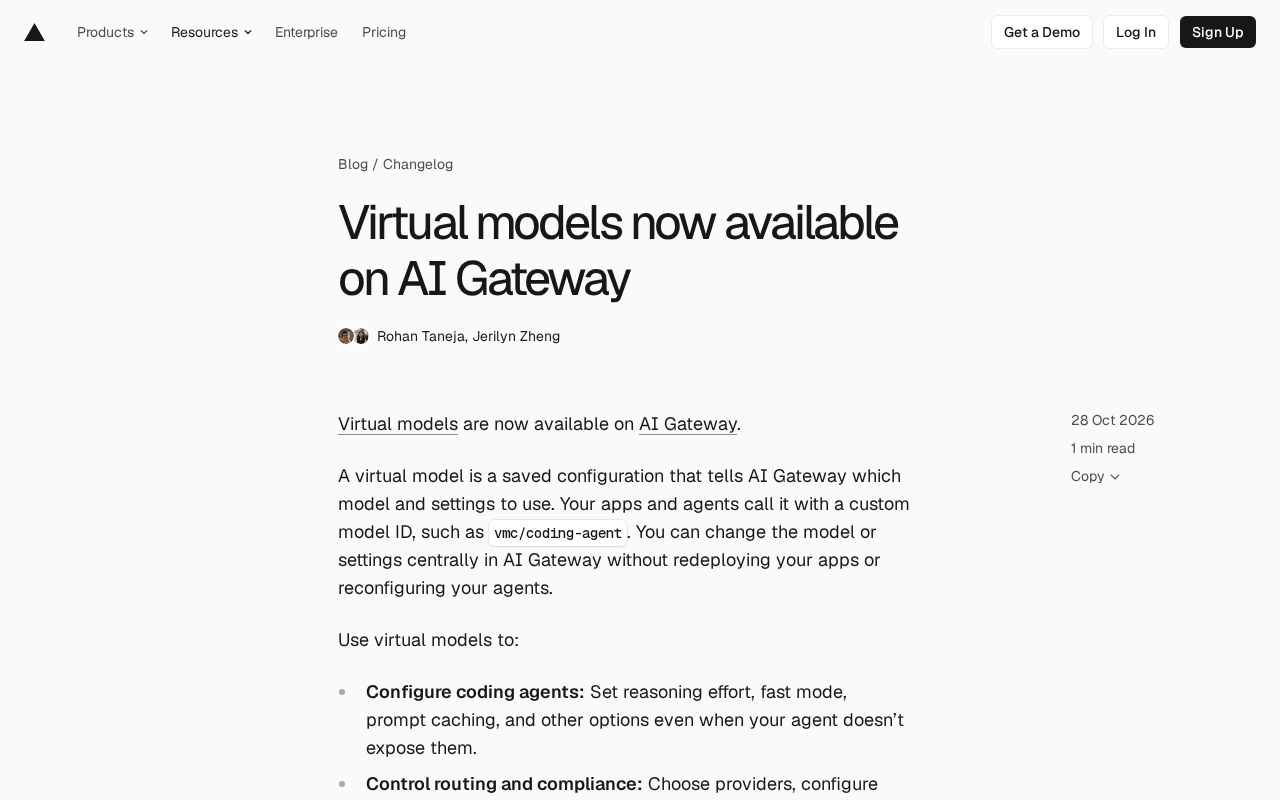
AI Gateway has launched Virtual Models, extracting model selection and parameters from application code into gateway-side configuration. Applications and agents call a custom slug like vmc/coding-agent, while the real model, reasoning effort, fast mode, prompt caching, providers, fallback, and Zero Data Retention are centrally managed without redeployment. It supports coding agents, routing and compliance, and cost attribution, and can be created via console or Vercel CLI.
AI Gateway has launched "Virtual Models." Put simply, it pulls the question of "which model to use and with what parameters" out of application code and turns it into a configuration stored on the gateway side. Applications and agents only need to call a custom model ID, such as vmc/coding-agent, and the underlying model and settings can be changed centrally in AI Gateway without redeploying the application or reconfiguring the agent.
What Problem Do Virtual Models Solve?
Model selection and parameter configuration have long been scattered across the code or configuration files of individual applications and agents. Switching models or adjusting reasoning effort often means changing code and going through a release process. Virtual Models move this mapping up a layer: callers only recognize a custom slug, while the real model and parameters are determined on the gateway side.
This is especially valuable for teams where multiple applications and agents share the same model policy—policy changes go from "edit each piece of code" to "edit one configuration."
AI Gateway is a unified access layer between applications and model providers: applications only need to target one set of gateway APIs and credentials, and the gateway handles forwarding to different providers such as Anthropic, OpenAI, and Google, while uniformly managing authentication, usage metering, quotas, observability, and failover. Because it sits in the middle of the call chain, it can swap the real model, adjust parameters, or change routing policy without modifying caller code. Virtual Models essentially leverage this middle-layer position to turn the "model identifier" into information the gateway can interpret and rewrite, rather than a string passed straight through to the upstream provider.
Three Typical Use Cases
Configuring Coding Agents
One of the official use cases is coding agents. Many agents do not expose options such as reasoning effort, fast mode, or prompt caching. Virtual Models can forcibly inject these settings without waiting for agent-side support.
Controlling Routing and Compliance
Virtual Models can specify which providers to use, configure fallback models, and enforce requirements such as Zero Data Retention. Compliance policies can therefore be enforced uniformly at the gateway layer instead of relying on each caller to comply voluntarily.
Zero Data Retention (ZDR) means a model provider commits not to persistently store request and response content, completing inference in memory and then discarding it, typically to meet industry compliance requirements or internal security requirements with strict limits on data retention. Different providers have different scopes of ZDR support and ways to enable it—some through account-level agreements, others through request headers or parameters on a per-request basis. Putting a ZDR declaration in the Virtual Model configuration means that any request sent through that slug automatically carries the corresponding requirement, so compliance baselines are not broken even if callers overlook it. It can also be combined with fallback model settings so that providers that do not support ZDR are excluded from routing in compliance scenarios.
Attributing Costs
Each request using a Virtual Model can carry custom reporting tags, making it easy to attribute costs to specific projects or teams.
Reasoning effort is a controllable parameter offered by the new generation of reasoning models, adjusting the depth of internal thinking before producing an answer using levels such as low, medium, and high: higher levels generally improve quality but increase latency and token consumption. Fast mode generally refers to prioritizing low-latency model variants or reasoning paths, trading some quality for response speed. Prompt caching allows providers to reuse previously processed identical prefix content (such as long system prompts or codebase context); cached portions are billed at a lower price and significantly reduce time to first token, which is especially beneficial for coding agents that repeatedly carry the same large context. These three types of parameters are often only exposed in some SDKs or provider APIs, and Virtual Models provide a way to inject them uniformly while bypassing caller limitations.
How to Create and Use
On the Virtual Models page, click Create Virtual Model, fill in the slug, select the underlying model, configure the desired settings, and save. You can also create one via the Vercel CLI, for example:
vercel ai-gateway virtual-models create coding-agent \
  --model anthropic/claude-opus-5.5 \
  --config '{"speed":"fast","zeroDataRetention":true}'
This command creates a reusable coding agent configuration with fast mode and Zero Data Retention.
Using it is straightforward: in AI SDK or compatible API requests, replace the original provider model ID with vmc/<slug>, for example vmc/coding-agent. If you are using a coding agent, first connect to AI Gateway via vercel ai-gateway setup, then select the Virtual Model in the agent's model selector or configuration.
According to the official documentation, Virtual Models work with all model types on AI Gateway.
AI SDK is a model-calling abstraction library for JavaScript/TypeScript that describes models from different providers through a unified interface and supports capabilities such as streaming output, tool calls, and structured output. In AI SDK, a model is usually passed in as a string ID or a provider instance; IDs such as vmc/<slug> can be recognized directly, provided the request is sent through a connected AI Gateway, so gateway authentication and project binding must be completed first. For coding agents, the role of vercel ai-gateway setup is precisely to write local credentials and the gateway address so that the agent's model selector can later list and resolve Virtual Models, thereby switching the underlying model without modifying the agent's source code.
A Design Choice Worth Noting
Making model configuration an "indirection layer" on the gateway side essentially treats model calls as infrastructure that can be governed centrally. The cost is an extra hop of indirect addressing; the benefits are decoupling configuration changes from code releases, enforceable compliance policies, and clearer cost attribution. For teams already using AI Gateway, this is a low-cost incremental capability; for teams still evaluating, the value of Virtual Models depends on whether you really have scenarios with "multiple callers and a need for unified policy"—if it is just a single application calling a single model, the benefit of this abstraction layer is limited.
For more examples, see the official launch article, and for details, see the Virtual Models documentation.
One-line Summary
AI Gateway launches Virtual Models, moving model selection and parameter configuration up to centralized gateway-side management.
Paragraph Summary
AI Gateway has launched Virtual Models, extracting "which model to use and with what parameters" from application code and storing it as gateway-side configuration. Applications and agents only call a custom slug such as vmc/coding-agent, while the real model, reasoning effort, fast mode, prompt caching, provider selection, fallback models, and Zero Data Retention are all changed centrally on the gateway without redeployment. It mainly serves three scenarios: forcibly injecting settings into coding agents that do not expose the relevant options, uniformly enforcing routing and compliance policies at the gateway layer, and attributing costs via custom reporting tags. Creation is supported through the console page and the Vercel CLI, and it works with all model types on AI Gateway. The article also notes that the benefit of this indirection layer depends on whether there is a real scenario with multiple callers requiring a unified policy.
Related articles
Ollama+RAG Local Knowledge Base Setup: A Step-by-Step AnythingLLM Tutorial
Based on a Bilibili tutorial, this guide details building a local RAG knowledge base with Ollama + AnythingLLM: from general LLM knowledge limits and RAG principles to document upload, vector storage, and verification.
The Ultimate Ollama Tutorial: A Beginner's Guide to Running Large Models Locally for Free
Ollama is an open-source local large model management tool supporting free download and deployment of models like DeepSeek, with command-line and Web UI, cross-platform, automatic GPU/CPU scheduling — ideal for AI beginners and private deployment.
Giving Claude "Hands": Exoproc Open-Source MCP Server Enables Live Process Hooking
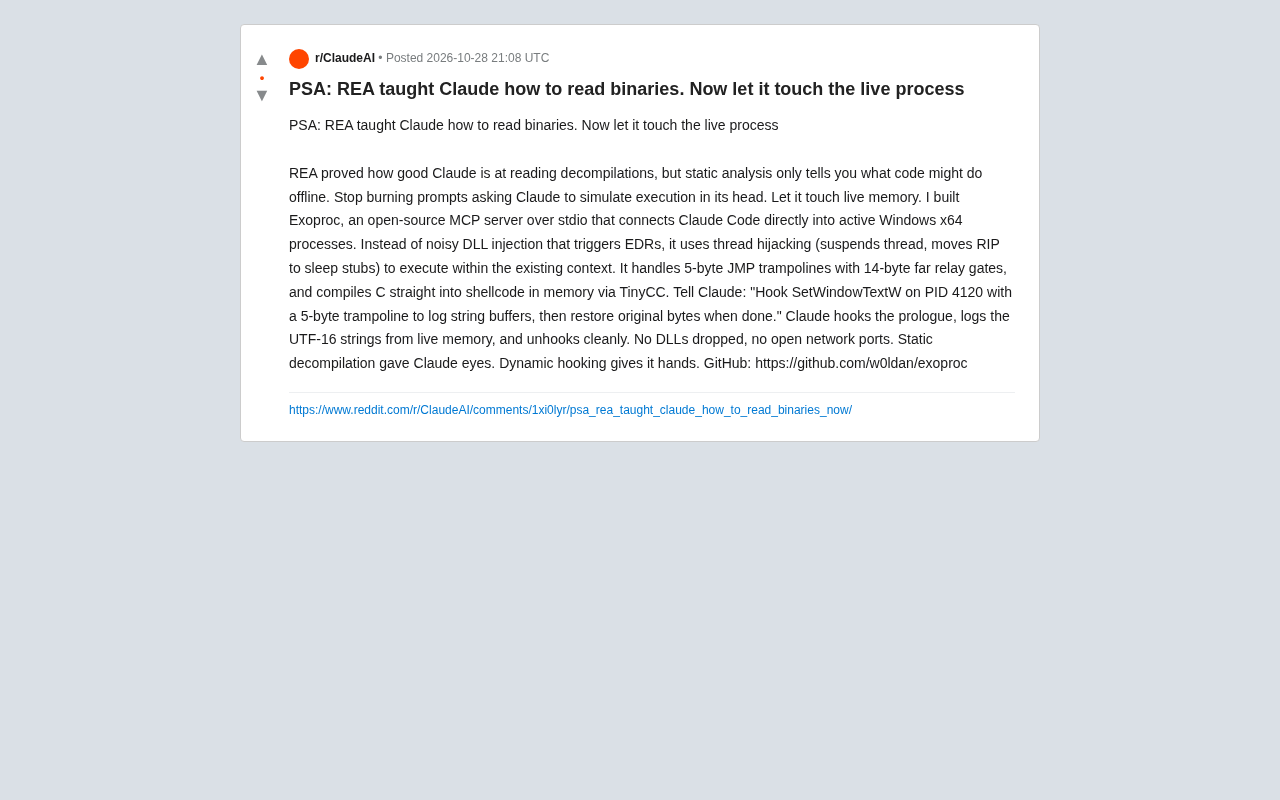
Exoproc is an open-source MCP server enabling Claude Code to hook live Windows x64 processes via thread hijacking, bypassing EDR for dynamic analysis. Static decompilation gave Claude eyes; dynamic hooking gives it hands.