AI-Generated Editable Native PPT: A Hands-On Tutorial with PptxGenJS + OpenCode

Generate native editable PPTs with PptxGenJS + AI, no more screenshot-style exports
Most AI-generated PPT solutions produce exports that are essentially screenshots and can't be edited. This article introduces a solution based on the PptxGenJS library: by creating a Skill in AI coding tools like OpenCode, the AI automatically generates PptxGenJS code that outputs native PPTX files compliant with the OOXML standard, where text, images, and shapes are all freely editable in WPS/Office. The solution is portable to Claude Code, Cursor, and other tools.
The Common Pain Point of AI-Generated PPTs: Exports Are Just Screenshots
Using AI to generate PPTs is nothing new, but most solutions can't escape an awkward problem — exported PPTs are essentially screenshots. For example, the Sndive solution mentioned previously produces nice-looking results, but once exported to PPTX format, all content becomes images that can't be directly edited for text or layout adjustments in WPS or Microsoft Office.
To understand why this is a fundamental problem, you need to understand the nature of the PPTX format. A PPTX file is essentially a ZIP archive, composed internally of XML files and media resources. This design originates from the Office Open XML (OOXML) specification — submitted by Microsoft in 2006 and formally standardized by ISO/IEC in 2008 (ISO/IEC 29500). Word's .docx, Excel's .xlsx, and PowerPoint's .pptx are all based on this standard. OOXML's design philosophy is a hybrid packaging approach of "human-readable XML + binary media resources," giving documents both structured parsability and efficient storage of rich media content like images and audio. Each slide corresponds to an XML file that precisely describes the position, dimensions, font, color, and other attributes of every text box, shape, and image — text is text, images are images, stored independently of each other. This is the fundamental reason why they're editable.
The screenshot approach essentially renders an entire page as a PNG or JPEG image and embeds it in the PPTX. Although the file extension is .pptx, the content is already rasterized bitmap data, losing all editable structural information. This also explains why screenshot-based files tend to be larger: a single 1920×1080 PNG image can easily be several hundred KB, while native XML describing the same content only needs a few KB.
In practical work, this is almost unacceptable. What we truly need is a native, editable PPT file — where text can be modified, images can be swapped, shapes can be dragged, no different from a manually created PPT.
The solution shared today is specifically designed to solve this problem.
Core Solution: Generating Native PPTX with PptxGenJS
The technical core of this solution is a JavaScript library called PptxGenJS. Its function is straightforward — generating standard PPTX files through JS code.

PptxGenJS is a pure JavaScript open-source library under the MIT license that runs in both Node.js and browser environments. Its core value lies in directly manipulating the underlying XML structure of PPTX, rather than through screenshots or Canvas rendering. From a technical lineage perspective, it belongs to the Office Open XML (OOXML) manipulation library family — similar to python-pptx in the Python ecosystem or Apache POI in the Java ecosystem. These libraries share a common working principle: constructing XML document trees in memory according to the OOXML specification, encoding binary resources like images into corresponding directories, and finally packaging the entire directory structure into a spec-compliant ZIP archive renamed with a .pptx extension. PptxGenJS encapsulates this complex XML generation logic, allowing developers to describe slide content using intuitive APIs (like addText, addImage, addShape). The output files can be normally opened and edited in WPS, LibreOffice, Microsoft Office, and other mainstream software, being completely equivalent at the format level to manually created PPTs.
Core Capabilities of PptxGenJS
- Generate native elements like text, images, and shapes in PPTs
- Precise control over layout, background images, and color schemes
- Output standard PPTX format, directly openable and editable in WPS or Office
Here's a key point: we don't need to learn PptxGenJS's API ourselves. We just need the AI to know how to call it. The AI automatically generates PptxGenJS code based on our requirements, and running it directly outputs the PPT file. Throughout the entire process, PptxGenJS is transparent to us.
Actual Results: Freely Editable in WPS
Let's look at the actual generated results. Taking an "Internet Personality Introduction" PPT as an example, when opened in WPS:
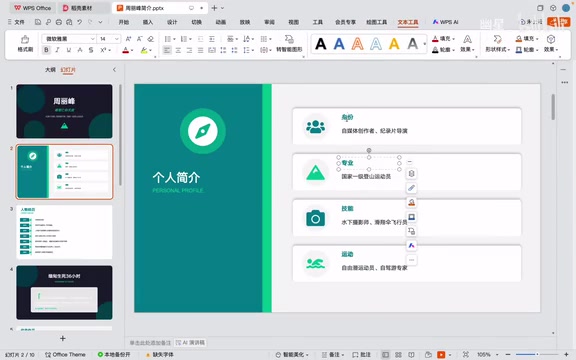
- All text can be directly clicked and edited — change whatever paragraph you want
- Images, shapes, etc. are all independent native elements in the PPT, supporting drag, resize, and replacement
- The overall layout and color scheme are quite good, with clear content structure
- Images in the PPT were collected by AI from the web, covering personal biography, awards, TV show appearances, etc.
Compared to the screenshot approach, the advantages of native PPT are immediately obvious: just directly edit whatever you're not satisfied with, perfectly matching everyday office editing habits.
Step-by-Step Workflow: From Creating a Skill to One-Sentence PPT Generation
This entire solution uses OpenCode (an open-source AI coding tool similar to Claude Code) as the AI interaction entry point. The operation is divided into two steps.
Step 1: Create a PPT Generation Skill
OpenCode supports custom Skills, so we first create a Skill specifically for generating PPTs. Before understanding this step, it's worth explaining how the Skill mechanism works.
A Skill is essentially a combination of "prompt templating" and "workflow orchestration", representing an advanced practice form of Prompt Engineering. Compared to prompts written ad-hoc in single conversations, Skills pre-define role settings, task decomposition steps, tool calling sequences, and output format constraints, solidifying validated solutions into reusable assets — this aligns closely with the concept of "design patterns" in software engineering: don't reinvent the wheel, but abstract effective solutions into templates for future reuse.
What distinguishes AI Coding Agents like OpenCode from ordinary chat-based AI is their Function Calling capability — the model can not only generate text but also decide which external tools to call during reasoning (reading/writing files, executing terminal commands, calling external APIs, etc.), and continue reasoning based on tool return results. This "think → act → observe" loop (known academically as the ReAct framework) enables Agents to truly autonomously complete complex tasks requiring multi-step, cross-system collaboration, rather than merely offering suggestions.
The process of creating a Skill can itself be delegated to AI:
- Open OpenCode's built-in Skill Creator feature
- Tell the AI: "Create a new Skill for making PPTs, using PptxGenJS as the tech stack"
- Provide the AI with PptxGenJS's official documentation link as reference
- The AI will automatically generate the complete Skill configuration file

Once the Skill is created, it contains a complete workflow definition: plan content → generate JS script → run script to output PPT, along with details like default color schemes. All these configurations are automatically generated by AI — no need to manually write a single line of code.
Step 2: One-Sentence Command to Generate PPT
Once the Skill is created, you can call it directly in your current project. The operation is very simple:
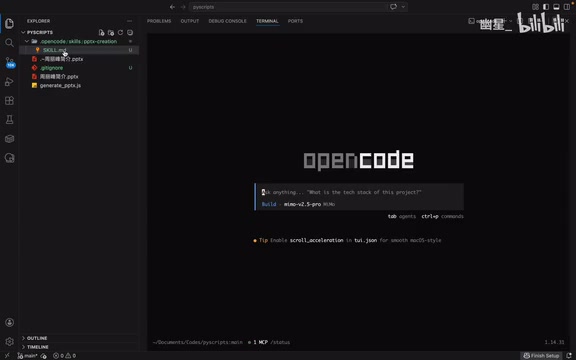
Just enter a one-sentence command, for example:
"Generate a profile PPT about internet personality Zhou Lifeng, search for images online, and make it look nice."
Then reference the previously created PPT Skill, and the AI will automatically complete the following tasks:
- Plan PPT structure: Determine number of pages, content per page, overall narrative logic
- Search for materials: Collect relevant images and information from the web
- Generate PptxGenJS code: Write a complete JS script including layout, text, and image references for all pages
- Run and output: Execute the script to generate the final PPTX file
This "configure once, call repeatedly" pattern dramatically lowers the barrier to using AI tools. When users input natural language commands and reference a Skill, the AI combines user intent with the pre-defined workflow in the Skill, automatically decomposing the overall goal into sub-tasks like "search images → write code → execute script → verify output" through the Function Calling mechanism, executing them sequentially. The entire process is completely transparent to the user. The end result is a native PPT that can be directly opened in WPS or Office and freely edited.
Solution Portability: Works with Claude Code, Cursor Too
This Skill isn't locked to OpenCode. If you regularly use other AI coding tools like Claude Code, Cursor, or other Coding Agents, you just need to copy the Skill's configuration content over and it works. The core logic is universal:
- Help the AI understand PptxGenJS's API usage
- Plan PPT content and structure based on user requirements
- Automatically generate and execute JS code
- Output standard PPTX files
The underlying reason for this portability is that different AI coding tools, despite varying interfaces and interaction methods, all rely on similar Function Calling mechanisms and code execution sandbox capabilities. As long as the tool supports the core operation of "running code," PptxGenJS's Node.js scripts can execute normally within it. The effectiveness of this entire solution doesn't depend on any platform-specific proprietary features. In other words, as long as your AI tool supports running code, this solution will work.
Native PPT vs Screenshot Approach: Summary Comparison
The elegance of this solution lies in making a beautiful combination of AI's content generation capability and PptxGenJS's native PPT generation capability. AI handles the "thinking" — planning content, collecting materials, designing layouts; PptxGenJS handles the "doing."
Related articles
 Tutorials
ChatGPT Plus Subscription Guide: Are GPT-5.5, image-2, and Codex Worth the Upgrade?
A detailed look at ChatGPT Plus features — GPT-5.5, image-2, and Codex — with a Plus vs Pro comparison and a complete step-by-step subscription guide for users outside the US.
 Tutorials
Harness AI Engineering in Practice: Using Claude Code to Master Enterprise-Level E-Commerce Development
Deep dive into Harness AI Engineering: master enterprise e-commerce development with Claude Code using the Rules, Skills, Wiki, and Changes framework.
 Tutorials
Cursor + Codex Dual-IDE Collaboration: A Practical Methodology for Open-Source Project Customization
A complete methodology for open-source project customization based on real-world experience, detailing the Cursor+Codex dual-IDE workflow, seven-stage process, MVP validation, and AI source code reading techniques.