AI-Generated Floor Renovation Time-Lapse Videos: A Zero-Cost Tutorial for Creating Viral Short Videos That Make Money

Create viral renovation time-lapse videos using free AI tools and monetize them on short video platforms.
Renovation time-lapse videos are going viral on TikTok and similar platforms thanks to their addictive before-and-after appeal and high completion rates, with some accounts gaining 1.1 million followers and 122 million views per video in just two months. The entire production workflow uses three free tools — ChatGPT for structured prompts, Google Whisk for consistent image generation, and Google Flow for converting static images into time-lapse video — enabling zero-cost creation in under 30 minutes per video, monetizable through platform ad revenue and brand collaborations.
Floor renovations, resin floors, exterior makeovers… time-lapse style short videos like these are going viral on TikTok, Instagram Reels, and Facebook Shorts. Some accounts have amassed 1.1 million followers in just two months, with a single video hitting 122 million views. More importantly, these videos can be generated entirely for free using AI tools. This article breaks down the complete production workflow to help you create this type of viral content from scratch.
Why Do Renovation Time-Lapse Videos Go Viral on Short Video Platforms?
Renovation videos are inherently "addictive" — people have an instinctive curiosity about "before and after" comparisons, and the time-lapse presentation dramatically compresses viewing time, delivering satisfaction to users within seconds.
Time-lapse is a filming technique that compresses long processes into extremely short playback durations. Traditionally, it requires a fixed camera position, interval shooting of hundreds or even thousands of photos, followed by compositing. In short video platform recommendation algorithms, watch-through rate is one of the most critical weighting metrics — TikTok's recommendation system prioritizes pushing videos with high completion rates to larger traffic pools. Renovation time-lapse videos typically complete an entire "dirty mess → brand new" narrative arc within 15-60 seconds. This structure naturally pushes completion rates to extremely high levels because once viewers start watching, they want to see the final result, and the psychological cost of dropping out midway is high. Once the algorithm captures this signal, it naturally promotes the content aggressively.
Taking the case mentioned in the video as an example, an account focused on floor renovation content broke 1.1 million followers within two months, with three videos reaching 122 million, 89 million, and 75 million views respectively. Even using the most conservative estimate — earning just 1 cent per thousand views — 122 million views means approximately $1,220 in revenue from a single video. This doesn't even include brand collaborations, affiliate marketing, and other monetization channels.
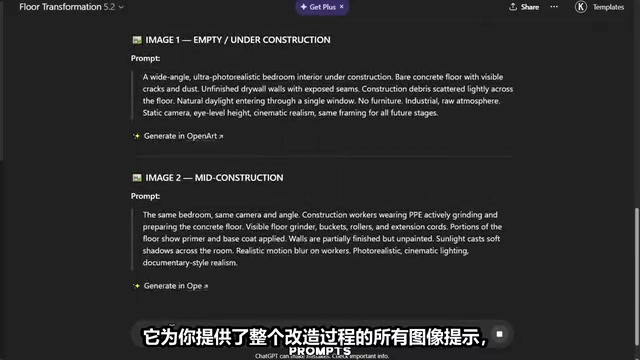
Core Tool Chain: ChatGPT + Google Whisk + Google Flow
The entire production workflow relies on three core AI tools working together, all available for free. Let's break down the specific operations for each step.
Step 1: Generate Prompts Using a ChatGPT Custom GPT
Open ChatGPT, click "Explore GPTs," and search for "Floor Renovation." You'll see multiple custom GPTs. Select one that ranks near the top and click "Start Chat."
Custom GPTs are a feature OpenAI launched in November 2023, allowing users to create AI assistants optimized for specific tasks on top of ChatGPT's base model. Each custom GPT is essentially a combination of preset system prompts, knowledge base files, and callable external tools. When you search for floor renovation-related custom GPTs, their creators have already pre-written detailed instruction templates that tell the model how to decompose a renovation scene into multiple stages and output prompts conforming to specific image generation model syntax for each stage. This is many times more efficient than users writing prompts from scratch and avoids quality fluctuations caused by non-standard prompts.
The GPT will present you with 10 different space options (such as bedroom, kitchen, bathroom, etc.). After selecting your desired scene, it automatically generates all image prompts and video prompts for the entire renovation process.
Here's a key tip: Don't directly use the GPT's randomly generated content. A better approach is to first download reference images of your desired specific style from Pinterest, then upload the reference images to the same GPT. This way, each prompt is generated directly based on your reference image, ensuring better consistency and more accurate visual effects.
Four Major Quality Improvements from Structured Prompts
When you use optimized structured prompts (rather than GPT's basic prompts), the final AI-generated video shows four significant improvements:
- Consistent worker appearance — No "face-changing" issues across different clips
- Highly realistic sound effects — This has a huge impact on viewing experience
- Controlled lighting — Indoor lighting won't jump between clips
- Natural time-lapse movement — Smooth camera motion without abrupt jumps
Image Generation: Google Whisk Operation Guide
Google Whisk is an experimental image generation tool from the Google DeepMind team. Its core difference from tools like Midjourney and DALL-E is its "image-conditioned generation" architecture. Traditional text-to-image tools rely solely on text prompts, while Whisk allows users to simultaneously provide reference images as visual anchors. The model extracts visual features such as style, color tone, and composition from reference images, then combines them with text prompts to generate new images. This is why subsequent operations emphasize "making sure only your selected image is checked" — Whisk uses checked images as visual condition inputs for the next generation, maintaining consistency in scene, lighting, and character appearance across multiple images. This is critical for time-lapse videos that require multi-frame coherence.
After importing reference images into Google Whisk, copy the first image prompt from ChatGPT and paste it. Select portrait (9:16) aspect ratio and press Enter. Whisk will generate two images within seconds.
Key operational points:
- Select your favorite image and drag it to the left panel
- Make sure only your selected image is checked, uncheck all other images
- Copy the second prompt from ChatGPT and paste it into Whisk
- New results will be generated based on your previously selected image
- Repeat this step to progressively generate images for all renovation stages
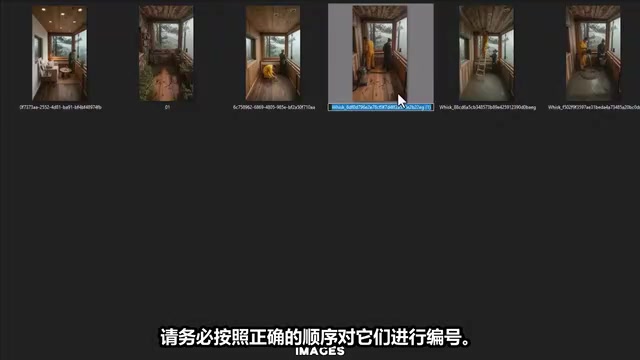
Important reminder: After generating all images, make sure to number them in the correct renovation order (e.g., 1-original floor, 2-removing old floor, 3-laying new material, 4-finished result, etc.). This directly determines the logical coherence of the subsequent video.
Video Generation: Converting Static Images to Time-Lapse Video with Google Flow
This is the most critical step in the entire AI video production workflow. Open Google Flow, select the "Image to Video" function, and create a new project.
Google Flow (based on Google DeepMind's Veo series video generation model) uses Video Interpolation and Motion Synthesis as its core "image to video" technology. When users input two keyframe images, the model doesn't simply do image morphing — it understands the semantic differences between two images (for example, from "floor covered with old tiles" to "worker prying up tiles") and then generates physically plausible intermediate motion. This technology relies on training with large-scale video datasets, where the model learns patterns of real-world object motion, lighting changes, and camera movement. The 8-second output duration represents the current balance point between quality and computational cost for video generation models, sufficient to cover the key actions of one renovation stage.
Core Logic: Create Transitions with Two Images
Always import two images at a time to create transition effects, maintaining strict order:
- Clip 1: Image 1 → Image 2
- Clip 2: Image 2 → Image 3
- Clip 3: Image 3 → Image 4
- And so on…
Specific steps:
- Click the plus sign on the left to import Image 1, select portrait (9:16), check crop and save
- Import Image 2 on the right, ensuring the first frame is on the left and the second frame is on the right
- Copy the corresponding video prompt from ChatGPT and paste it into Flow
- Press Enter, and an 8-second clip will be generated within seconds
Sound Design: Making AI Videos Sound Like Real Footage
You must explicitly add one instruction to the prompt: "No background music, no dialogue, no narration, only contextually appropriate sound effects."
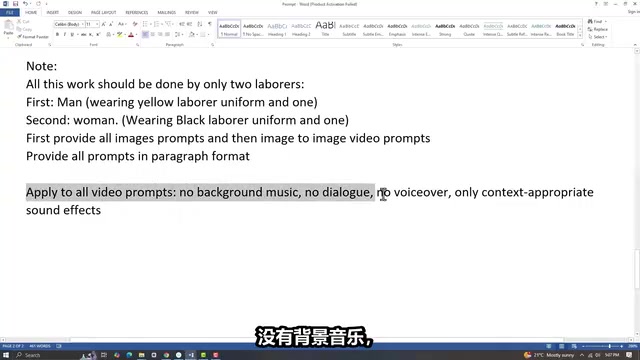
This is crucial. Sound design is called "the invisible 50%" in film production — viewers often don't consciously notice sound effects, but the moment they're missing or mismatched, the sense of incongruity immediately exposes the video's inauthenticity. Google Flow's built-in audio generation module can automatically synthesize ambient sound effects (Foley sounds) based on video content, such as hammering, painting, footsteps, etc. In traditional film post-production, Foley effects require professional Foley artists to handcraft sounds in recording studios at extremely high costs. AI sound effect generation matches corresponding sound samples by analyzing action semantics in video frames. While precision doesn't yet match manual production, it's convincing enough for short video platform viewing scenarios.
Without this restriction, Google Flow will automatically add random music or dialogue, destroying the authenticity of the time-lapse feel. Retaining ambient sound effects (such as footsteps, tool sounds, construction noises) causes viewers' brains to automatically categorize the video as "real footage," dramatically enhancing immersion.
Clip Continuity: Ensuring Seamless Video Without Frame Jumps
The ending frame of each clip becomes the starting frame of the next clip. For example, if Clip 1 ends at Image 2, then Clip 2 must start from Image 2 and import Image 3 as the second frame. This ensures continuity in the final video without frame jumps or visual breaks.
Final Editing and Multi-Platform Publishing
Once all clips are generated, import them into video editing software (such as CapCut) for final assembly:
- Arrange all clips in order — Ensure the renovation process logic is correct
- Add background music — Recommend using free music from YouTube Audio Library to avoid copyright and monetization issues
- Keep AI-generated ambient sound effects — This is the core source of video authenticity
- Export in 9:16 portrait format — Compatible with TikTok, Instagram Reels, YouTube Shorts, and other major short video platforms
Monetization Paths: How to Make Money with AI Renovation Videos?
Monetization methods for this type of content mainly include:
- Platform ad revenue sharing: TikTok Creator Fund, YouTube Shorts revenue, Facebook Stars, etc.
- Batch account operations: Since the production workflow is highly standardized, you can simultaneously operate multiple accounts with different styles
- Brand collaborations: Once follower count reaches a certain scale, home improvement and building materials brands will actively seek partnerships
It's worth noting that while AI-generated content is extremely efficient, platform policies on AI content are continuously evolving. As of 2025, major short video platforms' policies on AI-generated content (AIGC) are in a rapid iteration phase. TikTok requires creators to label "realistic AI-generated content" or face potential throttling or removal; YouTube Shorts introduced mandatory AI content disclosure mechanisms in 2024, where unlabeled AI content may receive reduced recommendation weight; Meta (Facebook/Instagram) has adopted the C2PA content provenance standard, capable of automatically detecting some AI-generated images and videos and adding watermarks. This means that while the production barrier for AI renovation videos is extremely low, creators need to closely monitor platform policy changes and operate within compliance frameworks. It's recommended to appropriately label AI-assisted creation when publishing, while maintaining differentiation in content creativity and topic selection — as similar content floods in, platform algorithms may also deduplicate or downrank highly homogeneous AI content. Therefore, topic differentiation and investment in content creativity will become key to long-term competitiveness.
The entire workflow from conception to finished product can be completed in under 30 minutes per video once you're proficient, at absolutely zero cost. For anyone looking to try AI content entrepreneurship, this represents an entry point with an extremely low barrier and considerable return potential.
Key Takeaways
- Renovation time-lapse videos are going viral on short video platforms, with accounts gaining 1.1 million followers in two months and single videos breaking 100 million views
- The complete tool chain is ChatGPT (prompt generation) + Google Whisk (image generation) + Google Flow (image-to-video), all free
- Using structured prompts ensures four key advantages: consistent worker appearance, realistic sound effects, controlled lighting, and natural movement
- The key video generation technique is importing two images at a time to create transitions, while explicitly requesting only ambient sound effects in prompts
- Once proficient, the entire workflow takes under 30 minutes per video at zero cost, monetizable through platform revenue sharing and brand collaborations
Related articles
 Tutorials
ChatGPT Plus Subscription Guide: Are GPT-5.5, image-2, and Codex Worth the Upgrade?
A detailed look at ChatGPT Plus features — GPT-5.5, image-2, and Codex — with a Plus vs Pro comparison and a complete step-by-step subscription guide for users outside the US.
 Tutorials
Harness AI Engineering in Practice: Using Claude Code to Master Enterprise-Level E-Commerce Development
Deep dive into Harness AI Engineering: master enterprise e-commerce development with Claude Code using the Rules, Skills, Wiki, and Changes framework.
 Tutorials
Cursor + Codex Dual-IDE Collaboration: A Practical Methodology for Open-Source Project Customization
A complete methodology for open-source project customization based on real-world experience, detailing the Cursor+Codex dual-IDE workflow, seven-stage process, MVP validation, and AI source code reading techniques.