AI-Generated HTML Embedded Development Tools: Font Bitmaps, CRC Checksums, and Serial Debugging in One Click

Use AI to generate HTML pages for quickly customizing embedded development tools
This article introduces a method of using AI to generate embedded development tools in HTML page format. HTML tools require zero installation, work cross-platform, and are easy to share. By describing requirements to AI, you can quickly customize commonly used tools like font bitmap generators, CRC/HASH checksum calculators, and serial port debugging assistants. The article emphasizes that AI lowers the coding barrier but not the cognitive barrier — a developer's core competitiveness lies in clear requirement articulation and technical understanding.
Embedded developers rely on various small tools daily — serial port debuggers, font bitmap generators, checksum calculators… In the past, you'd either scour the internet for unreliable software or spend half a day building one yourself. But now, AI is completely changing the game: with a few prompts and one minute of time, you can create custom HTML development tools tailored exactly to your needs.
Core Concept: Why Use HTML for Embedded Development Tools?
The essence of this approach lies in one simple trick: have AI generate tools in the form of HTML pages.
Why HTML instead of desktop applications? The reasons are extremely practical:
- Ready to use instantly: Double-click to open in a browser, zero installation cost
- Platform agnostic: Works on Windows, macOS, and Linux
- No environment setup: No need to install Python or Java — the browser is your runtime
- Easy to share: Deploy to an intranet server and send a link to your colleagues
For embedded developers, this means you can convert all your commonly used tools into HTML format, use them anywhere anytime, and even host them on a team's internal server for sharing.

Practical Example 1: LCD Font Bitmap Generation Tool
The first demonstration is the very common dot matrix font bitmap generation tool in embedded development. When displaying Chinese characters on an LCD screen, you need to convert text into dot matrix data. The traditional approach uses legacy tools like PCtoLCD, but these have fixed functionality, outdated interfaces, and have long since stopped being updated.
The essence of dot matrix font bitmaps is encoding the visual shape of characters into binary bitmap data. Taking a 16×16 dot matrix as an example, each Chinese character consists of 256 pixels, each pixel represented by 1 bit (on/off), requiring 32 bytes of storage per character. Scanning methods are divided into horizontal and vertical scanning, and the scan order (left-to-right, top-to-bottom, or reversed) directly affects how the driver code is written. Different LCD controllers (such as ST7735, ILI9341, SSD1306) often have different requirements. This is why generic bitmap tools often "feel awkward to use" — their default parameters may not match your specific hardware. For this very reason, AI-generated tools that allow free customization of scan direction and output format actually fit real-world needs better than legacy software.
Describe your requirements to AI:
I need a pure HTML dot matrix font bitmap tool that accepts text input, allows setting dot matrix size and font selection, previews the generated bitmap, and outputs a C language font array.

The AI completed this font bitmap generator in about one minute. After saving the generated HTML file, you can use it by simply double-clicking to open. In testing, generating four KaiTi font bitmaps at size 64 successfully produced C language font arrays, which displayed correctly on the LCD screen after being flashed to the device.
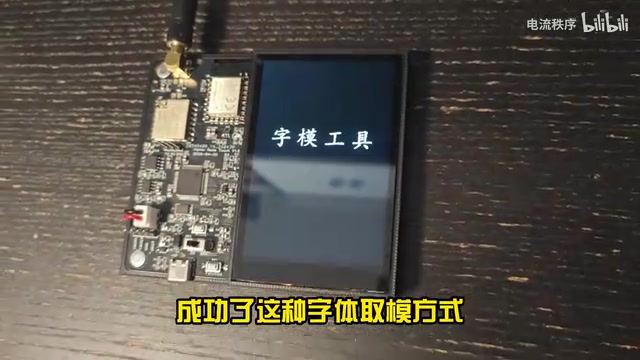
This approach is particularly suitable for scenarios displaying only a small number of fixed characters, such as product logos or status messages — it saves much more space than loading an entire font library. And because it's a custom tool, you can have AI modify it anytime you want to add features (such as supporting specific encoding formats or adjusting scan directions).
Practical Example 2: Universal CRC/HASH Checksum Calculator
The second tool is even more practical — a multi-function calculator integrating common HASH and CRC checksums.
When debugging embedded communication protocols, you frequently need to calculate various checksum values like CRC8, CRC16, CRC32, MD5, SHA256, etc. It's worth noting that CRC is not a single algorithm but a vast family of algorithms, with the core difference lying in the selection of generator polynomials: CRC8 is common in single-wire protocols (like the DS18B20 temperature sensor); CRC16-MODBUS is the de facto standard for industrial serial communication; CRC32 is widely used in Ethernet frame checking and file integrity verification. More troublesome is that under the same "CRC16" name, there may be hidden differences in initial values, input reflection, output reflection, and other parameters, causing inconsistent results between different tools. Online tools typically only support a single algorithm, and finding a universal checksum calculator that "inputs once, outputs all results" is nearly impossible.
But with AI, you can easily customize one: input a string or hexadecimal data, and automatically calculate and display all common HASH and CRC checksum results. This kind of highly personalized requirement is precisely where AI-customized tools shine — you're no longer limited by what others have built; you build whatever you need.
Practical Example 3: Serial Port Debugger with Number Highlighting
The most surprising example is building a serial port debugging assistant in HTML. Many people don't know that modern browsers can directly access serial port devices through the Web Serial API.
The Web Serial API is a browser standard proposed by the W3C's WICG (Web Incubator Community Group), officially shipped in Chrome 89 in 2021. It allows web pages to communicate directly with serial devices via JavaScript without installing any drivers or plugins. Under the hood, it works through the operating system's serial port drivers, supporting full configuration of baud rate, data bits, stop bits, parity, and more. For security reasons, the API requires user-initiated actions (such as clicking a button) to request port access permissions, and is only available in HTTPS or localhost environments — a technical detail to keep in mind for deployment and sharing.
The requirement this time was to add a special feature on top of a regular serial port assistant: automatic red highlighting of numeric text. During embedded debugging, serial output logs are often mixed with large amounts of text, and critical numerical data can easily get buried. Automatically highlighting numbers in red dramatically improves debugging efficiency.
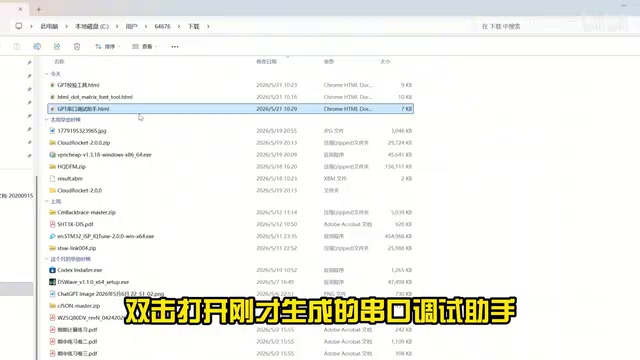
Test results: Open the HTML file, select the COM port to connect to the device, and all numeric portions in the serial output are highlighted in red as specified — critical data is immediately visible at a glance.
The Essence of AI Tool Customization: Your Ability to Describe Requirements Determines the Ceiling
From a technical standpoint, the workflow of AI-generating HTML tools is extremely simple: describe requirements → AI generates code → save file → double-click to use. But there's a key point that's easily overlooked:
This doesn't mean the barrier for developers has dropped to zero. Knowing what you need, understanding the boundaries of what computers can do, and being able to articulate that clearly — that itself is a capability and a threshold.
This statement highlights the shift in core competitiveness for developers in the AI era: from "how to implement" to "what to implement." You need to understand the principles of font bitmap generation, the types of CRC checksums, and the existence of the Web Serial API to formulate precise requirements. AI lowers the coding barrier, not the cognitive barrier.
Getting Started: Build Your Embedded HTML Toolbox
If you'd like to try using AI to customize embedded development tools, here are some recommendations:
- Be specific in your requirements: Don't just say "make a serial port tool" — specify functional details like baud rate selection range, data display format, special highlighting needs, etc.
- Iterate and optimize: It's normal for the first version to be imperfect. Feed back the issues to AI for continued refinement — typically 2-3 rounds will achieve satisfactory results.
- Build a personal tool library: Store all generated HTML tools in one place, link them together with an index page, and create your own "embedded development toolbox."
- Mind browser compatibility: The Web Serial API currently has full support only in Chrome and Chromium-based Edge; Firefox and Safari have not yet implemented this standard. Tools involving serial port functionality should specify browser requirements to users and ensure deployment in HTTPS or local environments.
With AI's assistance, every embedded developer can have a custom tool set perfectly aligned with their own workflow. Instead of spending time searching everywhere for tools and making do with what you find, spend one minute letting AI tailor-make exactly what you need.
Related articles
 Tutorials
ChatGPT Plus Subscription Guide: Are GPT-5.5, image-2, and Codex Worth the Upgrade?
A detailed look at ChatGPT Plus features — GPT-5.5, image-2, and Codex — with a Plus vs Pro comparison and a complete step-by-step subscription guide for users outside the US.
 Tutorials
Harness AI Engineering in Practice: Using Claude Code to Master Enterprise-Level E-Commerce Development
Deep dive into Harness AI Engineering: master enterprise e-commerce development with Claude Code using the Rules, Skills, Wiki, and Changes framework.
 Tutorials
Cursor + Codex Dual-IDE Collaboration: A Practical Methodology for Open-Source Project Customization
A complete methodology for open-source project customization based on real-world experience, detailing the Cursor+Codex dual-IDE workflow, seven-stage process, MVP validation, and AI source code reading techniques.