AI-Generated Video Thumbnails in Practice: Layered Prompts to Break Free from Template Design

A layered prompt methodology for AI video thumbnails that eliminates generic template aesthetics.
Bilibili creator Qiye shares his complete approach to AI-generated video thumbnails, demonstrating how decomposing prompts into layers — title hierarchy, hero visuals, mobile thumbnail scalability, and explicit exclusions — overcomes the generic "template look" that plagues both traditional and AI-generated designs. He publicly shares his working prompt templates for direct reuse.
From "Swap Text and Images" to AI-Powered Thumbnail Creation
In an era of exploding short-form video and visual content, thumbnails often determine a viewer's first impression. Bilibili creator Qiye shared a striking insight: all his video thumbnails are generated by AI, and "not a single one has been manually edited." This would have been unimaginable before AI image generation technology matured.
Before the AI era, the classic video thumbnail workflow was essentially "swapping text and images" within fixed templates — find an existing layout, replace the title text and hero image. This approach remains common today; many thumbnails you scroll past in content feeds are still template-based at their core. But Qiye argues that AI has pushed thumbnail quality and completeness far beyond what templates offer, freeing creators from those constraints.
The AI-generated thumbnails discussed here primarily rely on text-to-image diffusion models like Midjourney, Stable Diffusion, and DALL·E. These models learn to convert natural language descriptions into visual images by training on massive image-text pair datasets. Since Stable Diffusion went open-source in 2022, AI image generation has rapidly iterated from "usable" to "production-ready" — early models had obvious flaws in text rendering and hand details, but newer models from 2024 onward (such as FLUX, Ideogram, and GPT-4o's image generation capabilities) can handle both Chinese and English text layout reasonably well. This is the technical turning point where AI thumbnails went from "toy" to "production tool."
This isn't merely an efficiency improvement — it's a paradigm shift in production. AI is no longer just providing assets or serving as an entertainment tool; it can genuinely "take over" the entire thumbnail design and generation process.
The Common Trap of AI Thumbnails: A Different Kind of "Template Look"

However, Qiye also pointed out a commonly overlooked problem: AI-generated thumbnails have their own "template look" too.
You've certainly seen these kinds of images: frames packed with blue light particles, or covered in purple circuit board textures — they look busy and "techy," but when placed in a content feed, users' fingers scroll right past them without forming any lasting impression.

The reason behind this: if you simply toss a phrase like "premium feel" or "tech aesthetic" into your prompt, AI tends to generate the most common, most "safe" visual expressions from its training data — and these are precisely the overused, indistinct elements. In other words, lazy prompts only produce another form of template design. AI generation alone isn't the answer; what matters is how you guide the AI.
Notably, this "template look" isn't a new phenomenon of the AI era — it's a continuation of the long-standing tension between efficiency and distinctiveness in content creation. In traditional design, online tools like Canva and Chuangkit dramatically lowered the design barrier for non-professionals through massive template libraries, but also caused severe visual homogenization — countless accounts' thumbnails look nearly identical in color scheme, layout, and font choices. AI image generation had the potential to break this template dependency, but because training data itself contains vast amounts of templated design, and users habitually use vague style descriptors, it has spawned a new wave of "AI template look." This underscores once again that tool innovation doesn't automatically solve aesthetic homogenization — differentiated design thinking is the key.
Layered Thinking: The Core Method for Writing Effective Thumbnail Prompts
Qiye shared his core methodology, with the essence being to "decompose thumbnail requirements into layers" rather than issuing vague instructions. He explicitly specifies the following layers in his prompts:
The underlying logic of this method aligns with the core principles of Prompt Engineering. Prompt Engineering was initially widely discussed in the large language model space, with its core being carefully designed input instructions to guide models toward more expected outputs. In AI image generation, prompt engineering is equally crucial but more challenging — because visual language is more ambiguous than text, and the same word can evoke completely different images in different minds. Qiye's "layered decomposition" approach essentially translates Information Hierarchy theory from visual design into structured prompt syntax, so that AI no longer "guesses" what the user wants but organizes the composition according to explicit visual priorities.
Title Hierarchy
First, divide the title text into layers, clearly defining the visual weight of the main title versus subtitles. This determines reading priority and prevents all text from clustering together into visual chaos.
Hero Visual Selection
Next, clearly define "what goes in the hero visual." This is the thumbnail's visual focal point — it needs a clear, instantly communicative core element that conveys the content's theme.
Thumbnail Scalability
An extremely practical consideration: "What should be visible when shrunk down on mobile?" Thumbnails in content feeds are often displayed at tiny sizes. If you only design for full-size viewing, the result may become an unreadable blur when scaled down. Therefore, you must ensure core information remains clearly identifiable at thumbnail size.
This point has ample practical validation in the industry. Research shows that in mobile content feeds, thumbnail display sizes are typically only around 160×90 pixels — just a fraction of the original image. At this size, fine details completely disappear; only high-contrast color blocks, large title text, and clear subject outlines can be recognized. Famous YouTube creator MrBeast has publicly stated that his team specifically reviews every thumbnail at thumbnail size on phone screens, redoing any that don't pass. Qiye's incorporation of this professional practice into AI prompt design is a textbook example of deeply integrating platform operations experience with AI tools.
Explicit Exclusions
Finally, clearly specify "which elements are absolutely unwanted." This is often overlooked, but it's precisely the key to preventing AI from generating cliché elements like "blue light particles" and "purple circuit boards" — negative constraints pull AI out of its default patterns.
In AI image generation, this practice has a professional term: "Negative Prompt." In open-source models like Stable Diffusion, the negative prompt is a separate input field that tells the model to actively avoid certain visual features during generation. The technical principle involves subtracting the semantic vectors corresponding to negative prompts from noise predictions during the diffusion model's sampling process, thereby guiding generated results away from those features. Even in models without a dedicated negative prompt field (like Midjourney), similar effects can be achieved through the --no parameter or by using expressions like "avoid" and "without" in the prompt. This "subtractive" approach often improves image quality more than endlessly "adding" descriptive terms.

This "layered decomposition + explicit trade-offs + exclusion of distractions" approach essentially translates a designer's professional judgment into structured instructions that AI can understand — and represents the dividing line between amateur and professional prompts.
Public Prompt Templates and Free Trial Opportunities
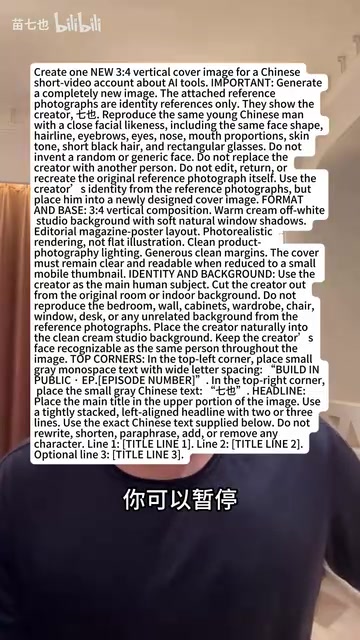
Commendably, Qiye chose to publicly share the complete prompts he actually uses. Users can pause the video, replace the titles and hero visuals with their own content, and regenerate to get started immediately. This "teach a person to fish" approach is far more valuable than simply showcasing finished products.
Additionally, he offered 100 free generation credits to help 10 viewers create thumbnails. Interested users can join his profile group chat, leave their content type (such as books, career, etc.), and experience AI thumbnail generation firsthand.
AI Is the Tool; Design Thinking Is the Core Competitive Advantage
The most valuable aspect of Qiye's sharing isn't the fact that "AI can generate thumbnails," but rather the revelation of how to harness AI image generation tools with the right mindset.
AI image generation technology is already powerful enough, but tool power doesn't automatically translate into good results. What truly creates differentiation is whether the user possesses clear design thinking — knowing how to organize information in layers, optimize for thumbnail scenarios, and use exclusions to avoid clichés.
As AI gradually takes over more creative production processes, this principle has universal significance: What determines output quality is always the person asking the questions, never the tool answering them.
Key Takeaways
Related articles

Why Does the Tesla Roadster Need to Fly? A Deep Dive into Musk's Wild Demo
Tesla's Roadster launch showed wall-climbing, upside-down driving, and flying stunts—but The Vergecast notes the demo car may lack a battery, the Rocket version is invite-only and not street-legal, and the website terms don't guarantee delivery. After nine years of delays, why does this car still need to exist?

AI Is Not a Replacement: Human-AI Collaboration Through the Lens of Factory Root Cause Analysis
Starting from factory root cause analysis, this article explains how AI accelerates evidence chain construction rather than replacing human experts, exploring the pragmatic implementation logic and business value of 'AI supporting people rather than replacing them.'

AI Agent Decision Auditing: Building an Evidence Chain in Regulated Workflows
Starting from a Reddit discussion, this article analyzes three core issues in AI agent decision auditing within regulated workflows: what fields audit records should contain, how to handle feedback latency for erroneous decisions, and how to continuously calibrate LLM judge consistency with human judgment.