AI One-Click Bypass of Infinite Debugger Anti-Debugging: A Tampermonkey Script Hands-On Tutorial

Use precise AI prompts to generate Tampermonkey scripts that efficiently bypass frontend Infinite Debugger anti-debugging
This article explains the principles behind frontend Infinite Debugger anti-debugging and its common implementations (setInterval, Function constructor, eval), showing why vague AI questions yield poor results. The key is deconstructing reverse engineering pain points into precise technical instructions. By crafting prompts with specific implementation details, output format, and target effects, AI generates Tampermonkey hook scripts that — combined with manual residual breakpoint marking — can reduce half an hour of debugging to just minutes.
What Is Infinite Debugger Anti-Debugging?
If you've ever done web scraping or frontend reverse engineering, you've definitely encountered this scenario: the moment you press F12 to open browser DevTools, the page frantically pops up Debugger breakpoints one after another, endlessly, until your hand gets sore and you give up.
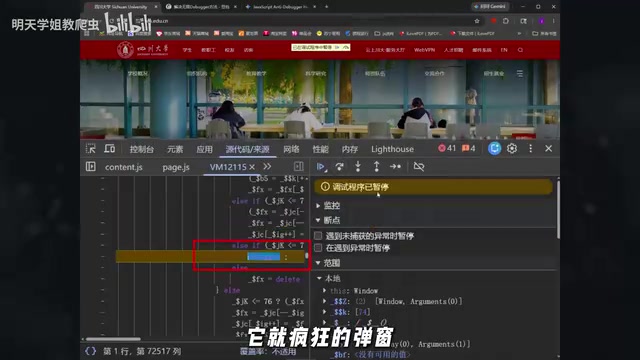
This is a common frontend anti-debugging technique — Infinite Debugger. The principle is straightforward: the website continuously triggers debugger statements via JavaScript. Once it detects that DevTools is open, it traps you in an infinite breakpoint loop, preventing you from viewing network requests or analyzing page logic.
Infinite Debugger implementations typically come in several variants: the most common uses setInterval or setTimeout timers to periodically execute functions containing debugger statements; another leverages the Function constructor to dynamically generate code, such as new Function('debugger')() — this approach bypasses static code analysis because the code content is only constructed at runtime, making it invisible to traditional scanning tools; and there's also executing debugger instructions in string form via eval(). Some advanced implementations nest and combine these methods while layering on code obfuscation, making it extremely difficult to manually locate the trigger source. This is precisely why relying solely on manual operations is often an exercise in futility.
Traditional solutions usually involve manually right-clicking "Never pause here" or manually overriding relevant functions in the console. But when facing complex, multi-layered anti-debugging, these approaches are extremely inefficient. Today, let's look at how to leverage AI tools to efficiently bypass Infinite Debugger.
Why Doesn't Simply Asking AI Work Well?
Many people's first reaction when encountering Infinite Debugger is to ask ChatGPT or another AI assistant: "How do I solve Infinite Debugger?"
The AI typically gives a textbook-style response:
This is a frontend anti-debugging technique. You can try right-clicking and selecting "Never pause here."
This answer is correct but useless. It merely restates information you already know without providing an actionable solution for your specific scenario.
The key issue is: you haven't deconstructed the reverse engineering pain point into precise instructions that AI can understand. You need to tell the AI the specific technical details — is the anti-debugging implemented via the Function constructor, or injected through timers? Is it triggered cyclically via setInterval, or dynamically executed through eval? Only with this context can AI transform from a "chat buddy" into a genuine reverse engineering assistant.
This involves the core logic of Prompt Engineering: carefully designing input instructions to maximize AI output quality. In reverse engineering scenarios, effective prompts need to contain three elements: technical context (the specific anti-debugging implementation mechanism), output format constraints (Tampermonkey script, specific syntax specifications), and acceptance criteria (bypass breakpoints without affecting normal page functionality). This aligns with the logic of a software engineering requirements specification — the more precise the description, the closer AI's output is to a directly deployable solution rather than generalized conceptual advice.
Complete Workflow for AI-Assisted Infinite Debugger Bypass
Step 1: Craft a Precise Prompt
The core idea is: don't ask vague questions — give AI a clear task description. Your prompt should include:
- The specific anti-debugging implementation (e.g.,
Functionconstructor,setIntervaltimer, etc.) - What you want AI to output (e.g., a Tampermonkey script)
- The target effect (bypass Debugger breakpoints, allow the page to load normally)
After feeding the crafted prompt into the AI tool, it will quickly generate a targeted Tampermonkey script that hooks key functions to prevent Debugger triggers at the source.
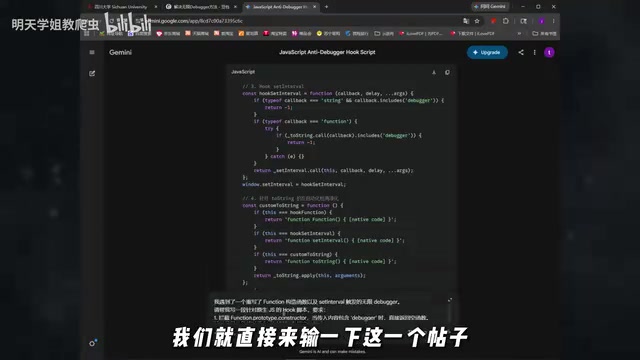
Step 2: Deploy the Tampermonkey Script
Once you have the AI-generated code, follow these steps:
- Open your browser's userscript extension (Tampermonkey or Violentmonkey)
- Click "Create a new script"
- Paste the AI-generated code and save
- Refresh the target page to activate the script
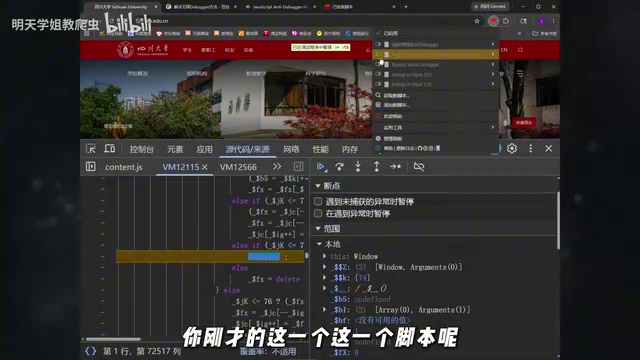
Userscripts (Tampermonkey/Violentmonkey) run at the browser extension layer and execute before page scripts, allowing them to preemptively override key functions before anti-debugging code runs. The core technique used here is the Hook mechanism: replacing native function references with custom functions — for example, replacing the Function constructor with a proxy version that filters out the debugger keyword, so all subsequent calls pass through our interception layer. Once the script takes effect, it automatically hooks the key functions that trigger Debugger during page load, cutting off the infinite breakpoint loop at its root rather than passively clicking "skip" one by one.
Step 3: Handle Residual Breakpoints
AI-generated Tampermonkey scripts typically resolve most Debugger breakpoints, but some sites may employ multi-layered defenses. If individual Debuggers still pop up after refreshing, combine with the browser's built-in features:
- Right-click on the breakpoint → Select "Never pause here"
- Refresh the page again
After the combined operation of script hooking + manual marking, the Infinite Debugger is completely bypassed, and you can freely inspect network requests and analyze data packets.

The Core Mindset of AI-Assisted Reverse Engineering: Question Quality Determines Output Quality
While this case is simple, it reveals an important methodology: AI's capability ceiling depends on the quality of your questions.
When facing the same Infinite Debugger anti-debugging:
| Approach | AI Output Quality |
|---|---|
| "How do I solve Infinite Debugger?" | Generic textbook response |
| "The target website uses Function constructor + setInterval to implement Infinite Debugger. Please generate a Tampermonkey script that hooks the relevant functions to bypass anti-debugging" | Directly usable script code |
The difference is obvious. Transforming vague questions into precise technical instructions — that's the correct way to use AI for reverse engineering. Essentially, you're "compiling" your understanding of the problem into a format AI can efficiently process — the clearer the technical background and the more explicit the constraints, the closer AI's output will be to production-ready code rather than a rough draft requiring extensive rework.
Summary and Future Outlook
Infinite Debugger is just the first hurdle in web scraping reverse engineering. By using AI to generate Tampermonkey hook scripts, work that would have taken half an hour of manual debugging can be shortened to just a few minutes.
But this is only the starting point for AI-assisted reverse engineering. More advanced use cases include:
- Environment patching: Having AI automatically identify missing browser environment variables and generate patching code
- Encryption algorithm reconstruction: Feeding obfuscated JS code to AI for analysis to quickly locate encryption logic
- Automated parameter construction: Having AI automatically generate signature parameter reconstruction code based on request characteristics
The key takeaway: don't use AI as a search engine — treat it as a technically capable programming assistant. The more precise the context and instructions you provide, the more valuable the results it returns.
Key Takeaways
- Infinite Debugger is a common frontend anti-debugging technique that continuously triggers debugger statements via
setIntervaltimers,Functionconstructors, orevaldynamic execution to block DevTools usage - Asking AI vague questions only yields textbook answers — you need to deconstruct reverse engineering pain points into precise technical instructions AI can understand
- The correct workflow is: craft precise prompts → AI generates hook script → deploy via Tampermonkey → combine with manual marking to clear residual breakpoints
- The core advantage of Tampermonkey scripts is that they execute before page scripts, using the hook mechanism to preemptively intercept key functions before anti-debugging code runs
- The essence of AI-assisted reverse engineering lies in question quality — transforming vague problems into instructions containing specific technical details
- AI reverse engineering applications extend beyond bypassing Debugger to environment patching, encryption algorithm reconstruction, automated parameter construction, and more
Related articles
 Tutorials
ChatGPT Plus Subscription Guide: Are GPT-5.5, image-2, and Codex Worth the Upgrade?
A detailed look at ChatGPT Plus features — GPT-5.5, image-2, and Codex — with a Plus vs Pro comparison and a complete step-by-step subscription guide for users outside the US.
 Tutorials
Harness AI Engineering in Practice: Using Claude Code to Master Enterprise-Level E-Commerce Development
Deep dive into Harness AI Engineering: master enterprise e-commerce development with Claude Code using the Rules, Skills, Wiki, and Changes framework.
 Tutorials
Cursor + Codex Dual-IDE Collaboration: A Practical Methodology for Open-Source Project Customization
A complete methodology for open-source project customization based on real-world experience, detailing the Cursor+Codex dual-IDE workflow, seven-stage process, MVP validation, and AI source code reading techniques.