AI-Powered Chrome Extension Monetization: A No-Code Practical Guide

A no-code guide to building and monetizing Chrome extensions overseas using AI tools.
This guide breaks down how non-developers can use AI tools like Cursor to build Chrome extensions and monetize them internationally. It covers demand research, product documentation, ASO optimization, and the subscription revenue model — plus three critical pitfalls for Chinese developers: payment processing, permission rejections under Manifest V3, and infrastructure setup.
For many people, Chrome extensions feel like an "played-out" space. But the opposite is true — the explosion of AI capabilities is actually driving a new growth cycle in this market. Search "YouTube video summary" in the Chrome Web Store and you'll find a whole row of AI-powered extensions, most built by teams of one to three people, quietly pulling in thousands to tens of thousands of dollars per month.
This article is based on insights shared by Bilibili creator "猎者出海," systematically breaking down how everyday people with no coding background can use AI tools to build Chrome extensions and monetize them in overseas markets.
Why Chrome Extensions Are Worth Building
Before committing to any niche, check three key numbers.
First, the traffic pool is enormous. Chrome holds over 65% of the global browser market — that's billions of users as a potential base.
Second, the revenue ceiling is significant. If you have 10,000 paying users each paying $10 per year, that's $100,000 in annual revenue. This isn't fantasy — it's a real possibility under a subscription model.
Third, and most importantly — the competitive gap. Chinese developers make up less than 5% of Chrome Web Store publishers. This is a mature market that Western developers have been building in for years, while it remains virtually untapped for Chinese creators.
Real revenue examples make this even more convincing:
- Gmax: Enables Gmail mass-sending — one person built it to $130,000/month;
- Bluetooth tool: Helps secondhand sellers auto-list items — $42,000/month;
- GoFullPage: $1/month subscription, 4 million users — $10,000/month;
- Honey: Free cashback extension — acquired by PayPal for $4 billion.
One telling detail: almost all of these were built by individuals or tiny two- or three-person teams, not large companies.
Four Monetization Models and the Optimal Combination
There are four primary ways to monetize a Chrome extension, often called the "3S model" plus one more.
Subscription (Most Recommended)
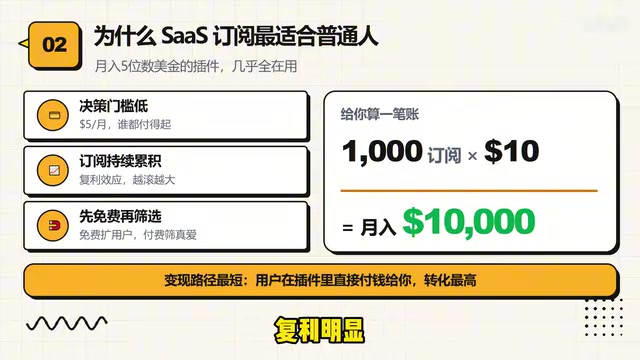
The extension is free to download; premium features cost $5–$30 per month. This is widely considered the best path for most people, for three reasons:
- Low barrier to entry: $5/month — nearly anyone can afford it;
- Compounding revenue: Subscription income grows like a tree, with clear compound effects;
- Shortest conversion path: Users pay directly inside the extension, giving the highest conversion rate.
Do the math: 1,000 subscribers × $10 = $10,000/month.
The Financial Logic of Subscription SaaS: The core financial metric for subscription models is MRR (Monthly Recurring Revenue). Compared to one-time purchases, the key advantage of subscriptions is revenue predictability — as long as your monthly churn rate stays below your new subscriber growth rate, MRR will keep climbing, forming a compounding curve. For Chrome extensions, once users integrate your tool into their daily workflow, switching costs are high, which naturally keeps churn low. Industry benchmarks suggest that healthy SaaS products should target a monthly churn rate below 2% (annual retention above 78%) to maintain a sustainable growth flywheel.
Operationally, the strategy is: grow your free user base first, then use paid features to filter out high-value users who are willing to pay.
Affiliate Marketing (Highest Ceiling)
Monetize through cashback commissions. Honey used this model to reach a $4 billion valuation.
How Affiliate Marketing Works: Affiliate marketing is a performance-based monetization model — developers embed tracking links in their extensions, and when users complete a purchase through those links, the developer earns a commission, typically 5–30%. Honey is the textbook example: it automatically applies coupons during checkout while earning affiliate commissions from e-commerce platforms on every completed sale. Platforms like WhatOffer serve as affiliate networks specifically for Chrome extension developers, aggregating advertiser resources — but working with these platforms requires understanding the basics of cookie tracking and attribution systems, which carries a real learning curve.
This path requires experience working with advertisers and has a steeper learning curve — better suited for those who already have an affiliate marketing foundation.
One-Time Purchase and Traffic Funneling
One-time purchases mean users pay once and move on, making it hard to build scalable revenue. Traffic funneling treats the extension as an entry point to drive users to your website or independent store.
Bottom line: For 90% of people, the optimal combination is subscriptions as the foundation + affiliate marketing as a supplement — subscriptions provide steady cash flow, while affiliate marketing delivers value before converting.
Five-Step Process: From Finding Demand to Chrome Extension Monetization
The entire development process breaks down into five steps: find demand → write a product document → generate code with AI → test and publish → drive traffic and monetize.
One core principle runs through all of it: your first version only needs to be 60% good. Complete the full loop first, validate that real people are willing to pay, then optimize.
Finding Demand Matters 10x More Than Writing Code
In an era where AI can write code automatically, product selection is the real moat. Three practical methods for finding demand:
- Read the bad reviews: Look specifically for Chrome Store extensions with over 1,000 reviews but ratings below 4.0. Real demand + poor execution = your opportunity;
- Listen to user requests: Search Reddit for phrases like "I wish there was an extension that could…" — these are genuine unmet needs;
- Watch community discussions: Pay attention to what indie developer communities are talking about.
Core principle: a specific pain point for a niche audience always beats a generic need for a mass audience.
Write a Good Product Document
The quality of AI-generated code is directly proportional to the quality of information you give it. A solid product document covers five things: a one-sentence positioning statement, target users, free vs. paid features, technical requirements, and UI references. One A4 page is enough.
Run this document past the AI for evaluation first — it may even warn you "this space is already saturated," helping you avoid many pitfalls upfront.

Choose Your Tools and Publish
Recommended tools: Cursor as the primary tool (VS Code-like interface, built-in AI, $20/month); command-line tools for more complex features with full automation; ChatGPT in the browser for those who don't want to install anything. Total monthly cost under $50, yet the output can exceed most outsourced development teams.
How Cursor Works: Cursor is an AI-native code editor built on VS Code's architecture. Its key advantage over ChatGPT in the browser is codebase-aware capability — it can directly read and modify your local codebase, understand dependencies between files, and pinpoint problematic code in one click when errors occur. For Chrome extension development, the typical workflow is: enter a requirement description → generate a complete code framework → load and test → paste error messages back into Cursor to fix → iterate. This "prompt–generate–test–fix" loop allows people without a technical background to complete basic feature development.
For testing: type chrome://extensions in the address bar, enable Developer Mode, load your code folder, and the extension will run. Any errors go back to the AI for fixes. Then spend $5 to register a developer account, prepare your icon, screenshots, and English description, package everything, and upload. Review takes 1–3 days.
Chrome Store Traffic: ASO Is the Main Battlefield
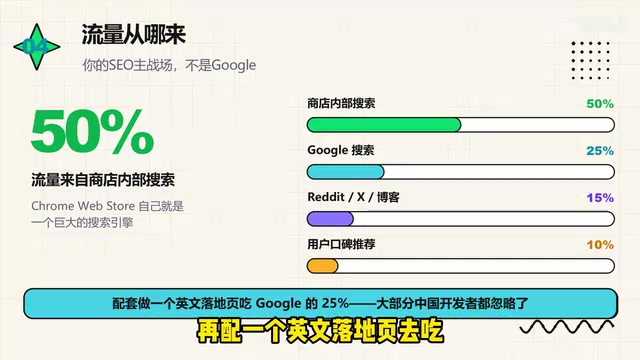
Getting your extension published doesn't mean people will find it. Based on the creator's analysis, traffic sources break down roughly like this: about half comes from in-store search, 25% from Google Search, and the rest from social media and word of mouth.
How ASO Works: ASO (App Store Optimization) logic closely mirrors SEO, but the algorithm signals differ. Chrome Web Store search rankings primarily factor in: keyword placement and frequency in titles and descriptions, installation growth rate, user ratings and review counts, retention rate (the inverse of uninstall rate), and click-through rate (CTR). Importantly, the Chrome Store doesn't rank purely by install count — new extensions with precise keywords and good early reviews can absolutely reach the front page, which is exactly the window of opportunity for newcomers.
That means ASO — optimizing for the store's own search system — is the primary battlefield. Four key areas to focus on:
- Title: Put core keywords first;
- First 80 characters of the description: This is the only part users see in search listings, directly affecting CTR;
- Category and tags: Choose the most precise classification;
- Ratings and reviews: Must be genuine — fake reviews will get you removed if detected.
Also, set up an English landing page to capture that 25% from Google Search — this is exactly the incremental traffic most Chinese developers leave on the table.
Three Major Pitfalls for Chinese Developers
Why do so few Chinese developers build Chrome extensions for overseas markets? Technology is no longer the barrier — the real pitfalls lie in the infrastructure.
Payment Collection Is the Most Critical Issue
PayPal has heavy restrictions and frequent freezes on Chinese accounts; Stripe is excellent but doesn't support mainland China entities.
Cross-Border Payment Ecosystem: Stripe is the world's leading online payment processor, known for being developer-friendly — but its risk controls are extremely strict for Chinese mainland entities, typically requiring company registration in supported regions (US, Hong Kong, Singapore, etc.). LemonSqueezy (recently acquired by Stripe) has become popular in indie developer communities as an alternative, positioning itself as a "Merchant of Record" — the platform takes on cross-border tax compliance responsibilities (like VAT) on behalf of developers, who only receive net income. This dramatically reduces the compliance complexity of operating internationally, which is why it has a strong reputation among Chinese developers going global.
Two solutions:
- Limited budget: Use LemonSqueezy — it supports Chinese developers, with slightly higher fees but reliable payment processing;
- Sufficient budget: Register a US or Hong Kong company then open a Stripe account — total setup cost is $3,000–$5,000 USD. Once you're above $2,000/month, the investment pays for itself.
Permission Rejections
Since Manifest V3, applying for sensitive permissions like "read all web pages" or "browsing history" requires submitting an English-language explanation document. If the justification isn't clear, your submission will be rejected outright — and three or more rejections can lead to account suspension.
Manifest V3 Technical Background: Manifest V3 (MV3) is Chrome's forced architectural upgrade rolled out in 2023 — the biggest technical change to the extension ecosystem in nearly a decade. MV3 replaced persistent background pages with Service Workers and significantly restricted network request interception capabilities (a direct blow to ad-blocking extensions), while implementing stricter permission review mechanisms. Designed to improve security and privacy, it now requires developers applying for sensitive permissions like
activeTaborwebRequestto provide clear use-case descriptions and privacy policies — otherwise, manual review rejections are common.
Two ways to handle this:
- Minimum permission principle: Design your extension's features to avoid needing sensitive permissions whenever possible;
- When you must request them: Attach a usage explanation and a link to your privacy policy. If rejected, read the feedback and revise — don't fight it.

Infrastructure
Developer accounts require a linked card — mainland Chinese credit cards are frequently declined, so use an overseas virtual credit card. You'll need a stable connection to access Google services; for long-term operations, consider setting up a dedicated line. All-English copy and customer support can be handled with AI assistance.
A Four-Week Launch Path
The creator shared a concrete four-week execution timeline you can follow directly:
- Week 1: Lay the groundwork — get a virtual card, set up your network, register a developer account; simultaneously identify a niche with lots of bad reviews;
- Week 2: Write your product document, use Cursor to generate code, and iterate — 20–30 rounds of back-and-forth is completely normal;
- Week 3: Use AI to write your English store description and privacy policy, then submit for review;
- Week 4: Cold-start on Reddit and Product Hunt; if someone pays, the loop is complete — then replicate the process for your next extension.
Final Thoughts: This Isn't a Get-Rich-Quick Business
To be honest: this isn't a high-margin, overnight-riches business. Most people earn $500–$5,000/month; breaking $10,000 puts you in the top 10%.
But its value lies in being long-term compoundable and highly automatable. AI has leveled the technical playing field — which is both the opportunity and the reason competition is intensifying. Your real moat is product selection, marketing, and service — not the code itself. Pairing it with an independent website for cross-channel synergy makes the business even stronger.
One piece of advice above all else: don't wait — complete the full loop first, then optimize.
Key Takeaways
Related articles

Resume Guide for Programmers Transitioning to AI: From an HR Perspective to Job Requirement Matching
How should programmers transitioning to AI write a resume? This Bilibili tutorial gives five key preparation actions: set aside two or three days to review skills and projects, choose a simple template, reverse-engineer the tech stack from job sites, emphasize LLM capabilities, and do a final check from an HR perspective.

Building a RAG Knowledge Base: A Complete Guide from Architecture to Retrieval Evaluation
A systematic overview of the full RAG knowledge base workflow: from overall architecture and mature retrieval solutions to key details of retrieval evaluation and who should learn it, helping developers build a path from beginner to hands-on practice.

Turn Screenshots into Web Code in Seconds: Anyone Can Write HTML with AI
A Bilibili creator demonstrates using AI to turn webpage screenshots directly into HTML and CSS code without manual coding. The article analyzes the tool's usage, new features like video-based app cloning, iterative refinement, and the real boundaries of AI giving zero-foundation users programming ability.