AI-Powered Development in Practice: Building a Python Django Admin System from Scratch

Rapidly building a Django + MySQL admin system from scratch using AI programming tools
This article demonstrates how to use Trae IDE's AI capabilities with Python Django and MySQL 8 to build a backend admin system from scratch, featuring login authentication, menu management, RBAC role permissions, and account management. It walks through the secondary development process of adding a news management module, while analyzing AI programming's strengths in rapid scaffolding and standardized code generation, as well as its limitations in security review and complex business logic.
Introduction
A backend admin system is a standard component of virtually every web application, yet building a complete permission management, menu management, and role assignment system from scratch remains a time-consuming endeavor for many developers. With today's AI programming tools, this process can be significantly streamlined.
This article walks through a real-world case study demonstrating how to use Trae IDE with AI models to build a fully functional backend admin system from scratch using the Python Django framework + MySQL 8 database, and shows how to extend it with secondary development.
Technology Stack & Tool Selection
The core technology stack for this project includes:
- Backend Framework: Python Django
- Database: MySQL 8
- Development Tool: Trae IDE (VSCode or other editors can also be used)
- AI Assistance: Trae's built-in AI models (supporting IDE mode and Solo mode switching)
Trae is an AI-native IDE developed by ByteDance, built on the VSCode core. It includes built-in conversational code generation, code completion, error fixing, and other AI capabilities. It supports Builder (Solo) mode—where users describe their requirements and the AI autonomously plans tasks, generates files, executes commands, and completes end-to-end project setup. The underlying technology of such AI programming tools typically leverages the code understanding and generation capabilities of large language models (such as Claude, GPT series). Unlike completion-focused tools like GitHub Copilot, Trae's Builder mode is closer to the "AI Agent" paradigm, capable of coordinating modifications across files—ideal for building project skeletons from scratch. Developers only need to describe requirements in natural language, and the AI automatically generates the Django project structure, model definitions, view logic, and template code. If you prefer using VSCode or other IDEs, you can achieve similar results with AI plugins.
It's worth noting that Django's ORM (Object-Relational Mapping) layer maps Python classes to database tables, allowing developers to perform most database operations without writing raw SQL. MySQL 8 offers significant improvements over earlier versions in performance, JSON support, window functions, and more, while also providing better compatibility with Django. Keep in mind that MySQL 8 uses the caching_sha2_password authentication plugin by default, and some older versions of Django or PyMySQL drivers may require additional configuration to connect properly. It's recommended to use the mysqlclient driver and ensure version compatibility—this is one of those details that requires manual verification when AI generates project configurations.
Core System Features Demo
Feature Module Overview
The AI-generated backend admin system includes the following core features:
- Login Authentication: Supports username/password login (default account: admin, password: 123456)
- First-level Menu Management: Supports add, edit, and delete operations
- Second-level Menu Management: Subordinate to first-level menus, with full CRUD support
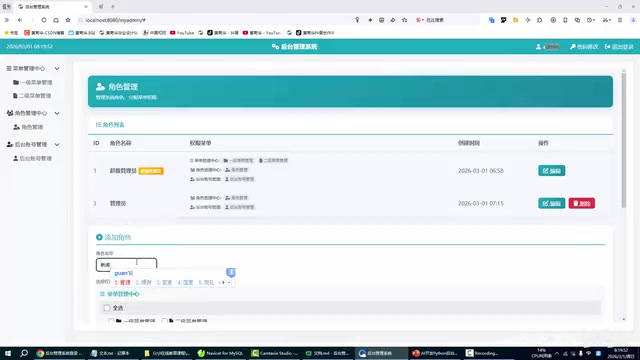
- Role Management: Create different roles (e.g., super admin, regular admin) and assign feature permissions to roles
- Account Management: Add, edit, and delete admin accounts with role binding
- Common Features: Password change and current login account info display in the top-right corner

The system comes with a default homepage. The overall interface structure is clean—a menu navigation panel on the left and a content display area on the right, which is the classic backend admin system layout.
Menu & Permission System Design
The system adopts the classic two-level menu + role-based permission design pattern. First-level menus serve as feature categories, second-level menus serve as specific feature entry points, and roles determine which menu items a user can see and access. This design is extremely common in real projects and offers excellent extensibility.
This design is essentially the RBAC (Role-Based Access Control) model, one of the most mainstream permission management approaches in enterprise applications. The core idea of RBAC is to assign permissions to roles rather than directly to users—users obtain permissions indirectly by being bound to roles. This design greatly reduces the complexity of permission management: when you need to adjust permissions for a certain type of user, you only need to modify the role configuration without changing each user individually. The two-level menu structure corresponds to the "resource" hierarchy in RBAC, allowing permission granularity to be precise down to specific feature pages.

Secondary Development in Practice: Adding a News Management Module
The greatest highlight of this backend admin system is its extensibility. Below we demonstrate how to quickly add a "News Center" module on top of the existing system.
Step 1: Create the Menu Structure
First, add "News Center" as a first-level menu, then create two second-level menus under it:
- News Entry (sort order: 1) — for creating and editing news content
- News Management (sort order: 2) — for viewing and managing the news list
The menu sort field can be flexibly adjusted to control the display order. Each second-level menu needs a corresponding URL path configured—for example, news management corresponds to the list route.
Step 2: Configure Role Permissions
Create a "News Administrator" role and assign only the News Entry and News Management permissions to it, without granting system management or other privileges.
Step 3: Create a Dedicated Account
Create a dedicated account for the News Administrator role, set the username and password, and bind it to the "News Administrator" role.
Step 4: Verify Permission Isolation
After logging out of the super admin account and logging in with the News Administrator account, you can see that this user can only access the "News Entry" and "News Management" pages—all other system management features are completely hidden. This confirms that the permission isolation mechanism is working correctly.

At this point, the specific business logic for the news entry and news management pages still needs further development, but the menu framework and permission system are already in place. Going forward, you only need to use AI to generate the corresponding Django Model, View, and Template code to quickly fill in the gaps. The Django framework uses the MTV (Model-Template-View) architectural pattern: Model handles the data layer, defining database structure and interacting with the database through ORM; Template handles the presentation layer, rendering HTML using Django's template language; View handles the business logic layer, processing HTTP requests and returning responses. This layered design keeps code responsibilities clear and is a key reason why AI can efficiently generate standardized code—the code patterns in each layer are relatively fixed, allowing AI to quickly populate the corresponding layer's logic based on requirement descriptions.
Advantages & Limitations of AI-Powered Backend System Development
Clear Advantages
As this case study demonstrates, AI programming excels in backend admin system development:
- Rapid project skeleton setup: Repetitive tasks like Django project initialization, database configuration, and base model definitions can be delegated to AI, saving significant time
- Standardized code generation: AI can generate decent quality code for common logic like login authentication, CRUD operations, and permission checks
- Lower barrier to entry: Even developers with limited Python experience can understand and build a complete web admin system with AI assistance
Points to Keep in Mind
- AI-generated code requires manual review, especially for security-related logic (such as SQL injection protection, XSS prevention, etc.)
- Complex business logic still requires developers to design and implement themselves
- Generated code style and project conventions may need to be unified to meet team collaboration standards
Regarding security review, several classic web security threats deserve particular attention. SQL injection involves attackers crafting malicious input to manipulate SQL statements—Django ORM escapes query parameters by default, effectively defending against such attacks, but raw SQL calls (raw() or execute()) require extra caution. XSS (Cross-Site Scripting) involves malicious scripts being injected into pages for execution—Django's template engine escapes HTML output by default, but using mark_safe() or the |safe filter bypasses this protection. Additionally, CSRF (Cross-Site Request Forgery) protection is provided by Django's built-in middleware, requiring forms to include the {% csrf_token %} tag. Understanding these mechanisms is a fundamental prerequisite for reviewing AI-generated code and a necessary step for ensuring system security before deployment.
Summary & Recommendations
Related articles
 Tutorials
ChatGPT Plus Subscription Guide: Are GPT-5.5, image-2, and Codex Worth the Upgrade?
A detailed look at ChatGPT Plus features — GPT-5.5, image-2, and Codex — with a Plus vs Pro comparison and a complete step-by-step subscription guide for users outside the US.
 Tutorials
Harness AI Engineering in Practice: Using Claude Code to Master Enterprise-Level E-Commerce Development
Deep dive into Harness AI Engineering: master enterprise e-commerce development with Claude Code using the Rules, Skills, Wiki, and Changes framework.
 Tutorials
Cursor + Codex Dual-IDE Collaboration: A Practical Methodology for Open-Source Project Customization
A complete methodology for open-source project customization based on real-world experience, detailing the Cursor+Codex dual-IDE workflow, seven-stage process, MVP validation, and AI source code reading techniques.