AI Programming in Practice: Building a Cross-Platform App in 1 Hour with Codex + Firebase

A complete hands-on guide to building a cross-platform "Shared Second Brain" app with Codex + GPT 5.5 and zero code.
This article details how to build a multi-user collaborative "Shared Second Brain" application from scratch using the AI programming (Vibe Coding) paradigm with OpenAI Codex, GPT 5.5, Firebase, and Vercel. The app is deployed across Web, desktop (Electron), and mobile platforms. The entire process requires virtually no hand-written code — development is driven entirely by natural language instructions to AI agents.
Introduction: The Era of Vibe Coding Has Arrived
In 2026, AI programming (Vibe Coding) is becoming one of the fastest-growing directions in the artificial intelligence field. This concept was proposed by OpenAI co-founder Andrej Karpathy in early 2025. The core idea is that developers no longer write code line by line — instead, they describe their intent in natural language and let AI models handle the actual code generation. The underlying support for this paradigm shift is the qualitative leap in large language models' code comprehension and generation capabilities — from GPT-3's era of only completing code snippets, to GPT-4 series understanding complex architectural intent, to GPT-5.5 maintaining contextual consistency across multi-file projects and autonomously debugging errors. With OpenAI's Codex and GPT 5.5, even someone with zero programming experience can build a complete cross-platform application in just one hour — from web apps to desktop apps to iOS mobile apps.
This article is based on a complete hands-on case study, breaking down in detail how to use AI agents to build a "Shared Second Brain" application from scratch and deploy it across Web, desktop, and mobile platforms. The entire process requires virtually no hand-written code. The core toolchain is: Codex + GPT 5.5 + Firebase + Vercel.
Tool Setup: Codex and Firebase Configuration Guide
Codex: The Core AI Programming Platform
Codex is OpenAI's desktop AI programming tool, available for download (macOS version) from openai.com/codex. Its workflow is very intuitive:
- Create a new project (essentially specifying a local folder)
- Describe the application you want in natural language
- The AI agent (GPT 5.5) automatically generates all code files
- Preview and test the application locally
- Iterate and modify until satisfied
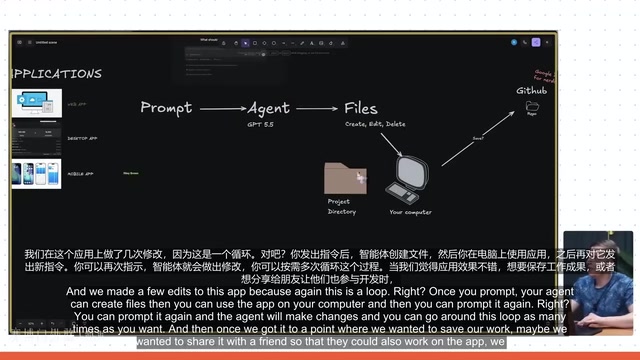
The entire process forms a loop: Issue command → Agent creates/modifies files → Local preview → Issue next command. The video demonstrates creating a Microsoft Paint application with a single sentence, generating a functional drawing tool in just 5 minutes.
Firebase: Backend Infrastructure Setup
For applications that need persistent data, browser local storage alone isn't enough. Firebase is Google's Backend-as-a-Service (BaaS) platform, and its core advantage lies in real-time data synchronization. Firestore uses a NoSQL document-based database structure where data is organized in a hierarchy of Collections and Documents — naturally suited for multi-device real-time sync scenarios. Firebase Security Rules allow developers to control data access permissions using declarative syntax, which is especially critical for multi-user collaborative applications. For AI programming scenarios, another major advantage of Firebase is its SDK's deep integration with mainstream frontend frameworks. AI models have seen extensive Firebase usage examples in their training data, so the generated integration code is relatively stable and reliable.
Firebase provides three key services:
- Authentication: User login/registration, with Google Sign-in support
- Database (Firestore): Stores all structured data
- Storage: Hosts images, videos, and other files
The setup process requires creating a project at firebase.google.com, enabling these three services sequentially, and then providing the Firebase configuration keys to Codex. This is the only step in the entire workflow that requires leaving Codex.

Hands-On: Building the "Shared Second Brain" Web App
Design Philosophy and Core Requirements
The core requirement of this application is: provide teams with a shared visual content library that can save links, screenshots, and scattered thoughts from X (Twitter), YouTube, and Instagram. Key features include:
- Automatically fetching link metadata (thumbnails, titles, etc.)
- Category filtering and multi-user collaboration support
- AI-generated concise titles
- Read/write interface for AI agents
From Zero to One: AI Automatically Generates the Complete App
The author first wrote the complete app concept as a Markdown file and placed it in the project folder as contextual reference for the AI agent. Then one core prompt was issued:
"You already have everything you need to build this app, fully based on Firebase for database, storage, and authentication. Build the entire application — it should look great and implement all the features we listed in the plan."
GPT 5.5 took about 25 minutes to complete the initial build of the entire application, including Google Sign-in, content saving, metadata fetching, and other complete features.
Practical Tips for Iterative Debugging
The initial version inevitably has issues. Here are several key debugging tips:
- Browser Inspect Element: Right-click → Inspect → Console, copy error logs to Codex
- Annotated Screenshots: Use tools like CleanShot to circle and mark problem areas on screenshots
- Voice Input: Use WhisperFlow to speak directly to Codex describing your needs
After 6-7 prompt iterations, the application had complete functionality: automatic X/YouTube/Instagram link parsing, masonry layout, category filtering, multi-user collaboration, and more.
Integrating OpenAI API: Automatic Title Generation
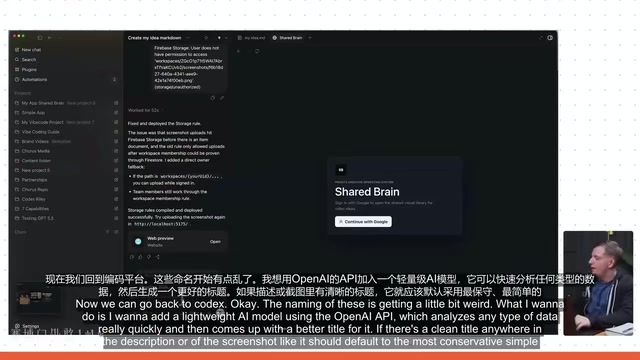
To give saved content automatic concise titles, the author introduced the OpenAI API (using the lightweight 4.1 nano model). The process:
- Create an API key at platform.openai.com
- Provide the key to Codex
- Instruct the agent to call AI to generate titles of no more than 6 words when saving content
The results were immediate — after saving a tweet, AI automatically named it "Codex for non-coding tasks."
Deployment and Cross-Platform Extension
Vercel One-Click Deployment: From Local to the Internet
Vercel is a cloud deployment platform designed specifically for frontend applications. Its core technology is Edge Network deployment — distributing static assets and serverless functions across dozens of global data center nodes so users can access from the nearest location. For modern frontend frameworks like React and Next.js, Vercel supports zero-configuration deployment. Simply connect a GitHub repository, and every code push automatically triggers the build and deployment pipeline. In AI programming scenarios, Vercel's value lies in minimizing the friction between local development and public internet access. Developers don't need to configure servers, DNS, or SSL certificates — all this infrastructure complexity is completely abstracted away.
After the application is developed locally, it's deployed to the public internet with one click via the Vercel plugin. The only thing to note is adding the Vercel-assigned domain to Firebase's authorized domains list; otherwise, Google Sign-in will throw an "unauthorized domain" error.
Electron Desktop App Packaging
Electron was developed by GitHub in 2013 (originally named Atom Shell). Its essence is bundling the Chromium browser engine with the Node.js runtime, enabling web applications to run as native desktop applications. This means developers can build cross-platform desktop apps using HTML/CSS/JavaScript while accessing OS-level APIs (such as the file system, system notifications, etc.) through Node.js. Well-known applications like VS Code, Slack, and Discord are all built on Electron. The main trade-off is larger application size (typically 100MB+) and higher memory usage, but for internal tools and productivity applications, this compromise is usually acceptable. Codex automatically generated the complete Electron configuration, and the application even created a "Shared Brain" entry in the system.
Related articles
 Tutorials
ChatGPT Plus Subscription Guide: Are GPT-5.5, image-2, and Codex Worth the Upgrade?
A detailed look at ChatGPT Plus features — GPT-5.5, image-2, and Codex — with a Plus vs Pro comparison and a complete step-by-step subscription guide for users outside the US.
 Tutorials
Harness AI Engineering in Practice: Using Claude Code to Master Enterprise-Level E-Commerce Development
Deep dive into Harness AI Engineering: master enterprise e-commerce development with Claude Code using the Rules, Skills, Wiki, and Changes framework.
 Tutorials
Cursor + Codex Dual-IDE Collaboration: A Practical Methodology for Open-Source Project Customization
A complete methodology for open-source project customization based on real-world experience, detailing the Cursor+Codex dual-IDE workflow, seven-stage process, MVP validation, and AI source code reading techniques.