AI Programming in Practice: The Right Development Approach — MVP First, Code Second

Master AI programming by spending 80% of time on planning and MVP validation before writing code.
Based on a real CAD drawing automation project, this article reveals why AI programming experts prioritize requirements communication and MVP validation over rushing to generate code. Key strategies include using model tier allocation to control costs, dividing work between professional and lightweight AI tools, and deferring interface development until core logic is proven.
In real-world AI programming scenarios, a counterintuitive lesson is being validated by more and more developers: true experts don't rush to have AI write code — they spend 80% of their time on requirements communication and solution design first. Bilibili creator whosper demonstrated this in the second episode of his "Cola Programming Practice" series, using a real factory's CAD drawing automation project as a case study to show how to use Cola paired with Claude Code to complete the entire pre-development process from requirements to MVP.
This article is based on that hands-on video, distilling the core methodologies around MVP-first development, model tier allocation, and tool division of labor. These insights offer practical reference value for any developer looking to build real projects with AI.
Why AI Programming Should Start with an MVP
The video author presents a key insight: in large-scale development, the time spent communicating with AI should account for 80% of the entire project. This runs completely counter to what many people imagine AI programming to be — most assume it's just one prompt generating a pile of code, but real industrial-grade development is far from that.
The author contrasts two scenarios: prompts for simple cases might not exceed 30 characters, while in serious large-scale development, AI-generated development plans "might already be tens of thousands of words" and reading them feels "like reading a book." Because of this, he even extends the point to argue that one of the core competencies in the AI era is speed reading — if someone can't even finish one book per year, they'll likely hit a bottleneck when using AI later on.
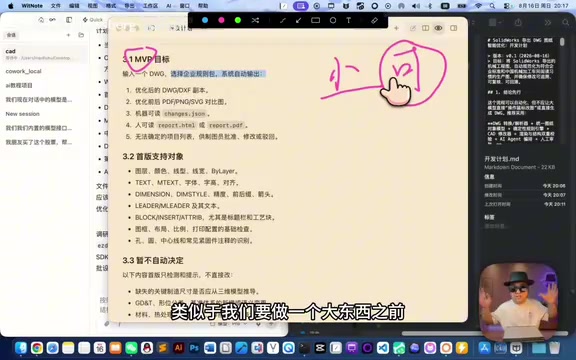
MVP (Minimum Viable Product) means running a "minimum viable" small sample before building a complex system. The MVP concept was first systematized by Eric Ries in The Lean Startup, with the core idea of using minimal resource investment to validate core assumptions. In traditional software development, the waterfall model requires completing all design before coding, often leading to massive rework; the MVP methodology advocates quickly building a prototype containing only core functionality, using real feedback to guide subsequent iterations. In AI programming scenarios, MVP's significance is further amplified — given the high uncertainty of AI-generated code, validating the feasibility of core technical paths early matters more than perfecting details.
Using this CAD project as an example, the MVP goal was clearly defined: input DWG drawings, select an enterprise optimization package, and have the system automatically output optimized drawings while providing both "machine-readable JSON" and "human-readable comparison diagrams." For items that cannot be determined, the system "won't process them automatically" but instead hands them to human judgment. This kind of boundary-clear goal setting is the essence of MVP methodology.
It's worth adding here that DWG is AutoCAD's native file format, developed and maintained by Autodesk, and is one of the most widely used CAD file formats in industrial design, architecture, and manufacturing. DWG files internally store graphic entities (line segments, arcs, polylines), layer information, dimension annotations, block references, and other complex data structures in binary format. Programmatically parsing and modifying DWG files typically requires the Open Design Alliance's open-source libraries or Autodesk's official ObjectARX SDK. The difficulty of AI involvement in CAD automation isn't in "understanding" the visual content of drawings, but in comprehending the topological relationships and engineering semantics between graphic entities — for example, whether a line segment represents a wall, a pipe, or an annotation leader line requires combined judgment based on layer naming, line type definitions, and contextual rules. This is precisely why this project requires such meticulous upfront solution design.
Blueprint and Implementation: Refine the Plan Before Writing Code
Throughout the practice session, the author repeatedly emphasizes one operational approach: meticulously polish the development plan as if it were a blueprint. He states plainly that if you start by having AI output a "grand architectural system," it will actually drift away from real requirements.
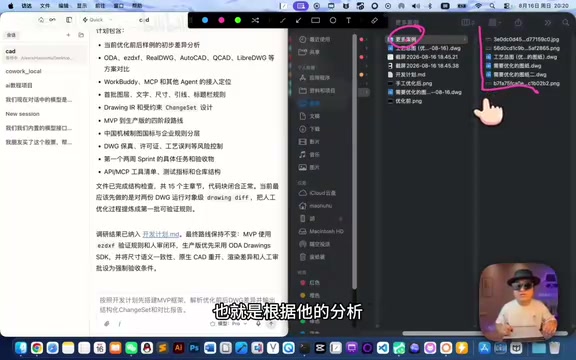
The video shows a typical iteration scenario: AI initially generated a lengthy development plan from a small number of drawings, containing complex architectural designs including a DWG parser, renderer, rule validator, and Agent responsibility division. But the author keenly realized that the root problem was too few examples given to the AI. So he supplemented more before-and-after drawing comparison cases, letting the AI re-understand "optimization patterns" based on richer samples, and explicitly demanded:
I don't need a grand blueprint right now. What we need now is a feasibility plan.
This course-correction is highly representative and reveals a typical behavior pattern of large language models. During training, LLMs are exposed to vast amounts of architecture documentation and technical blogs from open-source projects, which tend to showcase polished, production-grade system designs. When a user's requirement description is relatively vague, the model tends to recall those "professional-looking" complex architecture solutions from its training data — including microservice decomposition, message queues, multi-layer abstractions, and other design patterns. This isn't the model making a judgment after "understanding" the requirements, but rather a consequence of probability-distribution-based text generation characteristics. Therefore, providing more concrete examples (few-shot prompting) to constrain the model's output space, or explicitly limiting system scale and complexity in the prompt, are effective means of correcting over-engineering.
The author's experience is: spending 80% of time repeatedly refining this plan document is what lays the foundation for later code implementation. AI tends to "over-design" when information is insufficient, but by supplementing real examples and clearly expressing intent, you can pull AI from an armchair architect back to a pragmatic engineer.
Model Tier Allocation: Practical Wisdom for Saving Money in AI Programming
An easily overlooked but extremely practical detail is the model tier allocation strategy. The author points out that using premium models throughout the entire development process "will be very expensive."
To understand this, you first need to know the billing logic of AI APIs. Tokens are the basic unit of measurement for how large language models process text — one English word typically corresponds to 1-2 tokens, and one Chinese character usually corresponds to 1-3 tokens. API call costs are charged separately for input tokens and output tokens, with massive price differences between models. Using current market prices as reference, top-tier models (like Claude Sonnet, GPT-4o) have output token prices roughly 5-15x that of lightweight models (like Claude Haiku, GPT-4o-mini). In a complete AI programming project, the solution design phase involves many interaction rounds but relatively controllable total token volume; the code generation and debugging phase, however, can produce massive token consumption because each modification requires re-feeding the context to the model.
The author's approach is to use different models at different stages: during solution design and blueprint finalization, he calls more capable models to ensure output quality; in later execution and code writing phases, he switches to lower-cost models (the video mentions about 30% of scenarios can use lower-tier models). This "use expensive resources where they matter most" allocation approach is essentially seeking the Pareto optimum between output quality and cost, concentrating high-quality reasoning capabilities on the stages with the greatest decision impact. For projects requiring long-term investment, this is key to cost control.
For individual developers and small teams, this lesson is particularly worth noting — the cost of AI programming often lies not in a single call, but in the accumulated token consumption from repeated iterations. Properly allocating model tiers lets a limited budget last much longer.
Dual-Tool Division of Labor: Cola for Framework, Warp for Daily Use
In terms of tool selection, the author adopts a "dual-software" collaboration strategy, which is one of the key highlights of this episode.

His development tool Cola has both Codex and Claude Code built in, responsible for upfront framework building — including core architecture, scripts, and other fundamental components. Cola is an integrated development environment oriented toward AI programming scenarios, with its core feature being built-in programming interfaces for multiple large language models, allowing developers to switch between different AI backends within the same workflow. Claude Code is a terminal-oriented programming agent launched by Anthropic that can directly read project files, execute shell commands, and write and modify code in the command-line environment, with strong context understanding and multi-step reasoning capabilities.
After the framework is built, daily usage is handed off to an office-oriented AI tool (Warp), because "it's for office use, its software development capabilities are slightly inferior, but it's capable enough for handling already-developed frameworks." Warp is a modern terminal tool with built-in AI assistance features, primarily targeting daily development and operations scenarios. These three types of tools correspond to different layers in the AI programming workflow: Cola provides project-level AI orchestration capabilities, Claude Code provides deep code generation capabilities, and Warp provides lightweight AI-assisted command-line operations.
The essential logic of this division is: use professional tools for heavy lifting, use lightweight tools for daily tasks. Early development requires powerful code generation and architecture capabilities, while later usage only needs to invoke programs that are already working, significantly lowering the tool requirements. This combination ensures development quality while reducing the barrier and cost of daily use.
It's also worth mentioning that the author clarifies a common misconception: today's AI Agents already have quite strong recognition capabilities for various formats (drawings, PPTs, images) — "you throw it in and it can basically understand it." This is thanks to the rapid development of multimodal large models (Multimodal LLMs). Represented by the visual capabilities of GPT-4V and Claude 3.5, modern multimodal models can simultaneously process text and image inputs, understanding and describing text, charts, and engineering drawings in images. However, it's important to note that there's still a gap between "understanding" and "precise parsing" — a multimodal model's understanding of drawings is semantic inference based on visual features, not precise data extraction based on file format. For scenarios requiring exact modification of specific dimensions or layer properties in drawings, professional file parsing libraries are still needed for structured processing. Therefore, the value of such AI programming projects isn't in letting AI "understand" files, but in enabling it to systematically and at scale process the business problems these files represent.
The Interface Comes Last: First Verify It Can Run
The author uses a vivid analogy to explain why no graphical interface is needed during the MVP phase.
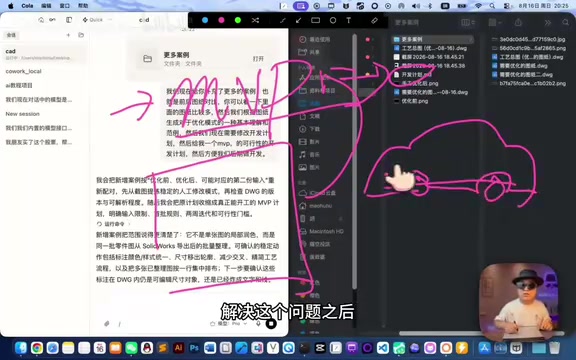
He compares software development to building a car: "We first need to verify whether four wheels plus a board can actually move." Only after solving the core functionality would you need "the car shell, the doors." The interface is like the car's exterior — it's for consumers, not for the developers themselves.
Therefore, in the MVP phase, this CAD tool is simply a script with no graphical interface: input a drawing, output the processed drawing to a designated location. It solves the core question of "can the functionality be achieved" rather than the experience question of "is it pleasant to use." Only after the MVP runs successfully and the core logic is validated is it worth investing effort into building an interface.
This "core first, shell later" development order prevents developers from getting bogged down in interface details before functionality is even validated — a very mature approach in engineering practice. This principle is especially important in AI programming: while AI's ability to generate frontend interface code is already quite impressive, if the backend logic changes frequently, the frontend code also needs to be rewritten repeatedly, causing massive meaningless token consumption and time waste. Validating the core process with command-line scripts first, then building the interface after confirming business logic stability, is the dual optimal solution for both cost and efficiency.
Final Thoughts
The value of this practice session isn't in how complex a system was ultimately built — in fact, the author candidly admits "there's still distance before it can truly be handed to a factory" — but it clearly demonstrates the right approach for large-scale development in the AI era:
Communication over coding, planning over code, validation over perfection. Whether it's the MVP-first development mindset, cost consciousness in model tier allocation, or the engineering judgment behind dual-tool division of labor and deferred interfaces, all these methodologies point to the same core truth — what AI programming truly tests isn't the speed of writing code, but the comprehensive ability to decompose requirements, design solutions, and control costs.
For those who want to build real projects with AI, rather than asking "can AI write this piece of code," it's better to first ask yourself "have I thought through the requirements clearly?" This is perhaps the most valuable takeaway from this practice session.
Related articles

Alguard: Building a Dual-Layer Trust Defense for AI Agent Shopping
Alguard, an Amazon Developer Hackathon project, designs a dual-layer trust architecture for Alexa+ agent shopping. Through physical isolation between an MCP server and a human approval channel, it replaces prompt defenses with structural constraints to block unauthorized purchases caused by prompt injection.

Food Poisoning: Causes, Symptoms, Treatment, and Prevention Explained
Food poisoning is caused by bacteria, viruses, parasites, or toxins contaminating food, with common symptoms including vomiting, diarrhea, and dehydration. This article explains the causes, symptoms, treatment, and prevention of food poisoning to help you safeguard food safety.

Helix Carbon: Recycling Blast Furnace Off-Gas to Make Iron Cheaper and Cleaner
Helix Carbon proposes recycling blast furnace off-gas to cut ironmaking costs and carbon emissions. We analyze its tech logic, commercial viability, and why "retrofit not rebuild" decarbonization appeals to existing steel mills.