AI Programming Post-Mortem: 6 Engineering Rules That Determine Project Success or Failure

AI programming success depends on engineering constraints, not code generation capability.
Based on the author's real experience building an Android client with AI tools, this article concludes that the core challenge of AI programming lies not in code generation but in engineering environment completeness. It proposes 6 key rules (3 detailed here): cross-project context must be systematically preserved to avoid repeated trial-and-error, local environments must support AI's autonomous verification loops, and API documentation must serve as strict prompt constraints. The thoroughness of engineering constraints determines the upper limit of AI programming.
Introduction: The Real Challenge of AI Programming Isn't "Writing" Code — It's Getting It "Right"
If you've recently been using AI programming tools like Codex, Claude, or Cursor on real projects, let me start with a conclusion that isn't exactly a feel-good story — what determines project success or failure often isn't whether the model can write code, but whether you've given it an engineering environment that can reliably close loops, continuously self-correct, and progressively converge.
Recently, the author attempted to build an Android client using Codex CLI and OMX Codex, based on an existing todo service backend. The process was extremely typical: fast progress at the beginning, followed by an endless stream of pagination bugs, navigation crashes, blank detail pages, awkward form interactions, and out-of-sync list states... In the end, most of the time wasn't spent having AI generate code, but fixing the misalignment between AI and engineering reality.
Many people still expect AI programming to be "one prompt in exchange for a working feature," but the moment a project enters any real-world scenario, you'll quickly discover that AI's most common failures aren't about syntax. They're about: whether context is inherited, whether the environment can self-verify, whether API contracts are strict enough, whether the architecture follows the platform's mainstream path, whether UI/UX constraints are specified upfront, and whether task decomposition is small and verifiable enough.
In other words, the upper limit of AI-written code depends on how thorough your engineering constraints are. The following 6 rules are the most valuable takeaways from this project post-mortem.
Rule 1: Without Cross-Project Context, AI Keeps Paying the Same Tuition
When building this Android client, the author had actually already aligned some product boundaries and UI/UX preferences in another client — what to build, what not to build, and which interactions should be handled a certain way by default. But this context was never systematically preserved, so when the Android project started, the AI went through the entire process again: requirement clarification, boundary exploration, style judgment, and interaction guessing.
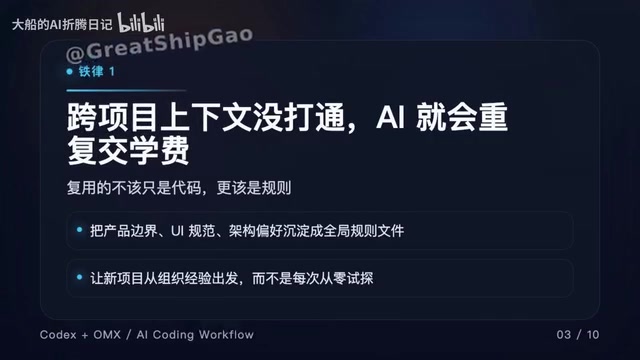
This type of waste is extremely hidden in AI collaboration because it doesn't look like a bug — it looks more like "the model misunderstood again." It's not that the model suddenly got worse; it's that you didn't turn the knowledge you already paid for in the last project into default assumptions for the next one.
Reusable Action: Add a global context file layer to your workflow (e.g., global_rules.md) that specifically records product boundaries, default UI/UX standards, architecture no-go zones and preferences, common non-goals, acceptance criteria, and the scope within which you allow AI to make autonomous decisions. Before starting any new project, have the AI read this ruleset before entering requirements and implementation — quality will stabilize significantly.
Background: Global Context Files and Prompt Engineering
Global context files like
global_rules.mdare essentially the engineering implementation of "System Prompts." In the conversational architecture of large language models, System Prompts have the highest priority and can continuously influence the model's behavioral boundaries throughout an entire session. However, most developers only use System Prompts in single conversations rather than preserving them as version-controlled, cross-project reusable engineering assets. Taking it further, these files can also be combined with Retrieval-Augmented Generation (RAG) mechanisms to inject relevant rule fragments on demand as projects scale, avoiding exceeding the model's Context Window limits. Anthropic's Claude also explicitly recommends in its official documentation: for long-term collaboration scenarios, constraint rules, role definitions, and acceptance criteria should be written into persistent instruction files rather than verbally restated each time.
Rule 2: Without a Runnable Local Environment, AI Isn't an Agent — It's Just Fancy Autocomplete
The most fatal issue in this project wasn't any specific bug, but a more fundamental fact: the terminal environment didn't have the project's required runtime and build tools correctly configured, preventing AI from running even the most basic verification commands.
The result was that the AI couldn't complete its most critical loop — write code → compile → see errors → auto-fix → re-verify. Once this loop breaks, AI's capabilities immediately degrade to "a text generator that looks like it knows how to code." All those low-level errors that followed — function parameters in the wrong order, framework API usage violating constraints, state-passing details gone wrong — should have all been caught in the AI's own verification step, but instead became manual testing costs.
Background: The Engineering Loop Nature of AI Agents
The underlying architectural differences between AI programming tools like Codex CLI, Claude, and Cursor determine their dependency on engineering environments. Taking OpenAI Codex CLI as an example, it's essentially a ReAct Loop running in a local terminal, where each iteration includes three steps: "Think → Act → Observe." When the toolchain is incomplete, the "Observe" step returns errors or null values, the Agent cannot extract effective signals from them, and the entire reasoning chain degrades to pure text prediction mode. This aligns closely with the "Fast Feedback Loop" principle in traditional software engineering — Test-Driven Development (TDD) is effective precisely because it compresses verification cycles to the second level. The engineering value of AI Agents is essentially an extension of this same principle: letting machines complete the "red-green-refactor" cycle themselves, rather than transferring verification costs to humans.
Core Conclusion: Whether AI can run build/test determines if it's an "engineering agent" or a "code generator."
Reusable Action: Before starting with any tech stack, do four things first:
- Confirm that the most basic runtime, toolchain, and version commands work normally in the terminal
- Confirm that the project's minimum build command runs successfully
- Confirm that the project's minimum test command runs successfully
- Confirm that the AI itself can invoke these commands
Establish the project's minimum verification loop first, then enter large-scale implementation. This step looks like "environment busywork," but it's fundamentally deciding — whether the AI debugs itself later, or you debug for the AI.
Rule 3: API Documentation Isn't Comments — It IS the Prompt
Two typical problems appeared in this project: first, the list endpoint requested "config equals 0" while the server required "config greater than or equal to 1"; second, when clicking an item to enter the edit page, the ID contained special characters that broke the route.

What these two bugs have in common: the AI wasn't being reckless — it was actually implementing things according to very common "default logic." If the API contract or schema documentation doesn't explicitly state value ranges, ID format constraints, or which fields require encoding validation, the AI will very likely use "industry average guesses"
Related articles
 Tutorials
ChatGPT Plus Subscription Guide: Are GPT-5.5, image-2, and Codex Worth the Upgrade?
A detailed look at ChatGPT Plus features — GPT-5.5, image-2, and Codex — with a Plus vs Pro comparison and a complete step-by-step subscription guide for users outside the US.
 Tutorials
Harness AI Engineering in Practice: Using Claude Code to Master Enterprise-Level E-Commerce Development
Deep dive into Harness AI Engineering: master enterprise e-commerce development with Claude Code using the Rules, Skills, Wiki, and Changes framework.
 Tutorials
Cursor + Codex Dual-IDE Collaboration: A Practical Methodology for Open-Source Project Customization
A complete methodology for open-source project customization based on real-world experience, detailing the Cursor+Codex dual-IDE workflow, seven-stage process, MVP validation, and AI source code reading techniques.