@ai-sdk/react 2.0.292 Released: A Seemingly Simple Dependency Update

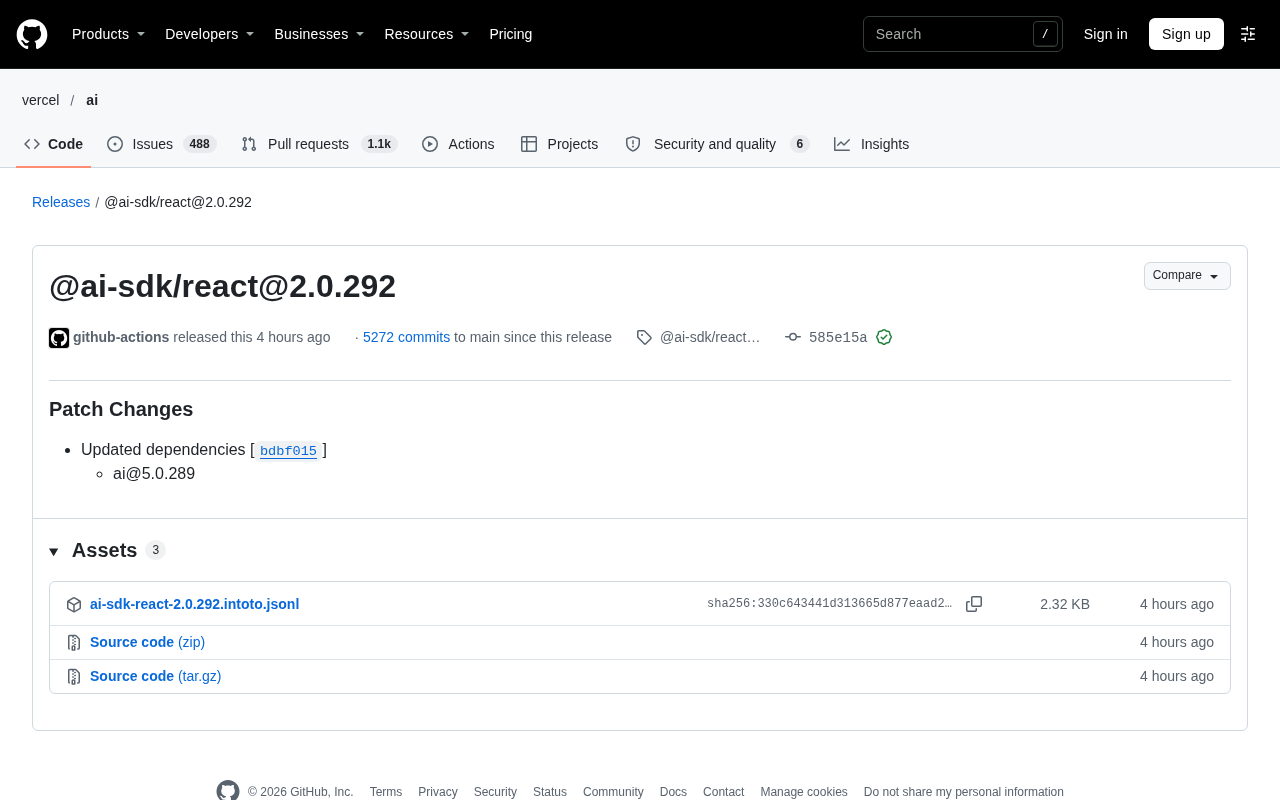
@ai-sdk/react 2.0.292 patch released, only updating the dependency to ai@5.0.289, reflecting the SDK's high-frequency iteration rhythm.
The article starts from the @ai-sdk/react 2.0.292 patch version, noting its only change is updating the dependency to ai@5.0.289, and from there observes how the Vercel AI SDK iterates. It explains that @ai-sdk/react is a React binding layer providing hooks like useChat and useCompletion, while core model invocation logic lives in the ai package, so when the core package releases, the binding layer must update its dependency declaration, and developers should watch lockfile differences. It suggests that although patch versions have no breaking changes, you should still regress streaming responses, error handling, and interruption logic on a development branch before merging. The repository's cumulative 5272 commits reflect high-frequency iteration, and dependency bots can automate patch upgrades. The loading error on the release page is an occasional GitHub issue and doesn't mean the release failed.
A Minor Release That Reveals the Rhythm of the AI SDK Ecosystem
In the release history of a GitHub repository, a version number like @ai-sdk/react@2.0.292 is easy to scroll past—no new features, no breaking changes, just a lone "Patch Changes" entry: updating the dependency ai@5.0.289. But if you pay attention to how the Vercel AI SDK iterates, this record is a signal in itself.
This release was carried out by the github-actions bot, with commit hash 585e15a, verified and signed by GitHub, accumulating 5272 commits from the previous version to the current one. The release date is listed as November 11. For developers building AI applications with React, the significance of such patch releases isn't "what new capabilities does it unlock" but "do I need to follow up immediately."
Behind the Version Number: How @ai-sdk/react Is Bound to the ai Package
Why the React Wrapper Follows the Core Package
@ai-sdk/react is the React binding layer of the Vercel AI SDK, providing hooks like useChat and useCompletion so that the frontend can more directly access streaming conversation and generation capabilities. It doesn't carry the core model invocation logic itself—that lives in the ai package. So when the core package releases ai@5.0.289, the React layer needs to update its dependency declaration accordingly to ensure users get a matching combination when installing.
This pattern of "core package releases, binding layer follows" is common in SDK ecosystems. For developers, it means version alignment matters: if you've pinned the @ai-sdk/react version in your package.json, upgrading it will often drag the ai package along too, so you need to watch for differences in the lockfile.
A lockfile (such as package-lock.json, pnpm-lock.yaml, yarn.lock) records the exact resolution result of the dependency tree, including the actual version and integrity hash of each package. When @ai-sdk/react is upgraded and modifies its dependency declaration on the ai package, the lockfile rewrites the relevant entries accordingly, potentially updating the ai package and its downstream dependencies as well. So you can't tell what's actually installed just from the version number in package.json; reviewing the lockfile diff is the reliable way to determine the true impact scope of this upgrade.
Should You Upgrade a Patch Version Immediately
Patch versions, per semantic versioning conventions, contain no breaking changes and can theoretically be followed painlessly. But in real projects, chained updates in the dependency tree can still introduce behavioral differences, especially for frequently iterating libraries like the AI SDK. A safer approach: upgrade on a development branch first, get the existing conversation flows and streaming rendering working, then merge into main; if the project has high requirements for production stability, you can wait one or two patch versions to observe before following up.
Semantic versioning (SemVer) dictates that version numbers take the form MAJOR.MINOR.PATCH: a major version change indicates incompatible API modifications, a minor version change indicates backward-compatible feature additions, and a patch (revision) change indicates backward-compatible bug fixes. So 2.0.292 relative to the previous version should only contain fixes, not introduce breaking changes. However, this convention only constrains the package's own public API, not changes in its dependency tree—when a patch version incidentally bumps a dependency's version, behavioral differences in transitive dependencies can still affect runtime behavior. This is also why the article recommends still doing regression verification for patch upgrades.
The Iteration Rhythm Read from Release Records
A volume of 5272 commits shows that this repository has quite high development activity. High-frequency minor releases, on one hand, let fixes reach users faster; on the other hand, they increase the cost of version tracking. For teams, rather than manually checking every release, it's better to use dependency bots (like Dependabot) to automate patch upgrades, leaving human attention for minor and major versions.
Worth noting: this release page itself showed a loading error message ("There was an error while loading"). This is unrelated to the release content—it's an occasional issue with GitHub page resource loading, and refreshing will restore it. Don't misjudge such prompts as a failed release.
Dependency bots (Dependabot, Renovate, etc.) can read a repository's dependency manifest and automatically create upgrade PRs when new versions are found, grouping, rate-limiting, or auto-merging according to configured rules. For dependencies with frequent patch releases like the AI SDK, a common strategy is: auto-merge patch versions and trigger CI, while only creating PRs for minor and major versions, waiting for manual review. This lets security fixes and bug fixes land quickly while focusing human attention on versions that could genuinely bring behavioral changes.
Practical Advice for Users
- Check your project's current
@ai-sdk/reactversion to confirm it matches theaipackage version; - After upgrading a patch version, focus regression testing on streaming responses, error handling, and interruption logic;
- Pay attention to the core package version pointed to by "Updated dependencies" in the release notes—that's the real source of behavioral changes.
Such releases won't make headlines, but it's precisely these granular version advancements that make up the daily life of AI application development infrastructure.
One-line Summary
@ai-sdk/react 2.0.292 patch released, merely updating the dependency to ai@5.0.289, reflecting the high-frequency iteration rhythm of the SDK.
Paragraph Summary
The article starts from the @ai-sdk/react 2.0.292 patch version, pointing out that its only change is updating the dependency to ai@5.0.289, and from there expands into observations on how the Vercel AI SDK iterates. The author explains that @ai-sdk/react is a React-oriented binding layer providing hooks like useChat and useCompletion, while the core model invocation logic lives in the ai package, so when the core package releases, the binding layer must update its dependency declaration accordingly, and developers should watch lockfile differences. The article suggests that although patch versions have no breaking changes, you should still regress streaming responses, error handling, and interruption logic on a development branch before merging. The repository's cumulative 5272 commits reflect high-frequency iteration, and dependency bots can automate patch upgrades. The loading error on the release page is an occasional GitHub issue and doesn't mean the release failed.
Related articles

Gemini 4 Neon Leak: A Potential Strong Contender Against Opus 5.5
A Hacker News thread suggests Gemini 4 Neon looks like an Opus 5.5 competitor. This article unpacks the product positioning behind this community signal, shifts in the top-model competitive landscape, and what it means for developers' model selection strategy.

Claude Fable 5.2's Self-Authored Short Film 'Fable' Sparks Discussion
A short film 'Fable,' credited to Claude Fable 5.2 for script, visuals, and directing, appears on Hacker News. This article analyzes the significance of full-pipeline AI creation, community reactions, and what it means for content creators.

Anthropic IPO Pricing: A Signal of AI Giants Going Public
Anthropic's IPO pricing draws attention. This article analyzes its potential impact on AI industry valuation, commercialization paths, and the competitive landscape, and highlights public-market expectations and challenges for AI companies.