@ai-sdk/tui 1.0.159 Released: New Progress in Terminal AI App Development
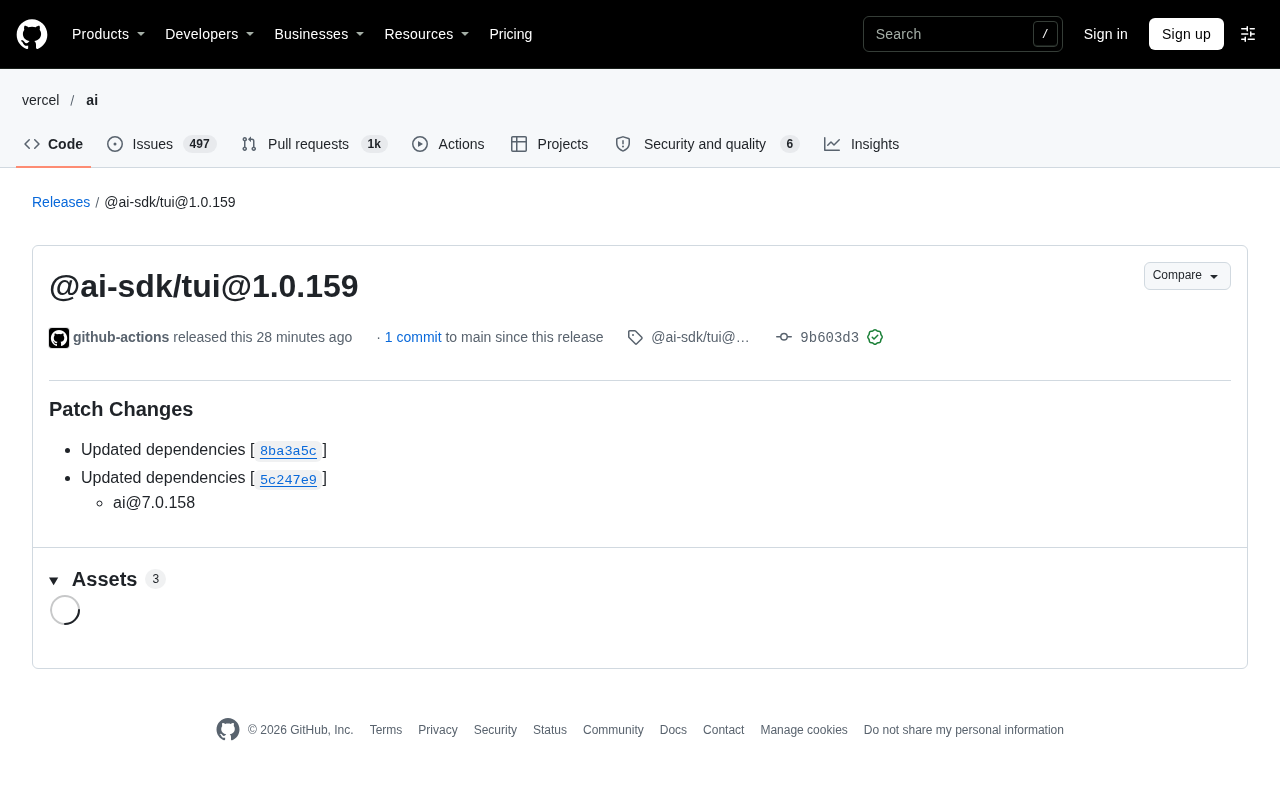
@ai-sdk/tui releases patch version 1.0.159, upgrading the core dependency ai package to 7.0.158.
The terminal interface library @ai-sdk/tui in the AI SDK ecosystem has released version 1.0.159, a patch-level update whose main change is synchronously upgrading underlying dependencies and raising the core ai package to 7.0.158. This version was automatically published by GitHub Actions, includes two patch changes commits, and carries a GPG-verified signature. The update introduces no new features or breaking changes and aims to maintain version compatibility between the tui library and the AI SDK core package. The library targets AI interaction applications in command-line and terminal environments, encapsulating details such as input/output, rendering, and the event loop. Developers can upgrade to this version via npm or pnpm; for production environments, it is recommended to first check the dependency changelogs.
The terminal user interface library @ai-sdk/tui in the AI SDK ecosystem has released version 1.0.159. As a patch update, its main change is a synchronized upgrade of underlying dependencies, the most important of which is updating the ai package to 7.0.158. For developers building command-line or terminal-based interactive applications with the AI SDK, this release means further alignment of the dependency chain.
Core Contents of the Version Update
According to the release record on GitHub, @ai-sdk/tui@1.0.159 was automatically published by github-actions, contains one commit, and includes a GPG-verified signature. The changelog shows two patch changes: one is updating dependencies (commit 8ba3a5c), and the other is another dependency update (commit 5c247e9), ultimately bringing the ai package to version 7.0.158.
This kind of patch-level release is common in fast-iterating open-source projects. It does not introduce new features or breaking changes, but ensures that the tui library remains compatible with the AI SDK core package. For developers using @ai-sdk/tui, upgrading to this version provides better coordination with ai@7.0.158 and avoids potential issues caused by version mismatches.
Semantic Versioning and patch updates: The npm ecosystem follows the SemVer (Semantic Versioning) specification, where the version number X.Y.Z corresponds to the major version, minor version, and patch version respectively. An increment in the patch position (Z) usually includes only backward-compatible bug fixes and dependency synchronization, and should not introduce new APIs or breaking changes. This is also why releases such as 1.0.159 can be automatically merged with relative confidence — the CI pipeline automatically calculates the version number and publishes based on commit conventions.
GPG signatures and supply chain security: The GPG-verified signature in the release record means that the publisher signs the tag or commit with a private key, and users can verify the authenticity of the source with the corresponding public key. In AI SDK projects with deep dependency chains, signature verification can reduce the risk of packages being tampered with or impersonated releases, and is a basic line of defense for supply chain security.
Significance for Terminal AI Application Developers
@ai-sdk/tui is positioned to provide tools for building AI interaction interfaces in terminal environments. Integrating model calls, streaming output, and status display in the command line requires handling details such as input and output, rendering, and the event loop. This library attempts to simplify this work so that developers can focus more on the AI logic itself.
Although this dependency update may seem minor, it reflects the AI SDK project's emphasis on ecosystem consistency. As the core dependency, the ai package's version upgrades may involve API adjustments, bug fixes, or performance improvements. Keeping up with patch versions of the tui library in a timely manner helps developers obtain a more stable terminal AI experience.
The difference between TUI and CLI: TUI (Terminal User Interface) is different from a simple line-by-line printing CLI. It maintains a redrawable interface area within the terminal, supporting cursor positioning, partial refresh, and keyboard event listening. To present streamingly generated model output smoothly in the terminal, it is usually necessary to handle ANSI escape sequences, rendering throttling, and a non-blocking input event loop to avoid output and user input blocking each other. @ai-sdk/tui encapsulates these low-level details so that developers only need to declare interface state and AI call logic.
How to Obtain and Upgrade
Developers can obtain this version through package managers such as npm or pnpm. Simply upgrade @ai-sdk/tui to 1.0.159 in the project. The release page also provides asset downloads and a complete commit comparison link, making it convenient to review change details. For production environments, it is recommended to check the changelogs of related dependencies before upgrading to confirm that there are no changes affecting existing functionality.
Overall, @ai-sdk/tui@1.0.159 is a maintenance release, suitable for developers who want to keep their dependencies up to date. It reflects the AI SDK's continued maintenance in the terminal interaction field and provides a more reliable foundation for building command-line AI tools.
Background Supplement
Dependency alignment and version mismatch risks: In npm's flattened dependency tree, if the version ranges of @ai-sdk/tui and the ai package directly depended on by the project do not overlap, the package manager may install two copies of ai, leading to type mismatches, failed instance checks, or streaming objects that cannot interoperate. Therefore, uniformly raising ai to 7.0.158 as in this release actually serves to converge the dependency graph and reduce duplicate installations and potential type conflicts. After upgrading, you can use npm ls ai or pnpm why ai to confirm that only one version remains in the dependency tree.
Related articles

Tencent WorkBuddy Hands-On: How AI Agents Crush Traditional Chat Assistants
WorkBuddy vs Doubao tested: how AI Agents directly operate computers to convert PPT to PDF, archive files and more. Analysis of WorkBuddy's low barrier, domestic ecosystem, pricing and plugin marketplace, plus AI Agent selection advice.

Azure Cross-Tenant Attack Chain: Root Cause Analysis of Five Paths
Binary Security analyzes five full cross-tenant compromise paths in Azure, trending 271 points on HN. This article interprets their shared root cause perspective and offers defense recommendations for cloud tenant isolation and reflections on responsibility boundaries.

Recreating a Real Bubble Tea Station in Isaac Sim: Script-Driven Unitree G1 Brews Tea
Developers recreated a real self-service tea station in NVIDIA Isaac Sim, using scripts to drive a Unitree G1 through a five-step tea-brewing process, exploring whether physics simulation can be a source of synthetic robot demonstration data and discussing contact stability and imitation learning.