AI Skill Development in Practice: Test-Driven Iteration and Model Pairing Strategies

The core of AI Skill development is a cycle of describing requirements, testing, and iterating.
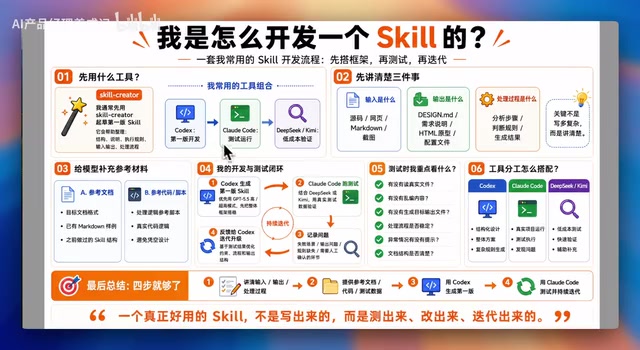
This article shares a battle-tested AI Skill development workflow built around the principle that "great Skills are tested, refined, and iterated into existence." Development starts with clearly describing inputs, outputs, and processing logic. For tooling, the recommended approach is using CodeX for initial drafts, Claude Code paired with DeepSeek/Kimi for validation and testing, and CC Switch for flexible model switching. The article uses the Design Generator Skill upgrade from v1.0 to v2.0 as a practical case study, demonstrating the complete iterative optimization process.
Introduction
Many people assume that developing an AI Skill requires writing massive amounts of code from scratch. In reality, with tools like Skill Creator, the entire development process is more like a cycle of "describe requirements → generate first draft → test feedback → iterate and optimize." This article shares a battle-tested Skill development workflow, built around one core principle: Great Skills aren't written—they're tested, refined, and iterated into existence.
What is an AI Skill? An AI Skill (AI plugin/capability) is a reusable AI execution unit that encapsulates specific task logic—essentially a combination of structured prompts and code logic that receives specific inputs, executes predefined processing workflows, and outputs standardized results. Unlike traditional software modules, the core competitive advantage of an AI Skill lies in its "intent understanding" capability: rather than relying on hard-coded rules, it leverages Large Language Models (LLMs) to understand context and flexibly handle edge cases. This characteristic shifts the development bottleneck from "how to write logic" to "how to clearly describe intent"—which is the fundamental reason why describing requirements matters more than writing code.
Clearly Describe Your Skill's Inputs and Outputs
The starting point for Skill development isn't writing code—it's describing requirements clearly. Specifically, you need to define three core elements:
- What are the inputs: source code files, screenshots, Markdown files, etc.
- What are the outputs: requirement specs, HTML prototypes, Design MD files, etc.
- What is the processing logic: how many steps to analyze the input, what to evaluate at each step, and what to generate as the final result
If you have reference documents for the output—such as a Markdown template for the desired document format, or a script that embodies the internal processing logic—provide them all to the model. This ensures the generated Skill is grounded in real code logic rather than conjured from thin air.
Tool Selection and Model Pairing Strategies
For tool selection, a phased pairing strategy is recommended:
- CodeX: Use for the first version, leveraging its powerful code generation capabilities for rapid drafting
- Claude Code: Pair with DeepSeekAd and Kimi for Skill validation and testing
- If your CodeX quota runs out, you can also pair Claude models or GPT within Claude Code for initial development
Why this division of labor? CodeX is OpenAI's AI model focused on code understanding and generation, fine-tuned specifically on massive open-source code datasets. It excels at "generating complete code skeletons directly from natural language descriptions," making it ideal for the cold-start phase. Claude Code is Anthropic's command-line AI programming assistant that can directly read the local file system, execute terminal commands, and modify code files. With its 200K token ultra-long context window for understanding large codebases holistically, its "Agentic" characteristics (autonomous task planning, tool invocation, and action execution) make it particularly suited for the validation and iteration phase. DeepSeek is renowned for its exceptional cost-effectiveness, with API costs at 1/10 or even lower than mainstream closed-source models, making it ideal for high-frequency test validation. Kimi excels with million-token-level ultra-long context processing capabilities, suitable for scenarios requiring analysis of large volumes of reference documents.
CC Switch: A Powerful Tool for Flexible Model Switching
Here's a practical tool recommendation—CC Switch, which helps you flexibly configure and switch between multiple models within Claude Code. Configuration steps:
- Add a custom configuration in CC Switch
- Provider name and link can be filled in freely
- API Key needs to be obtained via "Update Key" or "Get Key"
- Request URL should be the BaseURL displayed on the corresponding platform
- Configure the model based on your needs; if left empty, it defaults to Claude's recommended model
Once configured, simply click "Enable" when you need to use a specific model. This flexibility makes the development workflow more efficient: use Claude or GPT to generate the first draft, use DeepSeek or Kimi for test validation, then feed test results back to CodeX or Claude Code for subsequent iterations.
Practical Case Study: Design Generator Skill Iterative Upgrade
Using the Design Generator Skill as an example, here's the complete iterative upgrade process.
Upgrade Background from v1.0 to v2.0
Design Generator is based on the open-source project Awesome Design MD for generating design specification files. The open-source project upgraded from v1.0 to v2.0:
- v1.0: Oriented toward human reading and comprehension
- v2.0: Added Token and component definitions, better suited for AI and code generation
The Technical Value of Design MD Design MD (Design Specification Markdown files) is a technical specification document that structures visual design systems into machine-readable formats. Traditional design specs (such as Figma files, PDF design manuals) primarily target human designers. The core innovation of Design MD is encoding design decisions—color Tokens, font scales, spacing systems, component variants—into standardized Markdown structures, enabling AI models to directly parse and precisely follow these constraints during code generation. The upgrade from v1.0 to v2.0 is essentially a paradigm shift in design systems from "human-readable" to "AI-consumable"—the Token system introduced in v2.0 allows AI to precisely reference design variables when generating frontend code, rather than relying on vague natural language descriptions, dramatically improving design fidelity.

Upgrade Execution Workflow
First, tell the model to analyze the Skill in the current project path and, combined with the v2.0 folder contents, provide an upgrade plan. The model will return upgrade suggestions—if you have questions, continue the conversation to refine the final plan. Once the plan is confirmed, instruct the model to execute the upgrade.
Testing and Validation Results
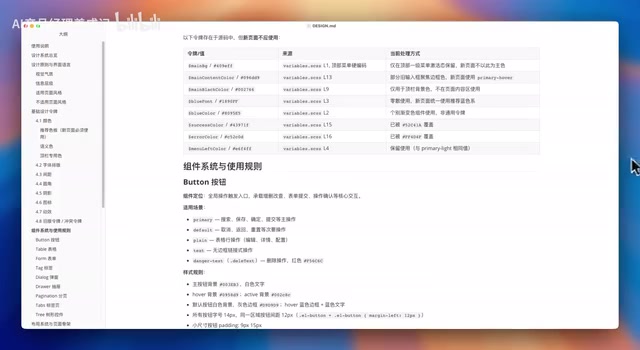
After the upgrade, execute the Design Generator Skill directly in the project path. It generates a corresponding Design MD file containing:
- Usage instructions and design system overview
- Typography, spacing, border-radius, and icon specifications
- Table and Tag style definitions
- Layout specifications and source summaries
- Preview pages (with color systems, font layouts, icons)
Identifying Issues and Targeted Fixes
During testing, a typical issue was discovered: in the generated sample file, the top navigation bar picked up the wrong color—it didn't follow the design specification.
Pinpointing the Root Cause
Launch Claude Code in the Design Generator Skill's directory and describe the problem directly: "In the current project test, the top navigation bar color should be XX color. Please analyze why this color wasn't picked up." The model will analyze the cause and provide fix recommendations.
Choose the Right Model Based on Fix Complexity
Select the appropriate model based on the complexity of the fix:
- Simple changes: Use DeepSeek—fast response, low cost
- Complex optimizations: Use Claude or GPT—design the solution first, then execute

The Core of Skill Development
Related articles
 Tutorials
ChatGPT Plus Subscription Guide: Are GPT-5.5, image-2, and Codex Worth the Upgrade?
A detailed look at ChatGPT Plus features — GPT-5.5, image-2, and Codex — with a Plus vs Pro comparison and a complete step-by-step subscription guide for users outside the US.
 Tutorials
Harness AI Engineering in Practice: Using Claude Code to Master Enterprise-Level E-Commerce Development
Deep dive into Harness AI Engineering: master enterprise e-commerce development with Claude Code using the Rules, Skills, Wiki, and Changes framework.
 Tutorials
Cursor + Codex Dual-IDE Collaboration: A Practical Methodology for Open-Source Project Customization
A complete methodology for open-source project customization based on real-world experience, detailing the Cursor+Codex dual-IDE workflow, seven-stage process, MVP validation, and AI source code reading techniques.