AI Testing End-to-End in Practice: A Complete Guide from Test Case Generation to Agent Automation

End-to-end guide to building a connected AI testing workflow from API capture to automated execution.
This article breaks down the fragmented state of AI-assisted QA and presents a complete closed-loop workflow: API capture, test case generation, Agent orchestration, and automated execution. It highlights two core challenges — incomplete documentation and the need for mandatory human review — and offers practical solutions including RAG-based knowledge bases, model routing strategies, and AI flow orchestration.
The Core Pain Point of AI Testing: A Fragmented Workflow
Nearly every QA engineer has tried using AI to boost efficiency, yet when it comes to real-world implementation, they run into an uncomfortable truth: the various AI use cases operate in silos. Some use AI to write test cases, only to get plain text that can't be reviewed or managed. Others have AI export to Excel or XMind, then manually merge each module. Still others get stuck after test case generation — how do you actually convert all these cases into automation scripts?
Technically, this fragmentation stems from the "context island" problem. Different AI tools each maintain their own independent context state, with no unified data format protocol between them. For example, test cases generated by ChatGPT are unstructured Markdown text, while automation frameworks like Pytest and Robot Framework require strictly structured data input. XMind exports mind maps in a proprietary XML format that requires manual conversion to connect with test management systems like Jira or TestRail. This "last-mile" data format gap means that efficiency gains from AI at any single step fail to propagate through the overall process.
As one testing blogger emphasized in a practical demo: "There are so many AI tools out there, and we end up using different AI stacks at different stages — which leaves the AI testing workflow in a fragmented state." The most critical disconnect happens precisely at the transition from manual testing to automated testing. Whether AI can truly bridge that gap is the real question.
This article is based on a hands-on demo of a customized AI Engine testing platform. It maps out a complete closed-loop workflow — from information gathering and API management to test case generation and Agent-driven automated execution — and distills two core challenges of real-world AI testing adoption along with strategies to address them.
Challenge #1: Incomplete Information — AI Can't Work Without the Right Inputs
Many people assume that feeding an API document to AI will automatically produce perfect test cases. The reality is that project documentation is rarely as complete as you'd expect.
A typical example: the vast majority of API documents don't include response body examples. If the AI only knows how to send a request but doesn't know the response structure, there's no basis for writing assertions. Missing information directly limits the quality of AI output.
Using API Capture to Fill Information Gaps
The solution: since the information AI receives is incomplete, have AI "capture" the missing data first. The platform uses a floating-ball browser recording tool to capture API requests triggered by real page interactions in real time, then AI analyzes and organizes that captured data into complete API documentation.
This type of recording tool is essentially built on browser extension-based network traffic interception. It works by injecting JavaScript scripts to listen for XMLHttpRequest and Fetch API calls, capturing the full data for request URLs, headers, request bodies, and response bodies. Compared to traditional packet capture tools like Charles or Fiddler, it requires no proxy configuration or SSL certificate installation, significantly lowering the barrier to use. More importantly, it correlates network requests with the user's UI interactions (clicks, inputs, navigation) in chronological sequence — so AI understands not just "what request was sent" but "in what interaction context it was sent," providing critical context for generating test cases with real business semantics.
One notable detail: AI can analyze not just APIs but also UI — identifying API calls triggered by interface interactions. This "what you see is what you get" capture approach ensures that downstream test case generation has reliable, real-world data to depend on. Without this foundation, the more AI is used, the more data gets generated — and the greater the drift from reality.
Challenge #2: AI Isn't as Smart as You Think — All Output Must Be Reviewed
This is the most important step in the entire AI testing workflow: AI-generated content cannot be used as-is.
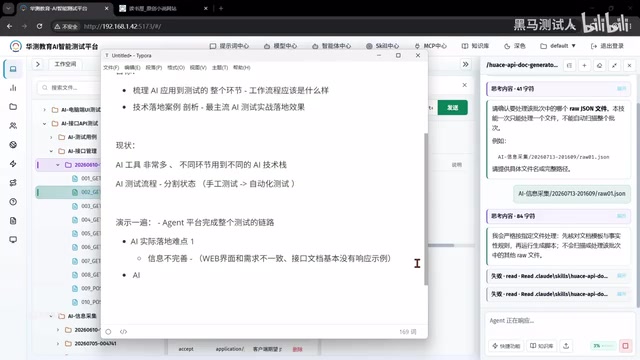
The second barrier to AI adoption is that it "isn't as smart as you think." Even with complete documentation, AI-generated API IDs, names, endpoints, and parameters can contain a high volume of errors. So once AI has organized the APIs, verification is essential: can these APIs be accessed normally? If an API can't even be reached, any test cases generated from it are essentially unreliable.
Making All AI Output Reviewable and Editable
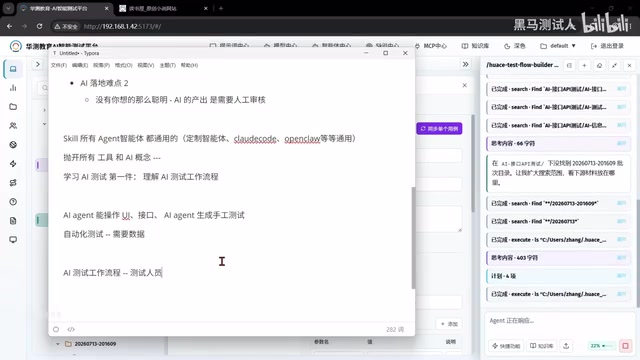
The core principle is: everything AI produces must be reviewable and editable. Test cases shouldn't be static documents — they should be structured, searchable data that includes test steps, expected results, and variable definitions.
The logic is straightforward: "If you can't even edit what AI generates, and the only option when something's wrong is to regenerate from scratch, the output becomes completely uncontrollable." Only by making outputs transparent and maintainable can QA engineers' review work add real value. This is also the fundamental difference between an enterprise-grade AI testing platform and a "half-finished hack."
AI's Capability Scope: Beyond APIs, Covering All Endpoints
A common misconception about AI is that it only handles text-based conversations. In reality, AI can understand far more than most people expect.
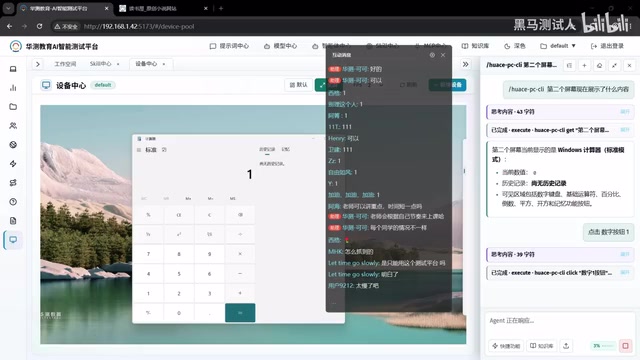
The demo platform can connect to multiple device types: PC desktop, browser, Android, and HarmonyOS. AI can directly read the contents of the Windows Calculator on screen and autonomously identify UI elements, click buttons, and execute operations based on instructions. It can also open websites, search for specified keywords, and return results.
Critically: AI can independently execute tests even on projects it has never encountered before. Being able to see everything on screen and interact with it means being able to understand it; being able to understand it means being able to plan UI modules and design test cases. This is the true value of AI-driven automated testing.
At the technical level, this capability is supported by different specialized solutions, each with a distinct role: ADB (Android Debug Bridge) is Google's official Android device debugging protocol, supporting app installation, touch simulation, screenshots, and command execution — the foundational infrastructure for Android automation testing. HarmonyOS uses Huawei's proprietary HDC (HarmonyOS Device Connector) tool, which works on similar principles. Playwright is Microsoft's open-source web automation framework; its key advantage over Selenium is native support for async operations, automatic waiting for element readiness, and built-in network request interception — making it ideal for modern single-page application testing. PyAutoGUI controls the PC desktop through OS-level mouse and keyboard APIs, combined with a vision model that semantically interprets screenshots, enabling "non-intrusive" automation of any desktop application — meaning AI can operate software like a human even without source code or automation interfaces.
From Manual Test Cases to Automation: Bridging the Data Gap
This is the most practically valuable section of the entire article. AI can operate UIs and generate manual test cases, but that doesn't mean it can directly perform automated testing.
Between manual and automated test cases lies a gap, and that gap is fundamentally about data. Take a login scenario: where do the username and password come from? Production, UAT, and test environments each have different database credentials. Hardcoding test data makes it impossible for AI to switch environments flexibly. Automation also involves dynamic processes like data retrieval and cleanup, dynamic function execution, database operations, and encryption/decryption — all of which AI cannot handle directly.
Have AI Orchestrate the Flow, Not Blindly Execute It
The solution requires a shift in thinking: have AI orchestrate the automation workflow rather than execute it directly.
For QA engineers unfamiliar with automation platforms, you can simply tell AI: "Based on this API, help me orchestrate an automated testing workflow." AI will generate a structured, step-by-step process — dynamically reading login credentials, data association, data management — with each step fully visible. Assertion logic is also generated by AI, for example: "Check whether the API returns JSON, and whether the JSON data contains a specified field."
Once the orchestration is complete, the QA engineer reviews it and tells AI to correct anything unreasonable. AI then automatically compiles it into the platform's description language or a code script. Only then is a truly reusable, environment-switchable automated test case fully defined.
Using a Knowledge Base to Handle Complex Business Flows
For simple APIs, AI can analyze call sequences on its own; common login flows are no problem. But for complex projects, AI will almost certainly fail to figure out the business flow — because it doesn't understand the company's specific business rules.
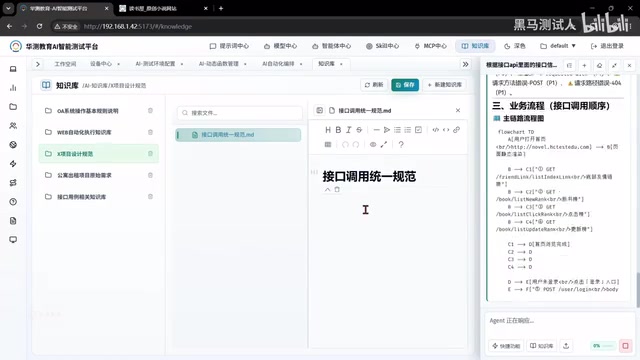
The solution is to introduce a knowledge base: capture what AI doesn't know — unified API call standards, project terminology, business design rules — and build it into a knowledge base. When starting a conversation, simply tell AI "we're working on business flow analysis for Project X," and AI can combine the knowledge base to produce process designs that conform to internal standards.
Technically, this corresponds to a RAG (Retrieval-Augmented Generation) architecture. The core idea is: split the company's private internal knowledge into text chunks, convert them into vectors using an embedding model, and store them in a vector database (such as Milvus, Pinecone, or Chroma). When a user asks a question, the system first retrieves the most relevant knowledge chunks and injects them as context into the large language model. RAG's greatest value is that it allows private knowledge to be injected without fine-tuning the model — far cheaper than full fine-tuning, and the knowledge base can be updated at any time. In a testing context, it solves the fundamental limitation of large models having no inherent knowledge of a specific organization's business logic.
Model Selection: Good Enough and Reliable, Not the Strongest
On the topic of model selection, the practical recommendation is this: the demo uses the MiniMax M3 model rather than the highest-performing model on the market.
The reason is simple: automated test execution ultimately boils down to clicking UI elements and managing data. No matter how powerful the model, it can't fill in the gaps in business knowledge. The selection criteria should therefore be "fit for purpose and cost-reliable."
Taking it further, different agents can be paired with different models — a strategy known in AI engineering as Model Routing: operations requiring automation use lightweight models to save costs, while test case generation calls a high-capability flagship model to ensure quality. This tiered selection strategy maintains overall output quality while keeping API call costs at 20–40% of what a single top-tier model would cost. For QA teams, no general-purpose model — no matter how powerful — can compensate for missing business knowledge. Filling that gap is a matter of knowledge base engineering, not model capability.
Summary: Understand the Workflow First, Then Choose Your Tools
The most valuable takeaway from this hands-on demo isn't any specific tool — it's establishing a complete mental model of AI testing:
Information Capture → API Management → Test Point Analysis → Test Case Generation → Flow Orchestration → Automated Execution
"If you jump straight into debating tools, all the tool knowledge in the world won't help much." Whether you're using a customized platform or calling tools like Claude Code directly, the underlying logic is the same. What truly matters is understanding the AI testing workflow, knowing the boundaries of what AI can and cannot do, and always treating human review as a non-negotiable step in the process.
Key Takeaways
Related articles

A New Paradigm for Text Editing in Compose: TextFieldState Replaces the Old API
Jetpack Compose introduces the TextFieldState API to fix dropped characters and cursor jumps from async input. The old value/onValueChange callbacks will be deprecated in 1.13. This article covers InputTransformation, OutputTransformation, four state hoisting patterns, and new formatted text editing capabilities.

Remote Compose: A New Document-Driven Paradigm for Cross-Platform UI on Android
Remote Compose transmits compact binary documents instead of screen pixels, enabling efficient UI rendering on remote surfaces like Wear OS and widgets. This article covers its document creation API, expression animations, size optimization techniques, and Wear OS progress.

How Crashlytics Eliminates Android Memory and Responsiveness Issues
Through the Chroma Clip case study, this article explains how Firebase Crashlytics uses Application Exit Info, Profiling Manager, GWP ASAN, and ARM MTE to pinpoint ANRs, OOMs, memory limit terminations, and native memory corruption—solving the challenge of stack traces that don't point to the real culprit.