AI Video Generation Control Tips: A Practical Guide to Model Selection and Camera Movement Prompts

Model selection and prompt writing are the two core factors determining AI video quality.
AI video quality depends on two key factors: model selection and prompt writing. For models, tools like Runway, Pika, Kling, Hailuo, Luma, and Vidu each excel in different areas—choose based on video type and adopt a multi-model pipeline. For prompts, cover four components: subject, scene, camera movement, and additional details. Camera movement descriptions (stable, dynamic, spectacular, imposing, and immersive) are the critical differentiator between professional and amateur AI videos.
Why Do Your AI Videos Always Look Amateurish?
Using the same AI tools to generate videos, why do some people's work look stunning while others produce unwatchable results? This question plagues countless AI video creators.
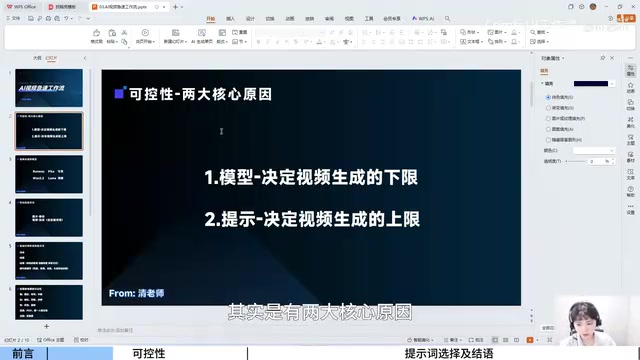
The answer is actually quite simple—the model determines the floor of your video quality, while the prompt determines the ceiling. These two core elements directly dictate the quality and controllability of your generated videos.
This article systematically covers both model selection and prompt writing, helping you precisely generate the AI video effects you want and produce content with coherent storylines and polished visuals in a short time.
The Technical Foundation of AI Video Generation: Why Are Different Tools So Different?
Before diving into tool comparisons, it's worth understanding the technical background of current AI video generation. Most mainstream AI video generation tools are built on Diffusion Models or their variants. Diffusion models generate high-quality images or video frames from random noise through a gradual denoising process, with core advantages in generation quality and controllability.
Video generation faces greater technical challenges compared to image generation—it not only needs to ensure single-frame quality but also maintain Temporal Consistency between frames, ensuring that characters and objects don't suddenly change or produce "ghosting" artifacts across consecutive frames. This is the fundamental reason why different tools perform so differently in specific scenarios: each team's emphasis on training data, model architecture, and optimization objectives differs, leading to unique advantages in particular vertical domains.
How to Choose an AI Video Generation Model: Six Mainstream Tools Compared
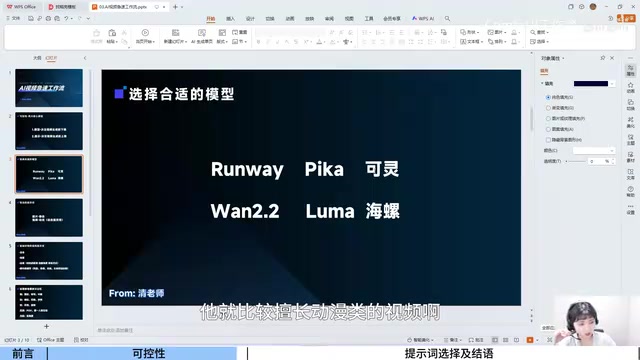
Current mainstream AI video generation tools each have their strengths, and choosing blindly often leads to wasted effort. Based on actual testing and usage experience, here's a comparison of popular tools and their specialties:
| Tool | Strengths |
|---|---|
| Runway | Camera movement control, realistic landscape videos |
| Pika | Anime-style videos |
| Kling | Chinese-themed videos |
| Hailuo | Cinematic visuals |
| Luma | Seamless beginning-to-end video continuity |
| Vidu 2.2 | Cinematic shot quality, overall expressiveness |
Model Selection Strategy: Reverse-Engineer Tool Choice from Video Type
The key principle is to reverse-engineer your tool choice based on video type. If you're making a Chinese-style short film, Kling is likely your first choice; if you're pursuing Hollywood-level cinematic quality, Hailuo or Vidu 2.2 would be more suitable; and if you need anime-style content, Pika's expressiveness is more outstanding.
Don't assume any single tool can handle all scenarios. In real projects, a Multi-Model Pipeline has become the mainstream approach for professional AI video production—use a model that excels at composition to generate keyframes, use one that excels at motion for dynamic segments, then integrate everything through video editing tools in post-production. This engineering mindset closely parallels the division of labor in traditional filmmaking: directors, cinematographers, and VFX artists each handle their specialties, ultimately collaborating to complete a work. Mixing multiple tools and leveraging each one's strengths often yields the best results.
How to Write AI Video Prompts: Four Essential Components
Images are static; videos are dynamic—this means video generation prompts need to include dynamic dimension descriptions. This is the core challenge of Prompt Engineering in the video domain: it needs to control not only spatial dimensions (composition, framing, color tones) but also precisely describe temporal dimensions (motion trajectories, rhythm changes, camera transitions).
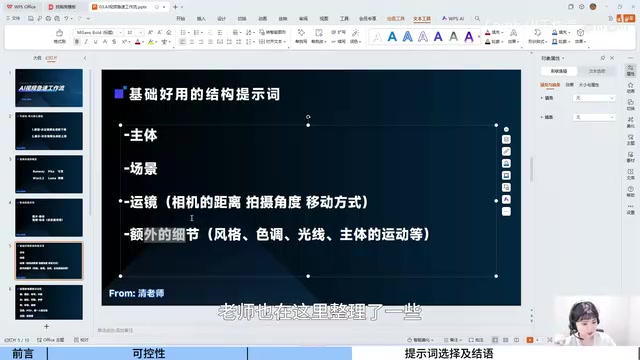
A complete AI video prompt should cover four components:
- Subject: What is the core object in the frame
- Scene: What environment does it take place in
- Camera Movement: How does the camera move
- Additional Details: Style, color tone, lighting, subject motion patterns, etc.
Among these, camera movement prompts are the most easily overlooked yet have the greatest impact on visual quality.
Five Categories of Camera Movement Prompts: Directing AI with Cinematic Language
Camera Movement is a core component of cinematic language, with different movement types carrying distinct narrative functions and emotional expressions. Transferring this century of accumulated visual storytelling expertise into AI prompts essentially means using mature film grammar to precisely guide AI output. Categorizing camera movements by visual feeling can dramatically improve prompt writing efficiency:
1. Stable — The Steadiness of Fixed Positions
Corresponding keywords: Static Shot, Close-up, Medium Shot
These shots are ideal for showing character details and emotional close-ups, with stable and focused visuals. Fixed camera positions eliminate camera movement, directing all viewer attention to the subject itself—a classic technique for expressing restrained emotions and emphasizing textural details. In actual testing, close-up shots generated with Vidu showed excellent expressiveness, clearly rendering facial expressions and object textures.
2. Dynamic — The Rhythm of Push and Pull
Corresponding keywords: Push In, Pull Out, Handheld, Cut
Push In is typically used to emphasize details or create tension, especially common in suspense and thriller genres; Pull Out is often used to reveal a larger environmental context or express loneliness and insignificance. Handheld effects simulate natural eye movement, adding realism and presence—a signature language of documentaries and realistic-style videos. These camera movements are most frequently used in narrative videos.
3. Spectacular — The Visual Impact of Orbits and Rotations
Corresponding keywords: Orbit Shot, Rotating
Orbit shots can showcase a subject from 360 degrees. Their visual effect originates from the well-known "Bullet Time" technique in Hollywood blockbusters—an orbiting perspective achieved through multiple camera positions or AI frame interpolation that gives the frame intense dramatic tension. Commonly used in product showcases, character introductions, and other scenes requiring visual impact.
4. Imposing — The Power of Low Angles
Corresponding keywords: Low Angle, Worm's Eye View
Low-angle shots naturally convey a sense of pressure and power, stemming from the human visual instinct that "looking up equals awe." They're ideal for showing the grandeur of architecture or the authority of characters, and are particularly common in action and sci-fi genres. The contrasting Bird's Eye View is often used to express insignificance or provide an overview perspective.
5. Immersive — The Engagement of First-Person Perspective
Corresponding keywords: POV (Point of View), Selfie Angle, Interactive Shot

First-person perspective (POV, Point of View) simulates a character's subjective viewpoint, breaking the "fourth wall" between the audience and the screen, greatly enhancing immersion. This technique is widely used in game trailers, and with the rise of immersive content and short-form video in recent years, it has become increasingly common in Vlog-style and interactive experience videos.
Practical Demonstration: The Complete Generation Workflow from Script to AI Video
Once you've mastered model selection and prompt writing, the practical workflow can be summarized in three steps:
Step 1: Write the Script and Scene Descriptions
Use AI tools like Doubao to generate a storyboard script, clearly defining the subject, scene, and camera movement for each shot. For example: "Close-up shot, a key engraved with '夜班' (Night Shift) slowly rotating under dim lighting."
Step 2: Select the Matching Generation Model
Choose the appropriate tool based on visual style requirements. The above example pursues realistic cinematic quality, so Vidu 2.2 would be a good choice.
Step 3: Generate and Iterate
Input the prompt into the model, then compare the generated video against the script description. Testing results show that carefully crafted prompts can produce results that closely match expectations—even text like '夜班' on the key can be accurately rendered.
Conclusion: Making AI Video Generation Controllable and Reproducible
The core competitive advantage in AI video generation lies not in the tools themselves, but in understanding tool characteristics and precise prompt expression. At its essence, this is a comprehensive capability that fuses filmmaking expertise, AI technical understanding, and creative experience. Here are four recommendations worth practicing for every creator:
- Build your own prompt library: Categorize and organize by camera movement, style, lighting, and other dimensions to create reusable templates
- Cross-test with multiple models: The same prompt may perform vastly differently across different models—find the best match
- Prioritize camera movement descriptions: This is the key dividing line between amateur and professional AI videos, and the core intersection of cinematic language and AI tools
- Start practicing with short clips: First master precise control of single shots, then gradually tackle the storyline continuity of multi-shot sequences
Related articles
 Tutorials
ChatGPT Plus Subscription Guide: Are GPT-5.5, image-2, and Codex Worth the Upgrade?
A detailed look at ChatGPT Plus features — GPT-5.5, image-2, and Codex — with a Plus vs Pro comparison and a complete step-by-step subscription guide for users outside the US.
 Tutorials
Harness AI Engineering in Practice: Using Claude Code to Master Enterprise-Level E-Commerce Development
Deep dive into Harness AI Engineering: master enterprise e-commerce development with Claude Code using the Rules, Skills, Wiki, and Changes framework.
 Tutorials
Cursor + Codex Dual-IDE Collaboration: A Practical Methodology for Open-Source Project Customization
A complete methodology for open-source project customization based on real-world experience, detailing the Cursor+Codex dual-IDE workflow, seven-stage process, MVP validation, and AI source code reading techniques.