AI Voice Programming in Action: Build an Excel VBA File Organizer with Zero Code

Build an Excel VBA file organizer with zero code using an AI voice programming assistant.
This article walks through how to build a fully functional Excel VBA file organizer using an AI voice programming assistant — no manual coding required. It covers the complete workflow: discussing requirements with AI, generating the form interface, and producing business logic code, all through natural language. Key tips include iterating with AI, being specific in descriptions, and separating UI from logic generation.
The Daily Pain of File Organization
In day-to-day work, we constantly face the challenge of sorting through large numbers of files — photos, documents, and spreadsheets scattered across folders that need to be categorized by type or purpose into designated directories. Doing this manually is not only time-consuming but also prone to errors.
Today I'm sharing a practical solution: using an AI voice programming assistant to build a fully functional file organizer inside Excel — without writing a single line of VBA code. The entire process requires no manual coding. Just describe what you need in plain language, and the AI automatically generates both the form interface and the business logic.
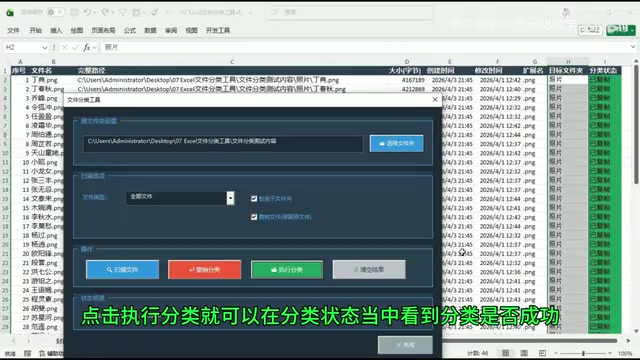
Full Feature Set of the File Organizer
This Excel VBA-based file organizer covers all the core needs of file management.
Core Feature Modules
- Folder Selection: Choose a target folder path via a pop-up dialog
- File Scanning: Scan all files in a folder with one click; details are automatically written to the Excel sheet (including index, filename, path, size, creation time, modification time, extension, etc.)
- File Type Filtering: A dropdown dynamically fetches all file types in the current directory, supporting type-specific sorting
- Subfolder Support: A checkbox controls whether to include files in subfolders
- Copy/Move Mode: Flexibly choose between copying or moving files to suit different scenarios
- Undo Sorting: After sorting, undo with one click to restore files to their original locations
- Visual Status Indicators: Green for success, red for failure, orange for unspecified destination
Workflow
The workflow is intuitive: Select a folder → Scan files → Fill in the target folder name in the Excel sheet → Click to execute sorting. The tool automatically creates the target folder and completes the copy or move operation — all in an instant.
Step-by-Step: AI Voice Programming in Practice
The real highlight here is how this tool was built. The author used a tool called "VBA YYDS Voice Programming Assistant" to complete the entire development through natural language conversation.
Launch the AI Programming Assistant
Open Excel's developer tools, press Alt+F11 to enter the VBA editor, find the "VBA YYDS" option in the menu bar, and select "Start Chat Programming."
Describe Your Requirements by Voice
This step is the heart of the entire process. The author started with an open-ended question to the AI: "I want to build a file organizer using an Excel form. Let's first discuss what features it should have."
The AI then lists the features it thinks a file organizer should include. The author then combined the AI's suggestions with their own practical needs and used voice to describe the complete feature specifications in detail.
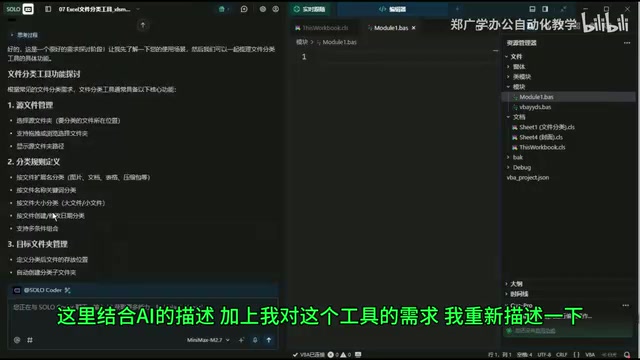
Here's a technique worth borrowing: let the AI suggest features first, then refine and supplement based on your own needs. This "human-AI collaboration" approach tends to produce more complete results than jumping straight to a requirements list.
Articulate the Details Precisely
The author paid close attention to specifics when describing requirements, including:
- The exact form of UI elements (buttons, dropdowns, checkboxes)
- Complete data field definitions (index, filename, path, size, timestamps, etc.)
- Clear interaction logic (target folder is filled in manually by the user)
- Visual design for status feedback (different colors for different states)
- Aesthetic preferences for the form's color scheme ("tech-inspired color palette")
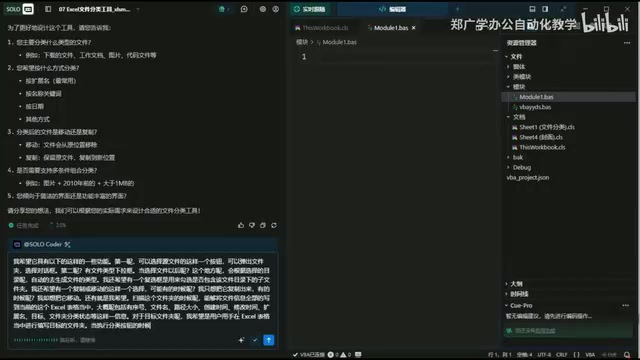
Precise requirement descriptions are the key to getting high-quality AI output. Vague descriptions only produce vague results.
Generate the Form Interface and Refine It
After analyzing the requirements, the AI automatically generated a preview of the form interface. If the result isn't satisfactory, you can continue requesting changes and have the AI regenerate — the iteration process is very flexible.
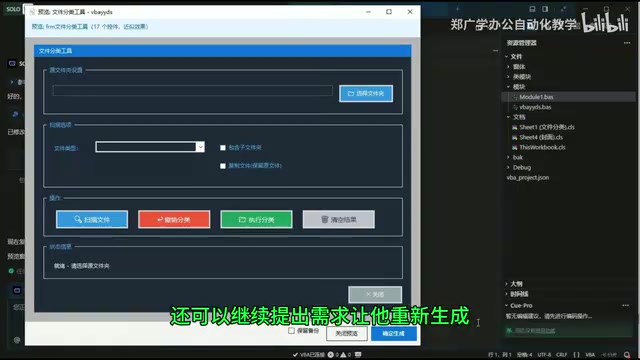
Once the form design is confirmed, click "Confirm and Generate," and the AI completes the interface creation.
Generate the Business Logic Code
After the form was generated, the author continued with a voice instruction to the AI: "Complete the business logic code for this form. Do not change the existing layout of the form." This instruction is critical — explicitly telling the AI to only write logic code and leave the interface alone prevents the AI from accidentally breaking the existing design when adding code.
Once the AI finished writing the code, it was tested immediately. Select a folder, fill in the sorting targets, execute — everything worked smoothly.
Practical Tips for AI-Assisted Programming
Four Keys to Using AI Programming Effectively
This case demonstrates an efficient AI-assisted development pattern:
- Discuss before you build: Don't rush the AI into writing code — start with a requirements discussion
- Work in stages: Generate the interface first, then add the logic — this reduces the chance of errors
- Be specific: The more concrete your description, the higher the quality of the AI's output
- Iterate: If you're not satisfied, keep refining rather than starting over from scratch
Use Cases and Caveats
This AI voice programming approach is especially well-suited for:
- Rapid development of everyday office automation tools
- Non-programmers solving specific workflow pain points
- VBA beginners looking to get started quickly and learn by example
That said, for complex enterprise-level applications, pure voice descriptions may not cover all edge cases. Some programming knowledge is still needed to review and optimize AI-generated code.
Conclusion
The core value of this case isn't just the practical file organizer it produced — it's the demonstration of how AI can lower the barrier to programming to the point where "if you can talk, you can build." From requirements discussion and UI design to code implementation, the entire process was completed through natural language interaction. Letting technology serve your needs, rather than forcing your needs to conform to technology — that's the real change AI programming tools bring.
Related articles
 Tech Frontiers
A Rare Quiet Day in AI: Recursive Self-Improvement Stirs Beneath the Surface
A rare quiet day in AI sees multiple sources go silent simultaneously. Behind the calm, Recursive Self-Improvement (RSI) research continues. What this means for the industry.
 Tech Frontiers
Reve 2 vs. Ideogram 4: A Deep Dive into Layout Control in AI Image Generation
A deep comparison of Reve 2 and Ideogram 4's layout control capabilities, covering technical approaches, real-world use cases, and industry trends for designers and creators.
 Tech Frontiers
In the Weights: Check Your Influence Score in the AI World
In the Weights is an AI influence search engine that quantifies your presence in the AI world with a score. Explore how it evaluates practitioners and what it means for digital identity.