AI Writes Code Faster, So Why Isn't Delivery Faster?

AI makes writing code faster, but the verification bottleneck keeps delivery efficiency from rising in step.
The Sonar 2026 Developer Survey shows 72% of developers use AI coding tools daily, 96% doubt AI-generated code, yet only 48% check before every commit. Writing code got faster, but the time saved goes almost entirely into reading and review, creating a "verification bottleneck." AI code looks clean but often fails at security-sensitive points like permission checks, output escaping, and query performance—especially in the WordPress ecosystem. The author offers five habits: keep diffs small, read before running, test behavior not syntax, manually check security points, and keep decision-making authority. The core takeaway: AI shifts software development's hard part from typing speed to judgment—knowing what to keep, change, or discard is the new core competency.
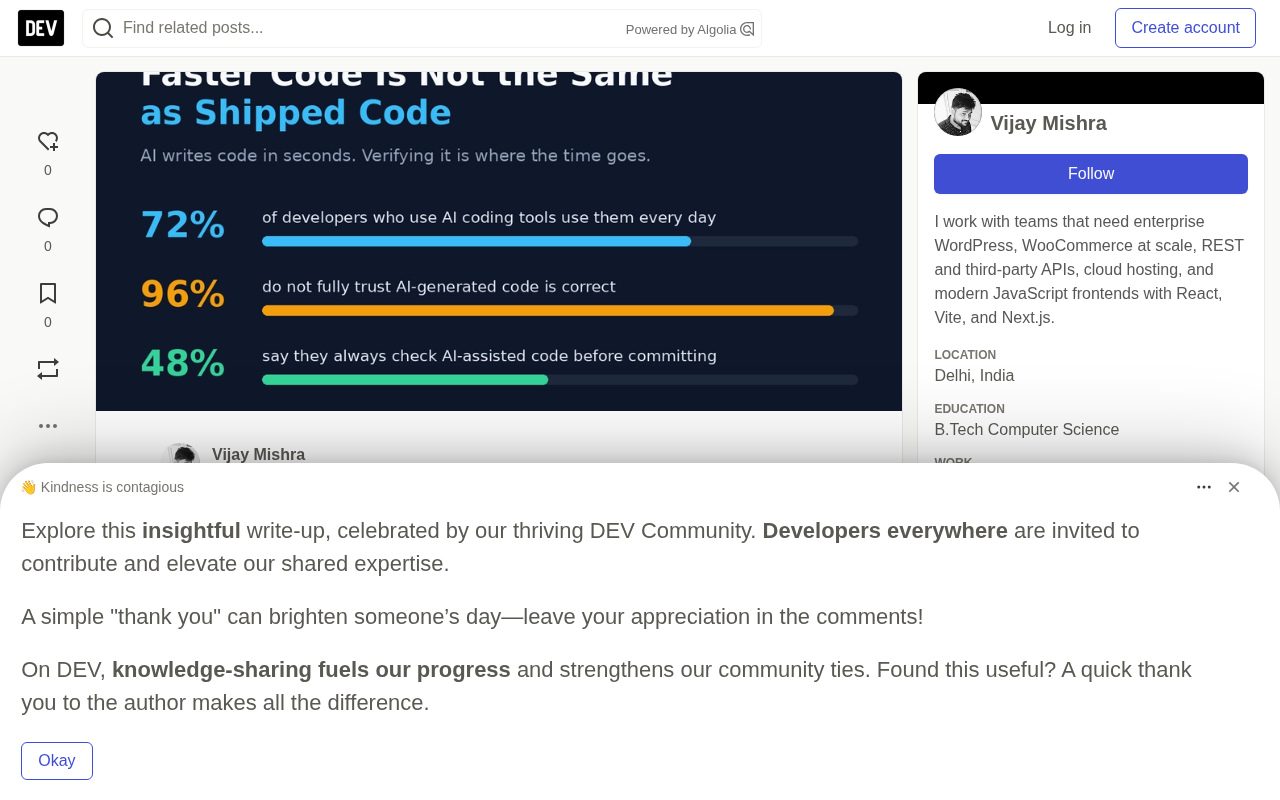
AI coding tools have dramatically sped up how fast developers write code, but delivery efficiency hasn't necessarily kept pace. The Sonar 2026 Developer Survey reveals a key contradiction: 72% of developers use AI tools daily, 96% doubt the correctness of AI-generated code, yet only 48% check every time before committing. Writing code got faster, but verification became the new bottleneck.
Faster to Write, Slower to Verify
The most tangible value of AI coding tools is shortening the time from "idea to first draft." A WordPress plugin skeleton, a block, a complex query—they can appear on screen in seconds. But the faster the first draft appears, the more obvious the real workload becomes: checking.
Sonar's survey data quantifies this feeling: among developers who have tried AI coding tools, 72% use them daily, 96% don't fully trust the functional correctness of AI-generated code, and only 48% say they check AI-assisted code before every commit. Sonar calls this the "verification bottleneck": writing code got faster, but the productivity gains many expected haven't materialized, because someone still has to confirm the code works.
This experience is especially real for solo developers. The typing time saved is almost entirely transferred to reading.
Why Review Became the Main Job
When you write code yourself, you understand every line because you made every decision. When an AI agent writes code, it may look clean but go wrong in easily overlooked places: missing capability checks, unescaped output, queries that work fine on a small site but crash on a large one. In the WordPress ecosystem, these seemingly minor omissions matter a lot, because plugins run on other people's websites.
96% doubt AI code, 48% check every time—that gap is the part worth paying attention to. Most people know they should verify, but far fewer actually do it every single time.
A capability check is a core concept in the WordPress permission system, corresponding to the current_user_can() function. WordPress defines fine-grained capabilities for each operation, such as edit_posts, manage_options, and publish_posts, and allows plugins and themes to define custom capabilities. Calling current_user_can() before performing sensitive operations is the standard practice for preventing unauthorized access. A common oversight in AI-generated code is performing database writes or administrative operations directly while skipping this check, allowing low-privilege users (such as subscribers) to trigger actions that should be restricted to administrators. Such defects are completely legal at the syntax level and may not be covered by unit tests; only manual review of the permission logic can find them, which is why capability checks deserve their own entry in the security-sensitive checklist.
Output escaping refers to encoding data before outputting it to HTML, attributes, URLs, or JavaScript contexts so that the browser treats it as plain text rather than executable code. WordPress provides functions such as esc_html(), esc_attr(), esc_url(), and wp_kses_post(), each corresponding to different output scenarios. Unescaped output is the most common source of cross-site scripting (XSS) vulnerabilities: attackers can inject scripts into controllable fields such as comments and user profiles, which then execute when other visitors browse the page. AI-generated code often looks correct at the data-fetching stage but omits the escaping function in the final echo, and this kind of problem doesn't cause page errors and is hard to expose through functional testing—only a line-by-line inspection of output points can locate it.
Five Habits to Improve the Verification Process
The author shares a simple but effective routine, with core principles: keep steps small, stay deeply involved, and steer the ship yourself.
- Keep changes small. Only small diffs can truly be understood. A giant AI-generated change makes it easy to skim quickly and merge with hope.
- Read before you run. If you can't explain what a function does, don't commit it.
- Test behavior, not just syntax. Code that runs isn't the same as code that does the right thing.
- Manually check security-sensitive points: input handling, output escaping, permissions, and database queries.
- Keep decision-making authority for yourself. AI can suggest approaches, but humans choose the architecture and humans are responsible for the results.
The key to this process isn't complexity—it's turning "trust but verify" into actionable steps. The manual security-related checks in particular can't rely on AI self-review—the security flaws in AI-generated code are precisely the parts most easily masked by surface correctness.
Small diffs (small change sets) are a prerequisite for effective review, which is directly related to human attention mechanisms. Research shows that when a single change set exceeds roughly 200 to 400 lines, reviewers' defect detection rates drop significantly, and faster review often comes at the expense of depth. An AI agent can generate thousands of lines of code in minutes, but a reviewer's cognitive bandwidth doesn't expand in sync. Splitting changes into logically independent small chunks not only makes the intent of each modification clearer, but also makes rollback and problem localization easier. In version control practice, this means committing in batches by feature point, avoiding mixing in unrelated refactoring, and using tools like git add -p to finely divide the scope of a commit—so that review actually happens rather than becoming a formality.
Judgment Is the New Core Competency
AI hasn't eliminated the hard parts of software development—it's just moved them. The more important skill now isn't typing speed but judgment: knowing what to keep, what to change, and what to discard.
If AI helps you write code faster, make sure the time saved goes into careful review. Faster code only truly counts when it's trustworthy. As the original article asks: do you review every AI-generated change, or do you rely on tests to find problems?
One-line Summary
AI makes writing code faster, but the verification bottleneck keeps delivery efficiency from rising in step.
Paragraph Summary
The Sonar 2026 Developer Survey shows that 72% of developers use AI coding tools daily, 96% doubt the correctness of AI-generated code, yet only 48% check before every commit. Once writing code got faster, the time saved was almost entirely transferred to reading and review, creating a "verification bottleneck." AI code looks clean on the surface but often goes wrong at security-sensitive points like permission checks, output escaping, and query performance—with particularly large impact in the WordPress ecosystem. The author proposes five habits: keep diffs small, read before you run, test behavior rather than syntax, manually check security points, and keep decision-making authority for yourself. The core conclusion is that AI shifts the hard part of software development from typing speed to judgment—knowing what to keep, what to change, and what to discard is the new core competency.
Related articles

Trump's Request to Rename the Atlantic Rejected by Google; 1Password Lets AI Agents Log In Securely
The Vergecast roundup: Trump's request to rename the Atlantic the 'Trump Ocean' was politely declined by Google's CEO; 1Password's new feature lets AI agents log into accounts without touching passwords; OPPO launches the world's first 200-megapixel phone, the Find X10 Pro Max. All three point to the boundaries of tech authorization and trust.

The Truth About American College Party Culture: The Risks Schools Won't Admit
Behind American college party culture, the administration's "don't ask, don't tell" attitude is amplifying freshman risks. This article analyzes how the pandemic strengthened Greek dominance, freshmen's difficulty accessing safety information, and the chain reactions caused by a culture of denial.

OpenAI Reportedly Raising $30B at $1.25T Valuation Ahead of IPO
OpenAI is planning a $30B funding round at a possible $1.25T valuation, paving the way for an IPO. If completed, it would set a private company valuation record. This article analyzes the funding size, pre-IPO logic, and industry signals.