AirPosture Lands on Mac: Using AirPods Sensors as Your Posture Coach
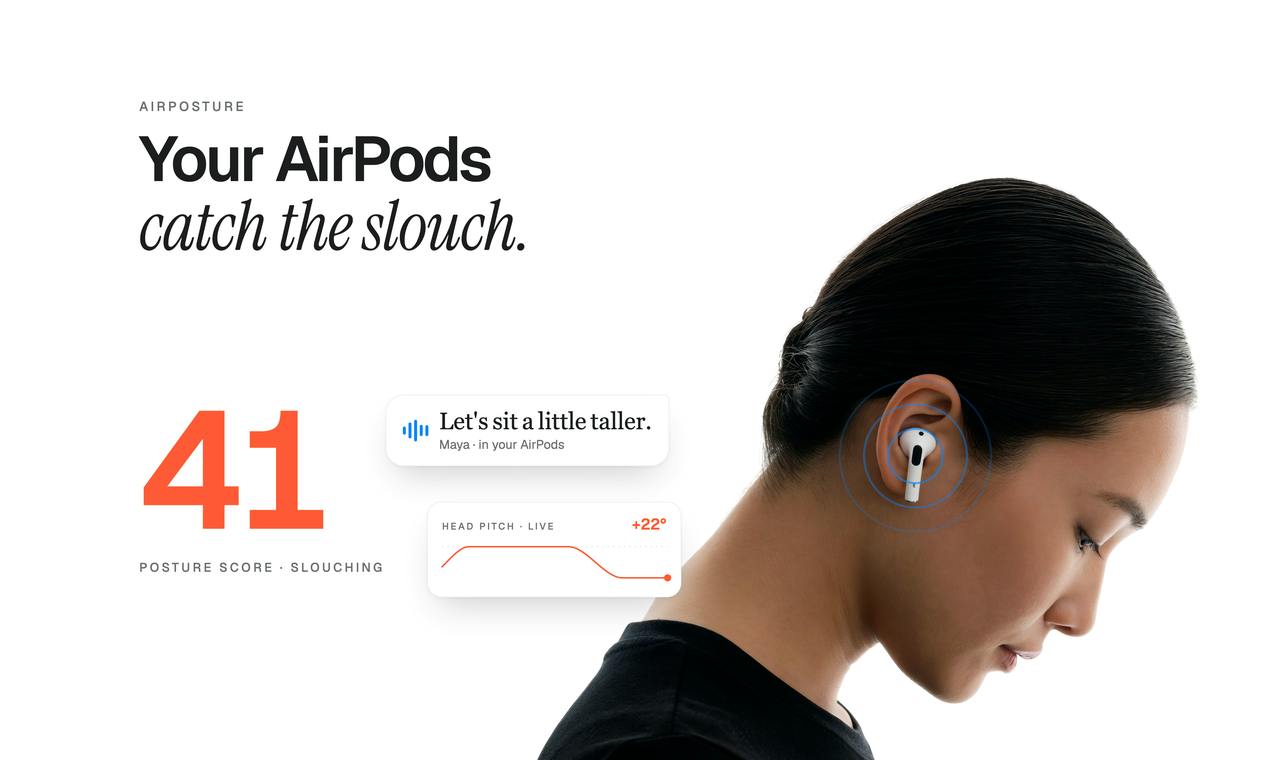
AirPosture launches a Mac version that uses AirPods sensors for posture reminders, free for 2 hours per day.
AirPosture has released a new version on Product Hunt, centered on launching a desktop app that resides in the Mac menu bar and gives prompts from the notch area, expanding the product from a mobile health gadget into a posture coach for long-hours desk workers. It reuses AirPods' built-in accelerometer and gyroscope to sense forward head tilt and gently reminds users via voice to sit up straight, adding a voice coach, continued operation while locked, a 30-second reset exercise, and a weekly posture view. It uses a freemium model with 2 free hours per day. The article argues its real value lies in reusing consumer earphone sensors for health scenarios without extra hardware, but accuracy is affected by wearing conditions and community feedback is still limited.
From iPhone to Mac: Posture Reminders Enter the Desktop
AirPosture has released a new version on Product Hunt, and the core change is the launch of a Mac app—a tool that lives in the menu bar and gives prompts from the notch area. This means it's no longer just a health gadget on your phone, but an attempt to enter the main battleground of people who work at a desk for long hours.
The underlying logic of this product isn't complicated: it uses the motion sensors built into AirPods to capture head posture, and when it detects forward head tilt, it gently reminds the user via voice to sit up straight. The developer emphasizes on the product page that the new version adds an AirPods voice coach feature and weekly posture data reviews, with synchronization between iPhone and Mac.
For people who work in front of a computer for hours every day, the value of this angle lies in being "seamless"—no additional hardware to wear, no camera needed, and AirPods are already a device many people use daily.
Three New Capabilities: Mac App, Voice Coach, and Lock-Screen Support
According to the product page, this update focuses on three areas:
Mac menu bar app. The app resides in the menu bar and gives reminders through visual prompts in the notch area. This directly fills the gap for desktop work scenarios and turns AirPosture from a "mobile health reminder" into a "posture coach for work scenarios."
AirPods voice coach. When forward head tilt is detected, the app uses a calm voice to guide the user to sit up straight again. Compared with pop-ups or vibrations, voice feedback doesn't require users to take their attention away from the screen, which is a reasonable interaction choice within a workflow.
Continues working while the screen is locked. The product page explicitly states that even when the user's phone is locked, posture coaching continues to run. This has a big impact on the actual experience—many health apps stop working once the screen is locked, making it hard for users to get continuous reminders.
In addition, the app offers a 30-second "reset" exercise and a weekly posture view to help users build short-cycle adjustment habits and observe changes over a longer time horizon.
Technical background of lock-screen background running
On iOS, apps are usually suspended by the system after entering the background or being locked, to save power and resources. To keep sensor collection and reminders running while the screen is locked, apps generally need to rely on specific background execution capabilities (such as audio playback or motion & fitness background modes) and accept system constraints on power consumption and runtime. This is also why many health apps stop working once the screen is locked.
Therefore, "continuing to run while locked" is not a default capability, but something that requires deliberate design and maintaining the process within what the system allows. It is especially critical for scenarios like posture reminders that require continuous monitoring, and it also means higher battery consumption—users should pay attention to the actual impact on battery life.
Free 2 Hours: A Usage Threshold Worth Noting
AirPosture uses a freemium model, with 2 hours of free use per day. This setting deserves separate discussion.
The 2-hour free allowance roughly covers one focused work session, but for people who need to work in front of a computer all day, they will soon hit the limit. From a product design perspective, this is a deliberately set conversion point: let users experience the core value (posture reminders really can improve sitting posture), while pushing payment in scenarios where long-term use is genuinely needed.
This model is not uncommon among health and productivity tools. AirPosture's challenge is that posture correction itself is an "invisible benefit"—users find it hard to intuitively feel the value the way they do when seeing a task completed, and building willingness to pay needs to rely on data feedback such as the weekly view to reinforce it.
Common design logic of the freemium model
Freemium refers to a model where basic features are free and advanced features or higher usage quotas are paid, and it is widely adopted in health and productivity apps. The key is to find the tipping point where "value has been validated but demand has not yet been satisfied": the free quota must be enough for users to form a usage habit and perceive the effect, yet feel insufficient in high-frequency usage scenarios. Limiting by usage time rather than number of features is a common approach for such tools, because it directly corresponds to the user's actual degree of dependence.
For posture reminder products, this model has an additional implication: posture improvement is a long-term, gradual benefit, and users find it hard to quantify the effect in the short term. Therefore, visual feedback such as weekly data reviews and trend curves often plays the role of "proving value" and supporting payment decisions.
Hardware Reuse Approach: Tapping Into Sensor Value Again
The most noteworthy thing about AirPosture is not the posture correction feature itself, but its technical path: using AirPods' motion sensors as input devices.
The AirPods series has built-in accelerometers and gyroscopes, originally used for features such as spatial audio and head tracking. AirPosture uses this sensor data for posture judgment, essentially turning consumer-grade earphones into a low-cost wearable health device. Compared with dedicated posture correctors, this approach has no additional hardware cost and a lower wearing burden.
Of course, this path also has inherent limitations. Sensor data comes from earphones rather than directly attached to the body, so the accuracy and stability of head posture detection will be affected by wearing conditions. The product page does not disclose specific detection algorithm details, and the false positive rate and reminder frequency in actual use need to be verified by users themselves.
From an industry perspective, this type of product points to a direction: when the sensor capabilities of wearable hardware are already widespread, new product opportunities may not lie in building new hardware, but in applying the sensor data of existing hardware to new scenarios. AirPosture is a concrete example of this idea in the health field.
What exactly are the sensors in AirPods measuring?
AirPods mainly have built-in accelerometers (accelerometers measure linear acceleration and can sense the direction of gravity and motion) and gyroscopes (measure angular velocity and can sense rotation), and some models also have optical sensors and force sensors. In spatial audio and head tracking features, the system estimates the head's orientation and rotation by fusing these data, thereby achieving the effect of fixing the sound field as the head moves. AirPosture reuses exactly this posture estimation capability: when the head continuously tilts forward relative to the direction of gravity and maintains it for a certain period, it is judged as poor posture.
It should be noted that earphones can only indirectly reflect head posture and cannot measure spinal curvature like a cervical patch, so this type of solution is essentially "head posture reminder" rather than "spinal posture monitoring." In addition, different AirPods models have different sensor configurations and degrees of firmware openness, and the sampling frequency and accuracy of available data will also affect the sensitivity of reminders and the false positive rate.
Who It's For, and What to Watch Out For
AirPosture's target users are fairly clear: people who work on a Mac for long hours, wear AirPods daily, and are willing to improve their sitting posture. For these users, the combination of menu bar presence and voice reminders aligns with the interaction principle of "not interrupting the workflow."
What needs attention is that the product currently has only 73 upvotes and 3 comments, so the community feedback sample is still very small, and feature stability and actual effectiveness lack sufficient third-party verification. The 2-hour daily free allowance also means heavy users need to evaluate subscription costs.
If you already use AirPods and want a posture reminder tool that requires no additional hardware, AirPosture is worth trying within the free allowance; if what you need is medical-grade posture assessment or detailed cervical health analysis, this kind of lightweight earphone-based solution may not meet your needs.
One-line Summary
AirPosture launches a Mac version that uses AirPods sensors for posture reminders, free for 2 hours per day.
Paragraph Summary
AirPosture has released a new version on Product Hunt, centered on launching a desktop app that resides in the Mac menu bar and gives prompts from the notch area, expanding the product from a mobile health gadget into a posture coach for people who sit at a desk for long hours. Its technical path is to reuse the accelerometer and gyroscope built into AirPods to sense forward head tilt, gently reminding users via voice to sit up straight, and it adds a voice coach, continued operation while the screen is locked, a 30-second reset exercise, and a weekly posture view. The product uses a freemium model with 2 free hours per day, and heavy users need to evaluate subscription costs. The article argues that its real value lies in reusing consumer-grade earphone sensors for health scenarios without additional hardware, but detection accuracy is affected by wearing conditions, and community feedback is currently very limited, with effectiveness lacking third-party verification.
Related articles

Will GitHub Die? Open Source Maintainer Burnout and the Collaboration Crisis in the AI Era
Lex Fridman podcast discussion on open source maintainer burnout and GitHub's predicament: massive pull requests overwhelm core maintainers, and AI worsens code bloat. Using math journal peer review and Poincaré conjecture verification as analogies, the article analyzes why verification in knowledge production must be deliberately slow, and how open source communities can avoid the failure mode of maintainers exiting.

Stop Building Cookie-Cutter AI Websites: 3 Tools That Transform Your Coding Agent
Three tools that boost AI coding agents: FFmpeg skill for local video editing in Claude Code and Cursor, Hallmark's 50 design themes to fix cookie-cutter AI sites, and Jailbreaks' 25+ model prompts.

How America's Gerontocracy Squeezes the Younger Generation
Americans over 55 hold nearly three-quarters of national wealth, alongside an 80-year-old president and elderly congressional leaders. The Atlantic's Idrees Kahloon explains how gerontocracy drives up housing costs, squeezes opportunities for the young, and explores zoning reform and child poverty reduction as practical fixes.