Ali Abdaal's Complete Hands-On Guide to Building AI Tools with Claude Code

Ali Abdaal's hands-on guide to building real AI tools with Claude Code using his AI Flywheel method.
YouTuber Ali Abdaal shares his three-month deep dive into Claude Code, demonstrating how non-developers can build real business tools like YouTube trackers, Slack bots, and AI agent systems. He introduces the AI Flywheel methodology — interview yourself with AI, build tools to solve real pain points, learn how AI works in the process, and use that knowledge to spark new ideas — creating a powerful cycle of continuous improvement.
The AI Flywheel Effect: Why Ali Abdaal Says Claude Code Changed His Life
Cambridge-trained doctor and YouTube creator with millions of subscribers, Ali Abdaal, shared his in-depth experience using Claude Code over three months in his latest video. He openly stated that this tool "completely changed my life" and positioned the video as a "starter guide" for friends, family, and team members.
He introduced a core concept — the AI Flywheel:
- Have AI interview you about your work and life situation
- Based on the interview results, AI suggests tools you can build to save time or increase revenue
- Through the building process, you naturally learn how AI works
- This new knowledge in turn sparks even more creative ideas
It's a positive feedback loop — with every turn, you become more capable.
The Flywheel Effect was originally proposed by management researcher Jim Collins in Good to Great, referring to a heavy flywheel that requires enormous force to get moving initially, but once spinning, each push accumulates momentum until it reaches a self-sustaining high-speed rotation. Amazon's Jeff Bezos applied this concept to his business model — lower prices attract more customers, more customers attract more sellers, more sellers drive down costs, creating a virtuous cycle. Ali adapted this framework to personal AI use cases, emphasizing cognitive compound interest: every collaboration with AI builds your understanding of AI's capability boundaries, and that understanding itself becomes an accelerator for the next collaboration.
Starting from Zero: Letting AI Help You Find the Most Worthwhile Projects
Interview Yourself with AI to Uncover Real Pain Points
Ali's first step wasn't writing code — it was having Claude interview him. He told Claude about his business structure: a YouTube channel, an online business school (Lifestyle Business Academy), and multiple software products. Then he had AI help identify the pain points most worth automating.
The project they landed on was a YouTube competitor tracker. His team spent hours every week manually copying data from YouTube Studio and Instagram Insights into Google Sheets, tracking the performance of about 50 channels. Claude not only understood the requirements but also suggested features Ali hadn't thought of — like AI-powered automatic topic trend tagging.
"What I previously spent $50,000 hiring an automation consulting firm to do, Claude achieved the same level of clarity through a few rounds of conversation."
Understanding Foundational Concepts: A Firmware Upgrade for Your Brain
During the building process, Ali emphasized a key habit: ask Claude whenever you encounter a concept you don't understand. When Claude mentioned APIs, he immediately asked about the history and principles behind them.
An API (Application Programming Interface) is a standardized protocol for communication between software systems. Think of it as a restaurant menu — you don't need to know how the kitchen operates; you just order according to the menu format, and the kitchen returns the dish you requested. YouTube Data API v3 allows developers to retrieve channel statistics, video lists, view counts, and other information through standardized HTTP requests, without manually logging into YouTube Studio to copy data one by one. The vast majority of modern internet services connect to each other through APIs — when you check the weather on your phone, the weather app is calling a meteorological service's API to fetch real-time data.
This isn't for academic purposes — it's because understanding these concepts gives you a "brain firmware upgrade." You suddenly realize many more possibilities.
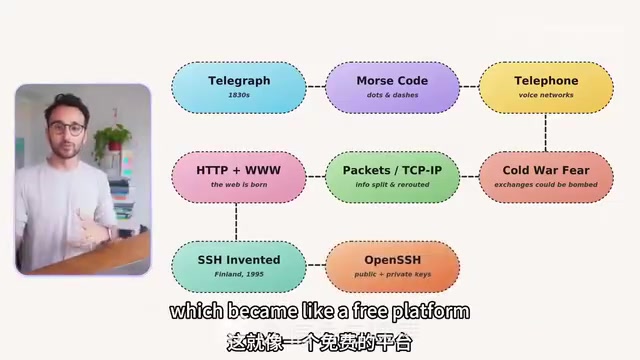
For example, when he didn't understand SSH while installing OpenClaude, he spent half an hour learning the entire historical arc from telegraphs to Morse code, to TCP/IP, to HTTP, and finally to SSH. SSH (Secure Shell) was born in 1995, developed by Tatu Ylönen at Helsinki University of Technology in Finland, prompted by a password-sniffing attack on his university's network. SSH uses asymmetric encryption (public/private key pairs) to establish secure connections: the public key is like a lock that can be freely distributed; the private key is like the key that must be kept strictly secret. When you connect to a remote server, the server encrypts a piece of random data with your public key, and only the holder of the corresponding private key can decrypt it, thereby proving identity. This is far more secure than traditional password login because the private key is never transmitted over the network. Now every time Ali types an SSH command in the terminal, he understands the meaning behind it.
Claude Code in Practice: From Terminal Basics to Complete Builds
The Terminal Isn't Scary: An Analogy to Eliminate Fear
Claude Code runs in the terminal, which intimidates many people. But Ali used an analogy to dissolve that fear:
"A GUI (graphical interface) is an automatic transmission car; the terminal is a manual transmission. Same car, same road, same destination — you just have more direct control."

The graphical user interface (GUI) was invented at Xerox PARC in the 1970s and later popularized by the Apple Macintosh and Microsoft Windows. Its design philosophy is "what you see is what you get" — using visual metaphors (folder icons, recycle bins) to reduce cognitive load. The command-line interface (CLI/terminal) has an even longer history, dating back to teletypewriters in the 1960s. The terminal's advantages include: programmability (commands can be combined and automated), precise control (not limited by paths predetermined by UI designers), and resource efficiency (no need to render a graphical interface). For AI coding assistants, the terminal is a natural collaboration interface — AI-generated commands can be executed directly without simulating mouse clicks.
The core terminal operations are actually quite simple:
ls: View the list of files in the current foldercd: Navigate into a foldermkdir: Create a new folder
Claude Code is essentially Claude running in the terminal — the same AI brain, but with the ability to directly operate on your file system.
Claude Code's Safety Mechanisms
Ali spent considerable time explaining security concerns, which is the part newcomers worry about most:
- Permission controls: Claude Code requests your approval before executing any modification operations
- Reading requires no permission: Non-destructive operations (like reading files) execute directly without confirmation prompts
- Be cautious with the rm command:
rm(delete) is the one command that requires special attention, because terminal deletion has no recycle bin - Sandboxed execution: Commands run in a sandbox by default, limiting their scope of operation
A sandbox is a core concept in computer security, derived from children's playground sandboxes — kids can play freely inside, but the sand won't spill outside. In software engineering, sandboxes use OS-level isolation mechanisms (such as Linux namespaces and cgroups, macOS App Sandbox) to restrict a program's file system access, network permissions, and system call capabilities. Claude Code's sandbox means that even if the AI generates a problematic command, its impact is confined to the specified directory and cannot access critical system files or other user data. This "principle of least privilege" is a cornerstone of modern security architecture.
His advice: maintain reasonable trust in large companies like Anthropic, but heighten your security awareness when dealing with customer data.
The Complete Workflow for Building the YouTube Tracker
The full steps for building the YouTube tracker were:
- Obtain an API key: Create a project in Google Cloud Console and enable YouTube Data API v3
- Create a project folder:
mkdir youtube-tracker && cd youtube-tracker - Launch Claude Code: Type
claudein the folder - Describe requirements in natural language: Tell it which channels to track and what data to collect
- Iterate and refine: When it displayed YouTube Shorts, simply tell Claude you only want long-form videos
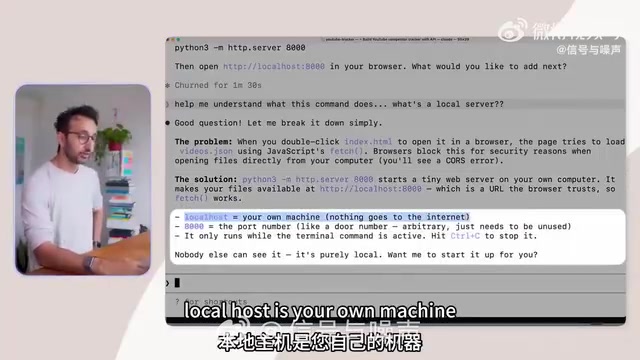
Claude Code automatically created Python scripts to scrape data and HTML pages to display results. Throughout the entire process, Ali only needed to approve permission requests and suggest modifications.
Two Months of Real Results: Business Automation Case Studies
Student Support System for the Online Business School
Ali built a complete support system for his online business school (200 students, each with their own Slack channel):
- Automatic support ticket creation
- Auto-reminders for tickets unanswered after 24 hours
- Coach visualization dashboard
- Multiple Slack bots: Dumbledore for DM strategy, Lupin for LinkedIn, Sprout for sales support
These bots have already processed thousands of student messages, and the coaching team can audit the quality of AI-generated advice to ensure accuracy and reliability.
Automated Competitor Analysis Alerts
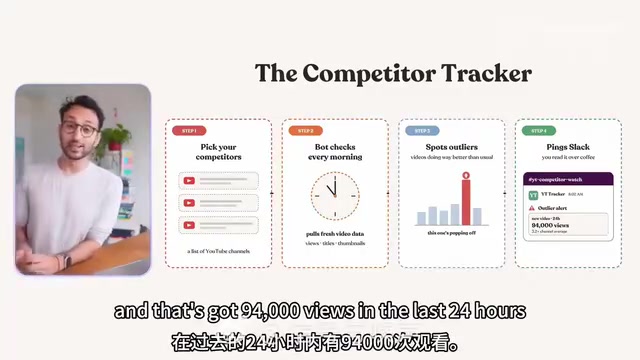
Every morning, a Slack bot automatically pushes competitor channel video performance data, flags outliers (such as a video with views far exceeding that channel's average), and alerts the team to content trends.
Personal AI Assistant Matrix: 8 Dedicated AI Agents
Ali built 8 dedicated AI agents on OpenClaude, covering every aspect of work and life:
| Agent Name | Role |
|---|---|
| Albus | Primary work assistant |
| Hermione | Course architect |
| Minerva | Operations vice principal |
| Remus | Content creative partner |
| Cedric | Relationship coach (dating advice, parenting research) |
| Kaladin | Health coach (protein intake tracking, custom fitness plans) |
| Dobby | Budget general-purpose assistant (runs on the Haiku model) |
OpenClaude is an open-source project that allows users to deploy multiple Claude instances on their own infrastructure, with each instance having independent system prompts, memory context, and tool permissions. This "AI agent matrix" design philosophy stems from Multi-Agent System research — rather than having one general-purpose AI handle all tasks, create multiple specialized agents, each with deep understanding of a specific domain's context. Ali's choice to name these agents after Harry Potter characters isn't just for fun — it reflects a practical principle: anthropomorphic naming helps users remember each agent's responsibility boundaries, preventing irrelevant requests from being sent to the wrong agent.
Notably, Dobby runs on the Haiku model, which relates to Anthropic's model tiering strategy. Anthropic's Claude series includes models of varying scales: Opus (most powerful, suited for complex reasoning), Sonnet (balancing performance and cost), and Haiku (fastest and cheapest, suited for simple tasks). This tiered design reflects the economic reality of AI applications — not every task requires the most powerful model. Simple tasks like checking the weather or formatting text can be handled by Haiku at potentially 1/10 the cost of Opus. Ali's positioning of Dobby as a "budget general-purpose assistant" embodies this cost awareness and represents a best practice for enterprise AI deployment: dynamically selecting model scale based on task complexity.
Core Methodology: How Ordinary People Can Push Through Technical Friction
Friction Is the Real Dividing Line
Ali pointed out that what stops most people from using Claude Code isn't technical difficulty — it's the psychological retreat when encountering friction. Developers are naturally accustomed to dealing with bugs and error messages, but ordinary people want to give up the moment they see Google Cloud Console's complex interface.
His solution is straightforward: copy and paste the entire page content to Claude and ask it what to do. When a Cloudflare interface update made a tutorial outdated, he simply took a screenshot and sent it to Claude for step-by-step guidance.
Parallel Multi-Window Workflow for Higher Efficiency
Ali shared an advanced tip: while one Claude Code instance is processing a task, you can open a second, third, or even fourth terminal window to work on different features simultaneously. He even purchased a 52-inch Dell monitor specifically to monitor multiple tasks at once.
Three Criteria to Avoid Over-Engineering
Ali also issued a warning: don't build for the sake of building. Every project should meet at least one of these three criteria:
- Creates value for customers — directly improves user experience
- Saves you time — reduces repetitive work
- Helps you earn more money — delivers quantifiable revenue growth
Conclusion: Start Building Your First AI Tool Now
"Every single day, the gap between people who only chat with the free version of ChatGPT and people who can build things with Claude Code is getting wider."
Ali Abdaal's core advice: spend a weekend, choose a real pain point, open the terminal, and start a conversation with Claude Code. You don't need a programming background, you don't need to finish every tutorial — you just need curiosity and the willingness to push through friction.
Start by having AI interview you, find pain points worth automating, then step by step let Claude Code turn your ideas into reality. Two months later, you'll feel like a completely different person.
Key Takeaways
Related articles

Tencent WorkBuddy Hands-On: How AI Agents Crush Traditional Chat Assistants
WorkBuddy vs Doubao tested: how AI Agents directly operate computers to convert PPT to PDF, archive files and more. Analysis of WorkBuddy's low barrier, domestic ecosystem, pricing and plugin marketplace, plus AI Agent selection advice.

Azure Cross-Tenant Attack Chain: Root Cause Analysis of Five Paths
Binary Security analyzes five full cross-tenant compromise paths in Azure, trending 271 points on HN. This article interprets their shared root cause perspective and offers defense recommendations for cloud tenant isolation and reflections on responsibility boundaries.

Recreating a Real Bubble Tea Station in Isaac Sim: Script-Driven Unitree G1 Brews Tea
Developers recreated a real self-service tea station in NVIDIA Isaac Sim, using scripts to drive a Unitree G1 through a five-step tea-brewing process, exploring whether physics simulation can be a source of synthetic robot demonstration data and discussing contact stability and imitation learning.