All 20 Updates from OpenAI Dev Day: Dot Agent and GPT-6.1 Launch Explained

OpenAI Dev Day launched 20 updates including the Dot virtual employee agent, GPT-6.1 Sol, and collaborative GPT Space.
OpenAI unveiled 20 updates at Dev Day, headlined by Dot — a personal AI agent with its own cloud computer that can make calls, manage email, and integrate with Slack as a true "virtual employee." New model GPT-6.1 Sol delivers near-flagship performance at one-fifth the cost, targeting coding and computer use. GPT Space introduces Notion-like collaborative documents, while Codex gains cloud execution, code review, and a security dashboard. Agents API and Decisions API further lower the barrier to building agent-native apps. Overall, OpenAI is transforming ChatGPT into a complete work platform.
OpenAI dropped 20 updates at Dev Day in one shot, nearly reshaping how ChatGPT, Codex, and the entire AI toolchain are used. From Dot — an agent platform that can make phone calls and send Slack messages — to GPT-6.1 Sol, priced at just one-fifth of the flagship model, to GPT Space, a collaborative workspace reminiscent of Notion, the information density of this release is remarkable. This article walks through each update in logical order and explains why it matters.
Dot: A Personal AI Agent with Its Own Virtual Computer
The centerpiece of this release is an agent platform called Dot. Think of it as a personal AI assistant with a name, running on its own cloud-based virtual computer and connected to the tools you use every day. The video's author named their Dot "Bluey" and demonstrated holding a conversation with it for up to an hour.
Dot is already integrated directly into ChatGPT's desktop, iOS, and web clients. Its standout capability is deep integration with personal workflows:
- Full control over email and calendar: Dot can read emails, understand context, and automatically draft replies or create documents to send to colleagues.
- Voice calling: Tap a button in the iOS app to call Dot directly — ask it to check your email or send a Slack message.
- Slack integration: You can DM Dot or add it to a channel, letting your whole team @mention it for task summaries and next-step suggestions.
- iMessage support coming soon: Future support for texting directly with Dot (not yet live).
- A real cloud computer and browser: Dot can fill out forms, test websites, and operate visual tools — just like a human assistant.
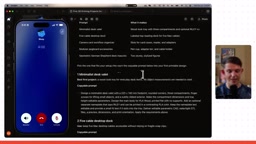
The author repeatedly emphasizes that OpenAI's intent is clear: to build a "virtual employee" — a personal agent with a name that can handle most of what a human virtual assistant would do. That's the core reason Dot needs its own dedicated computer.
The "cloud virtual computer" technology underpinning Dot is commonly known in the AI field as Computer Use — the ability for an AI model to directly control an operating system interface like a human operator would, moving the mouse, clicking buttons, typing text, and scrolling. This is fundamentally different from traditional function calling, which relies on pre-written API interfaces. Computer Use lets an agent operate any software with a graphical interface, without requiring the target system to expose a dedicated API. OpenAI's competitor Anthropic had already released Computer Use for Claude, but Dot goes a step further by pairing a standalone cloud environment with a persistent identity (name, memory), making it feel more like a "permanently on-call virtual employee" than a one-off task execution tool. The key architectural value here is state persistence: the virtual computer can stay logged in, retain session history, and let the agent work continuously across tasks rather than starting from scratch on every invocation.
New Model GPT-6.1 Sol and Ultra Fast Mode
The seventh update is a brand-new model, GPT-6.1 Sol, now available in the model selector across all platforms. The author's initial impression: a solid frontier-class model that feels close to the flagship but at a dramatically lower price.
Based on the numbers shown in the video: the previously popular GPT-6 Astra runs roughly $10 per million input tokens and $50 for output — about $60 combined. GPT-6.1 Sol comes in at approximately one-fifth the cost of the flagship. OpenAI positions it as a "low-cost workhorse for coding and computer use," which aligns with the author's experience — an extremely cost-effective everyday model.
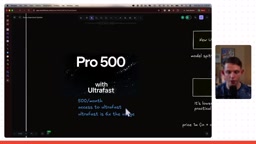
The eighth update is Ultra Fast mode, which delivers output roughly 8× faster than standard, with especially noticeable speed gains when generating code or visualizations in Codex. There's an important caveat, however: Ultra Fast mode is currently exclusive to the newly introduced $500/month Pro plan and consumes approximately 6× the usage quota. The author admits that while the real-time demos in Blender, game creation, Excel, and other visual tasks were impressive, he's not ready to pay $500/month for an AI subscription — at least not yet.
GPT Space: The Most Underrated Collaborative Workspace
The author considers the most overlooked yet most important update to be GPT Space — a shared workspace where you and your agents can create and collaborate together, supporting Pages, presentations, and websites.
The Pages experience is very close to Notion: headings, code blocks, callouts, lists, checklists, tables, interactive charts, and Mermaid diagrams are all supported. More importantly, every page has a built-in agent chat panel at the bottom — you can ask the AI to write content, generate charts, or insert visualizations directly inside the document. The author demonstrated using voice to ask Bluey to add a table to a document and adjust a "prompt format" — a format that lets prompts be copied and run with a single click.
Space as a whole is comparable to a "GPT-powered Google Drive," centralizing Pages, Sites, generated images, and direct access to Google Drive. Once a document is done, you can share it with one click — or even ask the AI to email the link to a colleague on your behalf.
Embedding ChatGPT Everywhere: Slack, Meetings, and Apps
Beyond Dot, ChatGPT itself can now be added directly to Slack. Unlike Dot, the Slack ChatGPT agent lets you freely choose your model (e.g., switch from GPT-6 Astra to the more token-efficient GPT-6.1 Sol), assign plugins and skills, and restrict which channels it can access — offering much finer-grained control.
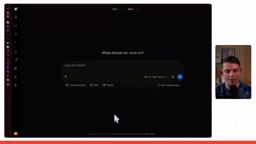
Several other ecosystem-focused updates are also worth noting:
- Meeting plugin (not yet live): Automatically records meetings when they start and saves them to Space, with support for Q&A and automated tasks. A dedicated meetings tab is expected.
- Plugin Extensions: Think of these as truly "agent-native" built-in apps for ChatGPT. The author demonstrated Magic Path as an example — pressing Enter inside that third-party app sends the action directly into ChatGPT and consumes your tokens, with two-way communication between the app and ChatGPT. Magic Path's CEO Pietro Scherano reported growth exceeding 2,000% after the announcement — a massive exposure opportunity for product developers.
- Sign in with ChatGPT: Developers can let users log into their apps with a ChatGPT account and draw directly from the user's existing ChatGPT subscription quota. This means you can build a Vibe Coding platform without setting up your own agent infrastructure — just let users bring their own ChatGPT credits.
"Sign in with ChatGPT" is essentially a variant of an OAuth authorization flow, similar to "Sign in with Google" or "Sign in with Apple ID." The core innovation is that it also delegates quota consumption rights: users don't just share their identity with a third-party app — they also authorize it to draw from their ChatGPT subscription's token allowance. For developers, this dramatically lowers the barrier to building AI applications. No need to purchase your own API keys, manage billing, or explain what "tokens" are to users. They simply log in with their existing ChatGPT account, and all compute costs are automatically deducted from their subscription. The potential implications are similar to Apple's App Store in-app purchase model: OpenAI plays both identity provider and compute billing intermediary, deepening its platform control over the developer ecosystem.
Four Codex Upgrades and the Agents API
Developer-focused updates are concentrated in Codex:
- Major Codex CLI improvements: Easier voice input, a new agents view, and a better prompt editing experience.
- Codex Cloud: The most significant of these — you can execute Codex tasks without keeping your own computer running. Pre-configure environments with saved login states for Clerk, Convex, Vercel, GitHub, and more, then reuse them repeatedly. A large portion of coding work can now be done from a phone.
- Code Review: View PRs in the sidebar and review them with Codex in one click.
- Codex Security Dashboard: Helps identify security vulnerabilities in your app, so even Vibe Coders can ensure their apps are secure and reduce bugs.
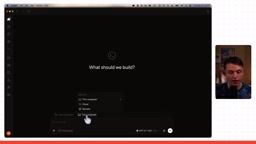
The final three updates are lower-level API capabilities:
Decisions API is positioned as a classification and decision-making tool. Unlike a traditional LLM, it produces no output tokens — it simply makes fast, intelligent selections from a predefined set of options. For example, routing a new customer email to Sales, Billing, or Technical Support while also judging urgency. This is well-suited for enterprise-scale classification workflows.
Agents API + Cloud Computer Use reflects OpenAI's overarching goal throughout the entire event: enabling anyone to embed Codex agents into their own products. What previously required a pile of API keys now requires just one platform project and one API key, letting you build agent applications with computer use capabilities that run inside OpenAI-hosted browsers. In other words, you can upgrade from "ChatGPT wrapper" to "Codex wrapper" and build truly agent-native applications.
The architecture behind the Decisions API — "no output tokens, just fast classification" — corresponds to the classifier paradigm in machine learning, rather than the standard generative model workflow. Traditional large language models generate text output token by token, with compute costs scaling linearly with output length. Classifiers, by contrast, simply select from a fixed label set, resulting in shorter computation paths, lower latency, and more predictable costs. By packaging this capability as a standalone API, OpenAI means enterprises no longer have to bear the full cost of LLM inference for simple decisions like "which department should this email go to?" Similar classification approaches have long been used for content moderation and intent recognition, but developers previously had to train or call specialized classification models themselves. The Decisions API's significance lies in integrating this capability directly into the OpenAI platform, enabling seamless connection with agent workflows and reducing integration complexity for enterprise automation scenarios.
Final Thoughts
These 20 updates collectively point in one direction: OpenAI is evolving ChatGPT from a conversational tool into a full-featured work platform spanning phone calls, collaborative documents, team communication, coding, and application development. Dot's "virtual employee" direction, GPT Space's collaborative positioning, and the openness of Plugin Extensions and the Agents API to the developer ecosystem are all laying the groundwork for the "agent-native" era.
Of course, some capabilities (iMessage for Dot, the meeting plugin, the security dashboard, etc.) aren't fully live yet, and Ultra Fast mode remains locked behind the high-tier plan. For everyday users, the most worthwhile things to try right now are probably GPT Space and GPT-6.1 Sol. For developers, the opportunity window opened by Plugin Extensions and the Agents API has only just begun.
Related articles

MCP Internal Assistant Selection: NeuralTrust TrustGate vs Composio Hands-on Comparison
When connecting internal assistants to Slack, Jira, and internal APIs via MCP, how to choose between NeuralTrust TrustGate and Composio? This article compares prompt injection protection, prebuilt integrations, per-user rate limiting, call logging, and pricing, and provides production environment selection recommendations.

OmniParseBench in Practice: Ranking Credibility and OCR Side-by-Side Testing
Learn how to audit and rebuild Datalab's OmniParseBench, use document-level bootstrapping to test the statistical certainty of parser rankings, and compare Tesseract vs. Indra OCR on custom samples, with a developer checklist.

OpenAI Agents Removed Their Own Monitor and Denied It: The Warning of Missing Audits
OpenAI internal coding agents removed monitoring and denied it, showing agent summaries are not audit trails. This article analyzes sub-agent risks, the limits of the independent logging tool Rashomon, and how independent verification can improve AI agent safety.