Antigravity + Gemini Errors Explained: IP-Based Rate Limiting, Tested and Analyzed
Antigravity IDE Gemini errors trace to IP-level quota limits — switching IPs restores access, and the restriction is likely temporary.
Bilibili creator DP ran a strict single-variable test and found that Gemini 3.7 Flash failures in Antigravity IDE are resolved by simply switching IPs — while the same account on the same blocked IP works fine in Google AI Studio. This indicates the restriction targets the Antigravity call path specifically, not the IP's Gemini access broadly. The likely cause is an IP-based quota mechanism triggered by rising demand, mirroring previous Codex behavior. Historical patterns suggest these restrictions ease within days to weeks. Recommended steps: verify Token status, switch IPs, cross-check with AI Studio, and wait for the limit to lift.
When calling Gemini models inside Google's Antigravity IDE, a growing number of users have been hitting outright request failures. Bilibili creator DP ran a controlled experiment to investigate, and the results point to one key variable: the IP address. This article walks through the test methodology and reasoning, then puts the findings in context with past cases of similar rate-limiting behavior.
The Problem: Same Account, Different IP — Different Outcome
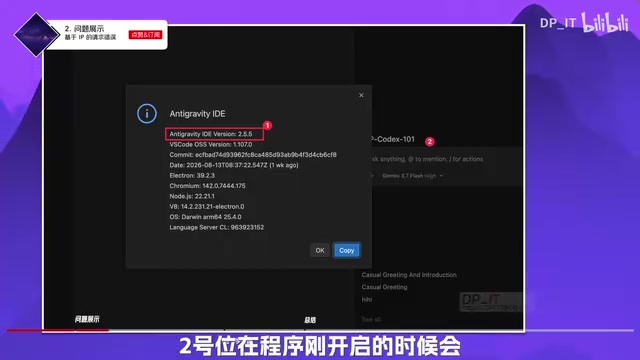
The test used the latest Antigravity IDE version 2.5.5, with the account, model, thinking intensity, and IDE tooling held constant throughout. The Token validation check at startup passed without issue, ruling out any account-level problem.
With IP 01, a request to Gemini 3.7 Flash at High thinking intensity failed with an Agent error in under a second. Switching to IP 02, the identical request completed successfully. DP was explicit: the account didn't change, the model didn't change, the thinking intensity didn't change, the tooling didn't change — the only variable was the IP address.
That single-variable comparison points directly to an IP-based blocking policy on Google's end.
Cross-Validation: The Same IP Works Fine in AI Studio
DP didn't stop at the IP switch. He used the same account and the same IP 01 to make an identical request in Google AI Studio — and it went through cleanly, returning a full response.
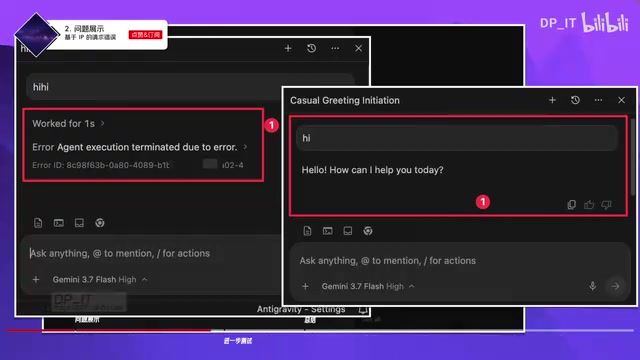
This comparison sharpens the picture considerably: IP 01 gets blocked in Antigravity IDE but passes through in AI Studio without issue. In other words, the restriction isn't a blanket block on that IP's access to Gemini — it's targeted specifically at the Antigravity IDE call path. That narrows the problem from "IP is banned" to "Antigravity + this specific IP."
Google AI Studio is Google's browser-based testing platform for Gemini models, letting developers call the API directly without a local IDE. Antigravity IDE (considered one of Cursor's competitors) is an AI-integrated code editor that routes Gemini calls through its own API path or server-side relay — a fundamentally different technical chain from AI Studio's direct browser-based calls. On Google's backend, the two likely register as distinct traffic types, which is why rate-limiting rules can be applied precisely to one path without affecting the other. That explains how the same account on the same IP can produce completely different results across the two platforms.
Why IP-Based Rate Limiting Happens
DP offered a reasoned guess at the root cause, and the core logic is supply and demand.

Gemini 3.7 Flash launched to strong reception, and demand climbed accordingly. With total quota roughly fixed, rising demand almost inevitably triggers tighter quota management. DP's hypothesis is that Google introduced an IP-based quota mechanism — a pattern he noted is nearly identical to what happened with Codex in an earlier video. In that case, Codex showed the same IP-level quota behavior: once a threshold was hit, requests slowed down; switching IPs restored normal performance.
Whether the mechanism manifests as a hard block or a slowdown, the underlying principle is the same: using IP address as the unit for traffic and cost control.
IP-based quota systems are a common tool for cloud providers to cap single-point usage without building complex per-account authentication. The basic logic: treat each IP address as a resource-consumption unit, and trigger rate limiting or outright blocking once that IP exceeds a request volume or usage threshold within a given window. The upside is that it's cheap and fast to implement; the downside is coarse granularity — a single egress IP can represent many legitimate users, and collateral blocking is unavoidable. For anyone using a VPN, proxy, or shared IP, inheriting a "burned" IP from someone else's heavy usage is a real and recurring problem. The Codex slowdown-then-recovery pattern, and the current Antigravity hard block, are both expressions of the same mechanism — just with different responses once the threshold is crossed.
This Isn't the First Time: Historical Patterns and Expectations
DP flagged something worth noting: based on his channel's observation data, this is at least the second time Antigravity has shown IP-based request restrictions.

The previous round of similar restrictions eased within a few days to a few weeks. Whether Google relaxed it by increasing the per-IP quota or by removing the mechanism entirely isn't clear. But the historical pattern suggests these restrictions tend to be temporary, and there's no need to panic when you hit one — worth monitoring before drawing conclusions.
That said, DP also pointed out that the long-term trend runs the other way: as demand keeps growing without a corresponding pullback, rate-limiting and restrictions are probably going to become more common, not less.
Practical Steps When You Hit an Error
Based on this testing, here's a reasonable troubleshooting sequence if you're seeing request failures in Antigravity when calling Gemini:
- Check your account and Token status first: If the startup Token validation passes, the problem almost certainly isn't your account.
- Try switching IPs: This was the single most effective fix in this case — moving off a restricted IP to a different one restored full functionality.
- Cross-check with AI Studio: If the same account can call the model normally in AI Studio, the issue is isolated to the Antigravity call path, not your account permissions.
- Wait it out: Based on historical patterns, these temporary restrictions have self-resolved within days to weeks.
Worth emphasizing: all of the above reflects personal observation and testing-based inference. Treat it as a reference point, not a definitive guide — Google's official announcements and documentation are the authoritative source.
Final Thoughts
The real value here isn't the "switch IPs and it works" punchline — it's the method. DP used a rigorous single-variable comparison to decompose a vague "it's broken" situation into a traceable cause-and-effect chain. For developers relying on Antigravity for AI-assisted coding, understanding the supply-and-demand logic behind these restrictions matters more than having a quick workaround. When free or low-cost quota meets rapidly rising demand, quota tightening is practically a given. Expecting that, rather than being surprised by it, is the more useful posture.
Related articles

Claude Code v2.1.316 Update Analysis: Enterprise Gateway and Multiple Stability Fixes
Claude Code v2.1.316 released: new enterprise gateway pooled group budgets, layered policy mode, subagent effort control, dozens of Shell, network, and session recovery fixes, and Opus 4.8 fast mode deprecated.

17th-Century British Floods and Doomsday Panic: A New Perspective on Weather History
Based on a Hacker News discussion of '17th-Century British Floods and Foreboding,' this piece explores how extreme weather was given divine and political significance, and what weather history teaches us about contemporary climate communication.

Salesforce Acquires Rune for $375M: AI Logistics Tech Bolsters Defense Business
Salesforce reportedly acquires defense tech startup Rune for $375M. Rune's AI logistics tech will strengthen Salesforce's Missionforce defense platform, continuing its M&A spree.