appdesigns Review: A Free Online App Store Screenshot Maker
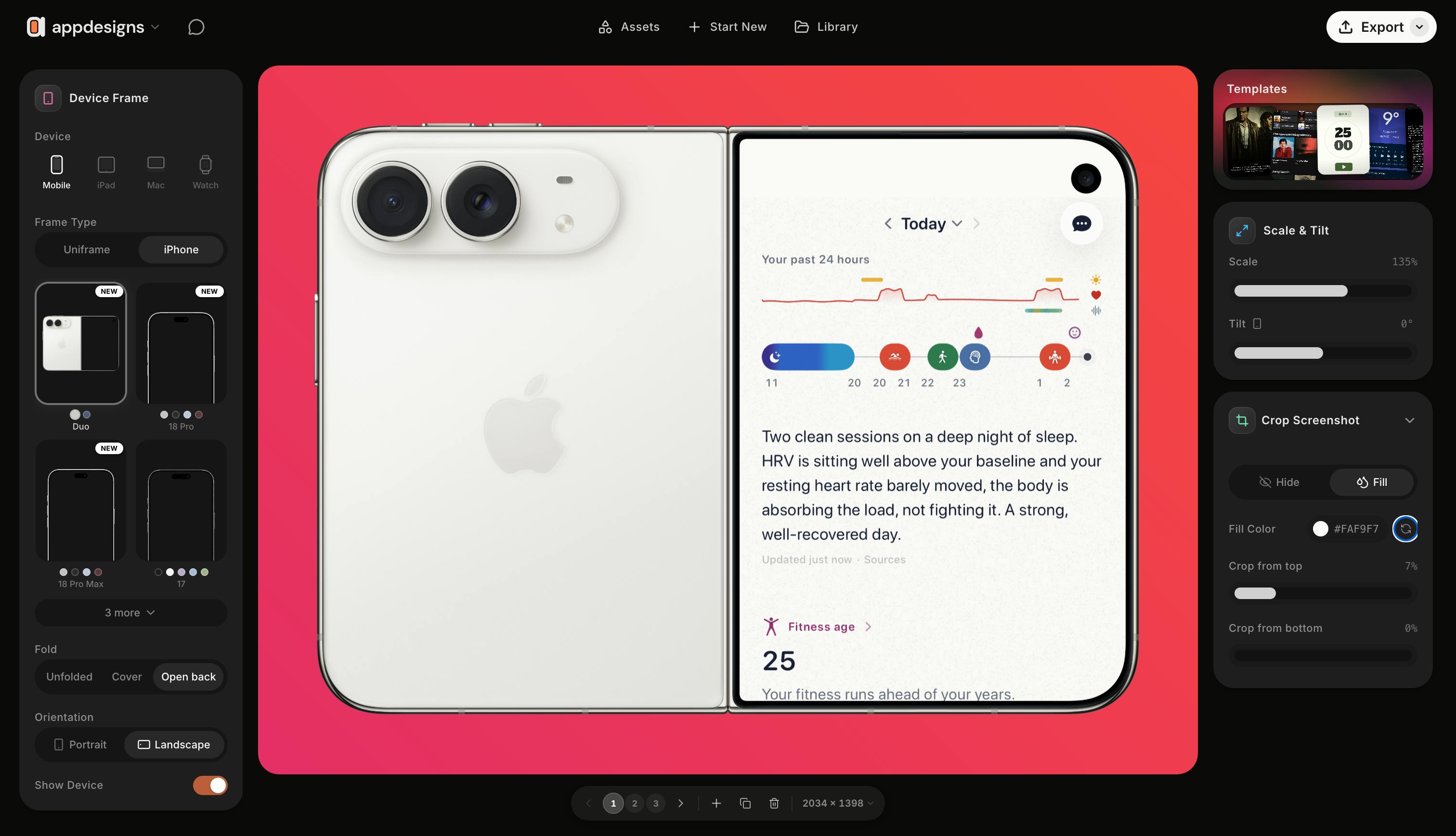
appdesigns is a free, no-watermark, no-signup browser tool for generating spec-compliant App Store screenshots.
appdesigns is a free browser-based editor for creating App Store and Google Play screenshots, built by Haider Nawaz and recently spotlighted on Product Hunt with 81 upvotes. Its core workflow covers device mockups, text and background overlays, side-by-side batch editing, and precise dimension exports. Compared to rivals like Screenshots.pro and AppMockUp, its key differentiator is a promise of unlimited exports, no watermarks, and zero registration — removing the paywalls common in this space. That makes it especially appealing to budget-conscious indie developers and small teams. The tool addresses efficiency and spec compliance in screenshot production, not highly customized brand creativity, so its ceiling is relatively well-defined.
Why App Store Screenshots Deserve Serious Attention
For developers and indie creators, App Store screenshots are often the single biggest factor driving download conversion rates. When users browse the App Store or Google Play, these preview images are the first thing they see — and they communicate product value far more effectively than lengthy descriptions. Yet producing a set of screenshots that meets platform size requirements and looks visually professional is no easy task: professional design tools have a steep learning curve, and template-based services often charge fees or slap on watermarks.
appdesigns, which recently launched on Product Hunt, targets exactly this pain point. It's a fully free, browser-based editor built for quickly generating marketing-quality store screenshots for App Store and Google Play. The product earned 81 upvotes on Product Hunt and ranked 12th for the day, appearing across the Design Tools, Marketing, and Developer Tools categories.
What appdesigns Can Do
Based on the official description, the core workflow in appdesigns is refreshingly straightforward: drag your app screenshots into the editor, choose a device frame for the latest iPhone, iPad, or Mac, layer on headline text, backgrounds, and sticker elements, then export at the exact dimensions required by App Store Connect.
A few design highlights stand out:
- Side-by-side batch editing: Edit your entire screenshot set at once to maintain visual consistency, rather than handling each image one by one.
- Flexible device transforms: Tilt and scale device frames to create more dynamic, layered compositions.
- Community template jumpstart: Users who don't want to start from scratch can apply community-made templates to lower the design barrier.
For indie developers without a design background, the real value here is collapsing "spec compliance" and "visual polish" into a single, low-friction operation.
A quick note on "device mockups" (also called device frames): this refers to embedding your app screenshot inside a rendered image of a phone, tablet, or computer shell to simulate how it looks on an actual device. It's the most common visual technique in app store marketing imagery — it helps users intuitively grasp the UI's proportions and feel on a real screen, rather than staring at a bare interface screenshot in isolation. App Store Connect enforces strict pixel dimensions for different devices (e.g., 6.7-inch for iPhone 15 Pro, 12.9-inch for iPad Pro), and submitting images that don't match specs will result in a failed review. Whether a screenshot tool bundles the latest device size specs and handles export sizing automatically is therefore a key indicator of practical usefulness. appdesigns emphasizes support for "the latest iPhone, iPad, and Mac device frames," implying its template library updates when new devices ship — an ongoing benefit for developers who maintain their store pages long-term.
The Differentiation: Free, No Watermark, No Sign-Up Required
The screenshot tool market isn't empty — competitors like Screenshots.pro and AppMockUp have been around for a while. appdesigns attempts to break through with three core zero-friction promises: unlimited exports, no watermarks, and no account registration required to get started.
This is a meaningful differentiator in this space. Most free tools either watermark exported images, cap the number of exports, or require account creation before you can save your work. appdesigns removes all of these common paywalls, making it especially friendly for developers just starting out with limited budgets. That said, whether the "fully free" model is sustainable long-term — and whether paid tiers will eventually be introduced — remains unclear from publicly available information.
From a business model perspective, a "completely free, zero friction" strategy in SaaS tooling typically follows a few possible paths: relying on ad revenue, accumulating a user base before introducing a Pro subscription tier (e.g., unlimited storage, team collaboration, premium templates), or operating as a low-cost personal brand project by the founder. Screenshots.pro uses tiered plan pricing, while AppMockUp offers a limited free tier plus a subscription — both confirming that willingness to pay exists in this niche. appdesigns' current decision to go fully open is likely a cold-start strategy aimed at building word-of-mouth and early user volume. For users, this means there's plenty of value to capture right now — but it's worth keeping a backup option in your workflow in case the strategy shifts down the line.
Who It's For — and Who It Isn't
Based on the product's shape, appdesigns is best suited for indie developers, small teams, and app creators who need to ship quickly — people who want professional-looking results without investing significant time or money in design software. Running entirely in the browser also means no installation required and full cross-platform compatibility; Mac and Windows users can dive in immediately.
On the other hand, if your team already has mature design resources and established Figma or Photoshop workflows, or if you need a highly customized brand visual system, the ceiling of a template-based tool like this may become apparent fairly quickly. It solves for efficiency and spec compliance — not for maximum creative expression.
Verdict
appdesigns is a clearly positioned, practical tool that makes the tedious work of app store screenshot production genuinely easier. The combination of free access, no watermarks, and no registration — paired with side-by-side batch editing and multi-device mockup support — gives it real appeal among indie developers. As a new product built by Haider Nawaz, the attention it received on Product Hunt is a signal that this demand is real. For developers preparing to launch or optimize their store pages, it's well worth trying as a free option.
Related articles

Salesforce Acquires Rune for $375M: AI Logistics Tech Bolsters Defense Business
Salesforce reportedly acquires defense tech startup Rune for $375M. Rune's AI logistics tech will strengthen Salesforce's Missionforce defense platform, continuing its M&A spree.

Why Fair Use Benefits Everyone in the AI Era
Starting from a Hacker News discussion, this article analyzes the legal logic and controversies of the fair use principle in AI training and content creation, and its dual impact on creators and the tech ecosystem.

Mistral Large 4 Open-Sources a Trillion Parameters, Microsoft Offers Voluntary Severance to 60,000 Employees
Mistral Large 4 open-sources a trillion-parameter multimodal model with a coding agent score of 48; SanDisk earnings show AI inference reshaping NAND demand; Google Gemini adds in-app file editing, OpenAI raises Codex quotas, and Microsoft offers voluntary severance to 60,000 employees.