Archify Explained: A DeepSeek Plugin That Generates Interactive Code Architecture Diagrams from a Single Sentence

Archify plugin lets the model read code and the plugin draw diagrams from a single sentence, delivering verifiable interactive architecture diagrams.
Archify is a DeepSeek Harness plugin. After a user requests a diagram in a conversation, the plugin scans the repository first, and the model is only responsible for understanding the code and outputting boxes and arrows, while layout, rendering, and validation are handled by the plugin. According to the demo, reading a 4,000-line repository takes about 100 seconds, and drawing a diagram from a description takes about 25 seconds, indicating that the main cost is understanding the project rather than drawing itself. It supports architecture, flowchart, sequence, data flow, state, ER, class, timeline, and waterfall views, and can also generate from pasted Mermaid in the sidebar. Generated diagrams automatically enter a gallery with snapshots, and support one-sentence edits, path tracing, PNG/SVG/animation export, and offline standalone HTML. The review feature requires each conclusion to include a file and line number, which the plugin verifies and discards if mismatched, reducing the risk of model fabrication.
When facing a project with thousands of lines of code and dozens of components, the best way to explain how they relate is often not text but a diagram. The Archify plugin introduced on Bilibili compresses this tedious task into a single sentence: say "draw the architecture diagram of this repository" in a conversation, and one or two minutes later, a validated interactive architecture diagram appears above the reply.
It doesn't have the model "draw" directly; instead, it breaks the task apart: the plugin first scans the entire repository, the model reads the code and outputs only boxes and arrows, and layout, rendering, and final checks are all handled by the plugin. This division of labor is key to understanding Archify — the model's strength is semantic understanding, the plugin's strength is stable output, and only by each doing its part can it deliver a usable diagram (rather than one that merely "looks like" a diagram) in an acceptable amount of time.
Trigger with one sentence, from scanning the repo to producing a diagram
Scanning and understanding
When you request an architecture diagram, the plugin first scans the repository, and the model reads the code structure based on that. This step is the most time-consuming part of the whole process: according to the video demo, reading a 4,000-line repository takes about 100 seconds, while drawing an architecture diagram from a description alone takes about 25 seconds. In other words, the complexity of the diagram is not the main cost — the real time is spent on "letting the model understand the project."
Mermaid is a text-based diagram description language that defines nodes, connections, and groups using Markdown-like syntax, which a renderer parses into graphics. Its approach aligns with Archify's division of labor where "the model outputs only boxes and arrows, and the plugin handles rendering": separating semantic description from visual presentation to avoid having the model deal with pixel-level layout. For users, the value of pasting Mermaid content to generate a diagram lies in controllability — what you write is the structure of the diagram, with no free interpretation by the model. For the plugin, Mermaid is also a stable intermediate representation that facilitates validation and secondary editing.
Rendering and validation
The model writes only boxes and arrows, meaning it doesn't need to "draw" the graphics at the pixel level. Layout and rendering are handled by the plugin, which also performs checks to ensure the final delivered diagram is sound in layout and structure. This is why the author emphasizes that the output is a "checked, deliverable" diagram rather than a casually generated sketch.
Hallucination refers to a large model generating content that seems plausible but actually contradicts facts or the input. In code-understanding scenarios, a typical manifestation is fabricating non-existent function names, file paths, or line numbers while stating them with a confident tone. Mitigation approaches generally fall into two categories: constraints on the generation side, such as requiring the model to cite the original text and provide evidence; and verification on the output side, where external programs compare the model's conclusions against the source files one by one. Archify's review feature adopts the latter — the model gives conclusions and locations, the plugin checks back against the code and discards anything that doesn't match, a pragmatic "post-generation filtering" route.
Coverage: from architecture diagrams to a dozen-plus common views

Archify supports a fairly wide range of diagram types: architecture diagrams, flowcharts, sequence diagrams, data flow diagrams, state diagrams, ER diagrams, class diagrams, data diagrams, timelines, waterfall charts, and more. This means it doesn't only serve the single scenario of "explaining repository structure" — various explanatory content that needs visualization in daily development can all be accomplished through the same conversational entry point.
If you don't want to trigger it from a conversation, you can also open the sidebar panel, choose a diagram type, write a description, or directly paste Mermaid content and click generate, with the progress visible at a glance. This is friendlier to users who prefer fine-grained control over input: conversations handle speed, the panel handles precision.

Generated diagrams are automatically collected into a gallery and come with snapshots by default. This design seems inconspicuous but is actually very valuable for long-term maintenance of project documentation — diagrams are not one-off products but a historical record that can be traced back and compared.
Turning "editing the diagram" into a single sentence too
In traditional workflows, the hardest part after a diagram is generated is modification: either go back to a drawing tool and adjust manually, or start over entirely. Archify's approach is that you say one sentence about "what to change," it returns to the session where the diagram was generated to make the change, and the image updates automatically afterward. This effectively turns the diagram into a continuous conversational product rather than a static file.
Letting the model "review" the diagram
Even more interesting is the architecture diagram review feature: the model reads the code and writes conclusions, each conclusion is attached with the corresponding file and line number, and the plugin then verifies each one — not a single mismatched conclusion is kept.
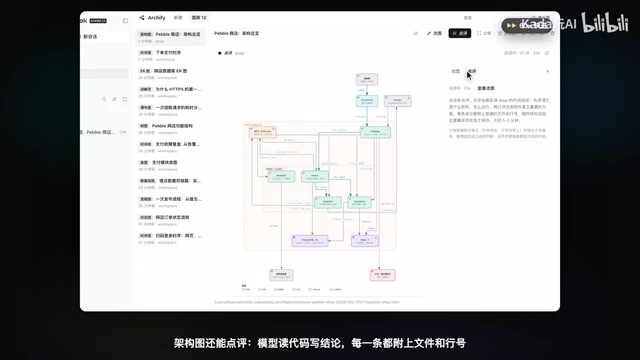
This chain deserves a closer look. The most common mistake large models make when explaining code is "fabrication" — sounding thoroughly convincing while pointing to locations that don't exist at all. Using the plugin for secondary verification and discarding mismatches is a pragmatic way to reduce hallucinations: not expecting the model to always be correct, but letting errors be filtered out before delivery. For teams that need diagrams for technical reviews or onboarding training, this mechanism is more important than the diagram itself.
Freedom in viewing and exporting
In full-screen mode, you can switch themes, enable animations, search components, and trace the path between any two points — this last feature is especially useful for mapping out call chains and dependencies. For export, PNG, SVG, and a playable animation are supported.
Each diagram is also a standalone HTML file that can be opened offline and sent to anyone without requiring them to install anything. This choice is very practical: technical documentation is often shared via email, IM, and links, and standalone HTML is easier to distribute than formats that require specific tools to open.
SVG is a scalable vector graphics format that describes graphic elements in text rather than pixels, so it doesn't lose quality at any magnification and is easy to embed in web pages and modify styles with scripts. PNG is a bitmap format with the best compatibility but blurs when enlarged. The significance of having both lies in different use cases: SVG is suitable for documents, Wikis, or further editing; PNG is suitable for quickly pasting into IM and email. Standalone HTML export packages graphics, interaction scripts, and styles into a single file that can be opened offline without a server or plugin, which is why it's easier to distribute in technical documentation.
Barriers to use and positioning
According to the video, you don't need to install Node, fill in keys, or call additional models; the "How to use" button in the upper right corner walks you through it step by step. The integration form is a DeepSeekAd Harness plugin, which needs to be installed from the plugin marketplace.
Looking at these factors together, Archify's positioning is not to replace professional drawing tools but to fill a previously awkward gap: project structure, call relationships, data flows — these things are too verbose to explain in text and too time-consuming to draw with drawing tools, yet they happen to be exactly what models are best at abstracting after reading code. One-sentence trigger, delivery in tens of seconds to one or two minutes, editable and exportable — if this path is stable, it will become the default approach for many teams to explain their codebase.
It's worth noting that the ~100-second time to scan a 4,000-line repository means it's better suited for "on-demand diagramming" of medium-to-large projects rather than high-frequency batch generation; at the same time, the plugin's practice of verifying model output also reminds us that when using any code-understanding AI tool, we should retain a sense of verification toward its conclusions — tools help you filter, but judgment remains with humans.
FAQ
What kind of projects is Archify suitable for?
From the demo, projects with thousands of lines of code and dozens of components are typical scenarios, with the most obvious benefits when you need to explain architecture, processes, or data flows to others.
Can generated diagrams be modified?
Yes. State what you want to change in one sentence, and it will return to the session that generated the diagram to modify it, with the image updating automatically.
Do recipients need to install the plugin to view exported diagrams?
No. Each diagram is a standalone HTML file that can be opened offline; PNG, SVG, or animation can also be exported.
One-line Summary
Archify lets the model read code and the plugin draw diagrams from a single sentence, delivering verifiable interactive architecture diagrams.
Paragraph Summary
Archify is a DeepSeek Harness plugin. After a user requests a diagram in a conversation, the plugin scans the repository first, and the model is only responsible for understanding the code and outputting boxes and arrows, while layout, rendering, and validation are handled by the plugin. According to the demo, reading a 4,000-line repository takes about 100 seconds, and drawing a diagram from a description takes about 25 seconds, indicating that the main cost is understanding the project rather than drawing itself. It supports architecture, flowchart, sequence, data flow, state, ER, class, timeline, and waterfall views, and can also generate from pasted Mermaid in the sidebar. Generated diagrams automatically enter a gallery with snapshots, and support one-sentence edits, path tracing, PNG/SVG/animation export, and offline standalone HTML. The review feature requires each conclusion to include a file and line number, which the plugin verifies and discards if mismatched, reducing the risk of model fabrication.
Related articles

Nothing CMF Buds 2A Drops to $17.89 on Black Friday: A New Low for ANC Earbuds
Nothing CMF Buds 2A wireless earbuds Black Friday deal: just $17.89 on Amazon, about $11 off retail and a record low. ANC earbuds at an entry-level price.

When AI Creation Gets Accused of "Spitting": Hacker News Heats Up Over the Glaude Controversy
A Hacker News post, "Spitting in the Face of Glaude," sparks debate on AI creation transparency and attribution ethics. This analysis examines the blurred creator identity behind the controversy and offers practical advice for AI content production.

Akai Embraces Custom Firmware: MPC Sample 1.4 Lets Users AI-Program Their Sampler
Akai embraces the modding community with MPC Sample 1.4 firmware, supporting vibe-coded custom firmware and effects. We analyze the impact of this open strategy on music hardware and AI-assisted programming.