Are Make and n8n Still Worth Learning? Choosing Automation Tools in the Age of Agents
Visual automation tools face a paradigm shift as Coding Agents like Claude Code reshape workflow building.
This article examines whether Make and n8n remain relevant as Coding Agents like Claude Code and OpenAI Codex transform automation. It traces visual tools from their golden age of democratizing automation to their spider-web complexity bottleneck, then explains why Agents work more efficiently with code directly. The conclusion: beginners should go Agent-First, while existing stable workflows can stay put.
As AI Agents rapidly gain traction, an increasingly common question has emerged: are visual automation tools like Make and n8n — once wildly popular — still worth a newcomer's time to learn? Based on an in-depth analysis by a Bilibili creator who has been closely following Claude Code and Codex, this article explores the historical value of visual automation tools, their current limitations, and the paradigm shift brought about by Coding Agents.
The Golden Age of Visual Automation Tools
Looking back, Make and n8n became so popular because they precisely addressed the most painful points in automation. In the past, work was full of tedious, repetitive processes, but the moment you tried to connect different software together, you'd run into a series of problems: API integration, authentication, data format conversion, and error handling.
It's worth explaining what these technical barriers actually mean. An API (Application Programming Interface) is the bridge that enables communication between different software systems. In automation scenarios, linking services like Gmail, Slack, and databases together essentially means exchanging data through their respective APIs. This process involves OAuth authentication (a protocol that lets third-party applications securely access user data), different interface styles like REST/GraphQL, data format conversion between JSON/XML, and engineering details like rate limiting and error retries. Back then, all of this required writing code, making the barrier extremely high for non-programmers.
Make (formerly Integromat) and n8n excelled by transforming all this complex code logic into a visual graphical interface — encapsulating low-level concepts like HTTP request headers and status codes into graphical modules, allowing non-technical users to complete cross-platform integrations without understanding these details. They turned invisible logic into clear blocks and connecting lines on screen: trigger conditions linked to processing steps, then linked to subsequent actions. How data flows from left to right, which step succeeded, what each step output — everything was visible at a glance.
This intuitive presentation allowed complete beginners to get started, building their first working automation flow in an afternoon, accompanied by a real sense of accomplishment. At the time, this was genuinely a major breakthrough.
The Visual Bottleneck: Node Sprawl Becomes a Spider Web
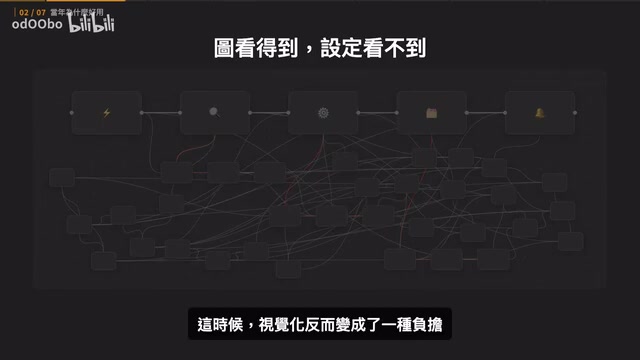
However, once you applied these tools to complex business scenarios, you'd quickly hit new bottlenecks. When a workflow had just three to five steps, the connections on screen looked clean and beautiful. But as business requirements grew — needing to handle various edge cases like missing user data routing to different branches, format conversion issues, API disconnection retries — the flowchart would rapidly balloon into dozens of nodes with connections crisscrossing like a spider web.
At this point, visualization actually became a burden. Every data transformation setting, every conditional check was scattered across dozens of different pop-ups and menus. If just one node went wrong, you'd often have to click through ten or more nodes one by one to find exactly which field mapping was incorrect.
We used to accept this hassle and were even willing to spend dozens of hours mastering advanced tricks in the graphical interface. The reason was simple: back then you only had two choices — either learn to write code and manage servers, or use a graphical interface to drag and connect. For most people, the latter was obviously much easier.
The Premise Has Changed: Maintenance Handoff from Humans to Agents
This logic rested on one critical premise: the person building, maintaining, and monitoring the automation every day was a human. Because humans were the ones looking at it, the visual interface provided the greatest sense of security. But with the emergence of powerful Coding Agents, this premise has quietly shifted.
Coding Agents are autonomous programming intelligences built on Large Language Models (LLMs). Represented by Claude Code and OpenAI Codex, they can not only generate code snippets but also perform multi-step reasoning, file read/write operations, command-line operations, and self-correction within complete development environments. Their core architecture typically includes: an LLM brain responsible for understanding intent and generating plans, a sandbox environment that can execute code and system commands, and a loop mechanism (i.e., ReAct or similar Agent Loop patterns) that feeds execution results back to the model for iterative optimization. This closed-loop capability has evolved them from "code completion tools" into "autonomous engineers."
Complex workflows that used to give you headaches in visual tools can now be described in a single sentence, and the Agent will build and test them end to end.
Step back and you'll notice something interesting: the workflows dragged out in Make or n8n and the automation written by engineers in code are fundamentally identical at the base level. They're both describing the same program logic — when to trigger, what data to read, what conditions to evaluate, what actions to execute, and how to handle errors. Make and n8n are code underneath as well; they just wrap the interface in a more visually appealing package.
Why Agents Are Better Suited to Working Directly with Code
Large Language Models are the brain behind Coding Agents like Claude and Codex, and these models were trained on massive amounts of standard code from around the world — programming languages are essentially their native tongue. When Agents work directly with code, they can read and modify it with great precision, with high processing speed and token efficiency.

It's important to understand why token efficiency matters so much. A token is the basic unit of text processing for LLMs — roughly 1-2 tokens per English word, and about 1-2 tokens per Chinese character. Every interaction with an Agent consumes tokens, and a model's context window determines the total amount of information that can be processed in a single conversation. When an Agent needs to parse a JSON configuration exported from Make, the large volume of platform-specific metadata and node IDs consumes precious token budget, squeezing out space for actual reasoning and problem-solving. In contrast, standard code is more concise with higher information density, allowing the Agent to understand more business logic within the same token budget.
Conversely, when an Agent operates Make or n8n, it must first spend extra effort understanding the platform's proprietary node rules, data structures, and configuration constraints, then debug through this additional layer of abstraction. This not only adds a significant detour and wastes a large number of tokens, but if the platform's official documentation is unclear or node rules were recently updated, the Agent is prone to errors from misunderstanding the rules.
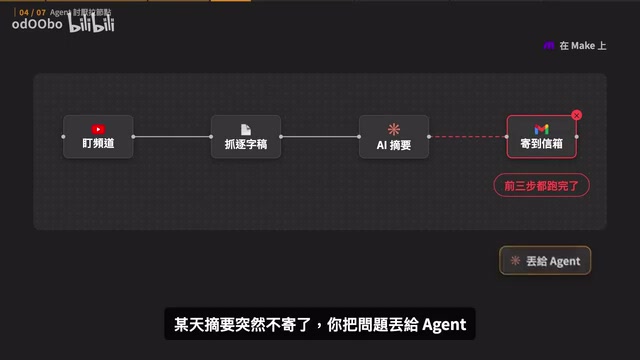
Here's an example: a Make workflow is responsible for daily fetching of new YouTube video transcripts, summarizing them, and sending them to an email inbox. One day the summaries suddenly stop sending. You toss the problem to an Agent, and it faces a large exported JSON configuration from Make, filled with platform-created node IDs and field codes — like trying to decode someone else's codebook. But if the same workflow were in pure code, the Agent would directly read the error message, locate the failing line, fix it, and rerun the tests in one smooth sequence. The efficiency gap is night and day.
Ecosystem Freedom and Mature Debugging Mechanisms
Even though both Make and n8n now have built-in AI chat features, the fundamental difference remains: when workflows get complex and need long-term maintenance, which one is easier to break, and which one is easier to iterate?
In visual tools, when a business change requires integrating a new tool, you always have to first check whether the platform supports that node. For example, if Anthropic releases a new model with API changes but the official node hasn't been updated yet, the only way to try it is to use a generic HTTP node to manually connect — at which point you're essentially back to hand-writing API calls. Hand it to a Coding Agent instead, and there are no platform restrictions; it can find existing packages on GitHub or directly interface with the official API.
Moreover, code benefits from decades of mature debugging mechanisms built up by software engineering. Version control systems (Git being the prime example) are the cornerstone of modern software engineering, recording every code change and supporting branching, merging, and one-click rollbacks. Complementing this are unit tests, integration tests, CI/CD (Continuous Integration/Continuous Deployment) pipelines, and other quality assurance loops. Agents can run tests, read logs, catch errors, fix them, and re-verify, all while leveraging Git to make every change traceable and instantly reversible. Coding Agents naturally fit this ecosystem: they can run git diff to view changes, execute pytest to run tests, and analyze stack traces to locate errors — the entire process is identical to a human engineer's workflow. Visual tools, by contrast, typically lack equivalent version management and automated testing capabilities. The entire "discover problem → modify → verify" loop can be completed fully automatically by the Agent in its own environment.
Even Non-Coders Can Handle It: The New Role of Visualization
Some might worry: if you can't write code, how do you know where things are stuck when the system has problems? In the Coding Agent era, the rules of the game have fundamentally changed. For simple personal workflows, you don't need to read code line by line at all. When something goes wrong, just ask the Agent in plain language: "How does this workflow run? Why didn't that notification get sent just now?" It will read the underlying code, execution logs, and test results, then explain it all back to you in plain language.
If you prefer looking at diagrams, you can also ask the Agent to draw a flowchart directly. Visualization still has value, but its most fitting role has shifted from "forcing you back to the canvas to drag nodes" to "a map or monitoring dashboard that helps you understand the big picture."
That said, let's give Make and n8n their fair due: they have one often-overlooked advantage — they handle the deployment problem for you. Once set up, workflows run automatically on schedule, retry automatically when they fail, and log every execution. When you switch to Agent-written code, you need to handle these deployment tasks yourself. So it's recommended that non-technical users spend some time understanding basic deployment concepts and make good use of free tools like GitHub Actions, Netlify, and Vercel to get programs running in the cloud 24/7.
Specifically, GitHub Actions is a CI/CD service provided by GitHub that can automatically trigger build, test, and deployment processes when code is committed. Netlify and Vercel are hosting platforms for frontend and Serverless functions, supporting automatic code pulls from Git repositories for deployment. Serverless architecture lets developers skip managing server infrastructure, charging based on actual invocations — ideal for scheduled tasks and event-driven automation scenarios. There are also options like AWS Lambda and Cloudflare Workers. The free tiers of these tools are typically sufficient for personal and small-team automation needs, and they're the key infrastructure for achieving "programs running 24/7 in the cloud" after moving away from Make/n8n hosting.
What About Existing Workflows? When to Migrate
If you already have Make or n8n workflows, don't panic. There's a time-tested principle in engineering: if the system is running smoothly and nothing's broken, don't rush to change it. There are only two situations where migrating to Coding Agent maintenance is recommended:
- Frequent failures: The workflow constantly throws errors, and every modification is nerve-wracking because there are no tests or version records. It's stuffed with custom scripts where changing one thing breaks three others. Only by refactoring into standard code can you escape the daily firefighting.
- Continuous iteration: The workflow will need frequent updates or foreseeable major overhauls in the future. Since you'll keep adjusting it anyway, take the opportunity to have the Agent rebuild it in pure code — future expansions will be much easier.
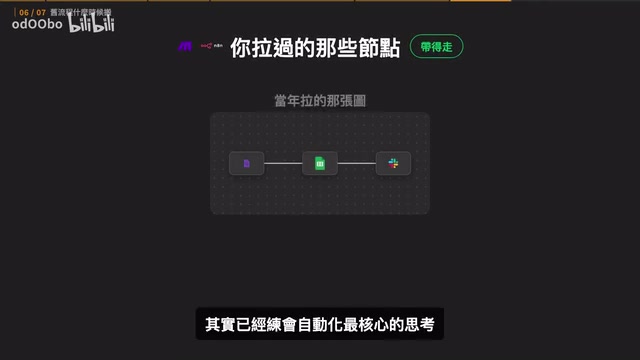
Also, if you've already invested time learning Make or n8n, don't feel it was wasted. The core automation thinking you developed while dragging nodes — when to trigger, how to persist data, how to handle errors — none of these concepts are outdated. In fact, they're your biggest advantage when directing an Agent.
Conclusion: Moving Toward Agent-First
In the AI era, the human role in work has fundamentally leveled up. We used to burn our energy on tedious field configurations, but now your real role is "system owner": you decide what should be automated, define security boundaries, set acceptance criteria, while the Agent is your personal assistant that precisely translates your ideas into code.
Conversing with an Agent is actually quite simple — treat it like a real human engineer and clearly communicate three things: why it needs to be done, how it's currently handled manually, and what outcome you want. The rest — writing code, running tests, even walking you through how to apply for an API Key — it will handle step by step.
Back to the original question: are Make and n8n still worth learning? The answer is clear — if you're a beginner just starting out, there's no need to learn visual tools from scratch anymore. If you have existing workflows running smoothly, there's no rush to tear them apart either. But for any brand-new automation need, go boldly Agent-First.
Related articles
AWS AgentCore Gateway: Connecting AI A…
AWS AgentCore Gateway: Connecting AI Agents to Enterprise Backends with MCP
How AWS AgentCore Gateway acts as a primary MCP server to aggregate REST APIs, Lambda, and existing MCP services? Analyzing its AST real-time mapping, zero cold start, semantic search for tool overload, session isolation, and key injection security design, plus the architectural approach to decoupling enterprise AI agents from backends.

One Link Gives Figma AI a New Skill: Hands-On with MCP Connectors
Paste one MCP server link and the AI Agent in Figma gains new tool capabilities. We break down the setup flow, 20+ one-click apps, read/write permissions and execution policies, and the public HTTPS requirement.

Cognition SWE-2 in Practice: One Prompt to Handle the Whole Product Launch Process
Analyzing a YouTube creator's prompt for using Cognition SWE-2 to launch a product: a landing page, seven-email sequence, and non-buyer follow-up tool, plus how the 'test and report' constraint changes AI delivery quality.