Auto-Generate YouTube Titles and Descriptions with n8n Using Just 3 Nodes

Generate YouTube titles and descriptions automatically with a 3-node n8n workflow connecting Google Sheets and OpenAI.
This article walks through a minimal n8n automation workflow that uses Google Sheets as a data hub: a trigger watches for new idea rows, OpenAI generates a video title and description in structured JSON format, and the results are written back to the original row using a unique ID. The entire flow requires just three nodes and two credentials. The article also emphasizes that AI-generated copy should always be reviewed before publishing, and highlights reusable patterns — spreadsheet-driven triggers, structured JSON output, and ID-based row updates — that can be applied to many other content production scenarios.
Drop a video idea into a spreadsheet, and seconds later the title and description are written automatically — no science fiction, just a minimal automation workflow built in n8n. The entire pipeline requires only three nodes, a connected Google account, and an AI API key. For content creators who want to get started with automation but lack a hands-on example, this is a high-value beginner project with a very low barrier to entry.
The Core Idea: Spreadsheet-Driven Content Generation
The logic behind this workflow is refreshingly simple: use Google Sheets as both the input and output layer, with a large language model in the middle to transform raw ideas into polished copy. All you need to do is add a new row with your idea — the workflow automatically detects it, calls the AI to generate a title and description, then writes the results back to the corresponding columns in that same row.
Before you begin, there are two setup steps: connect your Google account, and configure an AI API key (such as OpenAI). Then set up a spreadsheet with four columns — ID, Idea, Title, and Description. The ID column is critical: it acts as a unique identifier for each record, enabling the workflow to write results back to exactly the right row.
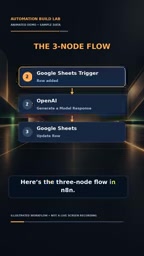
n8n is an open-source workflow automation tool in the same category as Zapier and Make (formerly Integromat), but it supports self-hosted deployment — your data never has to pass through third-party servers — and it's more developer-friendly, allowing you to manipulate data between nodes using JavaScript expressions. It uses a visual node-and-wire interface to build workflows: each node represents an operation (trigger, transform, read/write), and the connections between nodes define the data flow. For the use case described in this article, the free community edition of n8n is more than sufficient. Install it locally or on a server, or use the official cloud trial environment, and you're ready to build.
Breaking Down Each of the Three Nodes
Node 1: Google Sheets Trigger
The first node uses the Google Sheets trigger, configured to watch for new rows. As soon as you enter a new idea into the spreadsheet, this node fires and passes that row's data downstream. This change-driven trigger eliminates the need to manually run the workflow — once you've filled in your idea, the process takes care of itself.

Node 2: OpenAI Content Generation
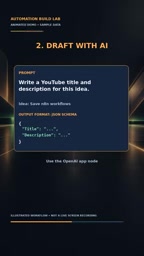
The second node calls OpenAI, sending the idea and instructing the model to return a JSON object containing exactly two fields: title and description. Requiring structured JSON output is the key insight here — it makes the AI's response predictable and parseable, so the next node can directly map the fields to the right columns without any messy text cleanup.
Asking the AI to return structured JSON rather than free-form text is a common practice in prompt engineering. Free-form output may be readable, but its structure can vary between generations, making it difficult for downstream nodes to extract data using a consistent field path. By explicitly instructing the model to "return only JSON with a title and description field" — and enabling JSON Mode in the OpenAI node where supported — you dramatically reduce the chance of parsing failures. If the model or API version you're using doesn't support native JSON Mode, you can include a few-shot example at the end of your prompt to guide the model toward the expected output format.
Node 3: Google Sheets Row Update
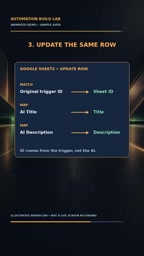
The third node is also Google Sheets, but this time configured with the Update Row operation. The key is using the original ID as the match condition — this ensures the generated title and description are written back to the exact row they belong to, rather than creating a new row or overwriting the wrong one. Finally, map the two fields returned by the AI to the Title and Description columns respectively.
Results and Usage Tips
Once configured, the workflow sits in a ready state. Add a new idea, and on the next polling cycle the workflow will automatically draft the copy and update that row. Your only job is to review the generated content before publishing — check whether the title is compelling and the description is accurate.
AI-generated copy is not ready to publish as-is — the "review before publishing" step is non-negotiable. Large language models can produce exaggerated, off-topic, or brand-inconsistent phrasing, and human oversight remains your quality floor. Treat AI as a first-draft tool, not a final decision-maker, and you'll be using this kind of automation the right way.
Who Is This Project For?
This is a classic "three-node starter" automation project — low barrier, fast feedback loop, and ideal for anyone new to n8n or workflow automation in general. It demonstrates several reusable core patterns: using a spreadsheet as a data hub, trigger-driven execution, requesting structured JSON from an AI, and using a unique ID for precise row updates. Once you've internalized these patterns, you can apply the same approach to other scenarios — batch-generating social media copy, automatically organizing asset libraries, or building a simple content pipeline.
Going from a single idea to automated content output, this workflow's value isn't just the time it saves — it's about freeing creators from mechanical copywriting tasks so they can focus on what matters most: the ideas themselves.
Related articles

Why Does the Tesla Roadster Need to Fly? A Deep Dive into Musk's Wild Demo
Tesla's Roadster launch showed wall-climbing, upside-down driving, and flying stunts—but The Vergecast notes the demo car may lack a battery, the Rocket version is invite-only and not street-legal, and the website terms don't guarantee delivery. After nine years of delays, why does this car still need to exist?

AI Is Not a Replacement: Human-AI Collaboration Through the Lens of Factory Root Cause Analysis
Starting from factory root cause analysis, this article explains how AI accelerates evidence chain construction rather than replacing human experts, exploring the pragmatic implementation logic and business value of 'AI supporting people rather than replacing them.'

AI Agent Decision Auditing: Building an Evidence Chain in Regulated Workflows
Starting from a Reddit discussion, this article analyzes three core issues in AI agent decision auditing within regulated workflows: what fields audit records should contain, how to handle feedback latency for erroneous decisions, and how to continuously calibrate LLM judge consistency with human judgment.