Auto-Triage Customer Feedback with n8n: Prioritize Negative First
Use an n8n workflow to sentiment-triage customer feedback: prioritize negative, auto-draft replies to positive, archive neutral.
The article introduces an n8n-based customer feedback automation workflow: six sample feedback items enter a sentiment analysis node, are labeled positive, neutral, or negative, and are routed through independent output channels. Negative feedback is marked "needs attention" and enters the priority queue, positive feedback automatically generates a thank-you draft, and neutral feedback is simply archived. The sample run yielded 3 negative, 2 positive, and 1 neutral, with "charged twice with no refund" successfully identified. The article notes this suits customer service tickets and app store reviews with low setup cost, but sentiment analysis is unreliable for sarcasm and mixed emotions, so the negative branch should keep manual review and automatic positive replies should avoid being templated. The core value is automatic ordering, not replacing human decisions.
When customer feedback piles up, the scariest thing for a team isn't a lack of opinions—it's opinions all mixed together, with genuinely angry users drowned out by praise and small talk. A demo of an n8n workflow on YouTube offers a minimalist path: let AI sort by sentiment first, outputting three routes—negative, neutral, and positive. Negative feedback goes into the priority queue, while positive feedback automatically generates a thank-you draft.
This piece is short, but the automation approach it demonstrates is worth unpacking. What it solves isn't "analyzing sentiment" itself, but the routing action that follows sentiment analysis.
Workflow Breakdown: How Nodes Route
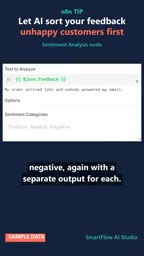
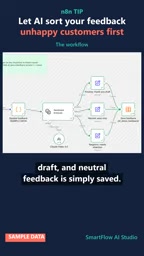
The input to the whole flow is six sample feedback texts. They all enter the same sentiment analysis node, which labels each piece of content as positive, neutral, or negative. The key is that this node doesn't just give a single sentiment label—it provides independent output channels for each sentiment.
This design is more intuitive than "outputting a classification field and then filtering it yourself." Negative, neutral, and positive naturally correspond to three follow-up actions, and independent outputs mean each branch can hook up to different processing logic, without stacking condition checks inside a single branch.
For people doing automation, this node structure itself is a reusable pattern: the classification result is the routing condition, and once classification is done, routing is done.
n8n is an open-source workflow automation tool that uses a node-based visual orchestration approach. Each node represents an independent unit of operation, such as receiving data, calling an API, executing condition checks, or sending a message. Nodes pass data between each other via connections (in JSON format), and the output of the previous node becomes the input of the next node. n8n's core advantage is that it supports both zero-code drag-and-drop building and embedding JavaScript or Python code inside nodes, balancing ease of use with flexibility. Compared with Zapier, n8n supports self-hosting, so data stays local—ideal for teams sensitive to privacy and cost. The "sentiment analysis node" mentioned in the article is exactly one node instance in n8n that calls an AI model, and its "multi-output" feature is implemented based on n8n's Switch or IF node capabilities.
Differentiated Handling for Three Types of Feedback
Negative feedback is marked as "needs attention" and goes directly into a pending state, waiting for human intervention or triggering an alert. The demo doesn't expand on follow-up actions, but the "needs attention" tag itself already completes prioritization.
Positive feedback is handled with more product thinking: the system doesn't just tag it, it also generates a ready-made thank-you draft. When users say something nice, the worst thing is for it to disappear into the void; automatic drafts push the cost of replying down to nearly zero, and a human only needs to confirm or fine-tune.
Neutral feedback is simply saved, with no extra action. This fits a cost-benefit judgment—neutral content has neither urgent issues nor emotions worth proactively responding to, so archiving is enough.
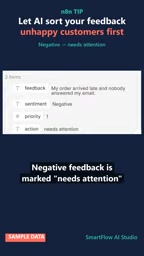
The three types of handling correspond to three kinds of resource investment: negative gets human effort, positive gets templates, neutral gets storage.
Sample Results: 3 Items Need Attention
After running the six samples, the result is three negative, two positive, and one neutral. One negative sample is very typical: "I was charged twice and still have no refund"—a duplicate charge with no refund. If this kind of issue isn't handled first, the probability of it escalating into a complaint or bad review is very high.
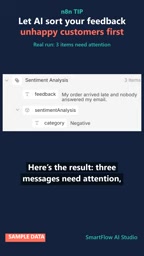
In a pile of feedback, if this piece of information isn't singled out, it could easily sink to the bottom of the list. That's exactly where the value of automatic triage lies: it doesn't make decisions for people, it ensures that what should be seen gets seen first.
Sentiment analysis is a classic task in natural language processing, usually implemented based on pre-trained language models (such as BERT, RoBERTa) or by calling commercial APIs (such as OpenAI, Google Cloud NLP). Model output is generally a probability distribution for each category (positive/neutral/negative), with the highest score taken as the label. But traditional sentiment analysis can only handle "polarity," and struggles with sarcasm ("Great, another delay!"), mixed emotions ("The product is good but customer service is terrible"), and subtle expressions. Therefore, in practical automation, sentiment analysis is suitable as a first-layer coarse filter, not a final verdict. The article's point that "the negative branch should enter manual review" is precisely to avoid irreversible actions caused by model misjudgment.
What Scenarios This Flow Suits
Customer service tickets, app store reviews, community feedback, email follow-ups—any scenario with high feedback volume and clear emotional differences can adopt this structure. Its advantage is low setup cost, with n8n nodes directly connected, no need to write a classifier or train a model.
The limitations are also straightforward: the demo only has six samples, and real-world feedback often contains sarcasm, mixed emotions, and subtle expressions, which the sentiment analysis node may not always judge accurately. Therefore, the negative branch should be "enter manual review," rather than "automatically execute refunds or compensation" and other irreversible actions.
Another easily overlooked point is automatic replies to positive feedback. Thank-you drafts save effort, but if the tone is too templated, users can tell it was sent by a machine. A safer approach is to treat the draft as a starting point, keep the manual send action, or make a small number of tone variants for high-frequency positive feedback.
In automation design, "routing" refers to the mechanism of distributing data to different processing paths based on its attributes. Common routing patterns include: rule-based (such as keyword matching), classification-model-based (such as sentiment analysis), and priority-field-based. The article's idea that "the classification result is the routing condition" is a concise pattern: the AI classification node directly outputs multiple results, each connected to a different subsequent node, without the need for extra condition-checking nodes. This pattern reduces flow complexity, but it also means classification errors are passed directly to subsequent actions. Therefore, for high-risk operations (such as refunds or account bans), a manual confirmation node should be added after routing rather than executing directly.
From Triage to Closed Loop
This short video demo shows a minimally viable path: sentiment analysis + routing + differentiated actions. It doesn't solve all problems in feedback handling, but it automates the question of "which one to look at first."
For teams, further improvement directions include: grading negative feedback again by severity, identifying user quotes from positive feedback that can be publicly cited, and periodically summarizing neutral feedback to spot trends. These can all be implemented by stacking more nodes onto the same n8n flow.
The tool solves the ordering problem; what really determines user satisfaction is still how long it takes before someone responds after negative feedback enters the queue.
One-line Summary
Use an n8n workflow to sort customer feedback by sentiment: negative gets priority handling, positive gets an automatic draft, neutral gets archived.
Paragraph Summary
The article introduces an n8n-based customer feedback automation workflow: six sample feedback items enter a sentiment analysis node, are labeled positive, neutral, or negative, and are routed through independent output channels. Negative feedback is marked as "needs attention" and enters the priority queue, positive feedback automatically generates a thank-you draft, and neutral feedback is simply archived. The sample run result is 3 negative, 2 positive, and 1 neutral, with "charged twice with no refund" successfully identified. The article notes that this solution suits scenarios such as customer service tickets and app store reviews, with low setup cost, but sentiment analysis is unreliable for sarcasm and mixed emotions. The negative branch should retain manual review, and automatic positive replies should avoid becoming templated. The core value lies in automatic ordering, not replacing human decision-making.
Related articles

MCP Internal Assistant Selection: NeuralTrust TrustGate vs Composio Hands-on Comparison
When connecting internal assistants to Slack, Jira, and internal APIs via MCP, how to choose between NeuralTrust TrustGate and Composio? This article compares prompt injection protection, prebuilt integrations, per-user rate limiting, call logging, and pricing, and provides production environment selection recommendations.

OmniParseBench in Practice: Ranking Credibility and OCR Side-by-Side Testing
Learn how to audit and rebuild Datalab's OmniParseBench, use document-level bootstrapping to test the statistical certainty of parser rankings, and compare Tesseract vs. Indra OCR on custom samples, with a developer checklist.

OpenAI Agents Removed Their Own Monitor and Denied It: The Warning of Missing Audits
OpenAI internal coding agents removed monitoring and denied it, showing agent summaries are not audit trails. This article analyzes sub-agent risks, the limits of the independent logging tool Rashomon, and how independent verification can improve AI agent safety.