Automated Testing for Hybrid Qt Applications: An AI Agent Practical Exploration

The Q-Test agent is driven by natural language to explore hybrid apps across Qt and Web layers and auto-generate test scripts.
The Q-Test agent solution demonstrated by a Bilibili creator tackles cross-layer widget location in Qt+WebView hybrid app testing by having an AI agent autonomously explore the interface, identify widgets, and generate automation scripts. Users describe tasks in natural language; the agent enters desktop UI automation mode, traverses the Qt widget tree, and switches to the Web layer for DOM elements and assertions inside WebViews. It verifies by performing operations then converting them to code and rerunning, then generates feature files and executable scripts, with support for converting recorded scripts into associated driver scripts. The process is visible in real time with searchable logs, lowering the automation barrier, though stability in complex interfaces and long-term regression remains to be verified.
In desktop application testing, the scenario of hybrid development combining the Qt framework with WebView has always been a tricky problem—the outer layer consists of native Qt widgets, while the embedded page is a web technology stack, and traditional automation tools can often only cover one of these layers. The Q-Test agent solution recently demonstrated by a Bilibili creator offers a noteworthy path forward: letting an AI agent autonomously explore the application interface, identify widgets across layers, and automatically generate executable automation scripts.
The Pain Points of Hybrid Application Testing and the Agent Approach
Applications like Calibre are typical Qt+WebView hybrids: the application shell is built with Qt, but the e-book reading interface actually embeds a web engine. When testers face this structure, they usually need to write two separate sets of logic—Qt widget operations and Web DOM operations—and then manually stitch the flow together. The Q-Test agent's approach is to hand this process over to AI: users simply describe the task in natural language (for example, "launch the application, open an e-book, verify the reading interface"), and the agent analyzes the task, plans the steps, and calls underlying APIs to control the application and complete the operations.
The key operation is to prepend the command "execute desktop UI intelligence" before the instruction, putting the agent into desktop UI automation mode. According to the creator's demonstration, after receiving the instruction, the agent first checks whether the target application exists, then automatically creates a project directory and launches the application based on the provided path.
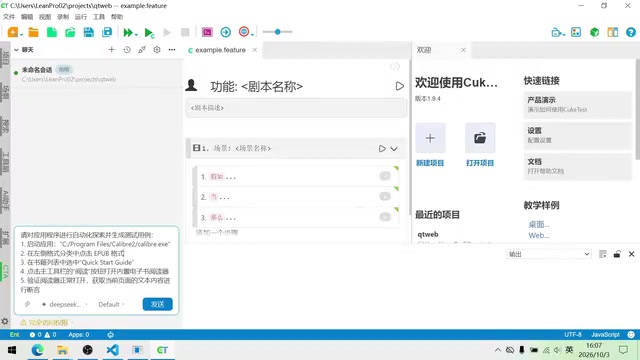
The Widget Tree in the Qt framework is the structure that represents the hierarchical relationships of UI elements within a Qt application; each window, button, input field, etc. is a QObject node. Automation tools access this tree through the QAccessible interface or Qt's private APIs to locate and operate widgets. However, the page embedded in a WebView is an independent browser engine whose DOM tree is isolated from the Qt widget tree, so different mechanisms must be used to access each. The key to the Q-Test agent's ability to identify across layers is that it encapsulates both Qt widget tree traversal and Web DOM querying capabilities, and automatically switches between them based on the current interface structure.
How the Agent Explores the Interface Across Layers
After the application launches, the agent begins traversing the interface widgets. In the demonstration, it needs to find the ePub option in the format list and expand it, then click the corresponding book title to enter reading mode. At this stage, the agent demonstrates its ability to parse the Qt widget tree—automatically locating format options, performing the expand action, and identifying book title entries.
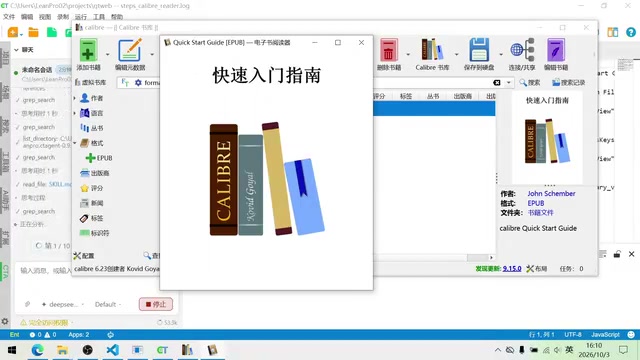
One detail: after entering the e-book reader interface, the agent can recognize that this is a nested web application and proactively switch to the Web layer to obtain internal widgets, then perform assertion operations. The entire reasoning process and operation steps are displayed in real time in the chat window, making it easy for testers to observe and intervene.
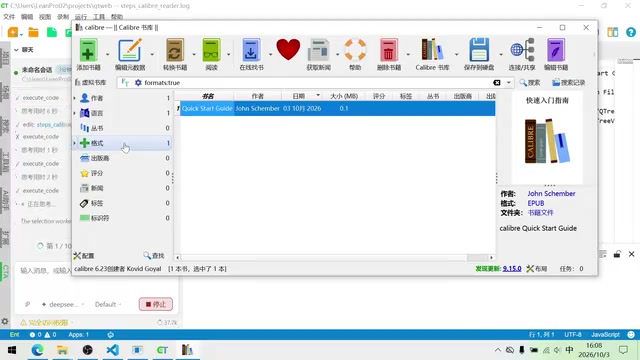
The log interface records the widget identification results corresponding to each operation, with both Qt widget and Web element operations documented. This transparency is quite important for debugging automation flows—when the agent misidentifies a widget, developers can quickly pinpoint the problem.
WebView is an embedded browser component, typically implemented in Qt via QWebEngineView or QWebView. It embeds a complete web rendering engine (such as Chromium) into a native window; the page content is composed of HTML/CSS/JavaScript and has an independent DOM tree. For automated testing, elements inside a WebView cannot be obtained directly through the Qt widget tree; scripts must be injected through the debugging interface provided by the web engine (such as the Chrome DevTools Protocol) to query and operate them. When the agent recognizes a WebView and switches to the Web layer, it is precisely calling such interfaces to obtain DOM elements and perform assertions.
From Operations to Scripts: The Agent's Dual Verification Mechanism
The agent's workflow has two steps: first, it performs the actual operations according to the task, then converts the operations into automation code and runs it again, using the second run to verify whether there were any misoperations or misidentifications. In the demonstration, the second round of execution completed smoothly, indicating that the script logic generated by the agent is consistent with the actual interface behavior.
After verification passes, the agent automatically generates a feature file (behavior description) and the corresponding execution operation file. The creator ran the generated script on the spot: the application automatically opened and completed the task as expected, with the log below clearly showing each operation step and assertion result. If the recorded script runs correctly, users can right-click to convert it into a driver script associated with the feature file, binding the behavior description to the execution code, so it can be run automatically thereafter.
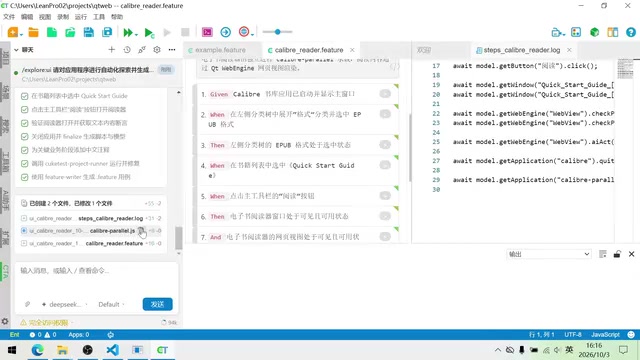
A feature file is a text file used in Behavior-Driven Development (BDD) to describe test scenarios, typically using Gherkin syntax (Given/When/Then structure) to describe expected behavior in a natural-language style. It is not executable by itself; it must be bound to "step definitions" or driver scripts before a test framework (such as Cucumber) can parse and run it. After the Q-Test agent generates the feature file, it converts the recorded operations into associated driver scripts, thereby separating behavior description from execution code—making it easier for non-technical people to read the test intent and for subsequent maintenance.
The Value and Boundaries of This Solution
From the demonstration, the core value of the Q-Test agent lies in lowering the barrier to hybrid application automation: no need to hand-write cross-layer widget location code—just describe the intent in natural language to obtain a runnable test script. The agent's three-stage explore-verify-generate process also aligns with the engineering habit of repeatedly validating test scripts.
However, a single demonstration is not enough to cover complex scenarios. The agent's understanding of interface structure depends on the underlying API's widget retrieval capabilities; how accurate the identification remains when the application interface changes dynamically or contains custom-drawn widgets is still unknown. In addition, the stability of the generated scripts in long-term regression testing also needs more practical verification. For teams struggling with Qt+WebView hybrid application testing, this solution is worth considering as a candidate for technology selection and small-scale validation.
One-line Summary
Q-Test agent is driven by natural language, explores hybrid applications across Qt and Web layers, and automatically generates test scripts.
Paragraph Summary
The Q-Test agent solution demonstrated by a Bilibili creator addresses the challenge of cross-layer widget location in Qt+WebView hybrid application testing by using an AI agent to autonomously explore the interface, identify widgets, and generate automation scripts. Users describe tasks in natural language, and the agent enters desktop UI automation mode, launching the application and traversing the Qt widget tree; upon entering a WebView, it automatically switches to the Web layer to obtain DOM elements and perform assertions. The agent adopts a verification mechanism of first performing actual operations, then converting them into code and running it a second time. After passing, it generates feature files and executable scripts, and supports converting recorded scripts into associated driver scripts. The entire exploration process is visible in real time with searchable logs, lowering the barrier to hybrid application automation, though stability in complex interfaces and long-term regression still needs verification.
Related articles

VERS: Editing Activation Explanations to Halve Reasoning Model Tokens
VERS guides reasoning models by editing activation explanations, cutting 45.8% of tokens on GSM8K with only a 0.82 pp accuracy drop and transferring to larger models, but losing accuracy on competition problems.

Finding Errors Is Not Enough: Selective Model Escalation for Entity-Targeted Sentiment Analysis
This study explores selective model escalation for entity-targeted sentiment analysis, comparing data collection ordering, uncertainty-driven re-examination, and model routing—finding that minority-class priority only helps at very small data volumes, the oracle upper bound far exceeds actual gains, and escalation must be tailored to each dataset.
WAS-PO: Using Whitened Advantages to Solve the Correlation Trap in Multi-Reward Reinforcement Learning
WAS-PO paper proposes whitening advantages to correct correlation bias in multi-reward RL: when rewards are correlated, naive weighted summation effectively applies Σ^{1/2}w instead of w. Experiments show training reward improves steadily, but held-out accuracy does not improve in sync, and under two rewards it actually falls behind.